USB Type-C: a new look at an old port

We independently test the products and technologies that we recommend.

To begin with, let's consider what are the features of the new standard, how it differs from all previous ones. And it actually has a lot of advantages.
For the first time, the fact that the USB Implementers Forum (USB-IF) is working on a new type of USB, which should surpass all previous developments, became known back in 2013 year. At the same time, two main tasks were set:
- to adapt the connector to provide power to devices with a power of up to 100 W;
- to achieve a data transfer rate of up to 10 Gbps. < /ul>
USB Type-C is based on the USB 3.1 specification. It is thanks to this that a higher throughput of 10 Gbps is provided. For comparison, USB 3.0 in use today, which is increasingly installed on modern laptops and tablets, speed data transfer can only reach 5 Gbps.
 |
| Comparing the familiar USB (pictured right) with the more compact USB Type-C (pictured left) |
As for power, thanks to USB Power Delivery 2.0 support, it is possible not only to provide power to 100-watt devices, but also to transfer power in both directions. That there is such a USB connector that can be used not only to charge peripherals from a laptop, but also to charge the laptop itself. The latter is remarkable in that there is no need for an additional power connector, which is especially important in the case of compact ultrabooks.
It is noted that initially the developers had an idea to make a new connector in the same form factor as the old one. That is, so that you can easily connect, for example, ordinary “flash drives” to the new connector. As a result, this idea was abandoned for two reasons. First of all, the goal was to reduce the size as much as possible. As a result, the new connector turned out to be 8.3x2.5 mm in size. This is almost the same as the widely used MicroUSB and Apple Lightning today. Well, as a bonus, we got the ability to plug in the cable, freely turning it 180 degrees.
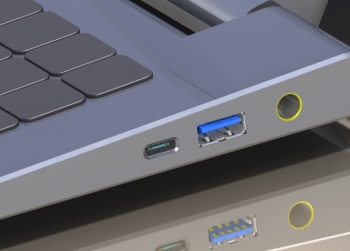 |
| New type of USB on laptop case (leftmost connector) |
Of course, resizing inevitably entails the need to use adapters. However, this problem is temporary. A few more years will pass and most users will not even remember such familiar USB Type-A today.
But tiny connectors are perfect for all kinds of mobile devices, for the reduction of connectors of which a real battle is being waged today. Suffice it to recall the emergence of such standards as Micro-SIM and Nano-SIM. Even fractions of a millimetre can play an important role today.
Alternate Mode is also a very interesting technology, thanks to which you can transfer different types of data at the same time without losing too much speed. And this means that USB Type-C can be used not only to connect flash drives or external hard drives, but also monitors. And at the same time, using paired cables for this.
And finally, it should be noted the increased resistance to radio interference. However, most users have not come across them and existing standards.
What does all this give us?
The most important thing that users will get with the massive introduction of USB Type-C with USB 3.1 support (in other words, USB 3.1 Type-C) is the unification of wired connections. After all, computers can get rid of a number of connectors by connecting a wide variety of devices using the same cables. And standardization in such matters is always good. If only because there will be much less confusion on the desktop. Yes, and connecting something somewhere in the wrong place simply by definition will not work.
By the way, at one time USB was created precisely as a universal connector. Its very name stands for Universal Serial Bus — "universal serial bus". But although the developers managed to adapt the new standard to numerous devices, until recently there was no talk of real standardization. Computers still had connectors such as HDMI, DVI, power connectors, etc. The introduction of the new standard will allow them all to be sent to the dustbin of history.
When it appears
At the time of this writing, there was not a single device on the market that supports USB 3.1 Type-C with all its advantages. However, the developers are sure that by the end of 2015 there will be a lot of them. However, it will take a few more years before the new standard becomes a standard, and not just a new exotic connector, for which you need to buy a special adapter.
In fairness, we note that there is still a device equipped with USB on the market. Type-C. This is a Nokia N1 tablet. However, we are talking only about the connector standard, the device itself uses the USB 2.0 interface. That is, in addition to the ability to connect the cable by any side, the user does not receive any more benefits. It is possible that this was done only for the sake of the possibility of the "first in the world" prefix.
| < img alt="There are both professional and low-cost IPS monitors on the market" src="/posts/files/325/usb_type_c_3.jpg" style="width: 650px; max-width: 550px; height: 249px ;" /> |
| USB connector typology |
Expected to be the very first a laptop with USB 3.1 Type-C would be MacBook Air with 12-inch screen, the presentation of which should be expected in May-June 2015. At the same time, it is suggested that this device will be equipped with only two connectors — one USB Type-C and a 3.5 mm audio output. Such restrictions will make the laptop even thinner than all previous models of the Air line.
Apple is doing its best traditions — abruptly abandoning everything old in the name of the new. However, other manufacturers will not be able to do this, and will not want to. This means that for some time we will be offered devices in which USB Type-C will be just one of the connectors. But in five years, we can expect the mass distribution of laptops, tablets, monitors and even TVs that will use one universal connector.
We have selected 5 models that can serve as a great solution for a noisy street.
MacBook Air, ASUS Zenbook or solutions from Lenovo? We will tell you 5 five interesting ultrabooks.
An overview of 5 good speakers to connect to your home or work computer.
Each of these models can serve as the best choice for a bedroom, children's room or kitchen.
One compact media centre can become the centerpiece of your home entertainment system.



Articles, reviews, useful tips
All materials