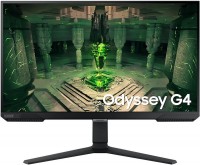
Samsung Odyssey G40B 27 27 "
 | Compare prices 2 → When you make a purchase through links on our site, we may receive a affiliate commission.
|
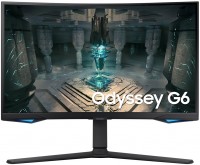
The 27-inch gaming monitor has joined Samsung's 2022 Odyssey lineup. The model represents the relatively affordable segment, supporting a resolution of 1920x1080 pixels, which partially lowers the demands on the computer's graphics card. The screen is based on an IPS panel with wide viewing angles, fast response (1 ms GtG), slight static contrast (1000:1), and decent peak brightness values of 400 cd/m².
The latter can be automatically adjusted to suit ambient lighting (thanks to the ambient light sensor). The gaming status of the Samsung Odyssey G4 27 monitor is reinforced by an excellent refresh rate of 240 Hz, support for AMD FreeSync Premium and NVIDIA G-Sync video synchronization technologies, as well as additional gaming options like Black Equalizer — which increases visibility by brightening dark areas. Other notable features of the model include decent color reproduction parameters, including 99% sRGB color space coverage and HDR support, flexible positioning adjustment options (swivel, height adjustment, portrait mode transition), a thin bezel, and in-demand connectivity interfaces (two HDMI and DisplayPort v 1.2).
|
| ||||||||||||||||||||||||||||||||||||||||||||||||||||||||||||||||||||||||||||||||||||||


Always clarify the specifications and configuration of the product with the online store manager before purchasing.
Catalog Samsung 2026 - new arrivals, bestsellers, and the most relevant models Samsung.











When I connected this monitor, I was very disappointed because the cable that came with it (HDMI 2.0) stopped working after a while. I had to buy a separate DisplayPort cable. I saw a lot of discussions on this topic in forums. Some people had issues even with a DisplayPort cable because certain settings needed to be configured, which, of course, required a second monitor. In my case, I just reset the settings to default because nothing else worked, and I bought a second cable. However, all efforts were in vain because the monitor quality is terrible. I should have returned it instead of spending two weeks trying to figure out the problem. The price is really good for such characteristics. A lot of settings. Adjustment (turned it however you wanted) For 27 inches, 1080p is just too little, trust me. You can really notice the unevenness of fonts, various objects, black borders on the edges of textures, and blurriness in some games. No amount of anti-aliasing helps. You can achieve a mediocre result through monitor and game settings, but it takes a lot of time and the picture is still so-so. It's better to buy a 24-inch monitor. The monitor constantly creaks, even if you don't move the desk, it might creak at night. |

Samsung Odyssey G40B 27 configurations
| Price for Samsung Odyssey G40B 27 | ||||
|---|---|---|---|---|
 | Samsung Odyssey G40B 25 25 " | from $292.00 | 3 offers | |
 | Samsung Odyssey G40B 27 27 " | from $298.00 | 2 offers | |