
Comparison PowerColor Radeon RX 7600 Fighter vs PowerColor Radeon RX 7900 XTX Hellhound
Add to comparison | 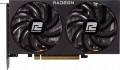 | 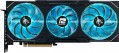 |
|---|---|---|
| PowerColor Radeon RX 7600 Fighter | PowerColor Radeon RX 7900 XTX Hellhound | |
| Compare prices 1 | Compare prices 1 | |
| TOP sellers | ||
| Interface | PCIe v4.0 8x | PCIe v4.0 16x |
GPU | ||
| Model GPU | Radeon RX 7600 | Radeon RX 7900 XTX |
| Architecture | Navi 3X (RDNA 3) | Navi 3X (RDNA 3) |
| Memory size | 8 GB | 24 GB |
| Memory type | GDDR6 | GDDR6 |
| Memory bus | 128 bit | 384 bit |
| Maximum frequency (Boost Clock) | 2655 MHz | 2525 MHz |
| Memory speed | 18000 Mbps | 20000 Mbps |
| Lithography | 6 nm | 5 nm |
| Max. resolution | 7680x4320 px | 7680x4320 px |
Connections | ||
| HDMI | 1 | 1 |
| HDMI version | v2.1 | v2.1 |
| DisplayPort | 3 | 3 |
| DisplayPort version | v.1.4 | v.2.1 |
Software | ||
| DirectX | 12 Ultimate | 12 Ultimate |
| OpenGL | 4.6 | 4.6 |
| Stream processors | 2048 | 6144 |
| Passmark G3D Mark test | 16615 points | 31355 points |
General | ||
| Monitors connection | 4 | 4 |
| Cooling | active (fan) | active (fan) |
| Fans | 2 pcs | 3 pcs |
| Lighting | RGB | RGB |
| Additional power | 8 pin | 8 + 8 pin |
| Minimum PSU recommendation | 550 W | 800 W |
| Length | 212 mm | 338 mm |
| Height | 129 mm | 147 mm |
| Occupies slots | 2.2 | 3 |
| Added to E-Catalog | may 2023 | january 2023 |


Compare PowerColor Radeon RX 7600 Fighter and Radeon RX 7900 XTX Hellhound
You may be interested in
My comparisons
PowerColor Radeon RX 7600 Fighter often compared


PowerColor Radeon RX 7900 XTX Hellhound often compared


Glossary
Interface
The interface through which a video card connects to a computer's motherboard.
In fact, the standard interface for modern video cards is PCIe (PCI Express of various versions: PCIe v2.0, PCIe v3.0, PCIe v4.0, PCIe v5.0); it has almost completely replaced the outdated AGP and "regular" PCI. Different versions and different numbers of PCIe lanes can be provided in modern components; for video cards, the compatibility rules with motherboards are as follows:
1. The number of PCIe lanes in the motherboard slot should be no less than the number of lanes on the video card. For example, a PCIe x8 video adapter can be connected to a PCIe x16 slot, but not the other way around. Generally, it's reasonable to assume that the connection will require an x16 slot: this is the maximum number of lanes found in motherboard slots, and it's what most modern video cards require to achieve the necessary bandwidth.
2. A video card of an older PCIe version can be connected to a slot of a newer version; however, the opposite is usually not possible (with rare exceptions—PCIe v2.1 video adapters may work on some cards with v2.0 slots, but this possibility should be clarified separately).
As for specific PCIe versions, the options can be:
— PCIe v2.0. The earliest of the currently relevant PCI Express versions. The bandwidth of one line of this inte...rface is 5 GT/s (gigatransactions per second), which in practice gives 500 MB/s per line. Consequently, the maximum data transfer speed (with 16 lanes) reaches 8 GB/s in each direction.
— PCIe v2.1. An improved version of 2.0 with some software enhancements; in terms of hardware and bandwidth, it is completely identical to its predecessor.
— PCIe v3.0. A fundamental update to the PCIe standard, featuring a more advanced data encoding scheme—128b/130b, meaning 2 "extra" bits for every 128 bits of useful information (while earlier standards used 8b/10b, with 2 service bits for every 8 main ones). Thanks to this, data transfer speed almost doubled compared to its predecessor (up to 985 MB/s per line), while the number of transactions increased from 5 to 8 GT/s.
— PCIe v4.0. A further development of the PCIe standard described above, released to the market in 2019. Compared to the previous version 3.0, the bandwidth was doubled again—to 16 gigatransactions per second (1969 MB/s per line, 31.5 GB/s on x16).
— PCIe v5.0. The 2025 standard compared to PCIe 4.0 doubles the bandwidth, providing up to 32 GT/s per line and up to 128 GB/s in x16 mode, which is particularly useful for data-intensive tasks such as rendering, machine learning, and ray tracing. This improvement unleashes the potential of next-generation high-performance graphics cards and ensures fast work with large amounts of data, although the difference is still minimal for gaming. PCIe 5.0 also retains backward compatibility, making it convenient for integration into modern systems.
In fact, the standard interface for modern video cards is PCIe (PCI Express of various versions: PCIe v2.0, PCIe v3.0, PCIe v4.0, PCIe v5.0); it has almost completely replaced the outdated AGP and "regular" PCI. Different versions and different numbers of PCIe lanes can be provided in modern components; for video cards, the compatibility rules with motherboards are as follows:
1. The number of PCIe lanes in the motherboard slot should be no less than the number of lanes on the video card. For example, a PCIe x8 video adapter can be connected to a PCIe x16 slot, but not the other way around. Generally, it's reasonable to assume that the connection will require an x16 slot: this is the maximum number of lanes found in motherboard slots, and it's what most modern video cards require to achieve the necessary bandwidth.
2. A video card of an older PCIe version can be connected to a slot of a newer version; however, the opposite is usually not possible (with rare exceptions—PCIe v2.1 video adapters may work on some cards with v2.0 slots, but this possibility should be clarified separately).
As for specific PCIe versions, the options can be:
— PCIe v2.0. The earliest of the currently relevant PCI Express versions. The bandwidth of one line of this inte...rface is 5 GT/s (gigatransactions per second), which in practice gives 500 MB/s per line. Consequently, the maximum data transfer speed (with 16 lanes) reaches 8 GB/s in each direction.
— PCIe v2.1. An improved version of 2.0 with some software enhancements; in terms of hardware and bandwidth, it is completely identical to its predecessor.
— PCIe v3.0. A fundamental update to the PCIe standard, featuring a more advanced data encoding scheme—128b/130b, meaning 2 "extra" bits for every 128 bits of useful information (while earlier standards used 8b/10b, with 2 service bits for every 8 main ones). Thanks to this, data transfer speed almost doubled compared to its predecessor (up to 985 MB/s per line), while the number of transactions increased from 5 to 8 GT/s.
— PCIe v4.0. A further development of the PCIe standard described above, released to the market in 2019. Compared to the previous version 3.0, the bandwidth was doubled again—to 16 gigatransactions per second (1969 MB/s per line, 31.5 GB/s on x16).
— PCIe v5.0. The 2025 standard compared to PCIe 4.0 doubles the bandwidth, providing up to 32 GT/s per line and up to 128 GB/s in x16 mode, which is particularly useful for data-intensive tasks such as rendering, machine learning, and ray tracing. This improvement unleashes the potential of next-generation high-performance graphics cards and ensures fast work with large amounts of data, although the difference is still minimal for gaming. PCIe 5.0 also retains backward compatibility, making it convenient for integration into modern systems.
Model GPU
A GPU is a type of graphics processor that determines the fundamental performance characteristics of a video adapter. Today there are two main manufacturers - AMD and NVIDIA. Intel has also entered the leadership race with its Intel Arc (A-Series, B-Series) line of discrete graphics.
NVIDIA: GeForce GT 1030, GeForce GTX 1050 Ti, GeForce GTX 1060, GeForce GTX 1070, etc. (all related to GeForce 10 series), GeForce GTX 1630, GeForce GTX 1650( SUPER), GeForce GTX 1660( SUPER, Ti), GeForce RTX 20 series, namely GeForce RTX 2060( SUPER), GeForce RTX 2070( SUPER), GeForce RTX 2080( SUPER, Ti), GeForce RTX 3050, GeForce RTX 3060..., GeForce RTX 3060 Ti, GeForce RTX 3070, GeForce RTX 3070 Ti, GeForce RTX 3080, GeForce RTX 3080 Ti, GeForce RTX 3090, GeForce RTX 3090 Ti, GeForce RTX 4060, GeForce RTX 4060 Ti, GeForce RTX 4070, GeForce RTX 4070 SUPER, GeForce RTX 4070 Ti, GeForce RTX 4 070 Ti SUPER, GeForce RTX 4080, GeForce RTX 4080 SUPER, GeForce RTX 4090, GeForce RTX 5050, GeForce RTX 5060, GeForce RTX 5060 Ti, GeForce RTX 5070, GeForce RTX 5070 Ti, GeForce RTX 5080, GeForce RTX 5090, as well as professional Quadro.
AMD: Radeon RX 500 series as Radeon RX 550, Radeon RX 560, Radeon RX 570, Radeon RX 580, Radeon RX 590, Radeon RX 5500 XT, Radeon RX 5600 XT, Radeon RX 5700, Radeon RX 5700 XT, Radeon RX 6400, Radeon RX 6500 XT, Radeon RX 6600, Radeon RX 6600 XT, Radeon RX 6650 XT, Radeon RX 6700 XT, Radeon RX 6750 XT , Radeon RX 6800, Radeon RX 6800 XT, Radeon RX 6900 XT, Radeon RX 6950 XT, Radeon RX 7600, Radeon RX 7600 XT, Radeon RX 7700 XT, Radeon RX 7800 XT, Radeon RX 7900 XT, Radeon RX 7900 XTX, Radeon RX 7900 GRE, Radeon RX 9060 XT, Radeon RX 9070, Radeon RX 9070 XT, Radeon RX Vega 56, Radeon RX Vega 64, AMD Radeon VII and professional FirePro.
Knowing the GPU model, you can find detailed information on it (special specs, reviews, reviews, etc.) and evaluate how suitable this board is for your purposes. It is worth noting that in video cards from third-party brands, the characteristics of the graphics processor may differ slightly from the standard ones (and often in the direction of acceleration and improvement).
NVIDIA: GeForce GT 1030, GeForce GTX 1050 Ti, GeForce GTX 1060, GeForce GTX 1070, etc. (all related to GeForce 10 series), GeForce GTX 1630, GeForce GTX 1650( SUPER), GeForce GTX 1660( SUPER, Ti), GeForce RTX 20 series, namely GeForce RTX 2060( SUPER), GeForce RTX 2070( SUPER), GeForce RTX 2080( SUPER, Ti), GeForce RTX 3050, GeForce RTX 3060..., GeForce RTX 3060 Ti, GeForce RTX 3070, GeForce RTX 3070 Ti, GeForce RTX 3080, GeForce RTX 3080 Ti, GeForce RTX 3090, GeForce RTX 3090 Ti, GeForce RTX 4060, GeForce RTX 4060 Ti, GeForce RTX 4070, GeForce RTX 4070 SUPER, GeForce RTX 4070 Ti, GeForce RTX 4 070 Ti SUPER, GeForce RTX 4080, GeForce RTX 4080 SUPER, GeForce RTX 4090, GeForce RTX 5050, GeForce RTX 5060, GeForce RTX 5060 Ti, GeForce RTX 5070, GeForce RTX 5070 Ti, GeForce RTX 5080, GeForce RTX 5090, as well as professional Quadro.
AMD: Radeon RX 500 series as Radeon RX 550, Radeon RX 560, Radeon RX 570, Radeon RX 580, Radeon RX 590, Radeon RX 5500 XT, Radeon RX 5600 XT, Radeon RX 5700, Radeon RX 5700 XT, Radeon RX 6400, Radeon RX 6500 XT, Radeon RX 6600, Radeon RX 6600 XT, Radeon RX 6650 XT, Radeon RX 6700 XT, Radeon RX 6750 XT , Radeon RX 6800, Radeon RX 6800 XT, Radeon RX 6900 XT, Radeon RX 6950 XT, Radeon RX 7600, Radeon RX 7600 XT, Radeon RX 7700 XT, Radeon RX 7800 XT, Radeon RX 7900 XT, Radeon RX 7900 XTX, Radeon RX 7900 GRE, Radeon RX 9060 XT, Radeon RX 9070, Radeon RX 9070 XT, Radeon RX Vega 56, Radeon RX Vega 64, AMD Radeon VII and professional FirePro.
Knowing the GPU model, you can find detailed information on it (special specs, reviews, reviews, etc.) and evaluate how suitable this board is for your purposes. It is worth noting that in video cards from third-party brands, the characteristics of the graphics processor may differ slightly from the standard ones (and often in the direction of acceleration and improvement).
Memory size
The amount of own memory of the GPU; this parameter is sometimes called the amount of graphics card memory. The larger the amount of GPU memory, the more complex and detailed picture it is able to process in a period of time, and therefore, the higher its performance and speed (which is especially important for resource-intensive tasks like high-end games, video editing, 3D rendering, etc. ).
When choosing, it is worth considering that the performance of a graphics card is affected not only by the amount of memory, but also by its type, frequency of operation (see below) and other features. Therefore, situations are quite possible when a model with less memory will be more advanced and expensive than a more voluminous one. And you can unambiguously compare with each other only options that are similar in other memory characteristics.
On the modern market, there are mainly video cards with memory capacities of 2 GB, 4 GB, 6 GB, 8 GB, 10 GB, 11 GB, 12 GB, and 16 GB or even more can be installed in the most advanced models.
When choosing, it is worth considering that the performance of a graphics card is affected not only by the amount of memory, but also by its type, frequency of operation (see below) and other features. Therefore, situations are quite possible when a model with less memory will be more advanced and expensive than a more voluminous one. And you can unambiguously compare with each other only options that are similar in other memory characteristics.
On the modern market, there are mainly video cards with memory capacities of 2 GB, 4 GB, 6 GB, 8 GB, 10 GB, 11 GB, 12 GB, and 16 GB or even more can be installed in the most advanced models.
Memory bus
The amount of data (bits) that can be transferred over the graphics card's memory bus in one cycle. The performance of the graphics card directly depends on the bus width: the higher the bit width, the more data the bus transfers per unit of time and, accordingly, the video memory runs faster.
The minimum bit depth for modern video cards is actually 128 bits, this figure is typical mainly for low-cost models. In mid-level solutions, there are indicators of 192 bits and 256 bits, and in advanced models — 352 bits, 384 bits and more, up to 2048 bits.
The minimum bit depth for modern video cards is actually 128 bits, this figure is typical mainly for low-cost models. In mid-level solutions, there are indicators of 192 bits and 256 bits, and in advanced models — 352 bits, 384 bits and more, up to 2048 bits.
Maximum frequency (Boost Clock)
The clock frequency of the GPU core, to which the GPU can automatically overclock under suitable conditions for temperature, cooling, and power supply. This parameter is necessary for the card to temporarily or quite long operate faster than the nominal level and deliver more performance in games, 3D graphics, and other heavy tasks.
The higher the Boost Clock, the more potential the graphics card has under load, especially in dynamic scenes where additional processing speed is important. However, this is not a constant value; it is the maximum or close to maximum operating mode, which depends on the specific system and the quality of cooling.
For example, in a game or during rendering, a graphics card with a high Boost Clock can noticeably more confidently maintain performance if the case is well ventilated and there is no overheating. Therefore, Boost Clock is particularly interesting for those choosing a model for gaming, editing, streaming, or other resource-intensive tasks.
The higher the Boost Clock, the more potential the graphics card has under load, especially in dynamic scenes where additional processing speed is important. However, this is not a constant value; it is the maximum or close to maximum operating mode, which depends on the specific system and the quality of cooling.
For example, in a game or during rendering, a graphics card with a high Boost Clock can noticeably more confidently maintain performance if the case is well ventilated and there is no overheating. Therefore, Boost Clock is particularly interesting for those choosing a model for gaming, editing, streaming, or other resource-intensive tasks.
Memory speed
Memory speed in graphics card specifications indicates how "quickly" the video memory operates and how fast the GPU can access and write data. It's similar to the concept of "bandwidth," but it's important not to confuse them: memory speed refers to the "rate" of the chips themselves, while the final bandwidth is also determined by the bus width. Thus, a card with slower memory but a wider bus can sometimes compete with a model that has faster memory and a narrower bus. Compared to core frequency, this parameter has a greater impact on scenarios with large textures and high resolution. If the graphics card has a large cache, the difference in memory speed may be less noticeable, as some data less frequently reaches VRAM. A typical example is enabling ultra-textures and 4K: if the memory speed is low, you might experience more drop-offs and load times, whereas with high memory speed, frames remain more stable and less "choppy" in demanding scenes.
Lithography
The process technology by which the graphics card's own processor is made.
This parameter is specified by the size of each individual transistor used in the processor. At the same time, the smaller this size, the more perfect the technical process is considered: reducing individual elements allows you to reduce heat dissipation, reduce the overall size of the processor, and at the same time increase its performance. Accordingly, nowadays, manufacturers are trying to move in the direction of reducing the technical process, and the newer the graphics card, the smaller the numbers in this paragraph can be.
This parameter is specified by the size of each individual transistor used in the processor. At the same time, the smaller this size, the more perfect the technical process is considered: reducing individual elements allows you to reduce heat dissipation, reduce the overall size of the processor, and at the same time increase its performance. Accordingly, nowadays, manufacturers are trying to move in the direction of reducing the technical process, and the newer the graphics card, the smaller the numbers in this paragraph can be.
DisplayPort version
The version of the DisplayPort and/or miniDisplayPort interface used by the graphics card. For the interfaces themselves, see the relevant help items; here we recall that they differ only in the type of plug. So the list of versions for both cases is the same, it looks like this:
— v 1.2. The earliest widely used version (2010). However, already in this version, 3D compatibility and the daisy chain mode appeared. The maximum fully supported resolution when connecting a single monitor is 5K (30 fps), transmission up to 8K is possible with certain restrictions; a frame rate of 60 Hz is supported up to a resolution of 3840x2160, and 120 Hz — up to 2560x1600. And when using daisy chain, you can connect up to 2 2560x1600 screens at 60 frames per second or up to 4 1920x1200 screens at the same time. In addition to the original version 1.2, there is an improved v 1.2a, the main innovation of which was support for AMD FreeSync, a technology used in AMD video cards to synchronize the refresh rate of the monitor with the actual frame rate output by the video adapter.
— v 1.3. An update introduced in 2014. The increased bandwidth made it possible to provide full, without restrictions, support for 8K at 30 fps, as well as transmit 4K images at 120 fps, sufficient for 3D work. Resolutions in daisy chain mode have also increased — up to 4K (3840x2160) at 60 fps for two screens and 2560x1600 at the same frame rate for four. Of the specific innovations, it is worth me...ntioning the Dual Mode mode, which allows you to connect HDMI and DVI devices to such a connector through the simplest passive adapters.
— v 1.4.Version introduced in March 2016. Formally, the bandwidth has not increased compared to the previous version, but thanks to signal optimization, it became possible to work with 4K and 5K resolutions at 240 fps and with 8K at 120 fps. However for this, the connected screen must support DSC encoding technology — otherwise, the available resolutions will not differ from version 1.3. In addition, v 1.4 added support for a number of special features, including HDR10, and the maximum number of simultaneously transmitted audio channels increased to 32.
—v 1.4a. An update released in 2018 "quietly" — without even an official press release. The main innovation was the update of Display Stream Compression technology from version 1.2 to version 1.2a.
— v 1.2. The earliest widely used version (2010). However, already in this version, 3D compatibility and the daisy chain mode appeared. The maximum fully supported resolution when connecting a single monitor is 5K (30 fps), transmission up to 8K is possible with certain restrictions; a frame rate of 60 Hz is supported up to a resolution of 3840x2160, and 120 Hz — up to 2560x1600. And when using daisy chain, you can connect up to 2 2560x1600 screens at 60 frames per second or up to 4 1920x1200 screens at the same time. In addition to the original version 1.2, there is an improved v 1.2a, the main innovation of which was support for AMD FreeSync, a technology used in AMD video cards to synchronize the refresh rate of the monitor with the actual frame rate output by the video adapter.
— v 1.3. An update introduced in 2014. The increased bandwidth made it possible to provide full, without restrictions, support for 8K at 30 fps, as well as transmit 4K images at 120 fps, sufficient for 3D work. Resolutions in daisy chain mode have also increased — up to 4K (3840x2160) at 60 fps for two screens and 2560x1600 at the same frame rate for four. Of the specific innovations, it is worth me...ntioning the Dual Mode mode, which allows you to connect HDMI and DVI devices to such a connector through the simplest passive adapters.
— v 1.4.Version introduced in March 2016. Formally, the bandwidth has not increased compared to the previous version, but thanks to signal optimization, it became possible to work with 4K and 5K resolutions at 240 fps and with 8K at 120 fps. However for this, the connected screen must support DSC encoding technology — otherwise, the available resolutions will not differ from version 1.3. In addition, v 1.4 added support for a number of special features, including HDR10, and the maximum number of simultaneously transmitted audio channels increased to 32.
—v 1.4a. An update released in 2018 "quietly" — without even an official press release. The main innovation was the update of Display Stream Compression technology from version 1.2 to version 1.2a.
Stream processors
The number of stream processors provided by the graphics card.
A stream processor is a separate part of the GPU, designed to execute one shader at a time. Shaders, in turn, are small programs responsible for creating individual graphic effects (for example, surface gloss, glare on the surface of water, motion blur, etc.). Accordingly, the more stream processors provided in the design, the more shaders the graphics card can simultaneously execute and the higher its computing power. However, in general, this is a rather specific parameter, relevant mainly for professional developers, modders and enthusiastic gamers.
A stream processor is a separate part of the GPU, designed to execute one shader at a time. Shaders, in turn, are small programs responsible for creating individual graphic effects (for example, surface gloss, glare on the surface of water, motion blur, etc.). Accordingly, the more stream processors provided in the design, the more shaders the graphics card can simultaneously execute and the higher its computing power. However, in general, this is a rather specific parameter, relevant mainly for professional developers, modders and enthusiastic gamers.