
Comparison PXN V10 vs PXN V9
Add to comparison | 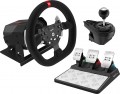 | 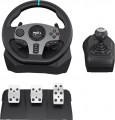 |
|---|---|---|
| PXN V10 | PXN V9 | |
from $239.99 | from $159.99 | |
| TOP sellers | ||
| Device type (configuration) | steering wheel and pedals | steering wheel and pedals |
| Steering wheel size | 27 cm | 28 cm |
| Detachable steering wheel |  |  |
| Compatibility | PC (Windows) Xbox PlayStation 4 | PC (Windows) Switch Xbox PlayStation 3 PlayStation 4 |
| Connection | wired | wired |
| Cable | USB-A | USB-A |
Technical specifications | ||
| Total number of buttons | 14 | 14 |
| Feedback | power | vibration |
| Drive type | belt | |
| Max. torque | 3.2 Nm | |
| D-pad controller | | |
| Steering wheel turn | 270° – 900° | 270° – 900° |
| Paddle shifters | 4 pcs | 2 pcs |
| Pedals | accelerator brake clutch | accelerator brake clutch |
General information | ||
| Mounting | clamps | clamps |
| Steering wheel cover | eco-leather | |
| Power source | network | USB port |
| Weight | 3280 g | |
| Color | ||
| Added to E-Catalog | march 2023 | march 2023 |


Compare PXN V10 and V9
Both steering wheels, PXN V10 and PXN V9, have wired connectivity and are compatible with multiple platforms, including PC, Xbox, and PlayStation. Both devices offer force feedback, 14 buttons, and the ability to use a gear shifter and paddles for shifting gears. However, the PXN V9 additionally supports the Nintendo Switch and has a 4-position D-pad, which the PXN V10 lacks. In terms of weight, the PXN V9 is heavier, weighing 3280 g, while the weight of the PXN V10 is not specified. The choice between them will depend on preferences for compatibility and additional features.
You may be interested in
PXN V10 often compared


PXN V9 often compared


Glossary
Steering wheel size
The size of a gaming steering wheel usually refers to the diameter of the wheel in round and D-shaped forms and affects the realism of control, rotation speed, and grip comfort. Compact wheels, around 20 – 24 cm, are more common in simple models and are suitable for arcade racing but feel less realistic. A size of 27 – 30 cm is considered more versatile and closer to an actual car steering wheel, making it convenient for simulators, GT, rally, and everyday play. Larger wheels, 31 – 35 cm, are more often used in advanced setups, especially for trucking simulators, drifts, or the most realistic seating.
For formula wheels or steering wheels with a cut-off shape, the size is more often indicated by the maximum width between the outermost grip points.
For formula wheels or steering wheels with a cut-off shape, the size is more often indicated by the maximum width between the outermost grip points.
Detachable steering wheel
The ability to detach the steering wheel from the base. This is convenient for storage, transportation, and changing the wheel for different types of racing: for example, installing a round wheel for drifting or a yoke for formula simulators.
Compatibility
Compatibility shows which devices a gaming wheel can work with: PC, PlayStation, Xbox, Nintendo Switch or specific console generations. It is important to check this parameter before purchasing because a PC wheel does not always fit a console, and models for PlayStation and Xbox often have different versions (PS3, PS4, PS5) due to the proprietary license and electronics inside the base.
Special attention should be given to steering wheels that have specific compatibility with bases. In most cases, all bases from the brand are suitable, but it is better to confirm this additionally.
Special attention should be given to steering wheels that have specific compatibility with bases. In most cases, all bases from the brand are suitable, but it is better to confirm this additionally.
Feedback
Type of feedback provided in the design of the controller (if it is available at all).
Feedback is the controller's response to certain events occurring in the game. Such a response enhances the "immersion effect," creating the impression for the player that they are holding a real airplane joystick, car steering wheel, etc. It can be as follows:
— Vibration. Feedback in the form of vibration allows imitation of, for example, the shaking from driving off-road, the shudder of an airplane when firing onboard weapons, or entering a turbulence zone, etc.
— Force. Controllers with force feedback are capable of creating certain resistance to the player's efforts—for example, to imitate the difficulty of turning the steering wheel with wheels stuck in the mud.
— Vibration/force. Controllers supporting both of the feedback types described above. This option is the most advanced and at the same time the most expensive.
Feedback is the controller's response to certain events occurring in the game. Such a response enhances the "immersion effect," creating the impression for the player that they are holding a real airplane joystick, car steering wheel, etc. It can be as follows:
— Vibration. Feedback in the form of vibration allows imitation of, for example, the shaking from driving off-road, the shudder of an airplane when firing onboard weapons, or entering a turbulence zone, etc.
— Force. Controllers with force feedback are capable of creating certain resistance to the player's efforts—for example, to imitate the difficulty of turning the steering wheel with wheels stuck in the mud.
— Vibration/force. Controllers supporting both of the feedback types described above. This option is the most advanced and at the same time the most expensive.
Drive type
The drive type indicates how the motor's force is transmitted to the wheel and how realistic the feedback feels in the game.
— Gear-driven. A gear mechanism transmits the motor's force to the wheel through a gear transmission, making these models generally simpler and more affordable. It provides basic feedback and is suitable for getting acquainted with racing, but may feel noisier, more stepped, and less smooth than belt or direct drive. Therefore, a gear-driven wheel is suitable for Forza, Need for Speed, or initial runs in simulators without serious precision demands.
— Belt-driven. The transfer of force through a belt makes the wheel rotation smoother and quieter compared to a gear mechanism. This type of drive usually smooths out jerks better, provides pleasant feedback, and is suitable for those looking for a noticeable step up from basic models. A belt-driven wheel is well-suited for circuit racing, where smooth trajectory handling and precise car correction are important.
— Hybrid. A combined drive uses several types of force transmission, most often belts and gears, to combine affordable pricing with smoother feedback. It generally operates more softly than a purely gear-driven mechanism but does not offer the precision and speed of direct drive. A hybrid wheel is suitable for a player who has outgrown the basic model but is not yet ready to invest in an expensive Direct Drive base.
— Direct. A direct drive system transmit...s motor force directly to the steering shaft, without belts and gears, allowing the wheel to react as quickly and accurately as possible. This option is valued for its powerful feedback, detailed transmission of small effects, and absence of play, though it is usually more expensive and requires secure mounting. For example, direct drive is well-suited for serious sim racing, where feeling tire slip, car weight, and the moment of drifting is important.
— Gear-driven. A gear mechanism transmits the motor's force to the wheel through a gear transmission, making these models generally simpler and more affordable. It provides basic feedback and is suitable for getting acquainted with racing, but may feel noisier, more stepped, and less smooth than belt or direct drive. Therefore, a gear-driven wheel is suitable for Forza, Need for Speed, or initial runs in simulators without serious precision demands.
— Belt-driven. The transfer of force through a belt makes the wheel rotation smoother and quieter compared to a gear mechanism. This type of drive usually smooths out jerks better, provides pleasant feedback, and is suitable for those looking for a noticeable step up from basic models. A belt-driven wheel is well-suited for circuit racing, where smooth trajectory handling and precise car correction are important.
— Hybrid. A combined drive uses several types of force transmission, most often belts and gears, to combine affordable pricing with smoother feedback. It generally operates more softly than a purely gear-driven mechanism but does not offer the precision and speed of direct drive. A hybrid wheel is suitable for a player who has outgrown the basic model but is not yet ready to invest in an expensive Direct Drive base.
— Direct. A direct drive system transmit...s motor force directly to the steering shaft, without belts and gears, allowing the wheel to react as quickly and accurately as possible. This option is valued for its powerful feedback, detailed transmission of small effects, and absence of play, though it is usually more expensive and requires secure mounting. For example, direct drive is well-suited for serious sim racing, where feeling tire slip, car weight, and the moment of drifting is important.
Max. torque
The max torque indicates the force with which the steering base can resist the steering wheel's turn. The higher the torque, the more strongly tire grip, impacts, skids, curbs, and load in turns are felt, making the control closer to that of a real car. Simple steering wheels usually provide up to 3 Nm, more advanced models — 4-8 Nm, and powerful Direct Drive bases can deliver 10-20 Nm and above.
Meanwhile, in simulators, the force is often adjusted for the game, car, and user's comfort. For example, for arcade racing, a small effort is enough, whereas for iRacing, Assetto Corsa, or serious drifting, a powerful base with a torque reserve provides more accurate and rich feedback.
Meanwhile, in simulators, the force is often adjusted for the game, car, and user's comfort. For example, for arcade racing, a small effort is enough, whereas for iRacing, Assetto Corsa, or serious drifting, a powerful base with a torque reserve provides more accurate and rich feedback.
D-pad controller
D-pad controller helps control the menu, camera, and additional functions directly from the gaming wheel without resorting to the keyboard or gamepad. It is usually a cross-shaped pad with up, down, left, and right presses, and some models also support diagonal commands. This element is convenient for switching cameras, navigating settings, selecting menu items, controlling onboard functions, or issuing quick commands during a race.
Paddle shifters
Paddle shifters behind the steering wheel, which can be pressed with fingers without removing hands from the wheel, are most often used for gear shifting. Basic models usually have two paddles: the right one is for shifting up, and the left one is for shifting down. More advanced wheels may have 4 or 6 paddles, with additional pairs used for clutch, manual start, DRS, car adjustments, or other commands in simulators. The more paddle shifters there are, the more convenient it is to control important functions directly from the wheel, especially in F1, GT, and other racing simulators.
Steering wheel cover
The steering wheel covering affects grip, tactile sensations, wear resistance, and comfort during long gameplay. The material determines whether the wheel is pleasant to the touch, won't slip in your hands, and how quickly the surface will lose its appearance with active use.
— Rubber. Practical, affordable, and well-suited for basic gaming wheels. This covering withstands frequent use, is easy to clean, and requires less maintenance, but usually feels simpler compared to leather or Alcantara.
— Alcantara. A pleasant-to-touch material that provides a firm grip, often found in more expensive and sporty steering wheels. It is great for simulators and active driving but gets dirty faster and requires gentle care, especially if playing without gloves.
— Leather. Usually represented by faux leather, making the wheel more akin to a car's and pleasant for everyday gaming. This covering is ideal for general use, GT, rally, and road simulators but may wear out over time in areas of active grip.
— Rubber. Practical, affordable, and well-suited for basic gaming wheels. This covering withstands frequent use, is easy to clean, and requires less maintenance, but usually feels simpler compared to leather or Alcantara.
— Alcantara. A pleasant-to-touch material that provides a firm grip, often found in more expensive and sporty steering wheels. It is great for simulators and active driving but gets dirty faster and requires gentle care, especially if playing without gloves.
— Leather. Usually represented by faux leather, making the wheel more akin to a car's and pleasant for everyday gaming. This covering is ideal for general use, GT, rally, and road simulators but may wear out over time in areas of active grip.