
Comparison Klipsch T5 Sport vs OnePlus Bullets Wireless 2
Add to comparison | 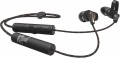 | 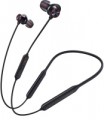 |
|---|---|---|
| Klipsch T5 Sport | OnePlus Bullets Wireless 2 | |
from $69.99 | from $49.99 | |
| TOP sellers | ||
Bullets Wireless 2 differs from the previous model by the presence of 3 sound drivers inside each earbud, as well as the use of Bluetooth v5.0 with support for aptX HD. Quick charge function — 10 minutes of charging provides 10 hours of use. Google Assistant support. Separate buttons for the most recently used devices for easy switching between them. | ||
Connection and design | ||
| Features | for active sports | |
| Design | in-ear | in-ear neck strap |
| Connection type | wireless | wireless |
| Connection | Bluetooth v5.0 | Bluetooth v5.0 |
| Range | 10 m | 10 m |
| Cable type | round, braided | round |
Specs | ||
| Frequency range | 10 – 19000 Hz | |
| Speaker size | 5 mm | |
| Emitter type | dynamic | dynamic |
| Number of emitters | 3 | |
Microphone specs | ||
| Microphone | on cable | in the mount |
| Microphone noise canceling | ENC | |
| Microphone mute |  |  |
Features | ||
| Volume control | | |
| Codec support | aptX HD | aptX HD |
Power supply | ||
| Power source | battery | battery |
| Headphone battery capacity | 80 mAh | |
| Operating time (music) | 10 h | 14 h |
General | ||
| Waterproof | IPX4 | |
| Weight | 13 g | |
| In box | silicone tips | silicone tips case |
| Color | ||
| Added to E-Catalog | november 2019 | may 2019 |


Compare Klipsch T5 Sport and OnePlus Bullets Wireless 2
Headphones Klipsch T5 Sport and OnePlus Bullets Wireless 2 have similar characteristics, but there are key differences. Klipsch T5 Sport offers a more compact design weighing only 13 g and water resistance IPX4, making them convenient for active use. However, the playtime is 10 hours. In contrast, OnePlus Bullets Wireless 2, with a neckband design, provides a longer playtime of 14 hours, which is a significant advantage for long listening sessions. Additionally, Bullets Wireless 2 features microphone noise cancellation, which can be useful in noisy environments. Both devices support wireless connectivity and have similar volume control functions.
You may be interested in
OnePlus Bullets Wireless 2 often compared


Glossary
Features
This parameter is specified only for specialized models, not related to general-purpose earphones. Nowadays, headphones can be found with such specializations as: gaming, for active sports, office, monitor (aka studio), for DJs, for children, for sleeping. Here is a more detailed description of these varieties:
— Gaming. Headphones mainly intended for use in games, primarily with PCs and laptops (a separate variety is produced for consoles, see more about it below). They stand out externally primarily by their design, which is usually quite bright and aggressive. Most of these models have an overhead design, most often the full-size “Over Ear” format (see “Design”), which provides the maximum immersive effect in the game. Other designs are also available, though much less frequently. A microphone is practically an obligatory feature for voice communication in online games. Additionally, most multi-channel models belong to this category (see “Sound”), as such sound is particularly important for games.
— For active sports. Headphones well-suited for sports activities. Firstly, such devices must have additional fixation in the ears or on the head to keep their position during intense moveme...nts; secondly, they should be resistant to sweat (ideally to rain, snow, and other atmospheric conditions). With rare exceptions, sports headphones are wireless to avoid inconvenience during movement. Sport models usually refer to in-ear, earbuds, and some on-ear headphones. Their key common traits are a secure fit and some level of IP water resistance (see “Protection level (IP)”).
— Office. Office headphones are intended for consultants, support operators, and other employees who frequently engage in voice communication via phone or Internet. Therefore, one of the main features of such models is the presence of a microphone. Among office headphones, models for one ear (see “Sound — mono”) are quite popular, allowing the user to hear both the conversation and the surrounding environment simultaneously. Many of these headphones connect via USB (see “Connection”), considering that inexpensive office computers may lack specialized audio outputs. A small control panel for IP telephony may be included on the USB plug, allowing functions such as accepting and rejecting calls. There are also wireless models (usually connecting via a radio channel, less often via Bluetooth) and specialized solutions for connecting to telephones with specific connectors.
— Monitor (studio). Headphones designed for professional sound recording and sound equipment tuning. They are wired only. However, the key feature of these models lies elsewhere: they have a flat frequency response, providing nearly equal loudness across all frequency bands, and a wide working range, often exceeding the limits of the human-audible frequency range. As a result, these headphones can clearly reveal any audio signal flaws, including details unnoticeable with traditional headphones; these capabilities are invaluable in professional sound work. On the other hand, for this reason, there's no point in using monitor models for everyday music listening: they not only reveal different recording flaws but also impart a sound coloration that is unusual and even unpleasant for the average user.
— For DJs. Headphones initially designed for professional DJs to use when mixing tracks. They are quite similar to the monitor models described above - particularly featuring a very flat frequency response for accurate sound reproduction and a wide frequency range. In addition, DJ headphones are usually closed-back and generally have high sound isolation quality, ensuring good audibility even in quite noisy environments.
— For kids. They differ from “adult” models mainly in appearance - both in smaller sizes and (in most models) in distinctive bright designs. Additionally, children's hearing is more sensitive to loud sounds, and excessively high volume is highly undesirable for a child (including psychological reasons). In this light, children's headphones may have specific features - for instance, slightly reduced sensitivity to prevent high sound levels or a volume limiter that only adults can control.
— For sleeping. Miniature headphones with a special anatomical design, allowing comfortable sleep while lying on your side without ear discomfort. To reduce surrounding noise, passive noise cancellation is typically included in their design. Such headphones can be used for listening to music, broadcasting white noise, nature sounds, or waves. Advanced models also monitor sleep quality, and the alarm clock function plays a melody for waking up at a set time. These headphones are frequently called electronic earplugs.
— Gaming. Headphones mainly intended for use in games, primarily with PCs and laptops (a separate variety is produced for consoles, see more about it below). They stand out externally primarily by their design, which is usually quite bright and aggressive. Most of these models have an overhead design, most often the full-size “Over Ear” format (see “Design”), which provides the maximum immersive effect in the game. Other designs are also available, though much less frequently. A microphone is practically an obligatory feature for voice communication in online games. Additionally, most multi-channel models belong to this category (see “Sound”), as such sound is particularly important for games.
— For active sports. Headphones well-suited for sports activities. Firstly, such devices must have additional fixation in the ears or on the head to keep their position during intense moveme...nts; secondly, they should be resistant to sweat (ideally to rain, snow, and other atmospheric conditions). With rare exceptions, sports headphones are wireless to avoid inconvenience during movement. Sport models usually refer to in-ear, earbuds, and some on-ear headphones. Their key common traits are a secure fit and some level of IP water resistance (see “Protection level (IP)”).
— Office. Office headphones are intended for consultants, support operators, and other employees who frequently engage in voice communication via phone or Internet. Therefore, one of the main features of such models is the presence of a microphone. Among office headphones, models for one ear (see “Sound — mono”) are quite popular, allowing the user to hear both the conversation and the surrounding environment simultaneously. Many of these headphones connect via USB (see “Connection”), considering that inexpensive office computers may lack specialized audio outputs. A small control panel for IP telephony may be included on the USB plug, allowing functions such as accepting and rejecting calls. There are also wireless models (usually connecting via a radio channel, less often via Bluetooth) and specialized solutions for connecting to telephones with specific connectors.
— Monitor (studio). Headphones designed for professional sound recording and sound equipment tuning. They are wired only. However, the key feature of these models lies elsewhere: they have a flat frequency response, providing nearly equal loudness across all frequency bands, and a wide working range, often exceeding the limits of the human-audible frequency range. As a result, these headphones can clearly reveal any audio signal flaws, including details unnoticeable with traditional headphones; these capabilities are invaluable in professional sound work. On the other hand, for this reason, there's no point in using monitor models for everyday music listening: they not only reveal different recording flaws but also impart a sound coloration that is unusual and even unpleasant for the average user.
— For DJs. Headphones initially designed for professional DJs to use when mixing tracks. They are quite similar to the monitor models described above - particularly featuring a very flat frequency response for accurate sound reproduction and a wide frequency range. In addition, DJ headphones are usually closed-back and generally have high sound isolation quality, ensuring good audibility even in quite noisy environments.
— For kids. They differ from “adult” models mainly in appearance - both in smaller sizes and (in most models) in distinctive bright designs. Additionally, children's hearing is more sensitive to loud sounds, and excessively high volume is highly undesirable for a child (including psychological reasons). In this light, children's headphones may have specific features - for instance, slightly reduced sensitivity to prevent high sound levels or a volume limiter that only adults can control.
— For sleeping. Miniature headphones with a special anatomical design, allowing comfortable sleep while lying on your side without ear discomfort. To reduce surrounding noise, passive noise cancellation is typically included in their design. Such headphones can be used for listening to music, broadcasting white noise, nature sounds, or waves. Advanced models also monitor sleep quality, and the alarm clock function plays a melody for waking up at a set time. These headphones are frequently called electronic earplugs.
Design
This item primarily specifies the way headphones are mounted on the ears; by this parameter, modern headphones are divided into over-ear, in-ear, earbuds, open-ear types. For over-ear models, it may also specify the acoustic design (closed, semi-open, open), as well as the presence of features such as over-ear construction (in the absence of this feature such headphones are called on-ear, or just "on-ear"), swivel cups, auto headband adjustment or even the popular mid-2021 trend — Cat Ear Headphones (headphones with cat ears). Details such as a rigid band, over-the-ear mounting, neck mounting, and folding ability, can be combined with almost any method of ear placement (with some exceptions — for example, on-ear models cannot be worn on the neck).
Here is a more detailed description of different ear placement options:
— On-ear. On-ear headphones are placed outside the auditory pinnae, covering the ear from the side ("usual" on-ear models) or completely (full-size Over-Ear — see below). In any case, such models are fairly large. This, on the one hand, simplifies the creation of headphones w...ith advanced audio characteristics, and also allows using some specific tricks without much difficulty — for example, multiple drivers or multichannel surround sound support. On the other hand, the size of the "ears" complicates transportation and use on the go. Moreover, it should be noted that most on-ear models feature a headband, making them less compatible with complex hairstyles and some headgear. This disadvantage is absent in models with rigid bands and over-the-ear mounts, but they also have their specifics (see below).
On-ear headphones can have different acoustic designs:
— In-ear with a rigid band. In-ear headphones are placed inside the ear canals, allowing them to be most securely fixed in the ear and not fall out. The presence of a rigid band further increases the reliability of the headphones' fixation. This type of headphones is well-suited for sports. The rigid band and in-ear design of sound emitters allows the headphones to stay securely in place even during intensive running.
— Earbuds. Also colloquially known as "pills." Similar to in-ear models, such headphones are small and placed in the auditory pinna — but not deep in the ear canal, just at its entrance, almost outside. As a result, earbuds are somewhat simpler in construction and cheaper, but achieving rich sound and advanced acoustic characteristics is more challenging with them. Such models provide quite low sound isolation, but this can be either a downside or an advantage — depending on the situation. Some headphones of this type have an elongated shape, allowing them to sit deeper in the ears and approaching in-ear models in capabilities.
It is worth noting separately that in-ear models and earbuds don't use headbands — the headphones are made either completely separate or connected by a device such as a rigid band or neck mount. Thus, such headphones can easily be worn with almost any hairstyle or headgear.
— Earbuds with a rigid band. Earbuds are simply inserted into the ear canal entrance, not penetrating deeply. This is not the most reliable way to fix the headphones, but due to the presence of a rigid band, earbuds gain secure placement and reliable fixation. The headphones themselves have an open sound path design, which reproduces audio with noticeable distortion to the original sound signal. However, the open acoustic scheme allows clear hearing of the surrounding environment.
As for additional design features, they can be such:
— Full-size Over-Ear. On-ear headphones (see above) in which each cup completely covers the ear and fits tightly against the head. Cups in such models are made fairly large and equipped with characteristic soft "borders" along the inner side's perimeter — these borders fit tightly against the head, so the ear pinna is effectively inside the cup. The main advantage of such a design is that the headphones (with the right size) practically do not touch the user's ears and do not press on them — this is particularly comfortable for extended use. Furthermore, Over-Ear models facilitate achieving high-quality sound isolation (although among them it is possible to find models with semi-open and even completely open acoustic design). The main disadvantage of such devices is bulkiness and inconvenience in transport and on-the-go use. Additionally, when wearing glasses, Over-Ear cups usually press on the frames' sides — this can cause discomfort.
— Open-ear. A special variety of wireless true wireless headphones with open acoustic design. Unlike earbuds and in-ear models, open-ear headphones do not suggest partial or full closure of the auricle — this provides better perception of surrounding sounds. This is handy during walks and outdoor runs. Most often, such headphones have over-the-ear mounts (see below), and the drivers in their construction are directed straight into the ear canals but remain outside. Passive noise isolation in open-ear headphones is practically absent, and the playing music and phone conversations may be heard by those nearby — keep this in mind.
— Auto headband adjustment. A headband capable of automatically adjusting to the user's head size. Such a headband usually consists of two parts — a rigid, usually metallic, base and a soft inner part that fits directly against the head. The inner part is capable of stretching, and the user just needs to place the cups on the ears comfortably — and the headband will automatically adjust to the needed size.
— Rigid band. A band made of rigid material, connecting the two headphones and worn on the back of the head; in some models, it can also serve as a neck mount (see below). The advantage of such a device over a classic headband is that the band can be used with almost any hairstyle and headgear. On the other hand, in in-ear models and earbuds (see above), this feature makes the headphones bulkier, and in on-ear models, it makes sense to use it only with regular models, not belonging to full-size Over Ear. Consequently, for a range of reasons, the band is not particularly popular nowadays.
— Over-the-ear mounting. A mount that allows fixing each headphone directly on the auricle; it generally has the form of a characteristic band. This feature appears in all types of modern "ears," except Over Ear (see above), and its specific meaning depends primarily on the main method of placing the headphone on the ear. For in-ear models and earbuds, over-the-ear mounting provides additional retention reliability: the likelihood of the headphone falling out of the ear is practically reduced to zero due to such a mount. In on-ear "ears," this feature appears significantly less often, and its main purpose is to do without a headband or rigid band — in some cases, these construction elements are unnecessary.
— Neck mounting. A feature found exclusively in wireless and combined models (see "Connection Type") — and only in in-ear and earbuds (see above). Both headphones in such models are connected by either a regular wire with a thickened part or a special horseshoe-shaped band (to each end of this band, an individual "ear" is connected via a wire). In any case, during use, this wire or band is located behind the user's neck, ensuring additional convenience: removed from the ears (or fallen out), headphones do not drop to the ground but remain hanging on the mount. Some models also feature special magnets, enabling the removed headphones to "stick" together, turning the entire structure into a ring — reducing the risk of dropping the device even further.
— Folding ability. The ability to compactly fold headphones for storage and transportation. Note that this feature is listed only for on-ear models (see above) — in-ear headphones and earbuds are already quite portable by themselves, without a special folding design.
— Swivel cups. A design feature found in on-ear headphones (see above). Swivel means cups that, in working position, can rotate at a certain angle around the vertical axis. This allows headphones to further adjust to the user's head size and shape — thereby increasing comfort, especially during prolonged wear. On the other hand, the swivel mount slightly complicates the headphones' construction, increases the cost, and somewhat reduces reliability.
Here is a more detailed description of different ear placement options:
— On-ear. On-ear headphones are placed outside the auditory pinnae, covering the ear from the side ("usual" on-ear models) or completely (full-size Over-Ear — see below). In any case, such models are fairly large. This, on the one hand, simplifies the creation of headphones w...ith advanced audio characteristics, and also allows using some specific tricks without much difficulty — for example, multiple drivers or multichannel surround sound support. On the other hand, the size of the "ears" complicates transportation and use on the go. Moreover, it should be noted that most on-ear models feature a headband, making them less compatible with complex hairstyles and some headgear. This disadvantage is absent in models with rigid bands and over-the-ear mounts, but they also have their specifics (see below).
On-ear headphones can have different acoustic designs:
- Closed. Models with a high degree of sound isolation, maximally shielding the user from external sounds. This design contributes to rich sound (especially in the bass range) and provides a very powerful immersion effect, making it suitable for home use (including computer games) and noisy environments. However, using such "ears" on the street is not recommended: full isolation from surrounding sounds in such conditions can be unsafe. Besides, it is believed that a fully closed design slightly worsens sound fidelity.
- Open. Headphones with minimal sound isolation, allowing most external sounds through. They are less powerful and rich in sound compared to closed models and less effective in noisy environments; also, the sound from such headphones is easily heard by those around. On the other hand, open models generally provide more authentic sound and are better suited for situations where it's necessary to monitor the surrounding environment — for example, for use on the street.
- Semi-open. A kind of compromise between the above-described options: headphones with better sound isolation than open models but still not reaching the level of closed "ears." For some users, this intermediate option may be more comfortable. Additionally, semi-open headphones are valued in professional sound work: they retain bass richness and at the same time do not create the distortions characteristic of a fully closed design.
- With a rigid band. A rigid band allows the earbuds to be reliably fixed to the auditory pinnae. A close analogue of the rigid band is the headband of full-size headphones, but unlike that, the band is worn on the back of the head, not the top. For this reason, rigid bands are mostly made without soft padding, from bare plastic/metal. Headphones with a rigid band most often have a sporting focus, as being on the back of the head, they will not slip even during intense running. On-ear headphones are closely pressed to the auditory pinnae, but the speakers themselves are placed outside the ear canals.
- Cat Ear ("ears"). On-ear headphones in an interesting design — with imitation cat ears on the headband. This addition does not affect working characteristics but looks unusual and can be a great addition to the owner's vibrant, original style. Cat Ear Headphones are particularly popular among teenagers.
— In-ear with a rigid band. In-ear headphones are placed inside the ear canals, allowing them to be most securely fixed in the ear and not fall out. The presence of a rigid band further increases the reliability of the headphones' fixation. This type of headphones is well-suited for sports. The rigid band and in-ear design of sound emitters allows the headphones to stay securely in place even during intensive running.
— Earbuds. Also colloquially known as "pills." Similar to in-ear models, such headphones are small and placed in the auditory pinna — but not deep in the ear canal, just at its entrance, almost outside. As a result, earbuds are somewhat simpler in construction and cheaper, but achieving rich sound and advanced acoustic characteristics is more challenging with them. Such models provide quite low sound isolation, but this can be either a downside or an advantage — depending on the situation. Some headphones of this type have an elongated shape, allowing them to sit deeper in the ears and approaching in-ear models in capabilities.
It is worth noting separately that in-ear models and earbuds don't use headbands — the headphones are made either completely separate or connected by a device such as a rigid band or neck mount. Thus, such headphones can easily be worn with almost any hairstyle or headgear.
— Earbuds with a rigid band. Earbuds are simply inserted into the ear canal entrance, not penetrating deeply. This is not the most reliable way to fix the headphones, but due to the presence of a rigid band, earbuds gain secure placement and reliable fixation. The headphones themselves have an open sound path design, which reproduces audio with noticeable distortion to the original sound signal. However, the open acoustic scheme allows clear hearing of the surrounding environment.
As for additional design features, they can be such:
— Full-size Over-Ear. On-ear headphones (see above) in which each cup completely covers the ear and fits tightly against the head. Cups in such models are made fairly large and equipped with characteristic soft "borders" along the inner side's perimeter — these borders fit tightly against the head, so the ear pinna is effectively inside the cup. The main advantage of such a design is that the headphones (with the right size) practically do not touch the user's ears and do not press on them — this is particularly comfortable for extended use. Furthermore, Over-Ear models facilitate achieving high-quality sound isolation (although among them it is possible to find models with semi-open and even completely open acoustic design). The main disadvantage of such devices is bulkiness and inconvenience in transport and on-the-go use. Additionally, when wearing glasses, Over-Ear cups usually press on the frames' sides — this can cause discomfort.
— Open-ear. A special variety of wireless true wireless headphones with open acoustic design. Unlike earbuds and in-ear models, open-ear headphones do not suggest partial or full closure of the auricle — this provides better perception of surrounding sounds. This is handy during walks and outdoor runs. Most often, such headphones have over-the-ear mounts (see below), and the drivers in their construction are directed straight into the ear canals but remain outside. Passive noise isolation in open-ear headphones is practically absent, and the playing music and phone conversations may be heard by those nearby — keep this in mind.
— Auto headband adjustment. A headband capable of automatically adjusting to the user's head size. Such a headband usually consists of two parts — a rigid, usually metallic, base and a soft inner part that fits directly against the head. The inner part is capable of stretching, and the user just needs to place the cups on the ears comfortably — and the headband will automatically adjust to the needed size.
— Rigid band. A band made of rigid material, connecting the two headphones and worn on the back of the head; in some models, it can also serve as a neck mount (see below). The advantage of such a device over a classic headband is that the band can be used with almost any hairstyle and headgear. On the other hand, in in-ear models and earbuds (see above), this feature makes the headphones bulkier, and in on-ear models, it makes sense to use it only with regular models, not belonging to full-size Over Ear. Consequently, for a range of reasons, the band is not particularly popular nowadays.
— Over-the-ear mounting. A mount that allows fixing each headphone directly on the auricle; it generally has the form of a characteristic band. This feature appears in all types of modern "ears," except Over Ear (see above), and its specific meaning depends primarily on the main method of placing the headphone on the ear. For in-ear models and earbuds, over-the-ear mounting provides additional retention reliability: the likelihood of the headphone falling out of the ear is practically reduced to zero due to such a mount. In on-ear "ears," this feature appears significantly less often, and its main purpose is to do without a headband or rigid band — in some cases, these construction elements are unnecessary.
— Neck mounting. A feature found exclusively in wireless and combined models (see "Connection Type") — and only in in-ear and earbuds (see above). Both headphones in such models are connected by either a regular wire with a thickened part or a special horseshoe-shaped band (to each end of this band, an individual "ear" is connected via a wire). In any case, during use, this wire or band is located behind the user's neck, ensuring additional convenience: removed from the ears (or fallen out), headphones do not drop to the ground but remain hanging on the mount. Some models also feature special magnets, enabling the removed headphones to "stick" together, turning the entire structure into a ring — reducing the risk of dropping the device even further.
— Folding ability. The ability to compactly fold headphones for storage and transportation. Note that this feature is listed only for on-ear models (see above) — in-ear headphones and earbuds are already quite portable by themselves, without a special folding design.
— Swivel cups. A design feature found in on-ear headphones (see above). Swivel means cups that, in working position, can rotate at a certain angle around the vertical axis. This allows headphones to further adjust to the user's head size and shape — thereby increasing comfort, especially during prolonged wear. On the other hand, the swivel mount slightly complicates the headphones' construction, increases the cost, and somewhat reduces reliability.
Cable type
The type of cable provided in the design or delivery of the headphones. Note that this parameter is relevant both for wired or combined models (see “Connection type”), and for some wireless models - in particular, earbuds and in-ear headphones without a mount, where a wire connects one earphone to another.
- Round. The classic round wire is straight, without braiding or other additional accessories. It is inexpensive and in most cases quite practical, which is why it is found in most modern headphones. The disadvantage is that if the thickness is small, the round wire is prone to tangling; therefore, this option is considered not very convenient for compact headphones, such as in-ear or in-ear (see “Design”), which often have to be carried in a pocket or bag.
- Flat. The main advantage of a flat cable is that it does not get tangled as much as a round cable, and if something happens it is much easier to untangle. This is especially important for earbuds and in-ear headphones, which are often rolled up for storage or transport. However, larger overhead models can also be equipped with a flat wire.
— Round, braided. A round wire with an outer braid, usually fabric. See above for details on round wire. And the presence of a braid gives such a cable a number of advantages over the classic one with “bare” insula...tion. Thus, the wire turns out to be more durable, reliable and resistant to kinks and pressure, tangles less, has a solid appearance, and in some models the braiding also provides shielding from external interference. The downside of these advantages is the increased price.
— Spiral. A round cable, coiled into a spring. The main advantages of a spiral wire are that it practically does not tangle and can significantly stretch relative to its original length. The latter is very convenient if, as you use your ears, you have to change the distance to the signal source. The disadvantages of spiral cable are bulkiness and relatively high cost. Therefore, it is often used in mid-range and top-end headphones (including professional models).
- Round, braided. A cable in the form of two wires twisted into a spiral. This option should not be confused with a spiral wire - in this case we are not talking about a spring. This cable is notable primarily for its unusual appearance; For greater originality, the wiring can be made in different colors. It is also somewhat more tangle-resistant than the classic round one, although a lot depends on the thickness. At the same time, individual wires can be noticeably thinner than a solid round wire, which somewhat reduces reliability.
- Round. The classic round wire is straight, without braiding or other additional accessories. It is inexpensive and in most cases quite practical, which is why it is found in most modern headphones. The disadvantage is that if the thickness is small, the round wire is prone to tangling; therefore, this option is considered not very convenient for compact headphones, such as in-ear or in-ear (see “Design”), which often have to be carried in a pocket or bag.
- Flat. The main advantage of a flat cable is that it does not get tangled as much as a round cable, and if something happens it is much easier to untangle. This is especially important for earbuds and in-ear headphones, which are often rolled up for storage or transport. However, larger overhead models can also be equipped with a flat wire.
— Round, braided. A round wire with an outer braid, usually fabric. See above for details on round wire. And the presence of a braid gives such a cable a number of advantages over the classic one with “bare” insula...tion. Thus, the wire turns out to be more durable, reliable and resistant to kinks and pressure, tangles less, has a solid appearance, and in some models the braiding also provides shielding from external interference. The downside of these advantages is the increased price.
— Spiral. A round cable, coiled into a spring. The main advantages of a spiral wire are that it practically does not tangle and can significantly stretch relative to its original length. The latter is very convenient if, as you use your ears, you have to change the distance to the signal source. The disadvantages of spiral cable are bulkiness and relatively high cost. Therefore, it is often used in mid-range and top-end headphones (including professional models).
- Round, braided. A cable in the form of two wires twisted into a spiral. This option should not be confused with a spiral wire - in this case we are not talking about a spring. This cable is notable primarily for its unusual appearance; For greater originality, the wiring can be made in different colors. It is also somewhat more tangle-resistant than the classic round one, although a lot depends on the thickness. At the same time, individual wires can be noticeably thinner than a solid round wire, which somewhat reduces reliability.
Frequency range
The range of sound frequencies that headphones can reproduce.
The wider this range, the more fully the headphones reproduce the spectrum of sound frequencies, the lower the likelihood that too low or too high frequencies will be inaccessible. However, there are some nuances to consider here. First of all, let us remind you that the perceptual range of the human ear is on average from 16 Hz to 22 kHz, and for the complete picture it is enough for headphones to cover this range. However, modern models can significantly exceed these boundaries: in many devices the lower threshold does not exceed 15 Hz, or even 10 Hz, and the upper limit can reach 25 kHz, 30 kHz and even more. Such wide ranges in themselves do not provide practical advantages, but they usually indicate a high class of headphones, and are sometimes given only for advertising purposes.
The second important point is that a wide frequency range in itself is not a guarantee of good sound: sound quality also depends on a number of parameters, primarily the amplitude-frequency response of the headphones.
The wider this range, the more fully the headphones reproduce the spectrum of sound frequencies, the lower the likelihood that too low or too high frequencies will be inaccessible. However, there are some nuances to consider here. First of all, let us remind you that the perceptual range of the human ear is on average from 16 Hz to 22 kHz, and for the complete picture it is enough for headphones to cover this range. However, modern models can significantly exceed these boundaries: in many devices the lower threshold does not exceed 15 Hz, or even 10 Hz, and the upper limit can reach 25 kHz, 30 kHz and even more. Such wide ranges in themselves do not provide practical advantages, but they usually indicate a high class of headphones, and are sometimes given only for advertising purposes.
The second important point is that a wide frequency range in itself is not a guarantee of good sound: sound quality also depends on a number of parameters, primarily the amplitude-frequency response of the headphones.
Speaker size
The diameter of the speaker installed in the headphones; models with multiple drivers (see "Number of drivers"), usually, the size of the largest speaker is taken into account, other dimensions can be specified in the notes.
In general, this parameter is relevant primarily for over-ear headphones (see "Design"). In them, emitters can have different sizes; the larger it is, the more saturated the sound is and the better the speaker reproduces the bass, however, large emitters have a corresponding effect on the dimensions, weight and price of the headphones. But in-ear "ears" and earbuds, by definition, have very small speakers, and rich bass in them is achieved due to other design features.
In general, this parameter is relevant primarily for over-ear headphones (see "Design"). In them, emitters can have different sizes; the larger it is, the more saturated the sound is and the better the speaker reproduces the bass, however, large emitters have a corresponding effect on the dimensions, weight and price of the headphones. But in-ear "ears" and earbuds, by definition, have very small speakers, and rich bass in them is achieved due to other design features.
Number of emitters
The number of emitters installed in each individual earphone. Specified only for models with more than one emitter.
The meaning of this feature depends on the type of emitters (see above). So, in hybrid models, by definition, there are several — the frequency range is distributed between them, which has a positive effect on the frequency response. For the same purpose, several reinforcing radiators can be used. And with the traditional dynamic principle of operation, due to several emitters, the effect of surround sound can also be provided (see "Sound").
Anyway, "ears" with numerous emitters, other things being equal, will be more advanced, but also more expensive.
The meaning of this feature depends on the type of emitters (see above). So, in hybrid models, by definition, there are several — the frequency range is distributed between them, which has a positive effect on the frequency response. For the same purpose, several reinforcing radiators can be used. And with the traditional dynamic principle of operation, due to several emitters, the effect of surround sound can also be provided (see "Sound").
Anyway, "ears" with numerous emitters, other things being equal, will be more advanced, but also more expensive.
Microphone
The location of the microphone, which the headphones are equipped with (if available, of course).
— On the cable. A microphone installed on the headphone connection wire (or on the connection cable in non-TWS wireless headphones). Can be combined with volume control. This option allows you to separate the microphone and headphones, reducing the weight and dimensions of the "ears" themselves; on the other hand, the microphone when worn is often quite far from the face, which can be inconvenient. Therefore, this design is mainly used among earbuds and in-ear headphones, where the size of the "ears" is critical.
— Built into the body. A microphone located in the housing of one of the headphones. This arrangement is convenient because there are no extra protruding parts outside (as in headphones without a microphone), while the microphone is close to the face, and in some models it is also able to perceive sound according to the principle of bone conduction. However installation in close proximity to the speaker gives additional interference and may degrade the quality of voice transmission. However, these shortcomings are not critical: interference can be compensated, and the built-in headphone microphones, in fact, do not need perfect sound transmission accuracy. Therefore, this option is quite popular nowadays, and it is fo...und not only in miniature models, for which the absence of unnecessary details on the outside is important, but also in rather large overhead "ears".
— On the bow. A microphone mounted on a small boom that is attached to one of the headphones. The microphone on the bow is the most popular among overhead headphones: a large cup can be supplemented with a boom without sacrificing convenience, and the microphone itself is located far from the headphones, which has a positive effect on the purity of the sound. The boom often has a swivel or detachable mount, which allows you to remove the microphone from the face until it is needed (by lifting the boom vertically along the headband).
— Retractable on the bow. Headband microphone (see above) with a retractable design: the headband can be pulled out of the cup when needed and can be tucked back inside when not in use. These headphones are more compact and have a neater appearance than models with a headband on a swivel mount: in a hidden position, the microphone takes up almost no space outside. The retractable microphone design is especially popular in gaming models (see “Intended Use”): in single-player games where you do not need to communicate with comrades, the microphone can be folded compactly.
— Removable on the shackle. Headband microphone (see above), which can be completely detached from the headphones if desired. Such a design can be useful, for example, if the “ears” are used both as gaming and as “marching and musical”: in a multiplayer game, the microphone is indispensable, and for listening to music outside the home, it can be removed so as not to carry extra equipment (which besides, you can lose).
— At the receiver. A variant used in wireless headphones with a separate receiver. In terms of design and use, it is similar to the microphone on the cable described above: on the one hand, the headphones themselves can be very light and tiny, on the other hand, the microphone may not be located close enough to the face, and when talking it will have to be brought closer.
— In the mount. In this case, most often means a microphone mounted on a neck mount (see below). This option is found mainly among wireless headphones, which have a signal receiver in the same mount. Such a microphone is located close to the neck, which allows you to achieve good speech intelligibility and at the same time cut off extraneous sounds even without any special additional tricks.
— On the cable and in the case. Headphones equipped with two microphones — one in the case, the other on the cable. The features of these variants are described in detail above. Here we note that their combination is extremely rare, mainly among high-quality "ears" with a combined connection (see "Type of connection"). In such models, when working via a wireless channel, a microphone in the case is used, and when connecting a wire, a microphone on a cable is used, which is less susceptible to interference.
— On cable and removable. Another kind of headphones with two microphones, also quite rare. One microphone in such models is mounted on a cable, the second — on a detachable bow. See above for more on each of these options, and combining them allows you to tailor the headphones to the specific situation. For example, the bow is very convenient for voice communication at home or office computers, but on the street and in transport it is better to remove it and use the microphone on the cable.
— In the case and removable. A rather rare and non-standard option is the combination of a microphone in the case and a microphone on a detachable bow. See above for more details on each of these varieties, and their combination is used quite rarely — in separate premium gaming models with a combined connection. The main point in this case is that it is more convenient to use a removable microphone in one place, with a wired connection, and in the “mobile” wireless mode it is better to remove it and get by with the built-in microphone. However, such features are fundamental mainly for the most demanding users, so this option has not gained distribution.
— On the cable. A microphone installed on the headphone connection wire (or on the connection cable in non-TWS wireless headphones). Can be combined with volume control. This option allows you to separate the microphone and headphones, reducing the weight and dimensions of the "ears" themselves; on the other hand, the microphone when worn is often quite far from the face, which can be inconvenient. Therefore, this design is mainly used among earbuds and in-ear headphones, where the size of the "ears" is critical.
— Built into the body. A microphone located in the housing of one of the headphones. This arrangement is convenient because there are no extra protruding parts outside (as in headphones without a microphone), while the microphone is close to the face, and in some models it is also able to perceive sound according to the principle of bone conduction. However installation in close proximity to the speaker gives additional interference and may degrade the quality of voice transmission. However, these shortcomings are not critical: interference can be compensated, and the built-in headphone microphones, in fact, do not need perfect sound transmission accuracy. Therefore, this option is quite popular nowadays, and it is fo...und not only in miniature models, for which the absence of unnecessary details on the outside is important, but also in rather large overhead "ears".
— On the bow. A microphone mounted on a small boom that is attached to one of the headphones. The microphone on the bow is the most popular among overhead headphones: a large cup can be supplemented with a boom without sacrificing convenience, and the microphone itself is located far from the headphones, which has a positive effect on the purity of the sound. The boom often has a swivel or detachable mount, which allows you to remove the microphone from the face until it is needed (by lifting the boom vertically along the headband).
— Retractable on the bow. Headband microphone (see above) with a retractable design: the headband can be pulled out of the cup when needed and can be tucked back inside when not in use. These headphones are more compact and have a neater appearance than models with a headband on a swivel mount: in a hidden position, the microphone takes up almost no space outside. The retractable microphone design is especially popular in gaming models (see “Intended Use”): in single-player games where you do not need to communicate with comrades, the microphone can be folded compactly.
— Removable on the shackle. Headband microphone (see above), which can be completely detached from the headphones if desired. Such a design can be useful, for example, if the “ears” are used both as gaming and as “marching and musical”: in a multiplayer game, the microphone is indispensable, and for listening to music outside the home, it can be removed so as not to carry extra equipment (which besides, you can lose).
— At the receiver. A variant used in wireless headphones with a separate receiver. In terms of design and use, it is similar to the microphone on the cable described above: on the one hand, the headphones themselves can be very light and tiny, on the other hand, the microphone may not be located close enough to the face, and when talking it will have to be brought closer.
— In the mount. In this case, most often means a microphone mounted on a neck mount (see below). This option is found mainly among wireless headphones, which have a signal receiver in the same mount. Such a microphone is located close to the neck, which allows you to achieve good speech intelligibility and at the same time cut off extraneous sounds even without any special additional tricks.
— On the cable and in the case. Headphones equipped with two microphones — one in the case, the other on the cable. The features of these variants are described in detail above. Here we note that their combination is extremely rare, mainly among high-quality "ears" with a combined connection (see "Type of connection"). In such models, when working via a wireless channel, a microphone in the case is used, and when connecting a wire, a microphone on a cable is used, which is less susceptible to interference.
— On cable and removable. Another kind of headphones with two microphones, also quite rare. One microphone in such models is mounted on a cable, the second — on a detachable bow. See above for more on each of these options, and combining them allows you to tailor the headphones to the specific situation. For example, the bow is very convenient for voice communication at home or office computers, but on the street and in transport it is better to remove it and use the microphone on the cable.
— In the case and removable. A rather rare and non-standard option is the combination of a microphone in the case and a microphone on a detachable bow. See above for more details on each of these varieties, and their combination is used quite rarely — in separate premium gaming models with a combined connection. The main point in this case is that it is more convenient to use a removable microphone in one place, with a wired connection, and in the “mobile” wireless mode it is better to remove it and get by with the built-in microphone. However, such features are fundamental mainly for the most demanding users, so this option has not gained distribution.
Microphone noise canceling
The presence of a noise reduction system in its own headphone microphone.
In accordance with the name, such a system is designed to eliminate extraneous noise - primarily during conversations. It is usually based on an electronic filter that passes the sound of a human voice and cuts off background sounds such as city noise, the rumble of wind in the microphone grille, etc. As a result, even in noisy environments, thanks to the noise reduction of the microphone, speech is clear and intelligible; True, the system inevitably introduces distortions into the final sound, but they are not critical in this case.
— ENC. ENC (Environment Noise Cancellation) technology significantly reduces ambient noise with directional microphones. It is used both in gaming devices so that gamers can easily communicate in voice chat, and in TWS earphone models so that you can comfortably talk on the phone in a noisy environment.
— cVc. Microphone noise reduction cVc (Clear Voice Capture) is an advanced technology that is found mainly in expensive headphone models. cVc algorithms effectively suppress echo and noise from the environment. Sound processing using this technology is carried out at several levels at once - the algorithm determines the reference signal-to-noise level, automatically adjusts speech to the desired volume level, applies adaptive equalizers to process the entire voice, as well as specialized filters to remove...low-frequency bubbling, sibilants and hissing.
In accordance with the name, such a system is designed to eliminate extraneous noise - primarily during conversations. It is usually based on an electronic filter that passes the sound of a human voice and cuts off background sounds such as city noise, the rumble of wind in the microphone grille, etc. As a result, even in noisy environments, thanks to the noise reduction of the microphone, speech is clear and intelligible; True, the system inevitably introduces distortions into the final sound, but they are not critical in this case.
— ENC. ENC (Environment Noise Cancellation) technology significantly reduces ambient noise with directional microphones. It is used both in gaming devices so that gamers can easily communicate in voice chat, and in TWS earphone models so that you can comfortably talk on the phone in a noisy environment.
— cVc. Microphone noise reduction cVc (Clear Voice Capture) is an advanced technology that is found mainly in expensive headphone models. cVc algorithms effectively suppress echo and noise from the environment. Sound processing using this technology is carried out at several levels at once - the algorithm determines the reference signal-to-noise level, automatically adjusts speech to the desired volume level, applies adaptive equalizers to process the entire voice, as well as specialized filters to remove...low-frequency bubbling, sibilants and hissing.
Microphone mute
The ability to turn off your own headphone microphone using a special button or switch.
This feature is relevant mainly for phone calls, Skype, etc. It is useful in situations where you need to distract from the main conversation and say something that the interlocutor does not need to hear. Disconnecting the microphone is easier and more reliable than covering it with your hand or disconnecting the headphones entirely.
Note that the ability to turn off the microphone may be provided in the communication programme itself (the same Skype, for example). However, again, using the switch on the headphones is more convenient.
This feature is relevant mainly for phone calls, Skype, etc. It is useful in situations where you need to distract from the main conversation and say something that the interlocutor does not need to hear. Disconnecting the microphone is easier and more reliable than covering it with your hand or disconnecting the headphones entirely.
Note that the ability to turn off the microphone may be provided in the communication programme itself (the same Skype, for example). However, again, using the switch on the headphones is more convenient.