
Comparison GameSir Nova 2 Lite vs GameSir T4 Pro
Add to comparison |  | 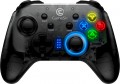 |
|---|---|---|
| GameSir Nova 2 Lite | GameSir T4 Pro | |
| Compare prices 3 | from $107.61 | |
| User reviews | ||
| TOP sellers | ||
| Product type | gamepad | gamepad |
Connection | ||
| Platform | PC (Windows) Android iOS Switch | PC (Windows) Android iOS Switch |
| Interface | Bluetooth / radio / wired | Bluetooth / radio / wired |
| Wired interface | USB-A | USB-A |
| Max. polling rate | 1000 Hz (1 ms) | |
| Range | 10 m | |
| Receiver (Dongle) | USB A | USB A |
Control | ||
| Number of buttons | 15 pcs | 16 pcs |
| Switch type | membrane | membrane |
| Feedback | vibration | vibration |
| D-pad | 8 position | 4 position |
| Sticks | 2 on Hall sensors | 2 asymmetrical |
| Bumpers (shifts) | 2 pcs | 2 pcs |
| Triggers | 2 pcs on Hall sensors with stroke adjustment | 2 pcs |
| Rear buttons | 2 pcs | 4 pcs |
Features | ||
| Turbo Function |  | |
| Backlight | + | multicolor |
| Button backlight |  | |
| Gyroscope | | |
| Braided cable | | |
| Detachable cable | | |
Power supply | ||
| Power source | battery | battery |
| Battery capacity | 600 mAh | 600 mAh |
| Operating time | 10 h | |
| Port on the device | USB-C | USB-C |
General | ||
| Phone mount | removable | |
| Material | plastic | plastic |
| Weight | 225 g | |
| Color | ||
| Added to E-Catalog | august 2025 | may 2021 |





Compare GameSir Nova 2 Lite and T4 Pro
Price comparison
You may be interested in
My comparisons
GameSir Nova 2 Lite often compared


GameSir T4 Pro often compared


Glossary
Max. polling rate
The polling rate indicates how often the controller sends data about presses and movements to the system, usually measured in Hz, and it directly affects the sense of responsiveness. The higher the polling rate, the smaller the "time window" between your action and when it appears in the game, making control feel more precise, especially in shooters, fighting games, and rhythm games. However, the actual effect also depends on the type of connection: wired high frequency often provides more stable performance, while Bluetooth can be limited by protocol or power saving, so two identical game controllers may feel different in wired and wireless modes. Thus, if you play a competitive shooter, a higher polling rate helps "catch" micro-movements of the stick more accurately; for calm games, the difference might be barely noticeable.
Range
The range of the wireless connection provided by the gamepad.
Almost all modern wireless models work confidently at a distance of at least 2 – 3 metres. So you need to pay attention to this parameter mainly when the device is planned to be used at a greater distance from the computer. At the same time, when evaluating the range, note that it is indicated for perfect conditions: the absence of interference and obstacles in the signal path, the battery is fully charged, etc. In fact, the communication range may be somewhat less, so when choosing, it is worth taking a certain margin. Nevertheless, according to the claimed range, it is quite possible to evaluate the practical capabilities of different models and compare them with each other.
Almost all modern wireless models work confidently at a distance of at least 2 – 3 metres. So you need to pay attention to this parameter mainly when the device is planned to be used at a greater distance from the computer. At the same time, when evaluating the range, note that it is indicated for perfect conditions: the absence of interference and obstacles in the signal path, the battery is fully charged, etc. In fact, the communication range may be somewhat less, so when choosing, it is worth taking a certain margin. Nevertheless, according to the claimed range, it is quite possible to evaluate the practical capabilities of different models and compare them with each other.
Number of buttons
The total number of buttons provided in the design of the manipulator.
The more buttons — the more additional features you can "tie" to the manipulator, the lower the likelihood that during the game you will have to turn to other controls (for example, a PC keyboard). However, many game consoles (see "Platform Compatibility") provide a certain minimum number of buttons for a compatible gamepad — a smaller number simply would not allow full use of all the functions of the console. For example, the original PlayStation 4 controller has 11 buttons.
Note that the D-Pad (see below) is not included in this calculation: it is considered a specific control, although it is based on buttons.
The more buttons — the more additional features you can "tie" to the manipulator, the lower the likelihood that during the game you will have to turn to other controls (for example, a PC keyboard). However, many game consoles (see "Platform Compatibility") provide a certain minimum number of buttons for a compatible gamepad — a smaller number simply would not allow full use of all the functions of the console. For example, the original PlayStation 4 controller has 11 buttons.
Note that the D-Pad (see below) is not included in this calculation: it is considered a specific control, although it is based on buttons.
D-pad
The presence of the D-Pad manipulator in the controller design; the type of such a manipulator can also be specified here.
D-Pad is used to move the character, cursor, etc. in strictly defined, standard directions. In some cases, this can be more convenient than using analogue levers that tilt to either side (see below). As for the varieties, nowadays there are such options:
— 4-position. The classic D-Pad, which appeared at the dawn of game consoles and does not lose popularity nowadays. Available as a set of 4 buttons in a distinctive cross-shaped layout, or as a single solid "multi-sided" button. Anyway, such a device provides 4 fixed directions: up, down, right, left. But to move diagonally, you need to select 2 corresponding directions at once; this is not always convenient, so in this regard, 4-way D-Pads are considered somewhat less practical than the 8-way ones described below. On the other hand, they are also quite functional, while being simpler in design, reliable and inexpensive; and strictly diagonal movements are not required as often as horizontal and vertical ones. So this type of D-Pads can be found even in accessories for the latest generations of game consoles.
— 8-position. A variation of the D-Pad, in which 4 standard directions (2 horizontal, 2 vertical) are supplemented by 4 intermediate — diagonal. In this case, we are usually talking about full-fledge...d fixed positions of the manipulator; in other words, to move diagonally, you need to click not on two standard directions, but on one intermediate one. The classic design of this type of D-Pad is a multi-sided button, which is the most suitable option in this case. However, this variety also includes some solutions for 4 separate buttons — provided that these buttons are placed very close, and pressing two at once with one finger is not difficult. Anyway, 8-position manipulators are somewhat more expensive, but more convenient than 4-position ones.
D-Pad is used to move the character, cursor, etc. in strictly defined, standard directions. In some cases, this can be more convenient than using analogue levers that tilt to either side (see below). As for the varieties, nowadays there are such options:
— 4-position. The classic D-Pad, which appeared at the dawn of game consoles and does not lose popularity nowadays. Available as a set of 4 buttons in a distinctive cross-shaped layout, or as a single solid "multi-sided" button. Anyway, such a device provides 4 fixed directions: up, down, right, left. But to move diagonally, you need to select 2 corresponding directions at once; this is not always convenient, so in this regard, 4-way D-Pads are considered somewhat less practical than the 8-way ones described below. On the other hand, they are also quite functional, while being simpler in design, reliable and inexpensive; and strictly diagonal movements are not required as often as horizontal and vertical ones. So this type of D-Pads can be found even in accessories for the latest generations of game consoles.
— 8-position. A variation of the D-Pad, in which 4 standard directions (2 horizontal, 2 vertical) are supplemented by 4 intermediate — diagonal. In this case, we are usually talking about full-fledge...d fixed positions of the manipulator; in other words, to move diagonally, you need to click not on two standard directions, but on one intermediate one. The classic design of this type of D-Pad is a multi-sided button, which is the most suitable option in this case. However, this variety also includes some solutions for 4 separate buttons — provided that these buttons are placed very close, and pressing two at once with one finger is not difficult. Anyway, 8-position manipulators are somewhat more expensive, but more convenient than 4-position ones.
Sticks
The number and location of analogue sticks provided in the design of the manipulator.
The analogue lever can be described as a "miniature joystick" — it is a protruding lever that can be deflected in any direction. Its purpose is generally similar to the D-Pad (see above), but the stick does not have fixed positions; this provides more "fine" control, which is very important in modern games. In addition, tilting it is often more convenient than pressing the D-Pad.
Separately, it is worth mentioning sticks on Hall sensors. The design of such levers is more reliable due to the absence of rubbing and contacting parts, and the position of the stick is determined by changes in the fluctuations of the magnetic field, which are monitored by appropriate sensors. Sticks on Hall sensors do not have “dead zones”, are devoid of the drift effect (misalignment), and wear out an order of magnitude slower. However, such solutions are not cheap.
This feature is most widely used in gamepads (see "Device type") — most of these controllers have at least one lever, models without sticks are already considered rare. In addition, such equipment, by definition, is installed in all arcade controllers; and analogue levers are also found in virtual reality weapons and motion controllers — it is very convenient to control the movement of the character through them.
...As for the location, it is indicated mainly for traditional design gamepads with a full set of controls, including 2 sticks. The most common options here are the left lever on top, the right one on the bottom ( like Xbox) or both levers on the bottom (like PlayStation). Much less common are devices where both analogue sticks are installed on top — this is, in particular, a regular gamepad for Wii U, as well as many models for mobile gadgets. And in some manipulators, a customizable (adjustable) arrangement of levers is provided: usually, the right stick in such models is fixed, and the left one can be installed from above or below, changing the format of the gamepad to suit your preferences.
The analogue lever can be described as a "miniature joystick" — it is a protruding lever that can be deflected in any direction. Its purpose is generally similar to the D-Pad (see above), but the stick does not have fixed positions; this provides more "fine" control, which is very important in modern games. In addition, tilting it is often more convenient than pressing the D-Pad.
Separately, it is worth mentioning sticks on Hall sensors. The design of such levers is more reliable due to the absence of rubbing and contacting parts, and the position of the stick is determined by changes in the fluctuations of the magnetic field, which are monitored by appropriate sensors. Sticks on Hall sensors do not have “dead zones”, are devoid of the drift effect (misalignment), and wear out an order of magnitude slower. However, such solutions are not cheap.
This feature is most widely used in gamepads (see "Device type") — most of these controllers have at least one lever, models without sticks are already considered rare. In addition, such equipment, by definition, is installed in all arcade controllers; and analogue levers are also found in virtual reality weapons and motion controllers — it is very convenient to control the movement of the character through them.
...As for the location, it is indicated mainly for traditional design gamepads with a full set of controls, including 2 sticks. The most common options here are the left lever on top, the right one on the bottom ( like Xbox) or both levers on the bottom (like PlayStation). Much less common are devices where both analogue sticks are installed on top — this is, in particular, a regular gamepad for Wii U, as well as many models for mobile gadgets. And in some manipulators, a customizable (adjustable) arrangement of levers is provided: usually, the right stick in such models is fixed, and the left one can be installed from above or below, changing the format of the gamepad to suit your preferences.
Triggers
Auxiliary controls located on the top of the gamepad at the back of the body. The triggers are pressed by the player's index or middle fingers.
In classic gamepads and joysticks, triggers are used to control various actions in games (for example, accelerating a car in racing games, shooting in shooters, etc.). Some models allow the trigger to be pressed halfway for aiming in the game or fully for firing at enemies. Such buttons may also feature a vibration feedback function. In the vast majority of cases, triggers are based on potentiometers (variable resistors), less frequently on Hall sensors, which track changes in the magnetic field fluctuations and lack frictional parts in their construction (though they are more expensive).
Triggers are arranged somewhat differently in clip-on gamepads for smartphones (see "Type"). Often these controls are equipped with lever-type mechanisms and sensitive contacts to the touchscreen layer, which touch a specific area of the display when the levers are pressed. Depending on the game layout, various control functions (shooting, aiming, crouching, or jumping, etc.) are typically assigned to the triggers.
In classic gamepads and joysticks, triggers are used to control various actions in games (for example, accelerating a car in racing games, shooting in shooters, etc.). Some models allow the trigger to be pressed halfway for aiming in the game or fully for firing at enemies. Such buttons may also feature a vibration feedback function. In the vast majority of cases, triggers are based on potentiometers (variable resistors), less frequently on Hall sensors, which track changes in the magnetic field fluctuations and lack frictional parts in their construction (though they are more expensive).
Triggers are arranged somewhat differently in clip-on gamepads for smartphones (see "Type"). Often these controls are equipped with lever-type mechanisms and sensitive contacts to the touchscreen layer, which touch a specific area of the display when the levers are pressed. Depending on the game layout, various control functions (shooting, aiming, crouching, or jumping, etc.) are typically assigned to the triggers.
Rear buttons
Additional buttons located on the back panel of the gaming controller.
This feature is found exclusively among gamepads (see "Type"). As a rule, rear buttons are customizable and can be assigned to specific functions at the player's discretion or depending on the demands of a particular game. They are designed so that you can control the game without having to take your fingers off the main buttons or sticks. Rear panel additional buttons are particularly useful in first-person shooters and fighting games, where quick reactions and precise control play a crucial role in achieving success in the game.
This feature is found exclusively among gamepads (see "Type"). As a rule, rear buttons are customizable and can be assigned to specific functions at the player's discretion or depending on the demands of a particular game. They are designed so that you can control the game without having to take your fingers off the main buttons or sticks. Rear panel additional buttons are particularly useful in first-person shooters and fighting games, where quick reactions and precise control play a crucial role in achieving success in the game.
Backlight
Backlight gives the controller a unique and stylish appearance, highlighting its belonging to the gaming device segment. The simplest variations are single-color options. Specific colors can vary: red, turquoise, green, etc. The most advanced options are multicolor and RGB lighting. Multicolor systems are those that offer more than three color options, sometimes with intermediate shades. RGB lighting allows the user to choose virtually any shade based on preference and mood.
Button backlight
Button backlight enhances the visibility of keys in low or no light, allowing for comfortable gameplay in the dark. With this lighting system, you won't have to fumble for the right button, and it minimizes false presses—so-called "miss-clicks" that can inadvertently activate unnecessary game functions or even ruin a game session.