Antennas and signal:15 dBm, 2 antenna(s), non-removable
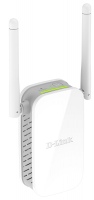
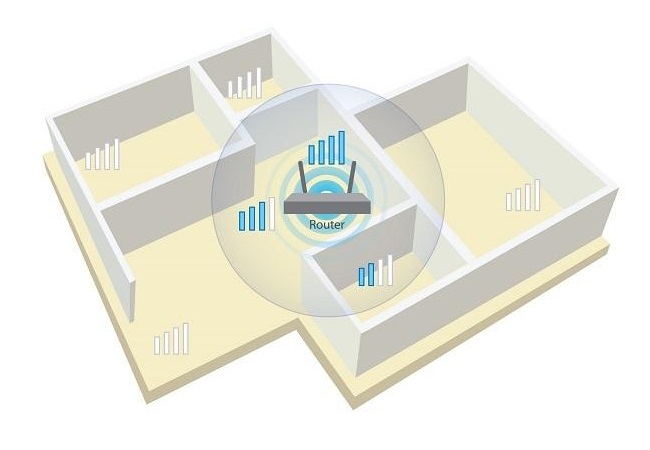
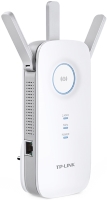
Powerful and reliable wireless network signal amplifier (repeater) of the Wi-Fi 4 (802.11n) standard with a built-in connector for connecting to a household power outlet. The manufacturer is positioning itself as a product of the basic price category, designed to create high-quality wireless network coverage in the 2.4 GHz band in large areas. It will be useful in situations where the main router cannot provide a signal of sufficient power due to a long distance or numerous obstacles.
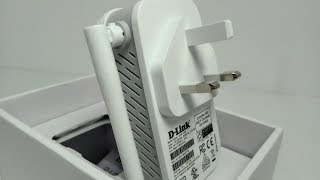
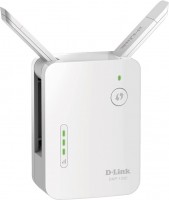
Thanks to the use of the D-Link DAP-1325 wireless repeater, you can achieve the complete elimination of "dead" zones, areas of unstable reception and refuse to lay a network cable. This model is equipped with two external antennas with a gain of 2 dBi and supports MIMO 2x2 multi-stream data transmission technology, which allowed the manufacturer to claim a peak throughput of up to 300 Mbps (the real maximum data transfer rate does not exceed 200 Mbps). There is a LAN port (up to 100 Mbps) for connecting to a PC/laptop or other network devices. All popular security protocols (WPA, WEP, WPA2) and user data encryption are supported.
The information in the model description is for reference purposes. Always clarify the specifications and configuration of the product with the online store manager before purchasing. Catalog D-Link 2026 - new arrivals, bestsellers, and the most relevant models D-Link.
When you make a purchase through links on our site, we may receive a affiliate commission.
D-Link DAP-1325 N300 - Wi-Fi range extender - 100Mb LAN - Wi-Fi, Wi-Fi - AC 100/230 V - in wall DAP-1325-US
Easy to set up, easy to use. Setting up the N300 Wi-Fi range extender is simple. Just use the one-touch configuration functio... moren by pushing the WPS push-button on the DAP-1325 and on the router or AP you want to extend, and the DAP-1325 will automatically configure itself for you. Extend your wireless network. Increase the coverage of your home wireless network with the sleek and easy-to-use DAP-1325 N300 Wi-Fi range extender. N300 technology helps to extend wireless range in your home or office and also provides backward compatibility with older wireless devices in your network, allowing you to enjoy a fast, reliable wireless connection. Alternatively, use the built-in Fast Ethernet port and your home's existing wired Ethernet cabling to extend wireless coverage without worrying about signal strength. Compact, convenient design. The DAP-1325's compact design and intuitive setup makes it perfect for use at home or in a small office. Simply plug it in and use the bright signal indicator LED to find the perfect location to extend your network. Its diminutive wall-plug design saves you the hassle of dealing with a power cord and its sleek, unobtrusive appearance blends easily into the decor of any home or office.
D-Link DAP-1325-US | DAP-1325 1 x Port 10/100Base-TX 300Mbit/s 802.11n 2.4GHz Wireless Range Extender Refurbished DAP-1325-U
Shop online DAP-1325-US D-Link DAP-1325 1 x Port 10/100Base-TX 300Mbit/s 802.11n 2.4GHz Wireless Range Extender from GotoDire... morect with fast shipping in the USA
D-Link DAP-1325/E | DAP-1325 1 x Port 10/100Base-TX 300Mbit/s 802.11n 2.4GHz Wireless Range Extender Refurbished DAP-1325/E
Shop online DAP-1325/E D-Link DAP-1325 1 x Port 10/100Base-TX 300Mbit/s 802.11n 2.4GHz Wireless Range Extender from GotoDirec... moret with fast shipping in the USA
D-Link DAP-1325 | 1 x Port 10/100Base-TX 300Mbit/s 802.11n 2.4GHz Wireless Range Extender Refurbished DAP-1325
Shop online DAP-1325 D-Link 1 x Port 10/100Base-TX 300Mbit/s 802.11n 2.4GHz Wireless Range Extender from GotoDirect with fast... moreshipping in the USA
Press, rather, take a router to replace your device
23 February 2021
If the signal drops to 60, it may log this, but stops working. The client mode works intermittently. It can show the signal quality and connection to another AP, but not perform any function. Or the interface simply freezes, and only a physical "reboot" helps. We bought a few pieces for the office, now they're stored in boxes in the warehouse.






 Oleg Lobodin: use D-Link DAP-1325 few months




The client mode works intermittently. It can show the signal quality and connection to another AP, but not perform any function.
Or the interface simply freezes, and only a physical "reboot" helps.
We bought a few pieces for the office, now they're stored in boxes in the warehouse.