
Comparison Dreame D9 Max vs Midea M7 Pro
Add to comparison | 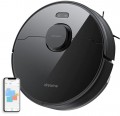 | 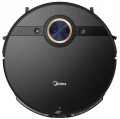 |
|---|---|---|
| Dreame D9 Max | Midea M7 Pro | |
from $259.99 | from $359.99 | |
| User reviews | ||
| TOP sellers | ||
| Type | robot vacuum cleaner | robot vacuum cleaner |
| Cleaning | dry and wet side brush turbo brush wiping with a cloth | dry and wet 2 side brushes turbo brush wet wiping (vibration) |
| Water supply adjustment |  | |
Robot vacuum cleaner | ||
| Suction power | 4000 Pa | 4000 Pa |
| Dust container capacity | 570 ml | 450 ml |
| Water tank capacity | 270 ml | 220 ml |
| Power auto-adjustment | | |
| Fine filter | HEPA | HEPA |
| Building a room map | rangefinder (laser) | rangefinder (laser) |
| Cleaning area limitation | via the app | via the app |
Features | ||
| Control via smartphone | | |
| Voice assistant | Amazon Alexa | |
| Scheduled cleaning | | |
| Memory of several maps (floors) |  | |
Battery | ||
| Battery capacity | 5.2 Ah | 5.2 Ah |
| Operating time | 150 min | 180 min |
| Charging time | 2.5 h | |
General | ||
| Cleaning area | 250 m² | 250 m² |
| Threshold clearance | 20 mm | 20 mm |
| Noise level | 65 dB | 65 dB |
| Dimensions (HxWxD) | 9.7x35x35 cm | 9.6x35x35 cm |
| Weight | 3.8 kg | 3.8 kg |
| Color | ||
| Added to E-Catalog | september 2021 | august 2021 |


Compare Dreame D9 Max and Midea M7 Pro
Both robot vacuums, the Dreame D9 Max and the Midea M7 Pro, offer similar features such as dry and wet cleaning, as well as a suction power of 4000 Pa. However, the Dreame D9 Max has a larger dustbin capacity (0.57 L) compared to the Midea M7 Pro (0.45 L) and a slightly smaller water tank capacity (0.27 L versus 0.22 L). The Dreame D9 Max has a runtime of 150 minutes, while the Midea M7 Pro can operate for up to 180 minutes, which is a significant advantage. Both devices support smartphone connectivity and have features for auto power adjustment and scheduled cleaning. However, the Midea M7 Pro offers the ability to remember multiple maps, which can be useful for multi-story homes. Overall, the choice between them may depend on preferences regarding dustbin capacity and runtime.
You may be interested in
Dreame D9 Max often compared


Midea M7 Pro often compared


Glossary
Cleaning
The cleaning method determines whether the robot can only collect dry debris or also wipe the floor covering with water, as well as which methods are available for this.
— Dry. The robot cleans the floor with brushes and airflow, directing dust, crumbs, hair and pet fur into the dust container. This option is suitable for carpets and hard floors, but does not remove stains and marks from the floor.
— Dry and wet. The device combines debris suction with wiping the floor using a damp attachment. Depending on the design, this can be a simple cloth or an active washing module that handles fresh stains and shoe marks more effectively.
— Side brushes. Small rotating elements that sweep debris along walls, near furniture and from corners towards the main suction opening. One side brush on the edge of the body sweeps debris along walls, near furniture and from corners into the central suction channel. This design is usually sufficient, since the robot most often moves along obstacles with one particular side. Two brushes work on both sides of the body and cover a wider strip of floor in one pass. This setup is especially convenient when moving along walls and between furniture, although on smooth floors fast brushes can sometimes scatter light debris.
— Extendable brush. A movable side brush automatically extends beyond the body when cleaning corners and areas near walls. Compared with a regular fixed design, it reduces uncleaned areas where the robot body cannot get close enough.
— Turbo brush.... A motorized module on the bottom of the robot that picks up debris and directs it into the suction channel. The working part may consist of a roller with bristles, rubber blades or a combined coating. This system collects pet fur, hair and dirt from carpets more effectively than a simple suction opening, but bristled elements need regular cleaning to remove tangled hair.
— Floor scrubber. An active washing module with rotating mops or a roller that does not simply glide over the floor, but mechanically scrubs away dirt. This system removes stains and marks better than a regular cloth.
— Extendable floor scrubber. One of the rotating mops shifts to the side and extends beyond the robot body. This allows the floor to be wiped closer to skirting boards, furniture legs and corners, where a regular fixed floor scrubber leaves a narrow dry strip.
— Vibration wiping. The washing platform rapidly moves the cloth back and forth, increasing friction against the surface. In terms of effectiveness, this option falls between a passive cloth and rotating mops, removing light stains and marks well.
— Cloth wiping. A damp fabric attachment is fixed under the body and pulled across the floor while the robot moves. This simple solution is suitable for regularly removing fine dust and fresh marks, but hardly scrubs off dried-on dirt.
— Dry. The robot cleans the floor with brushes and airflow, directing dust, crumbs, hair and pet fur into the dust container. This option is suitable for carpets and hard floors, but does not remove stains and marks from the floor.
— Dry and wet. The device combines debris suction with wiping the floor using a damp attachment. Depending on the design, this can be a simple cloth or an active washing module that handles fresh stains and shoe marks more effectively.
— Side brushes. Small rotating elements that sweep debris along walls, near furniture and from corners towards the main suction opening. One side brush on the edge of the body sweeps debris along walls, near furniture and from corners into the central suction channel. This design is usually sufficient, since the robot most often moves along obstacles with one particular side. Two brushes work on both sides of the body and cover a wider strip of floor in one pass. This setup is especially convenient when moving along walls and between furniture, although on smooth floors fast brushes can sometimes scatter light debris.
— Extendable brush. A movable side brush automatically extends beyond the body when cleaning corners and areas near walls. Compared with a regular fixed design, it reduces uncleaned areas where the robot body cannot get close enough.
— Turbo brush.... A motorized module on the bottom of the robot that picks up debris and directs it into the suction channel. The working part may consist of a roller with bristles, rubber blades or a combined coating. This system collects pet fur, hair and dirt from carpets more effectively than a simple suction opening, but bristled elements need regular cleaning to remove tangled hair.
— Floor scrubber. An active washing module with rotating mops or a roller that does not simply glide over the floor, but mechanically scrubs away dirt. This system removes stains and marks better than a regular cloth.
— Extendable floor scrubber. One of the rotating mops shifts to the side and extends beyond the robot body. This allows the floor to be wiped closer to skirting boards, furniture legs and corners, where a regular fixed floor scrubber leaves a narrow dry strip.
— Vibration wiping. The washing platform rapidly moves the cloth back and forth, increasing friction against the surface. In terms of effectiveness, this option falls between a passive cloth and rotating mops, removing light stains and marks well.
— Cloth wiping. A damp fabric attachment is fixed under the body and pulled across the floor while the robot moves. This simple solution is suitable for regularly removing fine dust and fresh marks, but hardly scrubs off dried-on dirt.
Dust container capacity
The dustbin capacity indicates how much dry debris fits in the robot vacuum’s built-in container before it needs to be emptied. Models with a 200–300 ml capacity are suitable for a small apartment and frequent cleaning cycles, while a 400–600 ml capacity is more convenient for larger areas, pets, or lots of hair. For robots with a self-emptying station, the size of the internal container is less important, as debris is automatically transferred to the docking station’s collection bin.
Water tank capacity
The tank capacity determines the water supply for moistening the pad, rotating mops, or cleaning roller. Compact tanks of around 200 ml are suitable for regular wiping of small areas, while 300–500 ml tanks allow fewer interruptions for refilling during cleaning.
Voice assistant
Voice assistant lets you control the robot vacuum with short commands through a compatible smart speaker, smartphone, or smart home system. You can use voice commands to start and stop cleaning, return the device to the docking station, and on some models select a room or operating mode. This feature is especially convenient when your phone is not within reach, but the set of available commands depends on the robot model and supported platform.
Memory of several maps (floors)
Multiple map memory allows the robot vacuum to save separate layouts for different floors or rooms. When the device is moved, it recognizes the required map and uses the already defined rooms, no-go zones, and cleaning settings. This feature is especially useful for multi-story homes, as it eliminates the need to rescan the space every time the robot is moved.
Operating time
Battery life determines how much area the robot vacuum can clean before returning to the docking station. Actual performance depends on the selected mode, suction power, floor type, operation of the mops or roller, and layout complexity. Therefore, the stated maximum time is usually achieved in a gentle mode and will be noticeably shorter during intensive cleaning.
Charging time
Full charging cycle of the robot vacuum to restore the battery from the minimum level to 100%. The process usually takes several hours and depends on the battery capacity and charging system power. However, with regular returns to the base, this parameter rarely affects cleaning convenience.