
Comparison Edifier W820BT vs Edifier W830BT
Add to comparison | 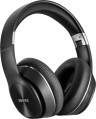 | 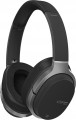 |
|---|---|---|
| Edifier W820BT | Edifier W830BT | |
| Compare prices 1 | Compare prices 1 | |
| User reviews | ||
| TOP sellers | ||
Connection and design | ||
| Design | overhead, closed full size Over-Ear foldable | overhead, closed full size Over-Ear foldable swiveling earcups |
| Connection type | combined | combined |
| Connection | mini-Jack (3.5 mm) Bluetooth v4.1 | mini-Jack (3.5 mm) Bluetooth v4.1 |
| Plug | L-shaped | straight |
| Cable supply | single-sided | single-sided |
| Range | 10 m | |
| Cable type | round | round |
| Detachable cable |  | |
Specs | ||
| Impedance | 32 Ohm | 24 Ohm |
| Frequency range | 20 – 20000 Hz | 20 – 20000 Hz |
| Sensitivity | 100 dB | 96 dB |
| Speaker size | 40 mm | 40 mm |
| Emitter type | dynamic | dynamic |
Microphone specs | ||
| Microphone | built into the case | built into the case |
Features | ||
| Volume control | | |
| NFC |  | |
| Codec support | aptX | |
Power supply | ||
| Power source | battery | battery |
| Operating time (music) | 80 h | 95 h |
General | ||
| Weight | 260 g | 274 g |
| Added to E-Catalog | january 2019 | september 2017 |


Compare Edifier W820BT and W830BT
Price comparison
You may be interested in
Edifier W820BT often compared


Edifier W830BT often compared

Glossary
Design
This item primarily specifies the way headphones are mounted on the ears; by this parameter, modern headphones are divided into over-ear, in-ear, earbuds, open-ear types. For over-ear models, it may also specify the acoustic design (closed, semi-open, open), as well as the presence of features such as over-ear construction (in the absence of this feature such headphones are called on-ear, or just "on-ear"), swivel cups, auto headband adjustment or even the popular mid-2021 trend — Cat Ear Headphones (headphones with cat ears). Details such as a rigid band, over-the-ear mounting, neck mounting, and folding ability, can be combined with almost any method of ear placement (with some exceptions — for example, on-ear models cannot be worn on the neck).
Here is a more detailed description of different ear placement options:
— On-ear. On-ear headphones are placed outside the auditory pinnae, covering the ear from the side ("usual" on-ear models) or completely (full-size Over-Ear — see below). In any case, such models are fairly large. This, on the one hand, simplifies the creation of headphones w...ith advanced audio characteristics, and also allows using some specific tricks without much difficulty — for example, multiple drivers or multichannel surround sound support. On the other hand, the size of the "ears" complicates transportation and use on the go. Moreover, it should be noted that most on-ear models feature a headband, making them less compatible with complex hairstyles and some headgear. This disadvantage is absent in models with rigid bands and over-the-ear mounts, but they also have their specifics (see below).
On-ear headphones can have different acoustic designs:
— In-ear with a rigid band. In-ear headphones are placed inside the ear canals, allowing them to be most securely fixed in the ear and not fall out. The presence of a rigid band further increases the reliability of the headphones' fixation. This type of headphones is well-suited for sports. The rigid band and in-ear design of sound emitters allows the headphones to stay securely in place even during intensive running.
— Earbuds. Also colloquially known as "pills." Similar to in-ear models, such headphones are small and placed in the auditory pinna — but not deep in the ear canal, just at its entrance, almost outside. As a result, earbuds are somewhat simpler in construction and cheaper, but achieving rich sound and advanced acoustic characteristics is more challenging with them. Such models provide quite low sound isolation, but this can be either a downside or an advantage — depending on the situation. Some headphones of this type have an elongated shape, allowing them to sit deeper in the ears and approaching in-ear models in capabilities.
It is worth noting separately that in-ear models and earbuds don't use headbands — the headphones are made either completely separate or connected by a device such as a rigid band or neck mount. Thus, such headphones can easily be worn with almost any hairstyle or headgear.
— Earbuds with a rigid band. Earbuds are simply inserted into the ear canal entrance, not penetrating deeply. This is not the most reliable way to fix the headphones, but due to the presence of a rigid band, earbuds gain secure placement and reliable fixation. The headphones themselves have an open sound path design, which reproduces audio with noticeable distortion to the original sound signal. However, the open acoustic scheme allows clear hearing of the surrounding environment.
As for additional design features, they can be such:
— Full-size Over-Ear. On-ear headphones (see above) in which each cup completely covers the ear and fits tightly against the head. Cups in such models are made fairly large and equipped with characteristic soft "borders" along the inner side's perimeter — these borders fit tightly against the head, so the ear pinna is effectively inside the cup. The main advantage of such a design is that the headphones (with the right size) practically do not touch the user's ears and do not press on them — this is particularly comfortable for extended use. Furthermore, Over-Ear models facilitate achieving high-quality sound isolation (although among them it is possible to find models with semi-open and even completely open acoustic design). The main disadvantage of such devices is bulkiness and inconvenience in transport and on-the-go use. Additionally, when wearing glasses, Over-Ear cups usually press on the frames' sides — this can cause discomfort.
— Open-ear. A special variety of wireless true wireless headphones with open acoustic design. Unlike earbuds and in-ear models, open-ear headphones do not suggest partial or full closure of the auricle — this provides better perception of surrounding sounds. This is handy during walks and outdoor runs. Most often, such headphones have over-the-ear mounts (see below), and the drivers in their construction are directed straight into the ear canals but remain outside. Passive noise isolation in open-ear headphones is practically absent, and the playing music and phone conversations may be heard by those nearby — keep this in mind.
— Auto headband adjustment. A headband capable of automatically adjusting to the user's head size. Such a headband usually consists of two parts — a rigid, usually metallic, base and a soft inner part that fits directly against the head. The inner part is capable of stretching, and the user just needs to place the cups on the ears comfortably — and the headband will automatically adjust to the needed size.
— Rigid band. A band made of rigid material, connecting the two headphones and worn on the back of the head; in some models, it can also serve as a neck mount (see below). The advantage of such a device over a classic headband is that the band can be used with almost any hairstyle and headgear. On the other hand, in in-ear models and earbuds (see above), this feature makes the headphones bulkier, and in on-ear models, it makes sense to use it only with regular models, not belonging to full-size Over Ear. Consequently, for a range of reasons, the band is not particularly popular nowadays.
— Over-the-ear mounting. A mount that allows fixing each headphone directly on the auricle; it generally has the form of a characteristic band. This feature appears in all types of modern "ears," except Over Ear (see above), and its specific meaning depends primarily on the main method of placing the headphone on the ear. For in-ear models and earbuds, over-the-ear mounting provides additional retention reliability: the likelihood of the headphone falling out of the ear is practically reduced to zero due to such a mount. In on-ear "ears," this feature appears significantly less often, and its main purpose is to do without a headband or rigid band — in some cases, these construction elements are unnecessary.
— Neck mounting. A feature found exclusively in wireless and combined models (see "Connection Type") — and only in in-ear and earbuds (see above). Both headphones in such models are connected by either a regular wire with a thickened part or a special horseshoe-shaped band (to each end of this band, an individual "ear" is connected via a wire). In any case, during use, this wire or band is located behind the user's neck, ensuring additional convenience: removed from the ears (or fallen out), headphones do not drop to the ground but remain hanging on the mount. Some models also feature special magnets, enabling the removed headphones to "stick" together, turning the entire structure into a ring — reducing the risk of dropping the device even further.
— Folding ability. The ability to compactly fold headphones for storage and transportation. Note that this feature is listed only for on-ear models (see above) — in-ear headphones and earbuds are already quite portable by themselves, without a special folding design.
— Swivel cups. A design feature found in on-ear headphones (see above). Swivel means cups that, in working position, can rotate at a certain angle around the vertical axis. This allows headphones to further adjust to the user's head size and shape — thereby increasing comfort, especially during prolonged wear. On the other hand, the swivel mount slightly complicates the headphones' construction, increases the cost, and somewhat reduces reliability.
Here is a more detailed description of different ear placement options:
— On-ear. On-ear headphones are placed outside the auditory pinnae, covering the ear from the side ("usual" on-ear models) or completely (full-size Over-Ear — see below). In any case, such models are fairly large. This, on the one hand, simplifies the creation of headphones w...ith advanced audio characteristics, and also allows using some specific tricks without much difficulty — for example, multiple drivers or multichannel surround sound support. On the other hand, the size of the "ears" complicates transportation and use on the go. Moreover, it should be noted that most on-ear models feature a headband, making them less compatible with complex hairstyles and some headgear. This disadvantage is absent in models with rigid bands and over-the-ear mounts, but they also have their specifics (see below).
On-ear headphones can have different acoustic designs:
- Closed. Models with a high degree of sound isolation, maximally shielding the user from external sounds. This design contributes to rich sound (especially in the bass range) and provides a very powerful immersion effect, making it suitable for home use (including computer games) and noisy environments. However, using such "ears" on the street is not recommended: full isolation from surrounding sounds in such conditions can be unsafe. Besides, it is believed that a fully closed design slightly worsens sound fidelity.
- Open. Headphones with minimal sound isolation, allowing most external sounds through. They are less powerful and rich in sound compared to closed models and less effective in noisy environments; also, the sound from such headphones is easily heard by those around. On the other hand, open models generally provide more authentic sound and are better suited for situations where it's necessary to monitor the surrounding environment — for example, for use on the street.
- Semi-open. A kind of compromise between the above-described options: headphones with better sound isolation than open models but still not reaching the level of closed "ears." For some users, this intermediate option may be more comfortable. Additionally, semi-open headphones are valued in professional sound work: they retain bass richness and at the same time do not create the distortions characteristic of a fully closed design.
- With a rigid band. A rigid band allows the earbuds to be reliably fixed to the auditory pinnae. A close analogue of the rigid band is the headband of full-size headphones, but unlike that, the band is worn on the back of the head, not the top. For this reason, rigid bands are mostly made without soft padding, from bare plastic/metal. Headphones with a rigid band most often have a sporting focus, as being on the back of the head, they will not slip even during intense running. On-ear headphones are closely pressed to the auditory pinnae, but the speakers themselves are placed outside the ear canals.
- Cat Ear ("ears"). On-ear headphones in an interesting design — with imitation cat ears on the headband. This addition does not affect working characteristics but looks unusual and can be a great addition to the owner's vibrant, original style. Cat Ear Headphones are particularly popular among teenagers.
— In-ear with a rigid band. In-ear headphones are placed inside the ear canals, allowing them to be most securely fixed in the ear and not fall out. The presence of a rigid band further increases the reliability of the headphones' fixation. This type of headphones is well-suited for sports. The rigid band and in-ear design of sound emitters allows the headphones to stay securely in place even during intensive running.
— Earbuds. Also colloquially known as "pills." Similar to in-ear models, such headphones are small and placed in the auditory pinna — but not deep in the ear canal, just at its entrance, almost outside. As a result, earbuds are somewhat simpler in construction and cheaper, but achieving rich sound and advanced acoustic characteristics is more challenging with them. Such models provide quite low sound isolation, but this can be either a downside or an advantage — depending on the situation. Some headphones of this type have an elongated shape, allowing them to sit deeper in the ears and approaching in-ear models in capabilities.
It is worth noting separately that in-ear models and earbuds don't use headbands — the headphones are made either completely separate or connected by a device such as a rigid band or neck mount. Thus, such headphones can easily be worn with almost any hairstyle or headgear.
— Earbuds with a rigid band. Earbuds are simply inserted into the ear canal entrance, not penetrating deeply. This is not the most reliable way to fix the headphones, but due to the presence of a rigid band, earbuds gain secure placement and reliable fixation. The headphones themselves have an open sound path design, which reproduces audio with noticeable distortion to the original sound signal. However, the open acoustic scheme allows clear hearing of the surrounding environment.
As for additional design features, they can be such:
— Full-size Over-Ear. On-ear headphones (see above) in which each cup completely covers the ear and fits tightly against the head. Cups in such models are made fairly large and equipped with characteristic soft "borders" along the inner side's perimeter — these borders fit tightly against the head, so the ear pinna is effectively inside the cup. The main advantage of such a design is that the headphones (with the right size) practically do not touch the user's ears and do not press on them — this is particularly comfortable for extended use. Furthermore, Over-Ear models facilitate achieving high-quality sound isolation (although among them it is possible to find models with semi-open and even completely open acoustic design). The main disadvantage of such devices is bulkiness and inconvenience in transport and on-the-go use. Additionally, when wearing glasses, Over-Ear cups usually press on the frames' sides — this can cause discomfort.
— Open-ear. A special variety of wireless true wireless headphones with open acoustic design. Unlike earbuds and in-ear models, open-ear headphones do not suggest partial or full closure of the auricle — this provides better perception of surrounding sounds. This is handy during walks and outdoor runs. Most often, such headphones have over-the-ear mounts (see below), and the drivers in their construction are directed straight into the ear canals but remain outside. Passive noise isolation in open-ear headphones is practically absent, and the playing music and phone conversations may be heard by those nearby — keep this in mind.
— Auto headband adjustment. A headband capable of automatically adjusting to the user's head size. Such a headband usually consists of two parts — a rigid, usually metallic, base and a soft inner part that fits directly against the head. The inner part is capable of stretching, and the user just needs to place the cups on the ears comfortably — and the headband will automatically adjust to the needed size.
— Rigid band. A band made of rigid material, connecting the two headphones and worn on the back of the head; in some models, it can also serve as a neck mount (see below). The advantage of such a device over a classic headband is that the band can be used with almost any hairstyle and headgear. On the other hand, in in-ear models and earbuds (see above), this feature makes the headphones bulkier, and in on-ear models, it makes sense to use it only with regular models, not belonging to full-size Over Ear. Consequently, for a range of reasons, the band is not particularly popular nowadays.
— Over-the-ear mounting. A mount that allows fixing each headphone directly on the auricle; it generally has the form of a characteristic band. This feature appears in all types of modern "ears," except Over Ear (see above), and its specific meaning depends primarily on the main method of placing the headphone on the ear. For in-ear models and earbuds, over-the-ear mounting provides additional retention reliability: the likelihood of the headphone falling out of the ear is practically reduced to zero due to such a mount. In on-ear "ears," this feature appears significantly less often, and its main purpose is to do without a headband or rigid band — in some cases, these construction elements are unnecessary.
— Neck mounting. A feature found exclusively in wireless and combined models (see "Connection Type") — and only in in-ear and earbuds (see above). Both headphones in such models are connected by either a regular wire with a thickened part or a special horseshoe-shaped band (to each end of this band, an individual "ear" is connected via a wire). In any case, during use, this wire or band is located behind the user's neck, ensuring additional convenience: removed from the ears (or fallen out), headphones do not drop to the ground but remain hanging on the mount. Some models also feature special magnets, enabling the removed headphones to "stick" together, turning the entire structure into a ring — reducing the risk of dropping the device even further.
— Folding ability. The ability to compactly fold headphones for storage and transportation. Note that this feature is listed only for on-ear models (see above) — in-ear headphones and earbuds are already quite portable by themselves, without a special folding design.
— Swivel cups. A design feature found in on-ear headphones (see above). Swivel means cups that, in working position, can rotate at a certain angle around the vertical axis. This allows headphones to further adjust to the user's head size and shape — thereby increasing comfort, especially during prolonged wear. On the other hand, the swivel mount slightly complicates the headphones' construction, increases the cost, and somewhat reduces reliability.
Plug
The design of the plug provided in the headphones. This parameter is relevant primarily for models with a mini-Jack interface (see "Connection") — the rest of the plugs are made straight in most cases, exceptions are extremely rare.
— Direct. The traditional, most simple and unpretentious option is plugs that do not have any bends. Usually, they are compatible without restrictions with stationary audio equipment, PCs, laptops, etc. But for smartphones and other portable gadgets, this option is not always optimal — it all depends on how the gadget is located in your pocket or case. In some cases — for example, when carrying a smartphone in a regular pants pocket — such a wire can be strongly bent around the plug, which quickly becomes unusable; in such cases it is worth paying attention to L-shaped or curved plugs (see below).
— L-shaped. Plugs angled at 90° in the shape of the letter L. Designed primarily for use with smartphones and other handheld devices: such devices, when worn, can be positioned in such a way that a bent plug is more convenient than a straight one. However, the L-shaped design may also be the best choice for stationary equipment, where the headphone wire approaches the connector at a right angle — for example, this situation is often found in computers and laptops.
— At an angle of 45°. A variation of the L-shaped plug...described above, bent not at a straight line, but at a smaller angle (not necessarily exactly 45 °). It is also designed primarily for pocket equipment, and with such an application, such plugs are considered even more convenient and reliable than traditional L-shaped ones. But for stationary devices, it hardly makes sense to specifically look for a model with a similar connector (although such an application is technically quite possible).
— Direct. The traditional, most simple and unpretentious option is plugs that do not have any bends. Usually, they are compatible without restrictions with stationary audio equipment, PCs, laptops, etc. But for smartphones and other portable gadgets, this option is not always optimal — it all depends on how the gadget is located in your pocket or case. In some cases — for example, when carrying a smartphone in a regular pants pocket — such a wire can be strongly bent around the plug, which quickly becomes unusable; in such cases it is worth paying attention to L-shaped or curved plugs (see below).
— L-shaped. Plugs angled at 90° in the shape of the letter L. Designed primarily for use with smartphones and other handheld devices: such devices, when worn, can be positioned in such a way that a bent plug is more convenient than a straight one. However, the L-shaped design may also be the best choice for stationary equipment, where the headphone wire approaches the connector at a right angle — for example, this situation is often found in computers and laptops.
— At an angle of 45°. A variation of the L-shaped plug...described above, bent not at a straight line, but at a smaller angle (not necessarily exactly 45 °). It is also designed primarily for pocket equipment, and with such an application, such plugs are considered even more convenient and reliable than traditional L-shaped ones. But for stationary devices, it hardly makes sense to specifically look for a model with a similar connector (although such an application is technically quite possible).
Range
Range of wireless-capable headphones (see "Connection type").
When evaluating the range, it should be taken into account that this parameter is rather conditional and the actual range may differ slightly from the claimed one (usually in a smaller direction). So, when connecting via a radio channel, the range is indicated for perfect conditions — without interference and obstacles in the signal path. For Bluetooth models, the range also depends on the power of the Bluetooth module in the device to which the “ears” are connected. And the effectiveness of the IR channel may be reduced in hot weather or in bright sunlight. So when choosing according to this indicator, it's ok to take a certain margin.
On the other hand, there are two points worth noting. Firstly, in general, the specified range accurately describes the capabilities of the headphones, and it is quite possible to evaluate and compare different models with each other. Secondly, even in the most modest wireless “ears”, the communication range is about 8–10 m, 11–20 m is considered an average, and a fairly large number of devices can operate at distances of tens and even hundreds of metres. So paying attention to the range makes sense mainly in cases where you plan to move away from the signal source at a considerable distance — from 5 m or more — or listen to sound through walls.
When evaluating the range, it should be taken into account that this parameter is rather conditional and the actual range may differ slightly from the claimed one (usually in a smaller direction). So, when connecting via a radio channel, the range is indicated for perfect conditions — without interference and obstacles in the signal path. For Bluetooth models, the range also depends on the power of the Bluetooth module in the device to which the “ears” are connected. And the effectiveness of the IR channel may be reduced in hot weather or in bright sunlight. So when choosing according to this indicator, it's ok to take a certain margin.
On the other hand, there are two points worth noting. Firstly, in general, the specified range accurately describes the capabilities of the headphones, and it is quite possible to evaluate and compare different models with each other. Secondly, even in the most modest wireless “ears”, the communication range is about 8–10 m, 11–20 m is considered an average, and a fairly large number of devices can operate at distances of tens and even hundreds of metres. So paying attention to the range makes sense mainly in cases where you plan to move away from the signal source at a considerable distance — from 5 m or more — or listen to sound through walls.
Impedance
Impedance refers to the headphone's nominal resistance to AC current, such as an audio signal.
Other things being equal, a higher impedance reduces distortion, but requires a more powerful amplifier — otherwise the headphones simply will not be able to produce sufficient volume. Thus, the choice of resistance depends primarily on which signal source you plan to connect the "ears". So, for a portable gadget (smartphone, pocket player), an indicator of 16 ohms or less is considered optimal, 17 – 32 ohms is not bad. Higher values — 33 – 64 ohms and 65 – 96 ohms — will require quite powerful amplifiers, like those used in computers and televisions. And models with a resistance of 96 – 250 ohms and above are designed mainly for Hi-End audio equipment and professional use; for such cases, detailed recommendations for selection can be found in special sources.
Other things being equal, a higher impedance reduces distortion, but requires a more powerful amplifier — otherwise the headphones simply will not be able to produce sufficient volume. Thus, the choice of resistance depends primarily on which signal source you plan to connect the "ears". So, for a portable gadget (smartphone, pocket player), an indicator of 16 ohms or less is considered optimal, 17 – 32 ohms is not bad. Higher values — 33 – 64 ohms and 65 – 96 ohms — will require quite powerful amplifiers, like those used in computers and televisions. And models with a resistance of 96 – 250 ohms and above are designed mainly for Hi-End audio equipment and professional use; for such cases, detailed recommendations for selection can be found in special sources.
Sensitivity
Rated headphone sensitivity. Technically, this is the volume at which they sound when a certain standard signal from the amplifier is connected to them. Thus, sensitivity is one of the parameters that determine the overall volume of the headphones: the higher it is, the louder the sound will be with the same input signal level and other things being equal. However, we must not forget that the volume level also depends on the resistance (impedance, see above); moreover, it is worth choosing “ears” for a specific device first by impedance, and only then by sensitivity. In this case, one parameter can be compensated for by another: for example, a model with high resistance and high sensitivity can work even on a relatively weak amplifier.
As for specific figures, headphones with indicators of 100 dB or less are designed mainly for use in a quiet environment (in some similar models, the sensitivity does not exceed 90 dB). For use on the street, in transport and other similar conditions, it is desirable to have more sensitive headphones — about 101 – 105 dB, or even 110 dB. And in some models, this figure can reach 116 – 120 dB. and even more.
It is also worth noting that this parameter is relevant only for a wired connection according to the analogue standard — for example, via a 3.5 mm mini-...jack. When using digital interfaces like USB and wireless channels like Bluetooth, the sound is processed in the built-in headphone converter, and if you plan to mainly use this kind of application, you can not pay much attention to sensitivity.
As for specific figures, headphones with indicators of 100 dB or less are designed mainly for use in a quiet environment (in some similar models, the sensitivity does not exceed 90 dB). For use on the street, in transport and other similar conditions, it is desirable to have more sensitive headphones — about 101 – 105 dB, or even 110 dB. And in some models, this figure can reach 116 – 120 dB. and even more.
It is also worth noting that this parameter is relevant only for a wired connection according to the analogue standard — for example, via a 3.5 mm mini-...jack. When using digital interfaces like USB and wireless channels like Bluetooth, the sound is processed in the built-in headphone converter, and if you plan to mainly use this kind of application, you can not pay much attention to sensitivity.
NFC
NFC is a short-range wireless communication technology (up to 10 cm). One of the most popular ways to use this feature on your headphones is to automatically connect via Bluetooth (see "Connecting"). When these Bluetooth “ears” are brought near an NFC-compatible signal source (for example, a smartphone), the devices automatically recognize each other, configure the connection settings, and the user only has to confirm the connection. In addition, other options for using this technology may be provided — for example, automatic playback start when you bring headphones to the player.
Codec support
Codecs and additional audio processing technologies supported by Bluetooth headphones (see “Connection”). Initially, sound transmission via Bluetooth involves fairly strong signal compression; This is not critical when transmitting speech, but can greatly spoil the impression when listening to music. To eliminate this shortcoming, various technologies are used, in particular aptX, aptX HD, aptX Low Latency, aptX Adaptive, AAC, LDAC and LHDC. Of course, to use any of the technologies, it must be supported not only by the “ears”, but also by the Bluetooth device with which they are used. Here are the main features of each option:
- aptX. A Bluetooth codec designed to significantly improve the quality of audio transmitted over Bluetooth. According to the creators, it allows you to achieve quality comparable to Audio CD (16-bits/44.1kHz). The benefits of aptX are most noticeable when listening to high-quality content (such as lossless formats), but even on regular MP3 it can provide a noticeable sound improvement.
- aptX HD. Development and improvement of the original aptX, allowing for sound purity comparable to Hi-Res audio (24-bits/48kHz). As in the original, the benefits of aptX HD are noticeable mainly on high-quality...audio, although this codec will not be out of place for MP3.
- aptX Low Latency. A specific version of aptX described above, designed not so much to improve sound quality, but to reduce delays in signal transmission. Such delays inevitably occur when working via Bluetooth; They are not critical for listening to music, but when watching videos or playing games, there may be a noticeable desynchronization between the image and sound. The aptX LL codec eliminates this phenomenon, reducing latency to 32 ms - such a difference is imperceptible to human perception (although for serious tasks like studio audio work it is still too high). aptX LL support is found mainly in gaming headphones.
- aptX Adaptive. Further development of aptX; actually combines the capabilities of aptX HD and aptX Low Latency, but is not limited to this. One of the main features of this standard is the so-called adaptive bitrate: the codec automatically adjusts the actual data transfer rate based on the characteristics of the broadcast content (music, game audio, voice communications, etc.) and the congestion of the frequencies used. This, in particular, helps reduce energy consumption and increase communication reliability; and special algorithms allow you to broadcast sound quality comparable to aptX HD (24 bits/48 kHz), using several times less amount of transmitted data. And the minimum data transfer latency (at the aptX LL level) makes this codec excellent for games and movies.
- aptX Lossless. The next stage in the development of aptX technology, which involves transmitting CD-quality sound over a wireless Bluetooth network without loss or compression. Audio broadcasting with sampling parameters of 16 bits / 44.1 kHz is carried out with a bitrate of about 1.4 Mbit/s - this is about three times faster than it was in the aptX Adaptive edition (see above). Support for aptX Lossless began to be introduced at the end of 2021 as part of the Snapdragon Sound initiative from Qualcomm.
- A.A.C. A Bluetooth codec used primarily in portable Apple gadgets. In terms of capabilities, it is noticeably inferior to more advanced standards like aptX or LDAC: the sound quality when using AAC is comparable to an average MP3 file. However, for listening to the same MP3s, this is quite enough; the difference becomes noticeable only on more advanced formats. AAC hardware requirements are low, and its support in headphones is inexpensive.
— LDAC. Sony's proprietary Bluetooth codec. It surpasses even aptX HD in terms of bandwidth and potential sound quality, providing performance at the Hi-Res level of 24-bits/96kHz audio; there is even an opinion that this is the maximum quality that it makes sense to provide in wireless headphones - further improvement will simply be imperceptible to the human ear. On the other hand, supporting this standard is not cheap, and there are still quite a few gadgets with such support - these are, in particular, Sony smartphones, as well as mid- and high-end devices running Android 8.0 Oreo and later versions.
- LHDC. LHDC (Low latency High-Definition audio Codec) is a high-definition, low-latency codec developed by the Hi-Res Wireless Audio Alliance and Savitech. In the vast majority of cases, its support is implemented at the hardware level in Huawei and Xiaomi smartphones. The codec is also known as HWA (Hi-Res Wireless Audio). When using LHDC, signal transmission from the phone to the headphones is carried out with a bits rate of up to 900 kbps, a bits depth of up to 24 bits and a sampling frequency of up to 96 kHz. This ensures a stable and reliable communication with reduced latency. The codec is optimally suited for high-end wireless headphones and advanced digital audio formats.
- aptX. A Bluetooth codec designed to significantly improve the quality of audio transmitted over Bluetooth. According to the creators, it allows you to achieve quality comparable to Audio CD (16-bits/44.1kHz). The benefits of aptX are most noticeable when listening to high-quality content (such as lossless formats), but even on regular MP3 it can provide a noticeable sound improvement.
- aptX HD. Development and improvement of the original aptX, allowing for sound purity comparable to Hi-Res audio (24-bits/48kHz). As in the original, the benefits of aptX HD are noticeable mainly on high-quality...audio, although this codec will not be out of place for MP3.
- aptX Low Latency. A specific version of aptX described above, designed not so much to improve sound quality, but to reduce delays in signal transmission. Such delays inevitably occur when working via Bluetooth; They are not critical for listening to music, but when watching videos or playing games, there may be a noticeable desynchronization between the image and sound. The aptX LL codec eliminates this phenomenon, reducing latency to 32 ms - such a difference is imperceptible to human perception (although for serious tasks like studio audio work it is still too high). aptX LL support is found mainly in gaming headphones.
- aptX Adaptive. Further development of aptX; actually combines the capabilities of aptX HD and aptX Low Latency, but is not limited to this. One of the main features of this standard is the so-called adaptive bitrate: the codec automatically adjusts the actual data transfer rate based on the characteristics of the broadcast content (music, game audio, voice communications, etc.) and the congestion of the frequencies used. This, in particular, helps reduce energy consumption and increase communication reliability; and special algorithms allow you to broadcast sound quality comparable to aptX HD (24 bits/48 kHz), using several times less amount of transmitted data. And the minimum data transfer latency (at the aptX LL level) makes this codec excellent for games and movies.
- aptX Lossless. The next stage in the development of aptX technology, which involves transmitting CD-quality sound over a wireless Bluetooth network without loss or compression. Audio broadcasting with sampling parameters of 16 bits / 44.1 kHz is carried out with a bitrate of about 1.4 Mbit/s - this is about three times faster than it was in the aptX Adaptive edition (see above). Support for aptX Lossless began to be introduced at the end of 2021 as part of the Snapdragon Sound initiative from Qualcomm.
- A.A.C. A Bluetooth codec used primarily in portable Apple gadgets. In terms of capabilities, it is noticeably inferior to more advanced standards like aptX or LDAC: the sound quality when using AAC is comparable to an average MP3 file. However, for listening to the same MP3s, this is quite enough; the difference becomes noticeable only on more advanced formats. AAC hardware requirements are low, and its support in headphones is inexpensive.
— LDAC. Sony's proprietary Bluetooth codec. It surpasses even aptX HD in terms of bandwidth and potential sound quality, providing performance at the Hi-Res level of 24-bits/96kHz audio; there is even an opinion that this is the maximum quality that it makes sense to provide in wireless headphones - further improvement will simply be imperceptible to the human ear. On the other hand, supporting this standard is not cheap, and there are still quite a few gadgets with such support - these are, in particular, Sony smartphones, as well as mid- and high-end devices running Android 8.0 Oreo and later versions.
- LHDC. LHDC (Low latency High-Definition audio Codec) is a high-definition, low-latency codec developed by the Hi-Res Wireless Audio Alliance and Savitech. In the vast majority of cases, its support is implemented at the hardware level in Huawei and Xiaomi smartphones. The codec is also known as HWA (Hi-Res Wireless Audio). When using LHDC, signal transmission from the phone to the headphones is carried out with a bits rate of up to 900 kbps, a bits depth of up to 24 bits and a sampling frequency of up to 96 kHz. This ensures a stable and reliable communication with reduced latency. The codec is optimally suited for high-end wireless headphones and advanced digital audio formats.
Operating time (music)
The declared operating time of headphones with autonomous power supply (see above) when listening to music on a single battery charge or a set of batteries.
As a rule, the characteristics indicate a certain average operating time in music listening mode, for standard conditions; in practice, it will depend on the intensity of use, volume level and other operating parameters, and in models with replaceable batteries - also on the quality of specific batteries. However, based on the stated time, you can fairly reliably assess the autonomy of the selected headphones and compare them with other models. As for specific values, relatively “short-lived” devices have a battery life of up to 8 hours, a figure of 8 – 12 hours can be called quite good, 12 – 20 hours – very good, and in the most “long-lasting” headphones the operating time can exceed 20 hours.
As a rule, the characteristics indicate a certain average operating time in music listening mode, for standard conditions; in practice, it will depend on the intensity of use, volume level and other operating parameters, and in models with replaceable batteries - also on the quality of specific batteries. However, based on the stated time, you can fairly reliably assess the autonomy of the selected headphones and compare them with other models. As for specific values, relatively “short-lived” devices have a battery life of up to 8 hours, a figure of 8 – 12 hours can be called quite good, 12 – 20 hours – very good, and in the most “long-lasting” headphones the operating time can exceed 20 hours.
Weight
The total weight of the headphones; for true wireless models (see "Cable Type"), the weight of each individual earbud is listed.
This parameter is directly related to the design (see above) and some features of the functionality. Thus, the mentioned true wireless devices are very light, their weight does not exceed 25 g. More traditional in-ears and in-ears can be noticeably heavier, up to 50g for in-ears and up to 100g for most in-ears. Overhead models, for the most part, are quite massive: among them there are many models weighing 200 – 250 g, 250 – 300 g and even more than 300 g. It should be noted that a significant weight for false ears is often not a disadvantage, but an advantage: it allows them to stay on the head more securely, creates an impression of solidity and reliability, and most often does not create significant inconvenience.
This parameter is directly related to the design (see above) and some features of the functionality. Thus, the mentioned true wireless devices are very light, their weight does not exceed 25 g. More traditional in-ears and in-ears can be noticeably heavier, up to 50g for in-ears and up to 100g for most in-ears. Overhead models, for the most part, are quite massive: among them there are many models weighing 200 – 250 g, 250 – 300 g and even more than 300 g. It should be noted that a significant weight for false ears is often not a disadvantage, but an advantage: it allows them to stay on the head more securely, creates an impression of solidity and reliability, and most often does not create significant inconvenience.