
Comparison Artline Gaming X44 X44v16 vs Artline Gaming X65 X65v12
Add to comparison | 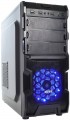 | 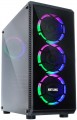 |
|---|---|---|
| Artline Gaming X44 X44v16 | Artline Gaming X65 X65v12 | |
| Outdated Product | Outdated Product | |
| TOP sellers | ||
| Product type | gaming | gaming |
| Form factor | Midi Tower | Midi Tower |
CPU | ||
| Chipset | AMD B450 | AMD A320 |
| Type | desktop | desktop |
| Series | Ryzen 5 | Ryzen 5 |
| Model | 1600 | 2600 |
| Code name | Summit Ridge (Zen) | Pinnacle Ridge (Zen+) |
| Cores | 6 | 6 |
| Threads | 12 | 12 |
| Speed | 3.2 GHz | 3.4 GHz |
| TurboBoost / TurboCore | 3.6 GHz | 3.9 GHz |
| Passmark CPU Mark test | 12476 points | |
| Geekbench 4 test | 24095 points | |
| Cinebench R15 test | 1129 points | |
Memory | ||
| RAM | 16 GB | 16 GB |
| Memory type | DDR4 | DDR4 |
| Speed | 2666 MHz | 2666 MHz |
| Number of slots | 2 | |
Graphics card | ||
| Graphics card type | dedicated | dedicated |
| Graphics card model | GTX 1050 Ti | GTX 1050 Ti |
| Graphics memory | 4 GB | 4 GB |
| Memory type | GDDR5 | GDDR5 |
| 3DMark test | 2349 points | 2349 points |
| Passmark G3D Mark test | 6405 points | 6405 points |
Storage | ||
| Drive type | HDD+SSD | HDD |
| Drive capacity | 1 TB | 1 TB |
| 2nd drive capacity | 240 GB | |
| NVMe |  |  |
| M.2 connector | | |
| Internal 3.5" compartments | 2 | |
| Internal 2.5" compartments | 2 | |
Back panel | ||
| Connectors | VGA DVI HDMI output DisplayPort | |
| PS/2 | 2 | |
| USB-A 2.0 | 2 pcs | |
| USB-A 5Gbps | 4 pcs | |
Front Panel | ||
| Optical drive | in absent | in absent |
| 5.25" compartments | 3 | |
| mini-Jack (3.5 mm) | | |
| USB-A 2.0 | 2 pcs | 2 pcs |
| USB-A 5Gbps | 1 pcs | 1 pcs |
Multimedia | ||
| LAN (RJ-45) | 1 Gbps | 1 Gbps |
| Wi-Fi | in absent | in absent |
| Sound | 7.1 | 7.1 |
General | ||
| Lighting type | backlit fan | backlit fan |
| Lighting colour | RGB | |
| PSU power | 500 W | 500 W |
| Preinstalled OS | without OS | without OS |
| Material | steel | steel |
| Dimensions (HxWxD) | 405x180x410 mm | 420x192x450 mm |
| Color | ||
| Added to E-Catalog | january 2020 | july 2019 |


Compare Artline Gaming X44 and Gaming X65
You may be interested in
My comparisons
Artline Gaming X65 often compared


Glossary
Chipset
The model of the chipset used in the standard configuration of the PC.
A chipset can be described as a set of chips that provides the combined operation of the central processor, RAM, I / O devices, etc. It is this chipset that underlies any motherboard. Knowing the chipset model, you can find and evaluate its detailed characteristics; most users do not need such information, but for specialists it can be very useful.
A chipset can be described as a set of chips that provides the combined operation of the central processor, RAM, I / O devices, etc. It is this chipset that underlies any motherboard. Knowing the chipset model, you can find and evaluate its detailed characteristics; most users do not need such information, but for specialists it can be very useful.
Model
The specific model of the processor installed in the PC, or rather, its index within its series (see "Processor"). The full model name consists of the series name and this index — for example, Intel Core i3 3220; knowing this name, you can find detailed information about the processor (characteristics, reviews, etc.) and determine how suitable it is for your purposes.
Code name
The code name for CPU that the PC is equipped with.
This parameter characterizes, first of all, the generation to which the processor belongs, and the microarchitecture used in it. At the same time, chips with different code names can belong to the same microarchitecture/generation; in such cases, they differ in other parameters — general positioning, belonging to certain series (see above), the presence / absence of certain specific functions, etc.
Nowadays, chips with the following code names are relevant among Intel processors: Coffee Lake (8th generation), Coffee Lake (9th generation), Comet Lake (10th generation) and Rocket Lake (11th generation), Alder Lake (12th generation), Raptor Lake (13th generation), Raptor Lake-S (14th generation), Arrow Lake (Series 2). For AMD, the list looks like this: Zen+ Picasso (3rd gen), Zen2 Matisse (3rd gen), Zen2 Renoir (4th gen), Zen 3 Cezanne (5th gen), Zen 3 Vermeer (5th gen), Zen 4 Raphael (6th gen), Zen 5 Granite Ridge (9th gen)....
This parameter characterizes, first of all, the generation to which the processor belongs, and the microarchitecture used in it. At the same time, chips with different code names can belong to the same microarchitecture/generation; in such cases, they differ in other parameters — general positioning, belonging to certain series (see above), the presence / absence of certain specific functions, etc.
Nowadays, chips with the following code names are relevant among Intel processors: Coffee Lake (8th generation), Coffee Lake (9th generation), Comet Lake (10th generation) and Rocket Lake (11th generation), Alder Lake (12th generation), Raptor Lake (13th generation), Raptor Lake-S (14th generation), Arrow Lake (Series 2). For AMD, the list looks like this: Zen+ Picasso (3rd gen), Zen2 Matisse (3rd gen), Zen2 Renoir (4th gen), Zen 3 Cezanne (5th gen), Zen 3 Vermeer (5th gen), Zen 4 Raphael (6th gen), Zen 5 Granite Ridge (9th gen)....
Speed
Clock speed of the CPU installed in the PC.
In theory, higher clock speeds have a positive effect on performance because they allow the CPU to perform more operations per unit of time. However, this indicator is rather weakly related to real productivity. The fact is that the actual capabilities of the CPU strongly depend on a number of other factors - the overall architecture, cache size, number of cores, support for special instructions, etc. As a result, you can compare by this indicator only chips from the same or similar series (see “CPU”), and ideally, also from the same generation. And that's pretty approximate.
In theory, higher clock speeds have a positive effect on performance because they allow the CPU to perform more operations per unit of time. However, this indicator is rather weakly related to real productivity. The fact is that the actual capabilities of the CPU strongly depend on a number of other factors - the overall architecture, cache size, number of cores, support for special instructions, etc. As a result, you can compare by this indicator only chips from the same or similar series (see “CPU”), and ideally, also from the same generation. And that's pretty approximate.
TurboBoost / TurboCore
Processor clock speed when running in TurboBoost or TurboCore mode.
Turbo Boost technology is used in Intel processors, Turbo Core — AMD. The essence of this technology is the same both there and there: if some of the cores work under high load, and some are idle, then some tasks are transferred from more loaded cores to less loaded ones, which improves performance. This usually increases the clock frequency of the processor; this value is indicated in this paragraph. See above for more information on clock speed in general.
Turbo Boost technology is used in Intel processors, Turbo Core — AMD. The essence of this technology is the same both there and there: if some of the cores work under high load, and some are idle, then some tasks are transferred from more loaded cores to less loaded ones, which improves performance. This usually increases the clock frequency of the processor; this value is indicated in this paragraph. See above for more information on clock speed in general.
Passmark CPU Mark test
The result shown by the PC processor in the test (benchmark) Passmark CPU Mark.
Passmark CPU Mark is a comprehensive test that allows you to evaluate CPU performance in various modes and with a different number of processed threads. The results are displayed in points; the more points, the higher the overall performance of the processor. For comparison: as of 2020, in low-cost solutions, the results are measured in hundreds of points, in mid-range models they range from 800 – 900 to more than 6,000 points, and individual top-end chips are capable of showing 40,000 points or more.
Passmark CPU Mark is a comprehensive test that allows you to evaluate CPU performance in various modes and with a different number of processed threads. The results are displayed in points; the more points, the higher the overall performance of the processor. For comparison: as of 2020, in low-cost solutions, the results are measured in hundreds of points, in mid-range models they range from 800 – 900 to more than 6,000 points, and individual top-end chips are capable of showing 40,000 points or more.
Geekbench 4 test
The result shown by the PC processor in the test (benchmark) Geekbench 4.
Geekbench 4 is a comprehensive cross-platform test that allows, among other things, to determine the efficiency of the processor in various modes. At the same time, according to the developers, the verification modes are as close as possible to various real tasks that the processor has to solve. The result is indicated in points: the more points — the more powerful the CPU, while the difference in numbers corresponds to the actual difference in performance ("twice the result — twice the power").
Note that the benchmark in Geekbench 4 is the Intel Core i7-6600U processor with a clock frequency of 2.6 GHz. Its power is estimated at 4000 points, and the performance of other tested CPUs is already compared with it.
Geekbench 4 is a comprehensive cross-platform test that allows, among other things, to determine the efficiency of the processor in various modes. At the same time, according to the developers, the verification modes are as close as possible to various real tasks that the processor has to solve. The result is indicated in points: the more points — the more powerful the CPU, while the difference in numbers corresponds to the actual difference in performance ("twice the result — twice the power").
Note that the benchmark in Geekbench 4 is the Intel Core i7-6600U processor with a clock frequency of 2.6 GHz. Its power is estimated at 4000 points, and the performance of other tested CPUs is already compared with it.
Cinebench R15 test
The result shown by the PC processor in the test (benchmark) Cinebench R15.
Cinebench is a test designed to test the capabilities of the processor and graphics card. The creator of this benchmark, Maxon, is also known as the developer of the Cinema 4D 3D editor; this determined the features of testing. So, in addition to purely mathematical tasks, when using Cinebench R15, the processor is loaded with processing high-quality three-dimensional graphics. Another interesting feature is the extensive support for multithreading — the test allows you to fully check the power of chips that process up to 256 threads at a time.
Traditionally, for CPU benchmarks, the test results are indicated in points (more precisely, points — PTS). The more points scored by the CPU, the higher its performance.
Cinebench is a test designed to test the capabilities of the processor and graphics card. The creator of this benchmark, Maxon, is also known as the developer of the Cinema 4D 3D editor; this determined the features of testing. So, in addition to purely mathematical tasks, when using Cinebench R15, the processor is loaded with processing high-quality three-dimensional graphics. Another interesting feature is the extensive support for multithreading — the test allows you to fully check the power of chips that process up to 256 threads at a time.
Traditionally, for CPU benchmarks, the test results are indicated in points (more precisely, points — PTS). The more points scored by the CPU, the higher its performance.
Number of slots
The number of slots for RAM modules provided on the PC motherboard. In this case, we are talking about slots for removable strips; for a PC with built-in memory, this parameter is irrelevant.
The slots available on the "motherboard" can be occupied all, partially or not occupied at all (in models without RAM). Anyway, you should pay attention to their number if the initially installed amount of RAM does not suit you (or ceases to suit you over time), and you plan to upgrade the system. The smallest amount found in a PC with removable memory is 1 slot ; if it is busy, you will only have to change the bar when upgrading. More connectors for RAM are always paired, this is due to a number of technical nuances; most often this number is 2 or 4, but it can be large — up to 16 in powerful workstations.
Note that when planning an upgrade, you need to take into account not only the number of slots and type of memory (see above), but also the characteristics of the motherboard. All modern "motherboards" have restrictions on the maximum amount of RAM; as a result, for example, the presence of two DDR4 slots does not mean that two strips of maximum capacity can be installed in the system at once, 128 GB each.
The slots available on the "motherboard" can be occupied all, partially or not occupied at all (in models without RAM). Anyway, you should pay attention to their number if the initially installed amount of RAM does not suit you (or ceases to suit you over time), and you plan to upgrade the system. The smallest amount found in a PC with removable memory is 1 slot ; if it is busy, you will only have to change the bar when upgrading. More connectors for RAM are always paired, this is due to a number of technical nuances; most often this number is 2 or 4, but it can be large — up to 16 in powerful workstations.
Note that when planning an upgrade, you need to take into account not only the number of slots and type of memory (see above), but also the characteristics of the motherboard. All modern "motherboards" have restrictions on the maximum amount of RAM; as a result, for example, the presence of two DDR4 slots does not mean that two strips of maximum capacity can be installed in the system at once, 128 GB each.