
Comparison Google TV Streamer vs Xiaomi Mi Box S
Add to comparison | 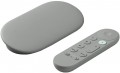 | 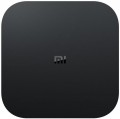 |
|---|---|---|
| Google TV Streamer | Xiaomi Mi Box S | |
| Compare prices 5 | from $69.99 | |
| User reviews | ||
| TOP sellers | ||
Gemini support, 4K video streaming. Serves as a hub for a smart home and can control other company devices.
Personalized content recommendations using AI. | Powerful Cortex-A53 processor. OS Android TV 8.1. 4K video playback at up to 60 frames per second. Minimalistic remote control. Support for Miracast technology. Support for HDR10 technology. No LAN connector. Xiaomi Mi Box S is the international version. | |
| Type | Media Player | Media Player |
| Operating system | Google TV (Android TV) | Android TV 8 |
Connectivity and interfaces | ||
| Bluetooth | v5.1 | v4.1 |
| Wi-Fi | Wi-Fi 5 (802.11ac) | Wi-Fi 5 (802.11ac) |
| Google Cast (Chromecast) |  |  |
| Miracast | | |
| IPTV support | | |
Connectors | ||
| HDMI | v 2.1 | v 2.0 |
| USB-A 2.0 | 1 pcs | |
| USB-C | 1 | |
| LAN | 1 Gbps | |
| AV output | | |
Hardware | ||
| CPU | Amlogic S905X | |
| CPU cores | 4 | |
| CPU frequency | 2 GHz | |
| RAM | 4 GB | 2 GB |
| Built-in memory | 32 GB | 8 GB |
| Ultra HD 4K support | | |
| HDR support | HDR10+, Dolby Vision | HDR10 |
General | ||
| Video decoders | H.263, H.264, H.265 | |
| Audio decoders | Dolby Digital, Dolby Digital Plus, Dolby Atmos | Dolby Digital Plus |
| Remote control | with voice control | + |
| Dimensions (WxHxD) | 163x76x25 mm | 95x16x95 mm |
| Weight | 162 g | 150 g |
| Added to E-Catalog | august 2024 | november 2018 |





Compare Google TV Streamer and Xiaomi Mi Box S
Price comparison
You may be interested in
My comparisons
Google TV Streamer often compared


Xiaomi Mi Box S often compared


Glossary
Operating system
— Proprietary system. The operating system of the device is represented by the proprietary software shell of the manufacturer. Usually, such operating systems have an attractive and convenient menu. A proprietary operating system is developed directly by the manufacturer for the hardware resources of a particular model or a whole line, but has limited capabilities.
— Android (AOSP). This type of operating system is a modification of the popular Android OS, mainly notable for being open source. It is a versatile operating system that gives the user much more freedom to create changes and customizations within the system itself. At the same time, the installation and stability of certain applications on this platform are not guaranteed, and the overall system management was not specially “tailored” for large screens, which may cause some inconvenience. First of all, such solutions will interest users who understand the features of the Android OS, like to customize and control everything for themselves, and have time for this.
— Android TV. Devices of this type have full-fledged Android TV software, specially adapted to work on large screens. In accordance with the name, it is a type of Android OS, specially designed for such equipment. In addition to the common features of all Androids (such as the ability to install additional applications, including...even games), it has a number of special features: an optimized interface, integration with smartphones (including the ability to use them as a remote control), voice search, etc. Thanks to this, TVs with this feature are significantly superior in functionality to models with a “regular” Smart TV. Of course, a dedicated processor, graphics subsystem and memory are provided for the operation of a multifunctional OS, and the presence of such hardware resources is reflected in the overall cost.
— Google TV. Rebranding of the Android TV platform for TVs and smart consoles, or rather, a new shell on top of the operating system under the sign of the “green droid”, introduced since 2021. Among the innovations, it has a redesigned user interface, an improved knowledge base that more efficiently distributes content by genre and collects search information from the entire list of installed applications and subscriptions. The voice assistant now understands the needs of the audience better and provides a detailed list of what was found. A separate tab in the interface contains live broadcasts of current events, whether it be sports events or a rocket launch to Mars. Among other things, the aspects that involve the use of TV as a command post for managing a single ecosystem of a “smart” home have been improved in the system.
Bluetooth
Bluetooth is a technology used to connect various devices wirelessly directly. In media centers and TV receivers, it can be used to broadcast sound to wireless headphones and acoustics, to work with wireless mice and keyboards, to use a smartphone / tablet as a remote control, etc.; specific functionality should be specified separately. Also note that the supported version of Bluetooth can be specified here. The newest and most advanced is Bluetooth 5.0, but here is a more detailed description of the different versions:
- Bluetooth v4.0. The version in which the "Bluetooth Low Energy" (LE) format was first introduced — in addition to regular Bluetooth (version 2.1 functionality) and the high-speed HE standard for transferring large amounts of information (introduced in version 3.0). Bluetooth LE allows you to significantly reduce power consumption when transmitting small data packets, such as request-responses about connection activity in idle mode. For the media centers and TV receivers themselves, this is not particularly important, but for portable equipment (especially miniature ones, where battery capacity is very limited), such functionality will be useful.
- Bluetooth v 4.1. Development and improvement of Bluetooth 4.0. One of the key improvements was the optimization of collaboration with 4G LTE communication modules so that Bluetooth and LTE do not interfere with each other. In addition, this...version has the ability to simultaneously use a Bluetooth device in several roles — for example, to remotely control an external device while simultaneously streaming music to headphones.
- Bluetooth v4.2. Further, after 4.1, the development of the Bluetooth standard. It did not introduce fundamental updates, but received a number of improvements regarding reliability and noise immunity, as well as improved compatibility with the Internet of Things.
- Bluetooth v5.0. Version introduced in 2016. One of the most notable updates was the introduction of two new modes of operation for Bluetooth LE — with an increase in speed by reducing the range and with an increase in range by reducing the speed. In addition, a number of improvements have been introduced regarding simultaneous work with numerous connected devices, as well as work with the components of the Internet of Things.
Google Cast (Chromecast)
The built-in feature allows you to send videos, music, photos, and browser tabs to the TV through a media player via Wi-Fi, without cables and flash drives. An important aspect is that in many applications, the phone acts as a remote control: you select a video or movie, "cast" it to the media player, and then the playback continues on the TV while you pause, rewind, and switch content from the smartphone. Compared to simple screen mirroring, Google Cast (Chromecast) is usually more stable and convenient for streaming since the phone can be used for other purposes in the meantime. Unlike Miracast, it often works better with Google services and the Chrome browser, but it requires a proper Wi-Fi connection and one network for the devices. Typical use cases: quickly play YouTube for kids on the TV, "transfer" a movie from an online cinema to the big screen, show guests an album from Google Photos, display a Chrome tab with a website or instruction, as well as launch a presentation from Google Drive/Slides at a meeting without a laptop and HDMI.
Miracast
A wireless technology that allows you to directly broadcast video and audio from one device to another directly over a Wi-Fi connection. At the same time, unlike AirPlay, transmission does not require a router and building a local network — it is enough that the receiver and transmitter are compatible with Miracast. One of the most popular ways to use this technology is to output a “picture” from a smartphone / tablet screen to a TV, and vice versa. A media centre or TV receiver with Miracast is useful if the TV itself does not support this function.
HDMI
HDMI is the most common modern interface for working with HD content and multi-channel audio. Video and audio signals with this connection are transmitted over a single cable, and the bandwidth in the latest versions ( HDMI 2.0 and HDMI 2.1) is enough to work with UltraHD resolution and even higher. Almost any modern screen (TV, monitor, etc.) with HD support has at least one HDMI input, which is why most media players and TV receivers have outputs of this type. However, there are also models without HDMI — these are mostly outdated or the most inexpensive solutions that use only analogue video interfaces. There are also models for several HDMI and in most cases one of these ports is for the incoming signal, while the HDMI ports differ in versions.
— v 1.4. The version presented back in 2009, however, does not lose popularity to this day. Supports 4K (4096x2160) video at 24 fps and Full HD at 120 fps; the latter, among other things, allows you to transfer 3D video over this interface. In addition to the original v 1.4, there are also improved versions v 1.4a and v 1.4b, where the possibilities for working with 3D have been further expanded.
-v 2.0. Version released in 2013. Among other things, it introduced the ability to work with 4K video at speeds up to 60 fps, compatibility with ultra-wide format 21: 9, as well as support for up to 32 channels and 4...audio streams simultaneously. HDR support was not originally included in this release, but was introduced in v 2.0a and further enhanced in v 2.0b; media players from this category can support both the original version 2.0 and one of the improved ones.
— v 2.1. 2017 version, also known as HDMI Ultra High Speed. Indeed, it provides a very solid bandwidth, allowing you to work even with 10K video at a speed of 120 fps; in addition, a number of improvements have been made to HDR support. Note that the full use of HDMI v 2.1 is possible only with a special cable, but the functions of earlier versions remain available when using conventional wires.
— v 1.4. The version presented back in 2009, however, does not lose popularity to this day. Supports 4K (4096x2160) video at 24 fps and Full HD at 120 fps; the latter, among other things, allows you to transfer 3D video over this interface. In addition to the original v 1.4, there are also improved versions v 1.4a and v 1.4b, where the possibilities for working with 3D have been further expanded.
-v 2.0. Version released in 2013. Among other things, it introduced the ability to work with 4K video at speeds up to 60 fps, compatibility with ultra-wide format 21: 9, as well as support for up to 32 channels and 4...audio streams simultaneously. HDR support was not originally included in this release, but was introduced in v 2.0a and further enhanced in v 2.0b; media players from this category can support both the original version 2.0 and one of the improved ones.
— v 2.1. 2017 version, also known as HDMI Ultra High Speed. Indeed, it provides a very solid bandwidth, allowing you to work even with 10K video at a speed of 120 fps; in addition, a number of improvements have been made to HDR support. Note that the full use of HDMI v 2.1 is possible only with a special cable, but the functions of earlier versions remain available when using conventional wires.
USB-A 2.0
A classic USB port for connecting flash drives, receivers, keyboards, and other compatible peripherals, designed for data transfer up to 480 Mbps. This type of port is convenient for basic tasks where high speed isn't necessary, but it significantly falls behind more modern USB versions for very large files and fast external drives. The major advantage here is compatibility: USB-A 2.0 has long remained the most familiar format for mass accessories.
USB-C
The number of USB-C connectors in the design of the device.
This interface differs from the full-sized USB host ports (see above) primarily in the design of the connector: it is much smaller and made double-sided (the plug can be inserted in either direction). There are also a number of notable differences regarding application specifics. The most common option is the same as for conventional USB — connecting external peripherals, primarily drives like flash drives and external HDDs. But for charging gadgets, such connectors are used extremely rarely. In some models, USB-C plays the role of a service input for managing settings from a computer (that is, it actually works in the USB slave format — see "Inputs"). Also, this connector may provide an Alternate Mode mode, when other interfaces are implemented through the USB-C hardware port — for example, DisplayPort or HDMI for video broadcasting, or Thunderbolt for connecting some accessories. In media players, this mode is practically not used yet, but in the future the situation may change.
Summing up, we can say that the features of using USB-C in each model should be clarified separately. As for the number, such connectors are rarely provided for more than one — this is quite enough in most cases.
This interface differs from the full-sized USB host ports (see above) primarily in the design of the connector: it is much smaller and made double-sided (the plug can be inserted in either direction). There are also a number of notable differences regarding application specifics. The most common option is the same as for conventional USB — connecting external peripherals, primarily drives like flash drives and external HDDs. But for charging gadgets, such connectors are used extremely rarely. In some models, USB-C plays the role of a service input for managing settings from a computer (that is, it actually works in the USB slave format — see "Inputs"). Also, this connector may provide an Alternate Mode mode, when other interfaces are implemented through the USB-C hardware port — for example, DisplayPort or HDMI for video broadcasting, or Thunderbolt for connecting some accessories. In media players, this mode is practically not used yet, but in the future the situation may change.
Summing up, we can say that the features of using USB-C in each model should be clarified separately. As for the number, such connectors are rarely provided for more than one — this is quite enough in most cases.
LAN
LAN — connector for wired connection to the Internet and/or local area network using an Ethernet cable. A wired connection is not as convenient as Wi-Fi (see "Multimedia"), but it is considered more reliable and provides faster data transfer speeds. And the speed indicators depend on the device and can be 100 Mbps and 1 Gbps.
AV output
— AV output. Analogue output for video and audio transferring. Previously, due to the large size of the equipment, it consisted of 3 RCA jacks and was connected to the TV accordingly. Now the devices have become more compact and don't have free space on the case. Therefore, the AV output is a single headphone jack, to which a tee cable is already connected (check availability in the package). Since all components of the video signal are on the same cable, the picture quality and immunity to interference are low.