
Comparison PXN V900 vs Genesis Seaborg 400
Add to comparison | 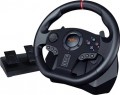 | 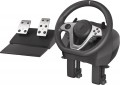 |
|---|---|---|
| PXN V900 | Genesis Seaborg 400 | |
from $79.99 | Outdated Product | |
| TOP sellers | ||
| Device type (configuration) | steering wheel and pedals | steering wheel and pedals |
| Steering wheel size | 28 cm | |
| Compatibility | PC (Windows) Switch Xbox PlayStation 3 PlayStation 4 | PC (Windows) Switch Xbox PlayStation 3 PlayStation 4 |
| Connection | wired | wired |
| Cable | USB-A | USB-A 2 m |
Technical specifications | ||
| Total number of buttons | 14 | 15 |
| Feedback | vibration | vibration |
| D-pad controller |  | |
| Sticks | 1 pcs | |
| Steering wheel turn | 270° – 900° | 270° – 900° |
| Paddle shifters | 2 pcs | 2 pcs |
| Pedals | accelerator brake | accelerator brake |
General information | ||
| Mounting | clamps | clamps, suction cups |
| Steering wheel cover | rubber | rubber |
| Power source | USB port | USB port |
| Weight | 2290 g | |
| Color | ||
| Added to E-Catalog | march 2023 | july 2022 |


Compare PXN V900 and Genesis Seaborg 400
You may be interested in
My comparisons
PXN V900 often compared


Genesis Seaborg 400 often compared


Glossary
Steering wheel size
The size of a gaming steering wheel usually refers to the diameter of the wheel in round and D-shaped forms and affects the realism of control, rotation speed, and grip comfort. Compact wheels, around 20 – 24 cm, are more common in simple models and are suitable for arcade racing but feel less realistic. A size of 27 – 30 cm is considered more versatile and closer to an actual car steering wheel, making it convenient for simulators, GT, rally, and everyday play. Larger wheels, 31 – 35 cm, are more often used in advanced setups, especially for trucking simulators, drifts, or the most realistic seating.
For formula wheels or steering wheels with a cut-off shape, the size is more often indicated by the maximum width between the outermost grip points.
For formula wheels or steering wheels with a cut-off shape, the size is more often indicated by the maximum width between the outermost grip points.
Cable
The cable can have a different interface indicating which connector the device connects to a PC, console, or another set component. Most commonly, USB-A is used, a standard connector for connecting to a computer or console, convenient because it doesn't require rare cables and is usually recognized by the system immediately. A proprietary interface is a manufacturer's branded connector often used for connecting pedals, shifters, handbrakes, or steering wheels to a compatible base. This option can be convenient within a single ecosystem but limits compatibility with devices from other brands.
At the same time, the cable can be detachable, simplifying storage, transport, and replacement of the cable.
At the same time, the cable can be detachable, simplifying storage, transport, and replacement of the cable.
Total number of buttons
The total number of buttons provided in the manipulator's design.
The more buttons, the more additional functions can be "assigned" to the manipulator, reducing the likelihood of having to use other control devices (e.g., a PC keyboard) during gameplay. However, many gaming consoles (see "Platform Compatibility") require a certain minimum number of buttons for a compatible gamepad — having fewer buttons would simply not allow full use of all the console functions. For instance, the standard controller for the PlayStation 4 has 11 buttons.
Note that the D-Pad manipulator (see below) is not counted in this calculation: it is considered a specific control device, although it is based on buttons.
The more buttons, the more additional functions can be "assigned" to the manipulator, reducing the likelihood of having to use other control devices (e.g., a PC keyboard) during gameplay. However, many gaming consoles (see "Platform Compatibility") require a certain minimum number of buttons for a compatible gamepad — having fewer buttons would simply not allow full use of all the console functions. For instance, the standard controller for the PlayStation 4 has 11 buttons.
Note that the D-Pad manipulator (see below) is not counted in this calculation: it is considered a specific control device, although it is based on buttons.
Sticks
Small analog mini-sticks on the device allow you to control the menu, camera, view, car settings, or other functions directly from the steering wheel. Unlike a D-pad, the stick supports smooth tilting in different directions, making it more convenient where more precise movement is needed than a simple "up/down" command. For example, the stick can be used for interface navigation, interior inspection, camera control, or quick settings in a simulator without resorting to the keyboard.
Mounting
Mounting demonstrates how a racing wheel is secured on a work surface to prevent movement during turns, vibrations, or force feedback.
— Clamps. Clamps (screw clamp mounting) secure the racing wheel to the table by mechanically pressing it to the tabletop. This option is more reliable than suction cups and better suited for wheels with vibration or force feedback, as the base shifts less during sudden turns. When choosing, it is important to consider the thickness of the table and the shape of the edge so the clamp can properly grab on and securely fix the wheel.
— Suction cups. Suction cups hold the wheel by sticking to a smooth table surface. This option is simpler and quicker to install, but usually less reliable, especially on rough, dusty, or uneven surfaces. Suction cups are more suitable for lightweight wheels without powerful feedback and for temporary setups, when you don't want to screw in clamps each time.
— Bolts. A rigid method for installing pedals, gear shifters, handbrakes, where the device is bolted to a cockpit, stand, or special platform through mounting holes. Such mounting is more reliable than clamps and suction cups because the device does not shift even during active driving.
— Clamps. Clamps (screw clamp mounting) secure the racing wheel to the table by mechanically pressing it to the tabletop. This option is more reliable than suction cups and better suited for wheels with vibration or force feedback, as the base shifts less during sudden turns. When choosing, it is important to consider the thickness of the table and the shape of the edge so the clamp can properly grab on and securely fix the wheel.
— Suction cups. Suction cups hold the wheel by sticking to a smooth table surface. This option is simpler and quicker to install, but usually less reliable, especially on rough, dusty, or uneven surfaces. Suction cups are more suitable for lightweight wheels without powerful feedback and for temporary setups, when you don't want to screw in clamps each time.
— Bolts. A rigid method for installing pedals, gear shifters, handbrakes, where the device is bolted to a cockpit, stand, or special platform through mounting holes. Such mounting is more reliable than clamps and suction cups because the device does not shift even during active driving.