
Comparison Huion HS611 vs XP-PEN Deco 01V2
Add to comparison | 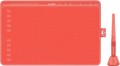 | 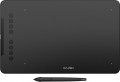 |
|---|---|---|
| Huion HS611 | XP-PEN Deco 01V2 | |
from $79.99 | Compare prices 1 | |
| User reviews | ||
| TOP sellers | ||
| Product type | graphics Tablet | graphics Tablet |
| Format | A5 | A5 |
| Workspace | 258x161 mm | 254x159 mm |
| Aspect ratio | 16:10 | 16:10 |
| Control keys | 10 | 8 |
| Touch strip |  |  |
Connection | ||
| Connection type | wired | wired |
| Connector on device | USB C | USB C |
| Compatibility | Windows MacOS Android | Windows MacOS ChromeOS Linux Android |
Pen | ||
| Pen model | PW500 | P05 |
| Pen power source | no battery (passive) | no battery (passive) |
| Max. reading height | 10 mm | 10 mm |
| Pressure levels | 8192 | 8192 |
| Pen angle | 60 ° | |
| Resolution | 5080 lpi | 5080 lpi |
| Response | 266 PPS | 200 PPS |
| Control keys | 2 | 1 |
General | ||
| In box | replacement pen nibs pen holder | replacement pen nibs pen holder |
| Power source | USB port | USB port |
| Size | 333x218x7.3 mm | 360x210x8 mm |
| Tablet weight | 0.55 kg | |
| Added to E-Catalog | october 2020 | january 2020 |



Compare Huion HS611 and XP-PEN Deco 01V2
Graphics tablets Huion HS611 and XP-PEN Deco 01V2 have similar characteristics, but there are also key differences. Both tablets are format A5 with a working area of approximately 254-258x159-161 mm and support 8192 pressure levels. However, the Huion HS611 offers 10 control keys compared to 8 keys on the Deco 01V2, which may be more convenient for users who need more hotkeys. The pen response on the Huion is 266 PPS, which is higher than the 200 PPS of the XP-PEN, potentially providing a faster response when drawing. In terms of compatibility, the Deco 01V2 supports ChromeOS and Linux, which can be a plus for users of these systems. Both devices have wired connectivity via USB-C and come with replaceable pen nibs.
Price comparison
You may be interested in
My comparisons
Huion HS611 often compared


XP-PEN Deco 01V2 often compared


Glossary
Workspace
The exact size of the active area of a tablet (or screen in a graphic display) in width and height. In general, it is more of a reference than a practically significant parameter: when choosing a traditional graphics tablet, there is often enough information about the format (see above), and for displays, primarily the diagonal (see above) and aspect ratio (see below) are of practical importance . However, the exact dimensions can also be useful in fact: for example, you can determine the aspect ratio from them (for classic tablets, this parameter is often not indicated).
Control keys
The number of control keys provided in the design of the tablet.
Each of these keys is responsible for a specific function, while the set of these functions can be configured: in some models they can be selected manually, in others the functionality of the keys changes automatically, depending on the currently active application. Anyway, additional keys allow the user to perform various actions without looking up from the tablet — this can be very convenient in the midst of the work process, when you don’t want to change the pen to the mouse again or reach for the keyboard. And the more control keys — so, respectively, more additional actions can be performed using the tablet. On the other hand, with relatively simple tasks, the abundance of additional buttons can hinder and confuse the user rather than help.
The most modest modern tablets provide up to 5 control keys ; the most popular option is from 6 to 10 keys, and in advanced models this number can reach 15 or even more.
Each of these keys is responsible for a specific function, while the set of these functions can be configured: in some models they can be selected manually, in others the functionality of the keys changes automatically, depending on the currently active application. Anyway, additional keys allow the user to perform various actions without looking up from the tablet — this can be very convenient in the midst of the work process, when you don’t want to change the pen to the mouse again or reach for the keyboard. And the more control keys — so, respectively, more additional actions can be performed using the tablet. On the other hand, with relatively simple tasks, the abundance of additional buttons can hinder and confuse the user rather than help.
The most modest modern tablets provide up to 5 control keys ; the most popular option is from 6 to 10 keys, and in advanced models this number can reach 15 or even more.
Touch strip
A touch-sensitive surface, usually located along one of the edges of the front panel of the tablet case. The touch strip provides additional controls such as scrolling, zooming, canvas rotation, and other gestures that can be customized to perform different tasks. Thus, the strip can often be reprogrammed for certain actions, be it quickly switching between tools in a graphic editor or changing brush parameters.
Compatibility
Full-fledged and mobile operating systems with which the device can interact normally. Specific compatibility options may be:
-Windows. The vast majority of graphics tablets are designed to work together with desktop computers and laptops running Windows. At the same time, it is important to clarify the supported OS versions - in modern realities, these are Windows 10 and Windows 11.
— MacOS. The ability of the device to work with Apple computer equipment that uses the proprietary desktop operating system macOS. First of all, these are iMac desktops and MacBook laptops. This technique has software and hardware features that significantly distinguish it from other types of PCs and laptops, so such compatibility for graphics tablets is specified separately.
- ChromeOS. ChromeOS is a software product from Google originally created for laptops. The key feature of Chromebooks is their close integration with web services, and in general they are positioned as the most inexpensive and accessible laptops.
- Linux. Initially, the Linux platform was designed mainly for professional programmers and IT enthusiasts. For the average user, such a system can be quite difficult to learn and use. However, a number of graphics tablet models are compatible with this OS.
- Android. Compatibility of the device with...portable gadgets running Android OS (primarily smartphones and tablets). This involves using mobile versions of applications to create and process graphics.
- iOS. The ability to work with mobile applications for creating and processing graphics, implemented when using Apple smartphones running the iOS operating system.
-Windows. The vast majority of graphics tablets are designed to work together with desktop computers and laptops running Windows. At the same time, it is important to clarify the supported OS versions - in modern realities, these are Windows 10 and Windows 11.
— MacOS. The ability of the device to work with Apple computer equipment that uses the proprietary desktop operating system macOS. First of all, these are iMac desktops and MacBook laptops. This technique has software and hardware features that significantly distinguish it from other types of PCs and laptops, so such compatibility for graphics tablets is specified separately.
- ChromeOS. ChromeOS is a software product from Google originally created for laptops. The key feature of Chromebooks is their close integration with web services, and in general they are positioned as the most inexpensive and accessible laptops.
- Linux. Initially, the Linux platform was designed mainly for professional programmers and IT enthusiasts. For the average user, such a system can be quite difficult to learn and use. However, a number of graphics tablet models are compatible with this OS.
- Android. Compatibility of the device with...portable gadgets running Android OS (primarily smartphones and tablets). This involves using mobile versions of applications to create and process graphics.
- iOS. The ability to work with mobile applications for creating and processing graphics, implemented when using Apple smartphones running the iOS operating system.
Pen model
The model of the pen that comes with the device. Allows you to understand which one is used and learn more fully its full characteristics. In this case, in the case of a replacement, you will already be aware of which accessory is needed for the purchase. However, nothing prevents you from replacing the existing one with a more advanced one, of course, if the graphics tablet itself allows you to work with a different pen model.
Pen angle
The maximum angle of the pen (relative to vertical) at which the tablet continues to perceive it as a working tool and respond to its movements. The larger this angle, the greater the allowable deviation of the pen from the perpendicular position and the higher the degree of freedom when working with the tablet.
Response
A characteristic of a graphics tablet that determines how many times per second the tablet records the artist’s actions. The response rate is expressed in PPS (Points Per Second).
The higher the PPS value, the more responsive the surface is. If responsiveness is low, there is a possibility of getting jagged lines when working with the pen, and the stylus cursor may lag behind the movement of your hand. Devices with a response of 266 PPS or more perform best, the “golden mean” is the range of values 230 – 233 PPS and 250 – 260 PPS, and in entry-level models the response can be 220 PPS or less.
The higher the PPS value, the more responsive the surface is. If responsiveness is low, there is a possibility of getting jagged lines when working with the pen, and the stylus cursor may lag behind the movement of your hand. Devices with a response of 266 PPS or more perform best, the “golden mean” is the range of values 230 – 233 PPS and 250 – 260 PPS, and in entry-level models the response can be 220 PPS or less.
Control keys
The number of control keys provided on the pen. These keys can be used for various purposes — for example, changing the type or size of the brush for painting, switching colours, turning on the eraser mode, etc. The more keys — the more options the artist can switch on the fly without getting into the settings of the graphic editor, and the more advanced, usually, this pen is.