
Comparison XP-PEN Deco 01V2 vs Wacom One Medium
Add to comparison | 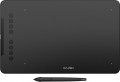 | 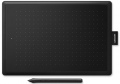 |
|---|---|---|
| XP-PEN Deco 01V2 | Wacom One Medium | |
| Compare prices 1 | Compare prices 2 | |
| User reviews | ||
| TOP sellers | ||
| Product type | graphics Tablet | graphics Tablet |
| Format | A5 | A5 |
| Workspace | 254x159 mm | 216x135 mm |
| Aspect ratio | 16:10 | 16:10 |
| Control keys | 8 | |
Connection | ||
| Connection type | wired | wired |
| Connector on device | USB C | microUSB |
| Compatibility | Windows MacOS ChromeOS Linux Android | Windows MacOS |
Pen | ||
| Pen model | P05 | LP-190K |
| Pen power source | no battery (passive) | no battery (passive) |
| Max. reading height | 10 mm | 7 mm |
| Pressure levels | 8192 | 2048 |
| Resolution | 5080 lpi | 2540 lpi |
| Response | 200 PPS | |
| Control keys | 1 | 2 |
| Pen weight | 9 g | |
General | ||
| In box | replacement pen nibs pen holder | replacement pen nibs pen holder |
| Power source | USB port | USB port |
| Size | 360x210x8 mm | 277x189 mm |
| Tablet weight | 0.44 kg | |
| Added to E-Catalog | january 2020 | april 2018 |


Compare XP-PEN Deco 01V2 and Wacom One Medium
What is the difference between XP-PEN Deco 01V2 and Wacom One Medium?
Deco 01V2 feels like the better value for drawing-focused users because it gives you a noticeably larger active area and far higher pen sensitivity and tracking performance, plus built-in tablet shortcut keys that speed up illustration work. Wacom One Medium is the simpler, more “just works” pick with a sturdier, minimalist approach and a more paper-like feel, but it trades away express keys and a lot of pressure headroom, which matters more as you move beyond basic retouching into detailed illustration.
Which is better?
Better overall for most buyers: XP-PEN Deco 01V2. It gives you a noticeably larger active area and far higher pen sensitivity, so strokes feel more controllable for drawing and shading. It also adds 8 tablet hotkeys, which speeds up workflow in editors, whereas Wacom One Medium has no tablet buttons and relies on the pen buttons and keyboard.
Choose Deco 01V2 if you want maximum value, more shortcuts, and a more “feature-rich” setup, including broader device support like Android and Linux. Be aware some users report driver settings not always saving correctly after restarts.
Choose Wacom One Medium if you want a simpler, sturdier-feeling tablet that is widely seen as very reliable with smooth performance and a more paper-like surface feel, especially for photo retouching. It has much lower pressure levels and a smaller working area, so it is less appealing for illustration-focused work.
Price comparison
You may be interested in
XP-PEN Deco 01V2 often compared


Wacom One Medium often compared


Glossary
Workspace
The exact size of the active area of a tablet (or screen in a graphic display) in width and height. In general, it is more of a reference than a practically significant parameter: when choosing a traditional graphics tablet, there is often enough information about the format (see above), and for displays, primarily the diagonal (see above) and aspect ratio (see below) are of practical importance . However, the exact dimensions can also be useful in fact: for example, you can determine the aspect ratio from them (for classic tablets, this parameter is often not indicated).
Control keys
The number of control keys provided in the design of the tablet.
Each of these keys is responsible for a specific function, while the set of these functions can be configured: in some models they can be selected manually, in others the functionality of the keys changes automatically, depending on the currently active application. Anyway, additional keys allow the user to perform various actions without looking up from the tablet — this can be very convenient in the midst of the work process, when you don’t want to change the pen to the mouse again or reach for the keyboard. And the more control keys — so, respectively, more additional actions can be performed using the tablet. On the other hand, with relatively simple tasks, the abundance of additional buttons can hinder and confuse the user rather than help.
The most modest modern tablets provide up to 5 control keys ; the most popular option is from 6 to 10 keys, and in advanced models this number can reach 15 or even more.
Each of these keys is responsible for a specific function, while the set of these functions can be configured: in some models they can be selected manually, in others the functionality of the keys changes automatically, depending on the currently active application. Anyway, additional keys allow the user to perform various actions without looking up from the tablet — this can be very convenient in the midst of the work process, when you don’t want to change the pen to the mouse again or reach for the keyboard. And the more control keys — so, respectively, more additional actions can be performed using the tablet. On the other hand, with relatively simple tasks, the abundance of additional buttons can hinder and confuse the user rather than help.
The most modest modern tablets provide up to 5 control keys ; the most popular option is from 6 to 10 keys, and in advanced models this number can reach 15 or even more.
Connector on device
- microUSB. A smaller version of the USB connector designed for portable devices. Currently it is losing ground to the USB type C interface with a more convenient symmetrical contact group.
- miniUSB. Almost the same interface as described above, which differs only in the size and shape of the connector.
— USB-A. Standard (full-size) USB connector used to connect the device to a computer and other external devices.
— USB-C. A miniature version of the USB connector, gaining popularity and in the future capable of displacing microUSB. The interface has a high data transfer rate, and most importantly, it is symmetrical, so the plug can be connected to either side.
- Branded. A connection connector that does not belong to generally accepted standards and is used to a limited extent - in models of one or several manufacturers. However, due to general standardization, this option has practically disappeared from the scene.
- miniUSB. Almost the same interface as described above, which differs only in the size and shape of the connector.
— USB-A. Standard (full-size) USB connector used to connect the device to a computer and other external devices.
— USB-C. A miniature version of the USB connector, gaining popularity and in the future capable of displacing microUSB. The interface has a high data transfer rate, and most importantly, it is symmetrical, so the plug can be connected to either side.
- Branded. A connection connector that does not belong to generally accepted standards and is used to a limited extent - in models of one or several manufacturers. However, due to general standardization, this option has practically disappeared from the scene.
Compatibility
Full-fledged and mobile operating systems with which the device can interact normally. Specific compatibility options may be:
-Windows. The vast majority of graphics tablets are designed to work together with desktop computers and laptops running Windows. At the same time, it is important to clarify the supported OS versions - in modern realities, these are Windows 10 and Windows 11.
— MacOS. The ability of the device to work with Apple computer equipment that uses the proprietary desktop operating system macOS. First of all, these are iMac desktops and MacBook laptops. This technique has software and hardware features that significantly distinguish it from other types of PCs and laptops, so such compatibility for graphics tablets is specified separately.
- ChromeOS. ChromeOS is a software product from Google originally created for laptops. The key feature of Chromebooks is their close integration with web services, and in general they are positioned as the most inexpensive and accessible laptops.
- Linux. Initially, the Linux platform was designed mainly for professional programmers and IT enthusiasts. For the average user, such a system can be quite difficult to learn and use. However, a number of graphics tablet models are compatible with this OS.
- Android. Compatibility of the device with...portable gadgets running Android OS (primarily smartphones and tablets). This involves using mobile versions of applications to create and process graphics.
- iOS. The ability to work with mobile applications for creating and processing graphics, implemented when using Apple smartphones running the iOS operating system.
-Windows. The vast majority of graphics tablets are designed to work together with desktop computers and laptops running Windows. At the same time, it is important to clarify the supported OS versions - in modern realities, these are Windows 10 and Windows 11.
— MacOS. The ability of the device to work with Apple computer equipment that uses the proprietary desktop operating system macOS. First of all, these are iMac desktops and MacBook laptops. This technique has software and hardware features that significantly distinguish it from other types of PCs and laptops, so such compatibility for graphics tablets is specified separately.
- ChromeOS. ChromeOS is a software product from Google originally created for laptops. The key feature of Chromebooks is their close integration with web services, and in general they are positioned as the most inexpensive and accessible laptops.
- Linux. Initially, the Linux platform was designed mainly for professional programmers and IT enthusiasts. For the average user, such a system can be quite difficult to learn and use. However, a number of graphics tablet models are compatible with this OS.
- Android. Compatibility of the device with...portable gadgets running Android OS (primarily smartphones and tablets). This involves using mobile versions of applications to create and process graphics.
- iOS. The ability to work with mobile applications for creating and processing graphics, implemented when using Apple smartphones running the iOS operating system.
Pen model
The model of the pen that comes with the device. Allows you to understand which one is used and learn more fully its full characteristics. In this case, in the case of a replacement, you will already be aware of which accessory is needed for the purchase. However, nothing prevents you from replacing the existing one with a more advanced one, of course, if the graphics tablet itself allows you to work with a different pen model.
Max. reading height
The height within which pen movements above the working surface are recorded by the tablet electronics even in the absence of direct contact.
Many tablets allow you to work in a "non-contact" way — without directly touching the stylus to the work surface. Thanks to this, it is possible, for example, with a raised pen to bring the cursor in the graphics editor to the desired point and turn on the drawing mode by touching the tablet with the stylus. And the greater the maximum reading height, the more convenient it is to use this mode, the less demanding the tablet is for the accuracy of movements. In many modern models, this parameter exceeds 10 mm.
Many tablets allow you to work in a "non-contact" way — without directly touching the stylus to the work surface. Thanks to this, it is possible, for example, with a raised pen to bring the cursor in the graphics editor to the desired point and turn on the drawing mode by touching the tablet with the stylus. And the greater the maximum reading height, the more convenient it is to use this mode, the less demanding the tablet is for the accuracy of movements. In many modern models, this parameter exceeds 10 mm.
Pressure levels
The number of pressure levels supported by the pen.
The more levels of pressure, the more accurately the pen tracks the force of pressure and the closer the drawing is to the drawing made by real tools like a pencil. The minimum value for a modern tablet is 512 levels, an indicator of 1024 levels is considered relatively small, 2048 is considered average, and in some models 4096 and even 8192 levels are found. At the same time, it is worth noting that the difference between pens with different accuracy becomes noticeable mainly on the thinnest strokes and on lines with a thickness that changes along the stylus; so numerous levels, even a professional artist is not always required. For this reason, this parameter has practically nothing to do with the general class of the device: for example, there are low-cost models on the market with 8192 levels, and professional solutions with only 1024.
The more levels of pressure, the more accurately the pen tracks the force of pressure and the closer the drawing is to the drawing made by real tools like a pencil. The minimum value for a modern tablet is 512 levels, an indicator of 1024 levels is considered relatively small, 2048 is considered average, and in some models 4096 and even 8192 levels are found. At the same time, it is worth noting that the difference between pens with different accuracy becomes noticeable mainly on the thinnest strokes and on lines with a thickness that changes along the stylus; so numerous levels, even a professional artist is not always required. For this reason, this parameter has practically nothing to do with the general class of the device: for example, there are low-cost models on the market with 8192 levels, and professional solutions with only 1024.
Resolution
The resolution of the graphics tablet's working area, expressed in lines per inch (lpi). The parameter includes the density of sensors on the tactile surface of the device per inch. It is these sensors that recognize the signal upon contact with the pen. The higher the resolution, the more accurately and in detail the movements of the pen across the working area of the tablet are transferred. This ensures the creation of objects with a high degree of detail.
The simplest devices are characterized by an indicator of 2540 lpi. The “golden mean” is 4000 lpi. And in professional graphics tablets the a resolution of 5080 lpi can be found. Moreover, it is important to take into account that higher accuracy significantly affects the cost of the device.
The simplest devices are characterized by an indicator of 2540 lpi. The “golden mean” is 4000 lpi. And in professional graphics tablets the a resolution of 5080 lpi can be found. Moreover, it is important to take into account that higher accuracy significantly affects the cost of the device.
Response
A characteristic of a graphics tablet that determines how many times per second the tablet records the artist’s actions. The response rate is expressed in PPS (Points Per Second).
The higher the PPS value, the more responsive the surface is. If responsiveness is low, there is a possibility of getting jagged lines when working with the pen, and the stylus cursor may lag behind the movement of your hand. Devices with a response of 266 PPS or more perform best, the “golden mean” is the range of values 230 – 233 PPS and 250 – 260 PPS, and in entry-level models the response can be 220 PPS or less.
The higher the PPS value, the more responsive the surface is. If responsiveness is low, there is a possibility of getting jagged lines when working with the pen, and the stylus cursor may lag behind the movement of your hand. Devices with a response of 266 PPS or more perform best, the “golden mean” is the range of values 230 – 233 PPS and 250 – 260 PPS, and in entry-level models the response can be 220 PPS or less.