
Comparison Hator Pulsar 2 vs Hator Pulsar Essential
Add to comparison | 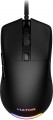 | 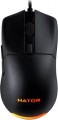 |
|---|---|---|
| Hator Pulsar 2 | Hator Pulsar Essential | |
| Outdated Product | Outdated Product | |
| User reviews | ||
| TOP sellers | ||
| Product type | mouse | mouse |
| Connection | wired | wired |
| Sensor | optical | optical |
| Type | for game | for game |
Sensor and control | ||
| Sensor | PixArt 3327 | PixArt 3327 |
| Sensor resolution | 400 – 6200 DPI | 400 – 6200 DPI |
| Max. acceleration | 30 G | 30 G |
| Max. polling rate | 1000 Hz (1 ms) | |
| Number of buttons | 5 | 5 |
| Side buttons |  | |
| DPI-button | | |
| Switch type | mechanical | mechanical |
| Switches | Kailh GM 4.0 | Huano |
| Scroll wheels | 1 | 1 |
Additional features | ||
| Programmable buttons | |  |
| Built-in memory | | |
| Lighting | RGB | RGB |
| Lighting effects | + | + |
| Feet material | teflon (PTFE) | teflon (PTFE) |
Connection and power supply | ||
| Cable | USB-A braided | USB-A braided |
| Cable length | 1.8 m | 1.8 m |
General | ||
| Suitable for left-handers | | |
| Size (LxWxH) | 123x68x38 mm | 123x68x38 mm |
| Weight | 69 g | 69 g |
| Color | ||
| Added to E-Catalog | october 2023 | january 2021 |


Compare Hator Pulsar 2 and Pulsar Essential
Mice Hator Pulsar 2 and Hator Pulsar Essential have similar characteristics, such as the optical sensor PixArt 3327 with a resolution of up to 6200 DPI and a wired connection via USB A. However, the main difference lies in the switches: Pulsar 2 uses Kailh switches, while Pulsar Essential is equipped with Huano switches. Users note that the Pulsar 2 has a higher-quality sensor and is better suited for gaming, whereas the Pulsar Essential stands out for its lightweight and ease of use. Overall, both models have positive reviews, but Pulsar 2 might be preferable for gamers.
You may be interested in
My comparisons
Hator Pulsar 2 often compared


Hator Pulsar Essential often compared


Glossary
Max. polling rate
The polling rate shows how often the mouse sensor exchanges data with the computer about cursor movement. This parameter is measured in hertz (Hz), with one second being taken as the unit of time for its assessment. The smoothness and speed of cursor movement directly depend on the polling rate of the sensor. Directly connected to it is the mouse response time — this is the time interval required for the signal about the manipulator's movement to reach the display of the cursor position change on the screen. Response time is measured in milliseconds (ms). The higher the mouse's "hertz rate," the lesser the response time it demonstrates. The most common value can be considered 1000 Hz with a response time of 1 millisecond. For competitive games, attention should be paid to faster mice, including 2000 Hz, 4000 Hz, and 8000 Hz. Values below might negatively manifest just in gaming scenarios.
Switches
The switches in a mouse indicate which specific switches are installed under the main buttons, such as Omron, Huano, Kailh, TTC, or proprietary solutions from the manufacturer. These determine the click characteristics, actuation force, click volume, lifespan, and the likelihood of double-clicking over time.
Unlike the general switch type, which refers to the working principle—mechanical or optical—the brand and model provide a more precise understanding of the performance level. For example, two mice with mechanical switches might feel different when clicked: some may be softer and quieter, while others could be stiffer, louder, and feel more "gaming-like."
Unlike the general switch type, which refers to the working principle—mechanical or optical—the brand and model provide a more precise understanding of the performance level. For example, two mice with mechanical switches might feel different when clicked: some may be softer and quieter, while others could be stiffer, louder, and feel more "gaming-like."
Programmable buttons
The presence of programmable buttons in the design of the mouse. In this case, the buttons mean not only the keys, but also the scroll wheels, which are usually able to work on pressure.
Almost all models with this feature are gaming (see "By Direction"). Usually, programming is carried out using special proprietary software, while the functionality of such a setting may be different. For example, in some models, only one action can be tied to one button, in others — a whole series of actions (such as a combination of attacks in an RPG). Often, it is possible to configure one button for different actions in different games.
However, this feature provides an additional convenience: the mouse keys are right at hand, and it is usually easier (and faster) to use them than to reach for the button (s) on the keyboard.
Almost all models with this feature are gaming (see "By Direction"). Usually, programming is carried out using special proprietary software, while the functionality of such a setting may be different. For example, in some models, only one action can be tied to one button, in others — a whole series of actions (such as a combination of attacks in an RPG). Often, it is possible to configure one button for different actions in different games.
However, this feature provides an additional convenience: the mouse keys are right at hand, and it is usually easier (and faster) to use them than to reach for the button (s) on the keyboard.
Built-in memory
The presence in the mouse of its own built-in memory.
The main and, in fact, the only way to use such memory is to store various advanced settings (for example, the functions of programmable keys, or even entire user profiles for various games or other tasks). This feature is relevant mainly for gamers, so almost all models with this feature are gaming.
The main and, in fact, the only way to use such memory is to store various advanced settings (for example, the functions of programmable keys, or even entire user profiles for various games or other tasks). This feature is relevant mainly for gamers, so almost all models with this feature are gaming.