
Comparison Hator Pulsar 2 vs Hator Pulsar
Add to comparison | 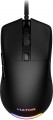 | 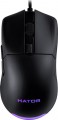 |
|---|---|---|
| Hator Pulsar 2 | Hator Pulsar | |
| Outdated Product | Outdated Product | |
| User reviews | ||
| TOP sellers | ||
| Product type | mouse | mouse |
| Connection | wired | wired |
| Sensor | optical | optical |
| Type | for game | for game |
Sensor and control | ||
| Sensor | PixArt 3327 | PixArt 3389 |
| Sensor resolution | 400 – 6200 DPI | 50 – 16000 DPI |
| Max. acceleration | 30 G | 50 G |
| Max. speed | 400 ips | |
| Max. polling rate | 1000 Hz (1 ms) | |
| Number of buttons | 5 | 5 |
| Side buttons |  | |
| DPI-button | | |
| Switch type | mechanical | mechanical |
| Switches | Kailh GM 4.0 | Omron |
| Scroll wheels | 1 | 1 |
Additional features | ||
| Programmable buttons | | |
| Built-in memory | | |
| Lighting | RGB | RGB |
| Lighting effects | + | + |
| Feet material | teflon (PTFE) | teflon (PTFE) |
Connection and power supply | ||
| Cable | USB-A braided | USB-A braided |
| Cable length | 1.8 m | 1.8 m |
General | ||
| Suitable for left-handers | | |
| Size (LxWxH) | 123x68x38 mm | 123x68x38 mm |
| Weight | 69 g | 69 g |
| Color | ||
| Added to E-Catalog | october 2023 | january 2021 |


Compare Hator Pulsar 2 and Pulsar
Hator Pulsar 2 and Hator Pulsar mice have similar characteristics, but there are key differences that may influence your choice. Hator Pulsar 2 is equipped with a PixArt 3327 sensor with a resolution of up to 6200 DPI, while Hator Pulsar uses a PixArt 3389 sensor with a resolution of up to 16000 DPI, providing higher precision and speed. Also, the maximum acceleration for Pulsar is 50 G, which is significantly higher than Pulsar 2's 30 G. Both devices have 5 buttons and RGB lighting, but users note that Hator Pulsar 2 has a lighter and more ergonomic design, whereas Pulsar offers better gaming performance thanks to its sensor. In reviews, users praise both models for comfort and build quality but point out drawbacks such as the glossy finish of Pulsar 2, which may leave fingerprints.
You may be interested in
My comparisons
Hator Pulsar 2 often compared


Hator Pulsar often compared


Glossary
Sensor
The model of the sensor installed in the mouse. This information is indicated mainly for models equipped with high-end sensors, which are significantly superior in their capabilities to simpler solutions. Such characteristics are important primarily for gaming mice, so most of the devices for which the sensor model is specified belong to this category.
Knowing the name, you can find detailed data on the sensor and evaluate its capabilities. Note that one of the most popular brands nowadays, under which advanced sensors are produced, is PixArt ; on the market are often found, in particular, sensors PixArt 3212, PixArt 3325, PixArt 3327, PixArt 3335, PixArt 3360, PixArt 3389, PixArt 3395, PixArt 3950.
Knowing the name, you can find detailed data on the sensor and evaluate its capabilities. Note that one of the most popular brands nowadays, under which advanced sensors are produced, is PixArt ; on the market are often found, in particular, sensors PixArt 3212, PixArt 3325, PixArt 3327, PixArt 3335, PixArt 3360, PixArt 3389, PixArt 3395, PixArt 3950.
Sensor resolution
Resolution of the sensor responsible for tracking mouse movements on the work surface. Specified in DPI — dots per inch.
The physical meaning of DPI as a whole is as follows. The sensor of a modern mouse works on the same principle as the camera matrix, and consists of pixels. And DPI is the number of pixels that fall on 1 inch of the underlying surface (length or width), "visible" by the sensor.
It is believed that more DPI means a more advanced sensor and mouse in general; nowadays, models for 3500 – 5000 DPI, 12000 DPI, 16000 DPI even more are not uncommon. In a way, it is — high resolution contributes to accuracy. However, the only thing that is directly determined by this indicator is the speed at which the cursor moves across the screen: the higher the resolution of the sensor, the greater the number of pixels that the cursor will move when the mouse itself moves a certain distance. At the same time, it is worth recalling that too high a speed is even more undesirable than too low. So the real need for high DPI ( 1000 and above) arises mainly when working on large screens (4K resolution and more); for more modest displays (HD and Full HD), smaller values are often enough.
The physical meaning of DPI as a whole is as follows. The sensor of a modern mouse works on the same principle as the camera matrix, and consists of pixels. And DPI is the number of pixels that fall on 1 inch of the underlying surface (length or width), "visible" by the sensor.
It is believed that more DPI means a more advanced sensor and mouse in general; nowadays, models for 3500 – 5000 DPI, 12000 DPI, 16000 DPI even more are not uncommon. In a way, it is — high resolution contributes to accuracy. However, the only thing that is directly determined by this indicator is the speed at which the cursor moves across the screen: the higher the resolution of the sensor, the greater the number of pixels that the cursor will move when the mouse itself moves a certain distance. At the same time, it is worth recalling that too high a speed is even more undesirable than too low. So the real need for high DPI ( 1000 and above) arises mainly when working on large screens (4K resolution and more); for more modest displays (HD and Full HD), smaller values are often enough.
Max. acceleration
The greatest acceleration during movement, at which the mouse maintains normal performance; if this indicator is exceeded, the cursor may “break down” (moving to an unexpected place due to incorrect processing of data from the sensor).
The faster the mouse moves, the greater the acceleration acting on it. Accordingly, this parameter determines the sensitivity to sudden movements, the extent to which this model is able to normally perceive and process such movements. High values of maximum acceleration ( 40 G, 50 G) are important first of all in dynamic games, especially for professional e-sportsmen and advanced enthusiasts. If the mouse is bought for relatively simple tasks (working with documents, surfing the web, etc.), you can ignore this indicator.
The faster the mouse moves, the greater the acceleration acting on it. Accordingly, this parameter determines the sensitivity to sudden movements, the extent to which this model is able to normally perceive and process such movements. High values of maximum acceleration ( 40 G, 50 G) are important first of all in dynamic games, especially for professional e-sportsmen and advanced enthusiasts. If the mouse is bought for relatively simple tasks (working with documents, surfing the web, etc.), you can ignore this indicator.
Max. speed
The ips (inches per second) parameter is the linear speed of mouse movement, expressed in inches per second, at which the manipulator's sensor is able to read the surface. In top models, the maximum mouse movement speed often reaches 400-600 ips, but devices with ips in the region of 200 are more common.
Max. polling rate
The polling rate shows how often the mouse sensor exchanges data with the computer about cursor movement. This parameter is measured in hertz (Hz), with one second being taken as the unit of time for its assessment. The smoothness and speed of cursor movement directly depend on the polling rate of the sensor. Directly connected to it is the mouse response time — this is the time interval required for the signal about the manipulator's movement to reach the display of the cursor position change on the screen. Response time is measured in milliseconds (ms). The higher the mouse's "hertz rate," the lesser the response time it demonstrates. The most common value can be considered 1000 Hz with a response time of 1 millisecond. For competitive games, attention should be paid to faster mice, including 2000 Hz, 4000 Hz, and 8000 Hz. Values below might negatively manifest just in gaming scenarios.
Switches
The switches in a mouse indicate which specific switches are installed under the main buttons, such as Omron, Huano, Kailh, TTC, or proprietary solutions from the manufacturer. These determine the click characteristics, actuation force, click volume, lifespan, and the likelihood of double-clicking over time.
Unlike the general switch type, which refers to the working principle—mechanical or optical—the brand and model provide a more precise understanding of the performance level. For example, two mice with mechanical switches might feel different when clicked: some may be softer and quieter, while others could be stiffer, louder, and feel more "gaming-like."
Unlike the general switch type, which refers to the working principle—mechanical or optical—the brand and model provide a more precise understanding of the performance level. For example, two mice with mechanical switches might feel different when clicked: some may be softer and quieter, while others could be stiffer, louder, and feel more "gaming-like."