
Comparison sound Cards
Save List
Add to comparison | 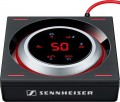 |
|---|---|
| Sennheiser GSX 1000 | |
from $196.87 | |
| User reviews | |
| TOP sellers | |
Informative display. Realization of virtual sound. Plug-n-play mode. Built-in equalizer. Wide frequency range. Built-in DAC. Will not drive headphones over 150 ohms. | |
| Type | gaming |
Specs | |
| Form factor | external |
| Interface | MicroUSB |
| Channels | 7.1 |
DAC | |
| DAC resolution | 24 bit |
| Max. sampling rate | 96 kHz |
| More features | headphones amplifier external control module |
Inputs | |
| mini-Jack (3.5 mm) | 1 |
Outputs | |
| mini-Jack (3.5 mm) | 1 |
| Added to E-Catalog | march 2017 |


You may be interested in
Glossary
Type
— Regular. This category includes all sound cards that do not have a clear specialization and do not belong to any of the types described below. Generally, they have a set of basic or mid-level characteristics and are intended for simple everyday tasks: listening to music and game sound through regular speakers or headphones, online communication via microphone, etc. Regular sound cards are equipped with both digital-to-analog and analog-to-digital converters and can be either internal or external.
— Audiophile (Hi-Fi). Sound cards designed for lovers of high-quality sound; they may also be useful for professionals engaged in professional audio processing who require the most accurate reproduction of the received signal. Accordingly, models of this type are distinguished by high build quality, advanced components, and additional equipment, a variety of interfaces, and extended configuration capabilities (both software and hardware, including even the possibility of replacing individual components of the circuit). However, such cards are priced accordingly.
— Gaming. Sound cards originally created as components for advanced gaming systems. Accordingly, the main purpose of such models is the high-quality transmission of game sound, including 3D and multi-channel sound. Usually, gaming sound cards are equipped with advanced DACs and support various special...standards (see below); furthermore, they may have additional equipment like external control modules (see below). The vast majority of models of this type are internal, but they often have rather original designs (which will be useful for modding enthusiasts using transparent cases).
— DAC. Abbreviation for "digital-to-analog converter." This term usually refers to a component of a sound card, but in this context, it refers to a separate type of sound card, whose distinctive feature is the lack of an analog-to-digital converter (ADC). Consequently, DACs can only transmit sound from the computer to headphones, speakers, etc., and cannot be used for sound digitization from a microphone or other external signal sources. Note that this category includes a variety of models — from basic "USB-headphone" adapters, the size of a flash drive, to advanced audiophile-class solutions.
— Audio Interface. A kind of opposite to the above-described DAC: audio interfaces are primarily intended for digitizing incoming sound (e.g., from a microphone or electric guitar). Consequently, they are not only necessarily equipped with analog-to-digital converters — generally, these ADCs have very advanced characteristics and extensive sound adjustment capabilities (and some models even provide hardware switches for this). At the same time, audio interfaces can also work in the mode of converting digital to analog sound (simply put — outputting sound to headphones/speakers). The cost of such devices is usually quite high, so it makes sense to purchase them only for those who plan to work a lot with sound recording.
— Audiophile (Hi-Fi). Sound cards designed for lovers of high-quality sound; they may also be useful for professionals engaged in professional audio processing who require the most accurate reproduction of the received signal. Accordingly, models of this type are distinguished by high build quality, advanced components, and additional equipment, a variety of interfaces, and extended configuration capabilities (both software and hardware, including even the possibility of replacing individual components of the circuit). However, such cards are priced accordingly.
— Gaming. Sound cards originally created as components for advanced gaming systems. Accordingly, the main purpose of such models is the high-quality transmission of game sound, including 3D and multi-channel sound. Usually, gaming sound cards are equipped with advanced DACs and support various special...standards (see below); furthermore, they may have additional equipment like external control modules (see below). The vast majority of models of this type are internal, but they often have rather original designs (which will be useful for modding enthusiasts using transparent cases).
— DAC. Abbreviation for "digital-to-analog converter." This term usually refers to a component of a sound card, but in this context, it refers to a separate type of sound card, whose distinctive feature is the lack of an analog-to-digital converter (ADC). Consequently, DACs can only transmit sound from the computer to headphones, speakers, etc., and cannot be used for sound digitization from a microphone or other external signal sources. Note that this category includes a variety of models — from basic "USB-headphone" adapters, the size of a flash drive, to advanced audiophile-class solutions.
— Audio Interface. A kind of opposite to the above-described DAC: audio interfaces are primarily intended for digitizing incoming sound (e.g., from a microphone or electric guitar). Consequently, they are not only necessarily equipped with analog-to-digital converters — generally, these ADCs have very advanced characteristics and extensive sound adjustment capabilities (and some models even provide hardware switches for this). At the same time, audio interfaces can also work in the mode of converting digital to analog sound (simply put — outputting sound to headphones/speakers). The cost of such devices is usually quite high, so it makes sense to purchase them only for those who plan to work a lot with sound recording.
Form factor
The installation and connection method of a sound card depends on its type.
— Internal. These models are designed to work as a permanent component of the system. They are installed in the computer's case, in a slot on the motherboard (PCI or PCIe, see "Connection Interface") in such a way that only the panel with inputs and outputs is usually visible from outside. One of the main advantages of internal cards is their compactness—they do not take up external space and hardly affect the dimensions of the system unit. At the same time, these models can range from the simplest budget options to advanced professional solutions. On the other hand, the connection of internal cards is less universal and more complicated than external ones: it requires at least opening the PC case, and the installation options are limited by the motherboard's specifications and available space inside the case. It's also considered that cards of this type are more susceptible to electromagnetic interference since they are located in close proximity to the computer's electronic components.
— External. As the name implies, models of this type operate outside the PC case and use appropriate connection interfaces—USB or FireWire (see below). The advantages of external cards include convenient connection: plugging a connector into an external socket is much easier and faster than dealing with the case's internals. Beca...use of this, one card can be easily used on multiple computers, reconnecting as needed. Additionally, they are indispensable for laptops and some desktop computers where the installation of internal sound cards is not structurally feasible. Another advantage is their distance from the computer's "innards," which reduces the level of interference. The main drawback of this type of card is the need for additional space near the computer; moreover, more advanced models generally occupy even more space. Furthermore, for devices requiring additional power (see below), a separate socket will be needed.
— Internal. These models are designed to work as a permanent component of the system. They are installed in the computer's case, in a slot on the motherboard (PCI or PCIe, see "Connection Interface") in such a way that only the panel with inputs and outputs is usually visible from outside. One of the main advantages of internal cards is their compactness—they do not take up external space and hardly affect the dimensions of the system unit. At the same time, these models can range from the simplest budget options to advanced professional solutions. On the other hand, the connection of internal cards is less universal and more complicated than external ones: it requires at least opening the PC case, and the installation options are limited by the motherboard's specifications and available space inside the case. It's also considered that cards of this type are more susceptible to electromagnetic interference since they are located in close proximity to the computer's electronic components.
— External. As the name implies, models of this type operate outside the PC case and use appropriate connection interfaces—USB or FireWire (see below). The advantages of external cards include convenient connection: plugging a connector into an external socket is much easier and faster than dealing with the case's internals. Beca...use of this, one card can be easily used on multiple computers, reconnecting as needed. Additionally, they are indispensable for laptops and some desktop computers where the installation of internal sound cards is not structurally feasible. Another advantage is their distance from the computer's "innards," which reduces the level of interference. The main drawback of this type of card is the need for additional space near the computer; moreover, more advanced models generally occupy even more space. Furthermore, for devices requiring additional power (see below), a separate socket will be needed.
Interface
The main interface used to connect a sound card to a computer or other device.
Like the sound cards themselves, the interfaces used in them are divided into internal (PCI, PCIe) and external (USB-A, USB-C, FireWire, Thunderbolt, 3.5 mm mini-jack, Bluetooth). Here's a more detailed description of each of these options:
— PCIe. The main modern interface for connecting internal peripherals (including sound cards) to computer motherboards. It is used in most internal type models (see above). The main advantage of PCIe solutions is that connectors for their connection can be found on almost any modern "motherboard". True, these connectors may be needed for other components — graphics cards, TV tuners, or even SSD drives; however, even the simplest motherboards usually have several PCIe slots, so this point cannot be considered a serious disadvantage.
— PCI. An interface for connecting expansion cards to the PC motherboard. It is the predecessor of PCIe, has significantly lower bandwidth and more modest capabilities, so overall it is outdated. Nevertheless, motherboards with such connectors, and sound cards for the PCI interface (including quite advanced ones), continue to be produced. This is because working with sound requires comparatively low bandwidth; and installing a so...und card in a PCI slot leaves PCIe connectors free, which may be required for components more demanding on connection speed. In any case, before purchasing such a sound card, it does not hurt to separately ensure that there is a connector for its connection on the "motherboard".
— USB-A. Connection through a standard USB port. Until recently, it was the most popular interface for external peripherals, found in almost all PCs and laptops. Most external sound cards were made for USB. The disadvantage of this connection method is that USB connectors may be needed for other devices, which creates problems with a small number of ports and an abundance of peripherals. On the other hand, such situations arise not so often, and to solve them, it is enough to have a USB hub on hand.
It should be noted separately that full-size USB ports in modern PCs and laptops have been replaced by more compact USB-C (see below).
— USB-C. A peripheral connector with a symmetrical contact group, which often replaces full-size USB ports on modern PCs and laptops. Many new models of external sound cards are made for this interface. The only exceptions are individual Thunderbolt devices (see below) — for them, Thunderbolt is indicated as the peripheral connection port, not USB-C.
— Thunderbolt. A universal peripheral port mainly used in Apple computers and laptops. It is important to consider that different generations of Thunderbolt differ in the type of physical connector: versions v1 and v2 use the miniDisplayPort socket, version v3 uses the USB-C socket. So when choosing a sound card with such a connection, it is necessary to clarify this point. On the other hand, Thunderbolt versions with different connectors are fully compatible with each other through corresponding adapters.
— FireWire. Also known as IEEE 1394. An interface for external devices that was somewhat popular some time ago but has now almost fallen out of use.
— 3.5 mm (mini-jack). The mini-jack is one of the most common audio connectors. However, it is usually provided as one of the audio inputs (see below) and is very rarely used as the main interface for connecting a sound card to an external device. Such a connection is mainly found in specialized gaming models, intended for use with consoles as well. In these models, the mini-jack may be combined, allowing for the connection of both a line (analog) signal via a regular electrical wire and an optical (digital) signal via a TOSLINK cable. It is worth noting that the optical interface is notable for being completely immune to external interference; it allows for transmitting multi-channel sound, but cables for such connections require careful handling.
— Bluetooth. Wireless connection following the Bluetooth standard. It is mainly found in models intended for use with smartphones and tablets — these gadgets have few wired connectors, but Bluetooth modules are almost guaranteed to be present. However, initial sound transmission is highly compressed, noticeably affecting its quality; to remedy this drawback, modern Bluetooth sound cards usually support aptX. Of course, this technology must be supported by the signal source as well — make sure of this before purchasing.
Like the sound cards themselves, the interfaces used in them are divided into internal (PCI, PCIe) and external (USB-A, USB-C, FireWire, Thunderbolt, 3.5 mm mini-jack, Bluetooth). Here's a more detailed description of each of these options:
— PCIe. The main modern interface for connecting internal peripherals (including sound cards) to computer motherboards. It is used in most internal type models (see above). The main advantage of PCIe solutions is that connectors for their connection can be found on almost any modern "motherboard". True, these connectors may be needed for other components — graphics cards, TV tuners, or even SSD drives; however, even the simplest motherboards usually have several PCIe slots, so this point cannot be considered a serious disadvantage.
— PCI. An interface for connecting expansion cards to the PC motherboard. It is the predecessor of PCIe, has significantly lower bandwidth and more modest capabilities, so overall it is outdated. Nevertheless, motherboards with such connectors, and sound cards for the PCI interface (including quite advanced ones), continue to be produced. This is because working with sound requires comparatively low bandwidth; and installing a so...und card in a PCI slot leaves PCIe connectors free, which may be required for components more demanding on connection speed. In any case, before purchasing such a sound card, it does not hurt to separately ensure that there is a connector for its connection on the "motherboard".
— USB-A. Connection through a standard USB port. Until recently, it was the most popular interface for external peripherals, found in almost all PCs and laptops. Most external sound cards were made for USB. The disadvantage of this connection method is that USB connectors may be needed for other devices, which creates problems with a small number of ports and an abundance of peripherals. On the other hand, such situations arise not so often, and to solve them, it is enough to have a USB hub on hand.
It should be noted separately that full-size USB ports in modern PCs and laptops have been replaced by more compact USB-C (see below).
— USB-C. A peripheral connector with a symmetrical contact group, which often replaces full-size USB ports on modern PCs and laptops. Many new models of external sound cards are made for this interface. The only exceptions are individual Thunderbolt devices (see below) — for them, Thunderbolt is indicated as the peripheral connection port, not USB-C.
— Thunderbolt. A universal peripheral port mainly used in Apple computers and laptops. It is important to consider that different generations of Thunderbolt differ in the type of physical connector: versions v1 and v2 use the miniDisplayPort socket, version v3 uses the USB-C socket. So when choosing a sound card with such a connection, it is necessary to clarify this point. On the other hand, Thunderbolt versions with different connectors are fully compatible with each other through corresponding adapters.
— FireWire. Also known as IEEE 1394. An interface for external devices that was somewhat popular some time ago but has now almost fallen out of use.
— 3.5 mm (mini-jack). The mini-jack is one of the most common audio connectors. However, it is usually provided as one of the audio inputs (see below) and is very rarely used as the main interface for connecting a sound card to an external device. Such a connection is mainly found in specialized gaming models, intended for use with consoles as well. In these models, the mini-jack may be combined, allowing for the connection of both a line (analog) signal via a regular electrical wire and an optical (digital) signal via a TOSLINK cable. It is worth noting that the optical interface is notable for being completely immune to external interference; it allows for transmitting multi-channel sound, but cables for such connections require careful handling.
— Bluetooth. Wireless connection following the Bluetooth standard. It is mainly found in models intended for use with smartphones and tablets — these gadgets have few wired connectors, but Bluetooth modules are almost guaranteed to be present. However, initial sound transmission is highly compressed, noticeably affecting its quality; to remedy this drawback, modern Bluetooth sound cards usually support aptX. Of course, this technology must be supported by the signal source as well — make sure of this before purchasing.
Channels
The most advanced multi-channel audio format that a sound card is capable of outputting.
— 2. Standard stereo sound on two channels — left and right. This format allows you to provide a sense of surround sound (especially when using headphones), which is quite enough for most simple tasks. However, it noticeably loses to multi-channel sound in terms of the "immersion effect", which can be critical for demanding gamers and audiophiles.
— 5.1. The classic and most popular multi-channel surround sound format today: a centre channel, two front and two rear channels allow you to achieve a full-fledged “surround effect”, and a separate subwoofer channel provides rich bass sound.
— 7.1. The 7.1 format differs from 5.1 by the presence of two additional channels. There are several options for localizing these channels — for example, a pair of side speakers, a pair of additional speakers above the front ones, etc. Anyway, the 7.1 format provides a more reliable surround sound transmission than 5.1, but such cards are more expensive, and there is less specialized content for 7.1.
When choosing a sound card by the number of channels, it is worth considering such moments. Firstly, multi-channel options are capable of producing sound in simpler formats (for example, a 7.1 card can be used for 5.1 acoustics), and stereo sound output is support...ed by all models in general. Secondly, modern multimedia software (in particular, codecs) allows you to output multi-channel audio through a card with fewer channels — for example, play 5.1 sound through a two-channel card with stereo speakers without quality loss. Thirdly, for the full-fledged operation of multi-channel sound, you will need not only a card, but also appropriate acoustics; therefore, it makes no sense to specifically look for a multi-channel model if you plan to use exclusively stereo speakers.
— 2. Standard stereo sound on two channels — left and right. This format allows you to provide a sense of surround sound (especially when using headphones), which is quite enough for most simple tasks. However, it noticeably loses to multi-channel sound in terms of the "immersion effect", which can be critical for demanding gamers and audiophiles.
— 5.1. The classic and most popular multi-channel surround sound format today: a centre channel, two front and two rear channels allow you to achieve a full-fledged “surround effect”, and a separate subwoofer channel provides rich bass sound.
— 7.1. The 7.1 format differs from 5.1 by the presence of two additional channels. There are several options for localizing these channels — for example, a pair of side speakers, a pair of additional speakers above the front ones, etc. Anyway, the 7.1 format provides a more reliable surround sound transmission than 5.1, but such cards are more expensive, and there is less specialized content for 7.1.
When choosing a sound card by the number of channels, it is worth considering such moments. Firstly, multi-channel options are capable of producing sound in simpler formats (for example, a 7.1 card can be used for 5.1 acoustics), and stereo sound output is support...ed by all models in general. Secondly, modern multimedia software (in particular, codecs) allows you to output multi-channel audio through a card with fewer channels — for example, play 5.1 sound through a two-channel card with stereo speakers without quality loss. Thirdly, for the full-fledged operation of multi-channel sound, you will need not only a card, but also appropriate acoustics; therefore, it makes no sense to specifically look for a multi-channel model if you plan to use exclusively stereo speakers.
DAC resolution
The bit depth of the digital-to-analogue converter (DAC) of the sound card. In this case, DAC refers to a part of the circuit that converts digital sound data (machine code) into analogue pulses that are fed directly to an external device — speakers, headphones, etc. The bit depth is one of the main parameters (along with the sampling frequency) that describes the quality of the DAC: the higher it is, the more reliable the sound will be reproduced, the less distortion will be introduced into it during conversion.
16-bit DACs usually have entry-level sound cards — this is enough for good sound quality. In other cases, 24-bit converters are most common, and even for advanced models, in particular gaming ones (see "View"), they are almost mandatory.
16-bit DACs usually have entry-level sound cards — this is enough for good sound quality. In other cases, 24-bit converters are most common, and even for advanced models, in particular gaming ones (see "View"), they are almost mandatory.
Max. sampling rate
The highest sampling rate provided by the digital-to-analogue converter (DAC) of the audio card. For more details on the role of the DAC, see paragraph "Bit depth" above. Here we note that the quality of its work directly depends on the sampling frequency: the higher it is, the less distortion occurs when converting sound.
Usually in sound cards there are standard values for the maximum sampling rate:
44.1 kHz — corresponds to the sound quality of Audio CD;
48 kHz — DVD;
96 kHz — DVD-Audio 5.1;
192 kHz — DVD-Audio 2.0 (two-channel audio has a higher sampling rate than multi-channel audio for a number of reasons), the highest value in modern consumer-grade sound cards.
Another specific point is that the quality of sound played on a computer cannot be higher than the capabilities of a sound card. In other words, if an audio file is recorded at a higher sampling rate than the audio card can provide, its sound quality will be reduced: for example, on a 44.1 kHz card, even DVD-Audio sound will sound like an Audio CD. Therefore, if you want to fully enjoy high-quality sound, you should choose a model with a high sampling rate.
Usually in sound cards there are standard values for the maximum sampling rate:
44.1 kHz — corresponds to the sound quality of Audio CD;
48 kHz — DVD;
96 kHz — DVD-Audio 5.1;
192 kHz — DVD-Audio 2.0 (two-channel audio has a higher sampling rate than multi-channel audio for a number of reasons), the highest value in modern consumer-grade sound cards.
Another specific point is that the quality of sound played on a computer cannot be higher than the capabilities of a sound card. In other words, if an audio file is recorded at a higher sampling rate than the audio card can provide, its sound quality will be reduced: for example, on a 44.1 kHz card, even DVD-Audio sound will sound like an Audio CD. Therefore, if you want to fully enjoy high-quality sound, you should choose a model with a high sampling rate.
More features
— Headphone Amplifier. The presence of a separate headphone amplifier in the design of the sound card. Such equipment allows at least to improve the overall sound of the “ears”, as well as to implement various additional settings for such sound (for example, a separate volume control). And some headphones — primarily high-impedance Hi-Fi models — in principle cannot be used without special amplifiers.
— External control module. The presence of an external control module in the design of the sound card. Such a module is actually a control panel with a wired connection; it doesn't give you the freedom of movement that a wireless remote control does (see below), but it's cheaper and often more convenient. So, the control module does not have to be in direct line of sight with respect to the audio card, and the length of the wire is often enough to place the device at the user's hand. However the set of adjustments placed on the external unit is usually limited to the most basic settings; however, even this, usually, is quite enough for comfortable use. In addition, the control unit often provides additional connectors for connecting headphones and a microphone. Among other things, this feature is especially convenient in games — it allows you to adjust the sound without distracting from the game itself. However, other types of sound cards can also be equipped with external modules (see "View").
...
— Remote control. A remote control is included with the sound card. Do not confuse this function with the external control module described above: in this case, we mean a classic wireless IR remote control, like those used in TVs. Such a device does not necessarily cover all the capabilities of the audio adapter, however, the range of functions of the remote control can be quite extensive. On the other hand, the need to control a sound card from a distance is extremely rare, and in most cases, the mentioned external module is enough for this. So models with a remote control are not widely used.
— Exit to the front panel. Ability to connect an internal sound card (see "Type") to the connectors on the front panel of the PC. To do this, a special connector (or several connectors) is provided on the board, which is connected to the corresponding connector (s) using a wire. The convenience of this feature is obvious: in desktop computers, the front panel is located closest to the user, and it is to it that it is easiest to connect peripherals that involve frequent plugging and unplugging, such as headphones and microphones. Actually, connectors for such devices are most often displayed on the front panel.
— External control module. The presence of an external control module in the design of the sound card. Such a module is actually a control panel with a wired connection; it doesn't give you the freedom of movement that a wireless remote control does (see below), but it's cheaper and often more convenient. So, the control module does not have to be in direct line of sight with respect to the audio card, and the length of the wire is often enough to place the device at the user's hand. However the set of adjustments placed on the external unit is usually limited to the most basic settings; however, even this, usually, is quite enough for comfortable use. In addition, the control unit often provides additional connectors for connecting headphones and a microphone. Among other things, this feature is especially convenient in games — it allows you to adjust the sound without distracting from the game itself. However, other types of sound cards can also be equipped with external modules (see "View").
...
— Remote control. A remote control is included with the sound card. Do not confuse this function with the external control module described above: in this case, we mean a classic wireless IR remote control, like those used in TVs. Such a device does not necessarily cover all the capabilities of the audio adapter, however, the range of functions of the remote control can be quite extensive. On the other hand, the need to control a sound card from a distance is extremely rare, and in most cases, the mentioned external module is enough for this. So models with a remote control are not widely used.
— Exit to the front panel. Ability to connect an internal sound card (see "Type") to the connectors on the front panel of the PC. To do this, a special connector (or several connectors) is provided on the board, which is connected to the corresponding connector (s) using a wire. The convenience of this feature is obvious: in desktop computers, the front panel is located closest to the user, and it is to it that it is easiest to connect peripherals that involve frequent plugging and unplugging, such as headphones and microphones. Actually, connectors for such devices are most often displayed on the front panel.
mini-Jack (3.5 mm)
The number of inputs in the design of the sound card using 3.5 mm mini-Jack connectors. This connector, usually used to transmit an analogue signal, is one of the most popular in modern audio technology. Speaking of inputs, it's worth noting that most computer microphones are designed to plug into the 3.5mm jack; this also applies to separate microphone plugs on headsets. At the same time, the specific purpose of the mini-jack sockets in different sound cards may be different; Moreover, in some models, the same socket can be reconfigured and even change its purpose (from input to output and vice versa). These points, usually, are specified in the characteristics.
Using a simple adapter, you can also connect a 6.35 mm plug (Jack) to the 3.5 mm jack.
Using a simple adapter, you can also connect a 6.35 mm plug (Jack) to the 3.5 mm jack.
mini-Jack (3.5 mm)
The number of outputs with 3.5 mm mini-Jack connectors in the design of the sound card. It is this connector that is used by the vast majority of modern computer headphones and speakers of all price categories (although it is relatively rare in top-end technology), and it is very popular in other consumer-class audio devices. Therefore, almost all entry-level and mid-level sound cards have at least one 3.5 mm jack; the absence of such outputs is typical for specialized models (for example, DAC, see "View"). Also note that a single mini-jack output can work with a maximum of two channels, however, this interface is also used in multi-channel sound systems — in this case, the audio card is equipped with several connectors, each of which is responsible for its own part of the system. For example, for 5.1 systems, one connector is allocated to the centre, one to a pair of front channels, one to a pair of rear channels, and one to a subwoofer.
As with 3.5mm inputs (see above), this type of output can be used in a variety of ways and can even be configurable.
As with 3.5mm inputs (see above), this type of output can be used in a variety of ways and can even be configurable.