
Comparison Fujifilm X-T100 kit vs Fujifilm X-A5 kit
Add to comparison | 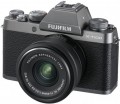 | 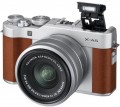 |
|---|---|---|
| Fujifilm X-T100 kit | Fujifilm X-A5 kit | |
from $541.00 | from $2,999.99 | |
| User reviews | ||
| TOP sellers | ||
Touch screen on a swivel hinge. Vintage retro style. Compact size and light weight. Low frame rate when shooting 4K video. High minimum ISO threshold for video shooting. There is no RAW support when photographing on the "machine". | ||
| Camera type | "mirrorless" (MILC) | "mirrorless" (MILC) |
Sensor | ||
| Sensor | CMOS (CMOS) | CMOS (CMOS) |
| Sensor size | APS-C (23x15.5 mm) | APS-C (23x15.5 mm) |
| Effective MP number | 24 | 24 |
| Maximum image size | 6000x4000 px | 6000x4000 px |
| Light sensitivity (ISO) | 200 - 51200 | 100-51200 |
| RAW format recording |  | |
Lens | ||
| Mount (bayonet) | Fujifilm X | Fujifilm X |
| Manual focus | | |
| Image stabilization | in absent | in absent |
Photo shooting | ||
| HDR |  | |
| 2 control dials | | |
| White balance measuring | | |
| Exposure compensation | ± 5 EV, in 1/3 EV steps | ± 5 EV, in 1/3 EV steps |
| Auto bracketing | | |
| Exposure modes | auto shutter priority aperture priority manual mode | auto shutter priority aperture priority manual mode |
| Metering system | point centre-weighted sensor (estimated) | point centre-weighted sensor (estimated) |
Video recording | ||
| Full HD (1080) | 1920x1080 px 60 fps | 1920x1080 px 60 fps |
| Ultra HD (4K) | 3840x2160 px 15 fps | 3840x2160 px 15 fps |
| File recording formats | MOV | MPEG-4 (H.264) |
| Manual video focus | | |
| Connection ports | HDMI v 1.4 microphone Jack | mini HDMI v 1.4 microphone Jack |
Focus | ||
| Autofocus modes | one shot AI focus tracking in face | one shot tracking in face by smile |
| Focus points | 91 шт | 91 шт |
| Touch focus | | |
Viewfinder and shutter | ||
| Viewfinder | electronic | in absent |
| Viewfinder crop | 0.93 x | |
| Frame coverage | 100 % | |
| Shutter speed | 30 - 1/4000 с | 30 - 1/4000 с |
| Continuous shooting | 6 fps | 6 fps |
| Shutter type | electronic/mechanical | electronic/mechanical |
Screen | ||
| Screen size | 3 '' | 3 '' |
| Screen resolution | 920 thousand pixels | 1040 thousand pixels |
| Touch screen | | |
| Rotary display | | |
Memory and communications | ||
| Memory cards types | SD, SDHC, SDXC | SD, SDHC, SDXC |
| Communications | Wi-Fi smartphone control | Wi-Fi Bluetooth smartphone control |
Flash | ||
| Built-in flash | | |
| Guide number | 5 | |
| Application range | 7 m | |
| External flash connect | | |
Power source | ||
| Power source | battery | battery |
| Battery model | NP-W126s | NP-W126S |
| Shots per charge | 430 шт | 450 шт |
General | ||
| Charger model | BC-W126s | |
| Material | magnesium alloy | aluminium alloy |
| Retrodesign | | |
| Dimensions (WxHxD) | 121x83x47 mm | 117x68x40 mm |
| Weight | 448 g | 361 g |
| Color | ||
| Added to E-Catalog | june 2018 | february 2018 |


Compare Fujifilm X-T100 and X-A5
You may be interested in
My comparisons
Fujifilm X-T100 often compared


Glossary
Light sensitivity (ISO)
The sensitivity range of a digital camera matrix. In digital photography, light sensitivity is expressed in the same ISO units as in film photography; however, unlike film, the light sensitivity of the sensor in a digital camera can be changed, which gives you more options for adjusting shooting parameters. High maximum light sensitivity is important if you have to use a lens with a low aperture (see Aperture), as well as when shooting dimly lit scenes and fast-moving objects; in the latter case, high ISO allows you to use low shutter speeds, which minimizes image blur. However, note that with an increase in the value of the applied ISO, the level of noise in the resulting images also increases.
HDR
Camera support for HDR.
HDR stands for High Dynamic Range. The main application of this technology is shooting scenes with significant differences in illumination, when there are both very bright and very dark areas in the frame. The features of modern digital photography are such that in the normal shooting mode, only a rather narrow range of brightness can be correctly processed; as a result, with a large difference in illumination, the image contains either too dark or overexposed fragments. HDR avoids this phenomenon: in this mode, the camera takes several shots with different exposure settings, and then glues them together in such a way as to reduce the brightness in bright places and increase in dark places. This allows you to shoot, for example, landscapes against the backdrop of a bright sunset sky, the interiors of dimly lit buildings with bright windows, etc. In addition, HDR can also be used as an artistic technique — to give the picture an unusual colour scheme.
Note that this effect can also be achieved using post-processing in a graphics editor; however, using the camera is much more convenient.
HDR stands for High Dynamic Range. The main application of this technology is shooting scenes with significant differences in illumination, when there are both very bright and very dark areas in the frame. The features of modern digital photography are such that in the normal shooting mode, only a rather narrow range of brightness can be correctly processed; as a result, with a large difference in illumination, the image contains either too dark or overexposed fragments. HDR avoids this phenomenon: in this mode, the camera takes several shots with different exposure settings, and then glues them together in such a way as to reduce the brightness in bright places and increase in dark places. This allows you to shoot, for example, landscapes against the backdrop of a bright sunset sky, the interiors of dimly lit buildings with bright windows, etc. In addition, HDR can also be used as an artistic technique — to give the picture an unusual colour scheme.
Note that this effect can also be achieved using post-processing in a graphics editor; however, using the camera is much more convenient.
2 control dials
The presence of two control dials in the design of the camera.
This design feature makes it easier to control the camera and change settings on the fly: additional operating parameters are transferred to the second disk, and turning it to the desired position is easier and faster than “digging” in the on-screen menu items. This feature is found mainly in semi-professional and professional cameras, which involve frequent use of manual shooting mode.
This design feature makes it easier to control the camera and change settings on the fly: additional operating parameters are transferred to the second disk, and turning it to the desired position is easier and faster than “digging” in the on-screen menu items. This feature is found mainly in semi-professional and professional cameras, which involve frequent use of manual shooting mode.
File recording formats
File formats in which the camera can record video. Given that the footage is designed to be viewed on an external screen, you should make sure that the playback device (DVD player, media centre, etc.) is able to work with the appropriate formats. At the same time, many camera models themselves can play the role of a player by connecting to a TV via an audio / video output or HDMI (see the corresponding paragraphs of the glossary). And if the video materials are to be viewed on a computer, you should not pay special attention to this parameter at all: problems with format incompatibility in such cases rarely occur, but are usually solved by installing the appropriate codec.
Manual video focus
The ability to manually focus the camera during video shooting.
This feature is typically found on cameras that support manual focus in photo mode (see "Manual Focus"); however, not all such models are capable of focus manually when shooting video, so this feature is highlighted separately. As in the case of photography, manual focus allows the user to independently choose the object to be focused on, without relying on automation (which quite often does not work the way we would like). This can be useful not only to ensure the overall quality of the material, but also to use original creative techniques.
This feature is typically found on cameras that support manual focus in photo mode (see "Manual Focus"); however, not all such models are capable of focus manually when shooting video, so this feature is highlighted separately. As in the case of photography, manual focus allows the user to independently choose the object to be focused on, without relying on automation (which quite often does not work the way we would like). This can be useful not only to ensure the overall quality of the material, but also to use original creative techniques.
Connection ports
— USB-C. A universal USB interface using a Type C connector. USB ports (of all types) are mainly used for connecting the camera to a computer to transfer captured materials, manage settings, update firmware, etc. Specifically, the Type C connector is comparable in size to the earlier miniUSB and microUSB, but it has a reversible design that allows the plug to be inserted either way. Moreover, USB-C often operates at a USB 10Gbps standard, allowing for connection speeds up to 10 Gbps—a useful feature when transferring large amounts of content.
— HDMI. An all-encompassing digital interface that allows video (including high resolution) and audio (up to multichannel) to be transmitted via a single cable. Having such a port allows the use of the camera as a player: it can be directly connected to a TV, monitor, projector, etc., to view captured materials on a big screen. These transmission capabilities may include not only video playback but also displaying captured photos as a slideshow. HDMI inputs are found in most modern video devices, and connection is usually not problematic.
Currently, several versions of the HDMI interface are available on the market:
— Headphone Output. An audio output that allows headphones to be connected to the camera. It is typically represented by a classic 3.5mm mini-jack. Such an output provides the ability to monitor sound in real time during video recording. This is especially important when shooting interviews, video blogs, and other similar projects.
— Microphone Input. A specialized input for connecting an external microphone to the camera. External microphones significantly outperform built-in ones in sound quality. Firstly, they are less sensitive to the camera's "own" sounds—from buttons, control wheels, focus motors, etc. (and if the microphone uses a long cable and is not mounted on the body, these sounds will not be audible at all). Secondly, external microphones themselves have more advanced characteristics. On the other hand, their use is mainly justified for professional video recording; therefore, the presence of a microphone input usually corresponds to advanced video shooting capabilities.
— HDMI. An all-encompassing digital interface that allows video (including high resolution) and audio (up to multichannel) to be transmitted via a single cable. Having such a port allows the use of the camera as a player: it can be directly connected to a TV, monitor, projector, etc., to view captured materials on a big screen. These transmission capabilities may include not only video playback but also displaying captured photos as a slideshow. HDMI inputs are found in most modern video devices, and connection is usually not problematic.
Currently, several versions of the HDMI interface are available on the market:
- v 1.4. The oldest of the current versions, released in 2009. Nevertheless, it supports 3D video, can work with resolutions up to 4096x2160 at 24 fps, and in Full HD resolution, the frame rate can reach up to 120 fps. Besides the original v.1.4, there are also improved modific...ations — v.1.4a and v.1.4b; they are similar in basic capabilities, with improvements primarily focused on 3D content.
- v 2.0. A significant HDMI update, introduced in 2013. In this version, the maximum frame rate at 4K increased to 60 fps, and new features include support for ultra-wide format 21:9. In the v.2.0a update, HDR support was added to the interface's capabilities; in v.2.0b, this feature was enhanced and expanded.
- v 2.1. Despite the similar naming to v.2.0, this version, released in 2017, was a very significant update. It added support for 8K and even 10K at speeds of up to 120 fps, as well as further expanded capabilities for working with HDR. A dedicated cable—HDMI Ultra High Speed—was released for this version, and all v.2.1 capabilities are only available using cables of this standard, although basic functions can be used with simpler cables.
— Headphone Output. An audio output that allows headphones to be connected to the camera. It is typically represented by a classic 3.5mm mini-jack. Such an output provides the ability to monitor sound in real time during video recording. This is especially important when shooting interviews, video blogs, and other similar projects.
— Microphone Input. A specialized input for connecting an external microphone to the camera. External microphones significantly outperform built-in ones in sound quality. Firstly, they are less sensitive to the camera's "own" sounds—from buttons, control wheels, focus motors, etc. (and if the microphone uses a long cable and is not mounted on the body, these sounds will not be audible at all). Secondly, external microphones themselves have more advanced characteristics. On the other hand, their use is mainly justified for professional video recording; therefore, the presence of a microphone input usually corresponds to advanced video shooting capabilities.
Autofocus modes
Autofocus operating modes provided in the camera design.
— One picture. The main mode of autofocus operation is found in all modern cameras and is used most often. Designed for shooting motionless objects.
— Follower. This mode is used for shooting moving objects, the distance to which is constantly changing: the camera constantly monitors the position of the object, constantly adjusting the optics so that it is in focus. Usually found in middle and upper class cells.
— AI focus. A peculiar combination of the previous two modes is used when a stationary object can start moving at any moment. If the scene is static, autofocus works in the single frame mode, but if the object on which focus is made starts to move, the device switches to tracking autofocus mode. AI mode allows you to almost instantly set the optimal autofocus settings, which is especially useful for sequential shooting. Initially, it was found in expensive models, however, thanks to the development of technology, today it can even be used in inexpensive compacts (see “Camera type”).
— By the face. Autofocus mode that uses a face recognition system and focuses on them. This feature is especially useful for taking pictures of people at a great distance from the camera, when the face is much smaller than the frame size, such as in group shots.
— With a smile. A further development of the face autofocus mode described above, when, in accordance with the nam...e, the system reacts not just to a face, but to a smile. This mode can be combined with the function of automatic shooting at the moment of a smile.
— Animal in the frame. A mode designed primarily for shooting animals, which can be difficult (and often impossible) to make them sit still in the frame. It is usually a variation of the tracking autofocus described above, but specific features of operation may vary depending on the camera model.
This list is not exhaustive, and other specific autofocus modes may be provided in the design of modern cameras.
— One picture. The main mode of autofocus operation is found in all modern cameras and is used most often. Designed for shooting motionless objects.
— Follower. This mode is used for shooting moving objects, the distance to which is constantly changing: the camera constantly monitors the position of the object, constantly adjusting the optics so that it is in focus. Usually found in middle and upper class cells.
— AI focus. A peculiar combination of the previous two modes is used when a stationary object can start moving at any moment. If the scene is static, autofocus works in the single frame mode, but if the object on which focus is made starts to move, the device switches to tracking autofocus mode. AI mode allows you to almost instantly set the optimal autofocus settings, which is especially useful for sequential shooting. Initially, it was found in expensive models, however, thanks to the development of technology, today it can even be used in inexpensive compacts (see “Camera type”).
— By the face. Autofocus mode that uses a face recognition system and focuses on them. This feature is especially useful for taking pictures of people at a great distance from the camera, when the face is much smaller than the frame size, such as in group shots.
— With a smile. A further development of the face autofocus mode described above, when, in accordance with the nam...e, the system reacts not just to a face, but to a smile. This mode can be combined with the function of automatic shooting at the moment of a smile.
— Animal in the frame. A mode designed primarily for shooting animals, which can be difficult (and often impossible) to make them sit still in the frame. It is usually a variation of the tracking autofocus described above, but specific features of operation may vary depending on the camera model.
This list is not exhaustive, and other specific autofocus modes may be provided in the design of modern cameras.
Viewfinder
The type of viewfinder provided in the design of the camera.
A viewfinder is an eyepiece in which the photographer is able to see the image being shot, and in some cases additional information (the location of autofocus sensors, individual shooting parameters, etc.). Regardless of the type, viewfinders are useful in that they allow you to clearly see the image you are shooting, even in bright ambient light (which can cause displays to “blind”). Their disadvantages are the need to bring the camera close to the face, as well as the inconvenience when working with glasses (although the latter is partly offset by diopter correction in the viewfinder itself). The types of viewfinders can be as follows:
— Electronic. Such a viewfinder is a system of lenses with a small screen behind them. It is widely used in advanced cameras with non-replaceable lenses (see "Camera Type"), can be used in MILC cameras, and relatively recently full-fledged " SLRs " have appeared (in particular, made according to the so-called "translucent mirror technology") equipped with electronic viewfinders. The advantage of such a viewfinder is that, in addition to the image itself, it can display a large amount of service information (for example, about shooting parameters); the main disadvantage is the need to supply power from the battery (although the power consumption of such a system is still much lower than that of an...external display).
— Optical. In this case, an optical viewfinder means an independent system with its own eyepiece and lens, built into the camera body and directed parallel to the optical axis of the lens (mirror and prism systems are separated into separate categories). Such a system can be located both directly above the lens and in the corner of the body. The advantages of optical viewfinders are simplicity, low cost and compactness, due to the absence of a complex system of mirrors or prisms in the design. Such a viewfinder can be used in any non-reflex cameras (classic digital or MILC). The main disadvantage of this option is the mismatch between the position of its lens and the main lens of the camera (the so-called parallax effect); in most cases, this does not create inconvenience, but when shooting at close distances, you have to take an amendment (although there are camera models with viewfinders that automatically correct).
— Optical and electronic. A specific type of viewfinder that combines elements of both systems described above. Usually, such structures are based on an optical viewfinder, which provides for the possibility of projecting various service information onto a visible image. And in some models, the system can also be switched to a fully electronic mode, blocking the access of light through the optics and observing only the picture on the screen through the viewfinder.
— Optical (mirror). As the name implies, the design of such a viewfinder is based on a system of mirrors. Through this system, the real image perceived by the camera lens is fed into the viewfinder eyepiece (in other words, the photographer is actually looking directly through the lens). SLR viewfinders are used exclusively in cameras of the corresponding type (see above). Their advantages are the absence of the parallax effect and the ability to immediately evaluate a number of shooting parameters, such as depth of field, the effect of installed light filters, etc. The main disadvantage of reflex viewfinders is the need to raise the mirror at the time of shooting. This complicates and increases the cost of the design, makes it less reliable, and the operation of the mirror lifting mechanism can cause vibrations and the “stirring” effect.
— Optical (pentaprism). In fact, it is a kind of mirror viewfinder (see above), in which the role of a part of the mirrors is assigned to a pentaprism — a glass structure of a special shape. The action of the pentaprism is based on the effect of the so-called total internal reflection; it is believed that in this way it is possible to achieve a brighter and clearer image than when using classic mirrors. Other advantages and disadvantages are identical to conventional reflex viewfinders (see above). The pentaprism is widely used in mirror devices.
— Is absent. The complete absence of a viewfinder in the design of the camera; For sighting in such models, a display is used. This feature is typical mainly for digital compacts (see "Type of camera"). Firstly, the dimensions of the body of such models often do not allow for a viewfinder to be included in the design; secondly, the specifics of the use of such cameras is usually such that the display is quite enough for them, and sometimes it is even more preferable — for example, when shooting from a non-standard position (above your head, with your arm outstretched in front of you, etc.).
A viewfinder is an eyepiece in which the photographer is able to see the image being shot, and in some cases additional information (the location of autofocus sensors, individual shooting parameters, etc.). Regardless of the type, viewfinders are useful in that they allow you to clearly see the image you are shooting, even in bright ambient light (which can cause displays to “blind”). Their disadvantages are the need to bring the camera close to the face, as well as the inconvenience when working with glasses (although the latter is partly offset by diopter correction in the viewfinder itself). The types of viewfinders can be as follows:
— Electronic. Such a viewfinder is a system of lenses with a small screen behind them. It is widely used in advanced cameras with non-replaceable lenses (see "Camera Type"), can be used in MILC cameras, and relatively recently full-fledged " SLRs " have appeared (in particular, made according to the so-called "translucent mirror technology") equipped with electronic viewfinders. The advantage of such a viewfinder is that, in addition to the image itself, it can display a large amount of service information (for example, about shooting parameters); the main disadvantage is the need to supply power from the battery (although the power consumption of such a system is still much lower than that of an...external display).
— Optical. In this case, an optical viewfinder means an independent system with its own eyepiece and lens, built into the camera body and directed parallel to the optical axis of the lens (mirror and prism systems are separated into separate categories). Such a system can be located both directly above the lens and in the corner of the body. The advantages of optical viewfinders are simplicity, low cost and compactness, due to the absence of a complex system of mirrors or prisms in the design. Such a viewfinder can be used in any non-reflex cameras (classic digital or MILC). The main disadvantage of this option is the mismatch between the position of its lens and the main lens of the camera (the so-called parallax effect); in most cases, this does not create inconvenience, but when shooting at close distances, you have to take an amendment (although there are camera models with viewfinders that automatically correct).
— Optical and electronic. A specific type of viewfinder that combines elements of both systems described above. Usually, such structures are based on an optical viewfinder, which provides for the possibility of projecting various service information onto a visible image. And in some models, the system can also be switched to a fully electronic mode, blocking the access of light through the optics and observing only the picture on the screen through the viewfinder.
— Optical (mirror). As the name implies, the design of such a viewfinder is based on a system of mirrors. Through this system, the real image perceived by the camera lens is fed into the viewfinder eyepiece (in other words, the photographer is actually looking directly through the lens). SLR viewfinders are used exclusively in cameras of the corresponding type (see above). Their advantages are the absence of the parallax effect and the ability to immediately evaluate a number of shooting parameters, such as depth of field, the effect of installed light filters, etc. The main disadvantage of reflex viewfinders is the need to raise the mirror at the time of shooting. This complicates and increases the cost of the design, makes it less reliable, and the operation of the mirror lifting mechanism can cause vibrations and the “stirring” effect.
— Optical (pentaprism). In fact, it is a kind of mirror viewfinder (see above), in which the role of a part of the mirrors is assigned to a pentaprism — a glass structure of a special shape. The action of the pentaprism is based on the effect of the so-called total internal reflection; it is believed that in this way it is possible to achieve a brighter and clearer image than when using classic mirrors. Other advantages and disadvantages are identical to conventional reflex viewfinders (see above). The pentaprism is widely used in mirror devices.
— Is absent. The complete absence of a viewfinder in the design of the camera; For sighting in such models, a display is used. This feature is typical mainly for digital compacts (see "Type of camera"). Firstly, the dimensions of the body of such models often do not allow for a viewfinder to be included in the design; secondly, the specifics of the use of such cameras is usually such that the display is quite enough for them, and sometimes it is even more preferable — for example, when shooting from a non-standard position (above your head, with your arm outstretched in front of you, etc.).
Viewfinder crop
This setting can be simplistically described as the amount of magnification provided by the viewfinder relative to how the image appears to the naked eye. The features of modern viewfinders are such that most of them have crop values less than 1 — that is, it somewhat reduces the visible “picture”.
In general, the larger this parameter, the larger the objects look in the viewfinder and the easier it is to focus through it.
In general, the larger this parameter, the larger the objects look in the viewfinder and the easier it is to focus through it.