
Comparison Esperanza Steering Wheel Nitro vs Trust GXT-288
Add to comparison | 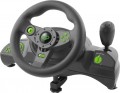 |  |
|---|---|---|
| Esperanza Steering Wheel Nitro | Trust GXT-288 | |
| Outdated Product | from $89.28 up to $107.56 | |
| User reviews | ||
| TOP sellers | ||
Steering wheel with gear lever and foot pedals. Compatible with PC and PlayStation. Vibration function. Clamp for fastening to the table. | ||
| Device type (configuration) | steering wheel, pedals, and gearbox | steering wheel, pedals, and gearbox |
| Compatibility | PC (Windows) PlayStation 3 | PC (Windows) PlayStation 3 |
| Connection | wired | wired |
| Cable | USB-A | USB-A |
Technical specifications | ||
| Total number of buttons | 12 | 11 |
| Feedback | vibration | vibration |
| D-pad controller |  |  |
| Steering wheel turn | 270° | 270° |
| Paddle shifters | 2 pcs | |
| Pedals | accelerator brake | accelerator brake |
General information | ||
| Mounting | clamps | |
| Steering wheel cover | rubber | |
| Power source | USB port | USB port |
| Color | ||
| Added to E-Catalog | april 2018 | july 2016 |


Compare Esperanza Steering Wheel Nitro and Trust GXT-288
You may be interested in
My comparisons
Esperanza Steering Wheel Nitro often compared


Trust GXT-288 often compared


Glossary
Total number of buttons
The total number of buttons provided in the manipulator's design.
The more buttons, the more additional functions can be "assigned" to the manipulator, reducing the likelihood of having to use other control devices (e.g., a PC keyboard) during gameplay. However, many gaming consoles (see "Platform Compatibility") require a certain minimum number of buttons for a compatible gamepad — having fewer buttons would simply not allow full use of all the console functions. For instance, the standard controller for the PlayStation 4 has 11 buttons.
Note that the D-Pad manipulator (see below) is not counted in this calculation: it is considered a specific control device, although it is based on buttons.
The more buttons, the more additional functions can be "assigned" to the manipulator, reducing the likelihood of having to use other control devices (e.g., a PC keyboard) during gameplay. However, many gaming consoles (see "Platform Compatibility") require a certain minimum number of buttons for a compatible gamepad — having fewer buttons would simply not allow full use of all the console functions. For instance, the standard controller for the PlayStation 4 has 11 buttons.
Note that the D-Pad manipulator (see below) is not counted in this calculation: it is considered a specific control device, although it is based on buttons.
D-pad controller
D-pad controller helps control the menu, camera, and additional functions directly from the gaming wheel without resorting to the keyboard or gamepad. It is usually a cross-shaped pad with up, down, left, and right presses, and some models also support diagonal commands. This element is convenient for switching cameras, navigating settings, selecting menu items, controlling onboard functions, or issuing quick commands during a race.
Paddle shifters
Paddle shifters behind the steering wheel, which can be pressed with fingers without removing hands from the wheel, are most often used for gear shifting. Basic models usually have two paddles: the right one is for shifting up, and the left one is for shifting down. More advanced wheels may have 4 or 6 paddles, with additional pairs used for clutch, manual start, DRS, car adjustments, or other commands in simulators. The more paddle shifters there are, the more convenient it is to control important functions directly from the wheel, especially in F1, GT, and other racing simulators.
Mounting
Mounting demonstrates how a racing wheel is secured on a work surface to prevent movement during turns, vibrations, or force feedback.
— Clamps. Clamps (screw clamp mounting) secure the racing wheel to the table by mechanically pressing it to the tabletop. This option is more reliable than suction cups and better suited for wheels with vibration or force feedback, as the base shifts less during sudden turns. When choosing, it is important to consider the thickness of the table and the shape of the edge so the clamp can properly grab on and securely fix the wheel.
— Suction cups. Suction cups hold the wheel by sticking to a smooth table surface. This option is simpler and quicker to install, but usually less reliable, especially on rough, dusty, or uneven surfaces. Suction cups are more suitable for lightweight wheels without powerful feedback and for temporary setups, when you don't want to screw in clamps each time.
— Bolts. A rigid method for installing pedals, gear shifters, handbrakes, where the device is bolted to a cockpit, stand, or special platform through mounting holes. Such mounting is more reliable than clamps and suction cups because the device does not shift even during active driving.
— Clamps. Clamps (screw clamp mounting) secure the racing wheel to the table by mechanically pressing it to the tabletop. This option is more reliable than suction cups and better suited for wheels with vibration or force feedback, as the base shifts less during sudden turns. When choosing, it is important to consider the thickness of the table and the shape of the edge so the clamp can properly grab on and securely fix the wheel.
— Suction cups. Suction cups hold the wheel by sticking to a smooth table surface. This option is simpler and quicker to install, but usually less reliable, especially on rough, dusty, or uneven surfaces. Suction cups are more suitable for lightweight wheels without powerful feedback and for temporary setups, when you don't want to screw in clamps each time.
— Bolts. A rigid method for installing pedals, gear shifters, handbrakes, where the device is bolted to a cockpit, stand, or special platform through mounting holes. Such mounting is more reliable than clamps and suction cups because the device does not shift even during active driving.
Steering wheel cover
The steering wheel covering affects grip, tactile sensations, wear resistance, and comfort during long gameplay. The material determines whether the wheel is pleasant to the touch, won't slip in your hands, and how quickly the surface will lose its appearance with active use.
— Rubber. Practical, affordable, and well-suited for basic gaming wheels. This covering withstands frequent use, is easy to clean, and requires less maintenance, but usually feels simpler compared to leather or Alcantara.
— Alcantara. A pleasant-to-touch material that provides a firm grip, often found in more expensive and sporty steering wheels. It is great for simulators and active driving but gets dirty faster and requires gentle care, especially if playing without gloves.
— Leather. Usually represented by faux leather, making the wheel more akin to a car's and pleasant for everyday gaming. This covering is ideal for general use, GT, rally, and road simulators but may wear out over time in areas of active grip.
— Rubber. Practical, affordable, and well-suited for basic gaming wheels. This covering withstands frequent use, is easy to clean, and requires less maintenance, but usually feels simpler compared to leather or Alcantara.
— Alcantara. A pleasant-to-touch material that provides a firm grip, often found in more expensive and sporty steering wheels. It is great for simulators and active driving but gets dirty faster and requires gentle care, especially if playing without gloves.
— Leather. Usually represented by faux leather, making the wheel more akin to a car's and pleasant for everyday gaming. This covering is ideal for general use, GT, rally, and road simulators but may wear out over time in areas of active grip.