
Comparison Dune HD Sky 4K Plus vs Dune HD Pro 4K
Add to comparison | 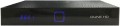 | 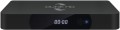 |
|---|---|---|
| Dune HD Sky 4K Plus | Dune HD Pro 4K | |
from $202.63 up to $308.88 | from $333.33 up to $343.05 | |
| TOP sellers | ||
Support for HDR technology | HDR 4K 60 fps. Support for Blu-ray images and 3D content. Remote control with programmable keys and backlight. bluetooth. Display. eSATA. USB 3.0 Support for multi-channel audio. | |
| Type | Media Player | Media Player |
| Operating system | Android (AOSP) | Android (AOSP) |
Connectivity and interfaces | ||
| Bluetooth | v4.2 | v4.2 |
| Wi-Fi | Wi-Fi 5 (802.11ac) | Wi-Fi 5 (802.11ac) |
| Card reader |  | |
| IPTV support | | |
Connectors | ||
| HDMI | 1 | v 2.0 |
| USB-A 2.0 | 3 pcs | 2 pcs |
| USB-A 5Gbps | 1 pcs | |
| LAN | 100 Mbps | 1 Gbps |
| AV output |  | |
| Optical output | | |
Hardware | ||
| CPU | Amlogic S905D | Realtek RTD1295 |
| CPU cores | 4 | |
| CPU frequency | 1.5 GHz | 1.5 GHz |
| RAM | 2 GB | 2 GB |
| Built-in memory | 16 GB | 16 GB |
| Ultra HD 4K support | | |
| HDR support | HDR10 | HDR10 |
General | ||
| Video decoders | H.264, H.265 | H.264, H.265 |
| Audio decoders | Dolby Digital, DTS | Dolby Digital, DTS |
| Screen | | |
| Remote control | + | + |
| Dimensions (WxHxD) | 260x160x40 mm | 187x140x29 mm |
| Weight | 510 g | |
| Added to E-Catalog | february 2018 | february 2018 |


Compare Dune HD Sky 4K Plus and Pro 4K
You may be interested in
My comparisons
Dune HD Sky 4K Plus often compared


Dune HD Pro 4K often compared


Glossary
HDMI
HDMI is the most common modern interface for working with HD content and multi-channel audio. Video and audio signals with this connection are transmitted over a single cable, and the bandwidth in the latest versions ( HDMI 2.0 and HDMI 2.1) is enough to work with UltraHD resolution and even higher. Almost any modern screen (TV, monitor, etc.) with HD support has at least one HDMI input, which is why most media players and TV receivers have outputs of this type. However, there are also models without HDMI — these are mostly outdated or the most inexpensive solutions that use only analogue video interfaces. There are also models for several HDMI and in most cases one of these ports is for the incoming signal, while the HDMI ports differ in versions.
— v 1.4. The version presented back in 2009, however, does not lose popularity to this day. Supports 4K (4096x2160) video at 24 fps and Full HD at 120 fps; the latter, among other things, allows you to transfer 3D video over this interface. In addition to the original v 1.4, there are also improved versions v 1.4a and v 1.4b, where the possibilities for working with 3D have been further expanded.
-v 2.0. Version released in 2013. Among other things, it introduced the ability to work with 4K video at speeds up to 60 fps, compatibility with ultra-wide format 21: 9, as well as support for up to 32 channels and 4...audio streams simultaneously. HDR support was not originally included in this release, but was introduced in v 2.0a and further enhanced in v 2.0b; media players from this category can support both the original version 2.0 and one of the improved ones.
— v 2.1. 2017 version, also known as HDMI Ultra High Speed. Indeed, it provides a very solid bandwidth, allowing you to work even with 10K video at a speed of 120 fps; in addition, a number of improvements have been made to HDR support. Note that the full use of HDMI v 2.1 is possible only with a special cable, but the functions of earlier versions remain available when using conventional wires.
— v 1.4. The version presented back in 2009, however, does not lose popularity to this day. Supports 4K (4096x2160) video at 24 fps and Full HD at 120 fps; the latter, among other things, allows you to transfer 3D video over this interface. In addition to the original v 1.4, there are also improved versions v 1.4a and v 1.4b, where the possibilities for working with 3D have been further expanded.
-v 2.0. Version released in 2013. Among other things, it introduced the ability to work with 4K video at speeds up to 60 fps, compatibility with ultra-wide format 21: 9, as well as support for up to 32 channels and 4...audio streams simultaneously. HDR support was not originally included in this release, but was introduced in v 2.0a and further enhanced in v 2.0b; media players from this category can support both the original version 2.0 and one of the improved ones.
— v 2.1. 2017 version, also known as HDMI Ultra High Speed. Indeed, it provides a very solid bandwidth, allowing you to work even with 10K video at a speed of 120 fps; in addition, a number of improvements have been made to HDR support. Note that the full use of HDMI v 2.1 is possible only with a special cable, but the functions of earlier versions remain available when using conventional wires.
USB-A 2.0
A classic USB port for connecting flash drives, receivers, keyboards, and other compatible peripherals, designed for data transfer up to 480 Mbps. This type of port is convenient for basic tasks where high speed isn't necessary, but it significantly falls behind more modern USB versions for very large files and fast external drives. The major advantage here is compatibility: USB-A 2.0 has long remained the most familiar format for mass accessories.
LAN
LAN — connector for wired connection to the Internet and/or local area network using an Ethernet cable. A wired connection is not as convenient as Wi-Fi (see "Multimedia"), but it is considered more reliable and provides faster data transfer speeds. And the speed indicators depend on the device and can be 100 Mbps and 1 Gbps.
AV output
— AV output. Analogue output for video and audio transferring. Previously, due to the large size of the equipment, it consisted of 3 RCA jacks and was connected to the TV accordingly. Now the devices have become more compact and don't have free space on the case. Therefore, the AV output is a single headphone jack, to which a tee cable is already connected (check availability in the package). Since all components of the video signal are on the same cable, the picture quality and immunity to interference are low.
CPU
The model of the CPU installed in the media player.
This information is mainly of reference value: the processor is selected in such a way as to provide certain practical characteristics (maximum resolution, support for certain standards, embedded applications, etc.). So when choosing, you should focus primarily on these specifications. However, if you wish, knowing the processor model, you can find detailed data on it and evaluate the capabilities of the media centre to work with resource-consuming applications. This can be useful, in particular, if you choose an Android model (see above) and plan to use additional software intensively — the set of applications for this OS is very extensive, and some of them are quite demanding on system resources.
Also note that CPU data is often specified for advertising purposes — to emphasize that the device has a fairly advanced chip from a well-known brand. Among the most common brands of such processors are Allwinner, Amlogic, Rockchip, Realtek.
This information is mainly of reference value: the processor is selected in such a way as to provide certain practical characteristics (maximum resolution, support for certain standards, embedded applications, etc.). So when choosing, you should focus primarily on these specifications. However, if you wish, knowing the processor model, you can find detailed data on it and evaluate the capabilities of the media centre to work with resource-consuming applications. This can be useful, in particular, if you choose an Android model (see above) and plan to use additional software intensively — the set of applications for this OS is very extensive, and some of them are quite demanding on system resources.
Also note that CPU data is often specified for advertising purposes — to emphasize that the device has a fairly advanced chip from a well-known brand. Among the most common brands of such processors are Allwinner, Amlogic, Rockchip, Realtek.
CPU cores
The core is the part of the processor that executes a single thread of instructions. Accordingly, the presence of multiple cores allows to work with multiple threads simultaneously, which has a positive effect on performance. Theoretically, more cores (4 cores or even 6 cores or more) can increase the efficiency of the processor. However, in fact, CPU performance depends on so many additional factors that the number of cores is purely a reference parameter. So, a high-end dual-core processor may well be more performant than an inexpensive quad-core one.