
Comparison Asus Xonar DGX vs Asus Xonar DG
Add to comparison | 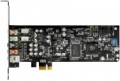 | 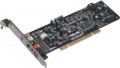 |
|---|---|---|
| Asus Xonar DGX | Asus Xonar DG | |
from $37.80 up to $43.44 | from $47.25 | |
| TOP sellers | ||
Dimensions allow you to install it in an ultra-compact case. Support for headphones with an impedance up to 300 ohms. Xonar Audio Centre software. | ||
| Type | gaming | gaming |
Specs | ||
| Form factor | internal | internal |
| Interface | PCIe | PCI |
| Channels | 5.1 | 5.1 |
| Audiochip | C-Media CMI8786 | C-Media CMI8786 |
| ASIO |  |  |
DAC | ||
| DAC resolution | 24 bit | 24 bit |
| Max. sampling rate | 96 kHz | 96 kHz |
| Signal-to-noise ratio | 105 dB | 105 dB |
ADC | ||
| ADC resolution | 24 bit | 24 bit |
| Max. sampling rate | 96 kHz | 96 kHz |
| Signal-to-noise ratio | 103 dB | 103 dB |
| More features | headphones amplifier front panel output | headphones amplifier front panel output |
Inputs | ||
| mini-Jack (3.5 mm) | 1 | 1 |
Outputs | ||
| mini-Jack (3.5 mm) | 3 | 3 |
| Optical S/PDIF | 1 | 1 |
| Added to E-Catalog | december 2013 | december 2013 |


Compare Asus Xonar DGX and Xonar DG
You may be interested in
My comparisons
Asus Xonar DGX often compared


Asus Xonar DG often compared


Glossary
Interface
The main interface used to connect a sound card to a computer or other device.
Like the sound cards themselves, the interfaces used in them are divided into internal (PCI, PCIe) and external (USB-A, USB-C, FireWire, Thunderbolt, 3.5 mm mini-jack, Bluetooth). Here's a more detailed description of each of these options:
— PCIe. The main modern interface for connecting internal peripherals (including sound cards) to computer motherboards. It is used in most internal type models (see above). The main advantage of PCIe solutions is that connectors for their connection can be found on almost any modern "motherboard". True, these connectors may be needed for other components — graphics cards, TV tuners, or even SSD drives; however, even the simplest motherboards usually have several PCIe slots, so this point cannot be considered a serious disadvantage.
— PCI. An interface for connecting expansion cards to the PC motherboard. It is the predecessor of PCIe, has significantly lower bandwidth and more modest capabilities, so overall it is outdated. Nevertheless, motherboards with such connectors, and sound cards for the PCI interface (including quite advanced ones), continue to be produced. This is because working with sound requires comparatively low bandwidth; and installing a so...und card in a PCI slot leaves PCIe connectors free, which may be required for components more demanding on connection speed. In any case, before purchasing such a sound card, it does not hurt to separately ensure that there is a connector for its connection on the "motherboard".
— USB-A. Connection through a standard USB port. Until recently, it was the most popular interface for external peripherals, found in almost all PCs and laptops. Most external sound cards were made for USB. The disadvantage of this connection method is that USB connectors may be needed for other devices, which creates problems with a small number of ports and an abundance of peripherals. On the other hand, such situations arise not so often, and to solve them, it is enough to have a USB hub on hand.
It should be noted separately that full-size USB ports in modern PCs and laptops have been replaced by more compact USB-C (see below).
— USB-C. A peripheral connector with a symmetrical contact group, which often replaces full-size USB ports on modern PCs and laptops. Many new models of external sound cards are made for this interface. The only exceptions are individual Thunderbolt devices (see below) — for them, Thunderbolt is indicated as the peripheral connection port, not USB-C.
— Thunderbolt. A universal peripheral port mainly used in Apple computers and laptops. It is important to consider that different generations of Thunderbolt differ in the type of physical connector: versions v1 and v2 use the miniDisplayPort socket, version v3 uses the USB-C socket. So when choosing a sound card with such a connection, it is necessary to clarify this point. On the other hand, Thunderbolt versions with different connectors are fully compatible with each other through corresponding adapters.
— FireWire. Also known as IEEE 1394. An interface for external devices that was somewhat popular some time ago but has now almost fallen out of use.
— 3.5 mm (mini-jack). The mini-jack is one of the most common audio connectors. However, it is usually provided as one of the audio inputs (see below) and is very rarely used as the main interface for connecting a sound card to an external device. Such a connection is mainly found in specialized gaming models, intended for use with consoles as well. In these models, the mini-jack may be combined, allowing for the connection of both a line (analog) signal via a regular electrical wire and an optical (digital) signal via a TOSLINK cable. It is worth noting that the optical interface is notable for being completely immune to external interference; it allows for transmitting multi-channel sound, but cables for such connections require careful handling.
— Bluetooth. Wireless connection following the Bluetooth standard. It is mainly found in models intended for use with smartphones and tablets — these gadgets have few wired connectors, but Bluetooth modules are almost guaranteed to be present. However, initial sound transmission is highly compressed, noticeably affecting its quality; to remedy this drawback, modern Bluetooth sound cards usually support aptX. Of course, this technology must be supported by the signal source as well — make sure of this before purchasing.
Like the sound cards themselves, the interfaces used in them are divided into internal (PCI, PCIe) and external (USB-A, USB-C, FireWire, Thunderbolt, 3.5 mm mini-jack, Bluetooth). Here's a more detailed description of each of these options:
— PCIe. The main modern interface for connecting internal peripherals (including sound cards) to computer motherboards. It is used in most internal type models (see above). The main advantage of PCIe solutions is that connectors for their connection can be found on almost any modern "motherboard". True, these connectors may be needed for other components — graphics cards, TV tuners, or even SSD drives; however, even the simplest motherboards usually have several PCIe slots, so this point cannot be considered a serious disadvantage.
— PCI. An interface for connecting expansion cards to the PC motherboard. It is the predecessor of PCIe, has significantly lower bandwidth and more modest capabilities, so overall it is outdated. Nevertheless, motherboards with such connectors, and sound cards for the PCI interface (including quite advanced ones), continue to be produced. This is because working with sound requires comparatively low bandwidth; and installing a so...und card in a PCI slot leaves PCIe connectors free, which may be required for components more demanding on connection speed. In any case, before purchasing such a sound card, it does not hurt to separately ensure that there is a connector for its connection on the "motherboard".
— USB-A. Connection through a standard USB port. Until recently, it was the most popular interface for external peripherals, found in almost all PCs and laptops. Most external sound cards were made for USB. The disadvantage of this connection method is that USB connectors may be needed for other devices, which creates problems with a small number of ports and an abundance of peripherals. On the other hand, such situations arise not so often, and to solve them, it is enough to have a USB hub on hand.
It should be noted separately that full-size USB ports in modern PCs and laptops have been replaced by more compact USB-C (see below).
— USB-C. A peripheral connector with a symmetrical contact group, which often replaces full-size USB ports on modern PCs and laptops. Many new models of external sound cards are made for this interface. The only exceptions are individual Thunderbolt devices (see below) — for them, Thunderbolt is indicated as the peripheral connection port, not USB-C.
— Thunderbolt. A universal peripheral port mainly used in Apple computers and laptops. It is important to consider that different generations of Thunderbolt differ in the type of physical connector: versions v1 and v2 use the miniDisplayPort socket, version v3 uses the USB-C socket. So when choosing a sound card with such a connection, it is necessary to clarify this point. On the other hand, Thunderbolt versions with different connectors are fully compatible with each other through corresponding adapters.
— FireWire. Also known as IEEE 1394. An interface for external devices that was somewhat popular some time ago but has now almost fallen out of use.
— 3.5 mm (mini-jack). The mini-jack is one of the most common audio connectors. However, it is usually provided as one of the audio inputs (see below) and is very rarely used as the main interface for connecting a sound card to an external device. Such a connection is mainly found in specialized gaming models, intended for use with consoles as well. In these models, the mini-jack may be combined, allowing for the connection of both a line (analog) signal via a regular electrical wire and an optical (digital) signal via a TOSLINK cable. It is worth noting that the optical interface is notable for being completely immune to external interference; it allows for transmitting multi-channel sound, but cables for such connections require careful handling.
— Bluetooth. Wireless connection following the Bluetooth standard. It is mainly found in models intended for use with smartphones and tablets — these gadgets have few wired connectors, but Bluetooth modules are almost guaranteed to be present. However, initial sound transmission is highly compressed, noticeably affecting its quality; to remedy this drawback, modern Bluetooth sound cards usually support aptX. Of course, this technology must be supported by the signal source as well — make sure of this before purchasing.
ASIO
Sound card compatible with ASIO standard.
ASIO (an abbreviation for Audio Stream Input/Output, i.e. “audio stream input-output”) is a technology designed for professional work with sound in the Windows environment; in particular, it reduces latency and improves the accuracy of the audio stream. If you do not plan to seriously engage in recording, mixing tracks, etc., most likely you will not need this function, but for musicians, sound engineers and other similar professionals, it can be very useful. The ASIO standard provides both software and hardware requirements; therefore, to fully use it, you must have a compatible audio card.
ASIO (an abbreviation for Audio Stream Input/Output, i.e. “audio stream input-output”) is a technology designed for professional work with sound in the Windows environment; in particular, it reduces latency and improves the accuracy of the audio stream. If you do not plan to seriously engage in recording, mixing tracks, etc., most likely you will not need this function, but for musicians, sound engineers and other similar professionals, it can be very useful. The ASIO standard provides both software and hardware requirements; therefore, to fully use it, you must have a compatible audio card.