
Comparison WD Blue WD5000AZLX 500 GB 32/7200 vs WD Blue 2.5" WD5000LPVX 500 GB 8/5400 CMR
Add to comparison | 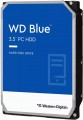 |  |
|---|---|---|
| WD Blue WD5000AZLX 500 GB 32/7200 | WD Blue 2.5" WD5000LPVX 500 GB 8/5400 CMR | |
| Compare prices 12 | Compare prices 22 | |
| User reviews | ||
| TOP sellers | ||
| Placement | built-in | built-in |
| Type | HDD | HDD |
| Features | for PC | for PC |
| Volume | 500 GB | 500 GB |
| Form factor | 3.5 " | 2.5 " |
| Connection | SATA3 | SATA3 |
| Manufacturer's warranty | 2 years | 2 years |
Technical specs | ||
| Cache memory | 32 MB | 8 MB |
| Record technology | CMR | CMR |
| RPM | 7200 rpm | 5400 rpm |
| Data transfer rate | 150 MB/s | |
| Average search time | 6 ms | |
| Operation power consumption | 6.8 W | 1.4 W |
| Standby power consumption | 1.2 W | 0.55 W |
| Reading noise level | 29 dB | |
| Standby mode noise level | 30 dB | |
| MTBF (on/off) | 300 K | 600 K |
General | ||
| Size | 147x102x26 mm | 100x70x7 mm |
| Weight | 450 g | 90 g |
| Added to E-Catalog | december 2015 | november 2015 |

Compare WD Blue WD5000AZLX and Blue 2.5" WD5000LPVX
You may be interested in
My comparisons
WD Blue often compared


WD Blue 2.5" often compared

Glossary
Form factor
The form factor in which the hard drive is made.
This indicator determines primarily the size of the device. But its more specific meaning depends on the execution (see the relevant paragraph). So, in the case of external drives, only the overall dimensions of the case depend on the form factor, and then quite approximately. But internal HDDs are installed in slots with a well-defined size and location of holes for fasteners; these holes are made specifically for one form factor or another. For desktop PCs, the standard form factor is 3.5", for laptops — 2.5" ; at the same time, there has been a recent trend in desktops towards miniaturization and the transition to 2.5-inch drives. Theoretically, there is an even smaller form factor — 1.8", but in fact it is used mainly among ultra-compact external HDDs.
This indicator determines primarily the size of the device. But its more specific meaning depends on the execution (see the relevant paragraph). So, in the case of external drives, only the overall dimensions of the case depend on the form factor, and then quite approximately. But internal HDDs are installed in slots with a well-defined size and location of holes for fasteners; these holes are made specifically for one form factor or another. For desktop PCs, the standard form factor is 3.5", for laptops — 2.5" ; at the same time, there has been a recent trend in desktops towards miniaturization and the transition to 2.5-inch drives. Theoretically, there is an even smaller form factor — 1.8", but in fact it is used mainly among ultra-compact external HDDs.
Cache memory
The amount of internal hard drive memory. This memory is an intermediate link between the high-speed computer RAM and the relatively slow mechanics responsible for reading and writing information on disk platters. In particular, the buffer is used to store the most frequently requested data from the disk — thus, the access time to them is reduced.
Technically, the size of the buffer affects the speed of the hard drive — the larger the buffer, the faster the drive. However, this influence is rather insignificant, and at the level of human perception, a significant difference in performance is noticeable only when the buffer size of the two drives differs many times — for example, 8 MB and 64 MB.
Technically, the size of the buffer affects the speed of the hard drive — the larger the buffer, the faster the drive. However, this influence is rather insignificant, and at the level of human perception, a significant difference in performance is noticeable only when the buffer size of the two drives differs many times — for example, 8 MB and 64 MB.
RPM
For drives used in a PC (see "Intended use"), 5400 rpm(normal) and 7200 rpm(high) are considered standard speeds. There are also more specific options, including models with the ability to adjust the speed depending on the load. In server HDDs, in turn, higher speeds can be used — 10,000 rpm and even 15,000 rpm.
Data transfer rate
The speed of data transfer between the disk and client devices is determined by the type of drive, spindle speed, memory buffer size and connection connectors. The last parameter is the most important, since it is impossible to exceed the bandwidth of a particular interface.
Average search time
The time it takes for the hard disk mechanics to find random requested data to read. For each specific case, the search time is different, as it depends on the location of the data on the surface of the disk and the position of the read head, therefore, the average value is indicated in the characteristics of hard drives. The lower the average seek time, the faster the disk works, all other things being equal.
Operation power consumption
The amount of power consumed by the disk when reading and writing information. In fact, this is the peak power consumption, it is in these modes that the drive consumes the most energy.
HDD power consumption data is needed primarily to calculate the overall system power consumption and power supply requirements for the system. In addition, for laptops that are planned to be used often "in isolation from outlets", it is advisable to choose more economical drives.
HDD power consumption data is needed primarily to calculate the overall system power consumption and power supply requirements for the system. In addition, for laptops that are planned to be used often "in isolation from outlets", it is advisable to choose more economical drives.
Standby power consumption
The amount of power consumed by the disk "idle". In the on state, the disk platters rotate regardless of whether information is being written or read or not — maintaining this rotation takes the energy consumed while waiting.
The lower the power consumption while waiting, the more economical the disk is, the less energy it consumes. At the same time, we note that in fact this parameter is relevant mainly when choosing a drive for a laptop, when energy efficiency is crucial. For stationary PCs, “idle” power consumption does not play a special role, and when calculating the requirements for a power supply, it is necessary to take into account not this indicator, but the power consumption during operation (see above).
The lower the power consumption while waiting, the more economical the disk is, the less energy it consumes. At the same time, we note that in fact this parameter is relevant mainly when choosing a drive for a laptop, when energy efficiency is crucial. For stationary PCs, “idle” power consumption does not play a special role, and when calculating the requirements for a power supply, it is necessary to take into account not this indicator, but the power consumption during operation (see above).
Reading noise level
The level of noise produced by the disk when reading and/or writing information. The source of sound in this case is the moving plates of the disk, as well as the mechanics that control the reading heads. The lower the noise level, the more comfortable the use of the device. The maximum noise produced by modern hard drives during operation is about 50 dB — this is comparable to the sound background in an average office.
Standby mode noise level
The amount of noise produced by a disk "idle", when no read and/or write operations are performed. The sound source in this case is the plates — they rotate all the time while the disk is on; since no other mechanics are involved, idle noise is generally lower than read/write noise. The lower the noise level, the more comfortable the use of the device. The maximum noise level of modern hard drives in standby mode is about 40 dB — this is comparable to quiet human speech.