
Comparison Universal Audio Volt 2 vs Steinberg UR22C
Add to comparison | 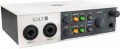 |  |
|---|---|---|
| Universal Audio Volt 2 | Steinberg UR22C | |
| Compare prices 5 | from $189.63 | |
| User reviews | ||
| TOP sellers | ||
Built-in mic preamp with Vintage Preamp mode to emulate the sound of a Universal Audio 610 tube preamp. Built-in headphone amplifier. 5V input for optional power supply. The power supply is not included in the package. | ||
| Form factor | desktop | desktop |
| Number of channels | 2 in 2 out | 2 in 2 out |
| Connection | USB 2.0 type C | USB 3.1 type C |
| DAC | 24 bit 192 kHz | 32 bit 192 kHz |
| Frequency range | 20 – 20000 Hz | 20 – 22000 Hz |
| Preamplifier | 1 pcs | 2 pcs |
Inputs | ||
| Total Jack / XLR audio inputs | x2 Combo XLR | x2 Combo XLR |
| Microphone | Combo XLR 2 pcs | Combo XLR 2 pcs |
| Instrument | Combo XLR 2 pcs | Combo XLR 1 pcs |
| Line | Combo XLR 2 pcs | Combo XLR 2 pcs |
| MIDI in | 1 | 1 |
Outputs | ||
| Total Jack/XLR audio outputs | Jack x3 | Jack x3 |
| Main | Jack (6.35 mm) 2 pcs | Jack (6.35 mm) 2 pcs |
| MIDI out | 1 | 1 |
| Headphones | Jack x1 | Jack x1 |
Features | ||
| Phantom power |  | |
| ASIO | | |
| DSP processor |  | |
| Loopback | | |
| Front headphone output | | |
| Headphone level adjustment | | |
| Software included | Ableton Live Lite, Softube Marshall Plexi Classic Amp Softube Time & Tone Bundle, | Steinberg Plus, Cubase AI, Cubasis LE, dspMixFx, Basic FX Suite |
General | ||
| ОС | Windows / macOS / iOS / iPadOS | Windows / macOS / iOS / iPadOS |
| Power supply | USB / mains | USB / mains |
| External power supply | | |
| Power consumption | 4.5 W | |
| Dimensions (WxDxH) | 174x130x53 mm | 159x159x47 mm |
| Weight | 0.65 kg | 1 kg |
| Color | ||
| Added to E-Catalog | june 2023 | september 2021 |





Compare Universal Audio Volt 2 and Steinberg UR22C
Price comparison
You may be interested in
My comparisons
Universal Audio Volt 2 often compared


Steinberg UR22C often compared


Glossary
Connection
Connection interfaces that the audio interface is equipped with.
- USB-A. Connection via standard USB port. Until recently, this was the most popular interface for external peripherals, found in almost all PCs and laptops. Nowadays, it is often replaced by a USB type C port (see the corresponding paragraph). Most USB-A audio interfaces draw power directly from the PC or other host device.
- USB type B. The connector has a characteristic square shape, noticeably different from the well-known rectangular USB-A ports. In audio interfaces, it is used to transmit signals from external sources to a computer for recording and processing.
- USB type C. A peripheral connector with a symmetrical contact group, which often replaces full-size USB ports on board modern PCs and laptops. Many new models of audio interfaces are being made for this interface. An exception to the rule is individual instances for Thunderbolt. For them, it is Thunderbolt that is indicated, and not USB type C.
- Thunderbolt v2. Initially, Thunderbolt is a universal connector used primarily in Apple computer equipment. On board audio interfaces it is used as a general peripheral connector (similar to USB). This uses the miniDisplayPort hardware port. The data transfer speed in this version reaches 20 Gbit/s. Recently, the v2 edition has been rep...laced by the Thunderbolt v3 version (see the corresponding paragraph).
- Thunderbolt v3. A universal interface that is found mainly in Apple technology. In audio interfaces it is used as a general peripheral connector (similar to USB). Specifically, Thunderbolt v3 provides data transfer speeds of up to 40 Gbps and uses a USB type C hardware connector (as opposed to earlier versions based on miniDisplayPort).
- Lightning. A connector used exclusively in Apple portable electronics (since 2012). Accordingly, audio interfaces with such a port are aimed at ease of connection to iPhones and iPads. Note that today there has been a transition from proprietary Lightning to the common USB type C - the latest generations of Apple gadgets are produced with just such a peripheral connection connector.
- mini-USB. A smaller version of the full-size USB interface, created for portable equipment. It is found very rarely in audio interfaces.
- FireWire. Universal connector, also known as IEEE 1394 or i-Link. In terms of functionality, it is analogous to USB, and in some characteristics it even surpasses it. However, FireWare is much less common. Used to connect to computers and some types of specialized audio equipment.
— Dante Dante connectors are used to connect audio interfaces to a network to transmit audio digitally. In this case, a standard Ethernet port (RJ-45) is used for physical access to the network.
- USB-A. Connection via standard USB port. Until recently, this was the most popular interface for external peripherals, found in almost all PCs and laptops. Nowadays, it is often replaced by a USB type C port (see the corresponding paragraph). Most USB-A audio interfaces draw power directly from the PC or other host device.
- USB type B. The connector has a characteristic square shape, noticeably different from the well-known rectangular USB-A ports. In audio interfaces, it is used to transmit signals from external sources to a computer for recording and processing.
- USB type C. A peripheral connector with a symmetrical contact group, which often replaces full-size USB ports on board modern PCs and laptops. Many new models of audio interfaces are being made for this interface. An exception to the rule is individual instances for Thunderbolt. For them, it is Thunderbolt that is indicated, and not USB type C.
- Thunderbolt v2. Initially, Thunderbolt is a universal connector used primarily in Apple computer equipment. On board audio interfaces it is used as a general peripheral connector (similar to USB). This uses the miniDisplayPort hardware port. The data transfer speed in this version reaches 20 Gbit/s. Recently, the v2 edition has been rep...laced by the Thunderbolt v3 version (see the corresponding paragraph).
- Thunderbolt v3. A universal interface that is found mainly in Apple technology. In audio interfaces it is used as a general peripheral connector (similar to USB). Specifically, Thunderbolt v3 provides data transfer speeds of up to 40 Gbps and uses a USB type C hardware connector (as opposed to earlier versions based on miniDisplayPort).
- Lightning. A connector used exclusively in Apple portable electronics (since 2012). Accordingly, audio interfaces with such a port are aimed at ease of connection to iPhones and iPads. Note that today there has been a transition from proprietary Lightning to the common USB type C - the latest generations of Apple gadgets are produced with just such a peripheral connection connector.
- mini-USB. A smaller version of the full-size USB interface, created for portable equipment. It is found very rarely in audio interfaces.
- FireWire. Universal connector, also known as IEEE 1394 or i-Link. In terms of functionality, it is analogous to USB, and in some characteristics it even surpasses it. However, FireWare is much less common. Used to connect to computers and some types of specialized audio equipment.
— Dante Dante connectors are used to connect audio interfaces to a network to transmit audio digitally. In this case, a standard Ethernet port (RJ-45) is used for physical access to the network.
DAC
Characteristics of the built-in DAC - a digital-to-analog converter for converting digital audio into line-level analog audio, usually in stereo format.
— Bit depth. Bit size of the digital-to-analog converter (DAC) used in the device. In this case, the meaning of this parameter is as follows: the bit depth of the DAC must be no lower than the bit depth of the audio signal with which the converter is planned to be used, otherwise the device will not be able to effectively cope with the conversion. As for specific values, the standard options in modern audio interfaces are 16 bit, 24 bit and 32 bit.
- Sampling frequency. The sampling rate of the digital-to-analog converter (DAC) installed in the audio interface. Let us recall that such a converter is responsible for converting digital audio into an analog audio signal. The paragraph usually indicates the maximum value of the sampling frequency, for which one of the standard values corresponding to a certain sound quality is used ( 48 kHz, 96 kHz, 192 kHz).
— Bit depth. Bit size of the digital-to-analog converter (DAC) used in the device. In this case, the meaning of this parameter is as follows: the bit depth of the DAC must be no lower than the bit depth of the audio signal with which the converter is planned to be used, otherwise the device will not be able to effectively cope with the conversion. As for specific values, the standard options in modern audio interfaces are 16 bit, 24 bit and 32 bit.
- Sampling frequency. The sampling rate of the digital-to-analog converter (DAC) installed in the audio interface. Let us recall that such a converter is responsible for converting digital audio into an analog audio signal. The paragraph usually indicates the maximum value of the sampling frequency, for which one of the standard values corresponding to a certain sound quality is used ( 48 kHz, 96 kHz, 192 kHz).
Frequency range
The audio frequency range supported by the device. Most often we are talking about the range of frequencies that a device can produce in an analog audio output signal.
In general, the wider the frequency range, the fuller the sound, the lower the likelihood that the audio interface will “cut off” the upper or lower frequencies. However, it must be taken into account that the human ear is capable of hearing sounds at frequencies from 16 to 22,000 Hz, and the upper limit decreases with age. So from a practical point of view, it makes no sense to provide a wider range in audio technology. And the impressive numbers found in high-end devices are rather a “side effect” of advanced electronic circuits and are given in the specifications mainly for advertising purposes. Also remember that the overall sound quality is affected by many other factors besides frequency range.
In general, the wider the frequency range, the fuller the sound, the lower the likelihood that the audio interface will “cut off” the upper or lower frequencies. However, it must be taken into account that the human ear is capable of hearing sounds at frequencies from 16 to 22,000 Hz, and the upper limit decreases with age. So from a practical point of view, it makes no sense to provide a wider range in audio technology. And the impressive numbers found in high-end devices are rather a “side effect” of advanced electronic circuits and are given in the specifications mainly for advertising purposes. Also remember that the overall sound quality is affected by many other factors besides frequency range.
Preamplifier
The number of preamplifiers in the design of an audio interface, designed to work with a weak signal - which directly comes from a microphone, pickup, etc. Each preamp corresponds to one low-level input channel. For example, if an audio interface has four preamps, it can simultaneously process signals from four microphones or other devices connected to those preamps. Professional studio audio interfaces are often equipped with a large number of preamps to provide flexibility and the ability to record from a large number of sources simultaneously.
Instrument
Connectors used to connect musical instruments (acoustic or bass guitars, keyboards, etc.). Most often they are made in the form of 6.35 mm Jack format sockets, but there are other options (see below). The audio signal from pickups has its own specific characteristics, so the instrument input typically features a higher input level and special impedance matching to ensure optimal sound quality.
— Jack (6.35 mm). Jack sockets (6.35 mm) are most widely used as instrument audio input. They are very large in size, thereby ensuring tighter contact, and support a balanced connection (for transmitting a high-quality signal without interference over fairly long wires). The number of Jack connectors (6.5 mm) usually corresponds to the number of tools that can be simultaneously connected to the device.
- XLR. A characteristic round connector, often combined with a Jack interface (6.5 mm). XLR is equipped with a locking lock and three contacts (there are other options in terms of quantity, but they are practically not found). The connector is used to transmit an analog signal through a balanced connection, which provides high immunity to interference - sufficient for professional use.
— Jack (6.35 mm). Jack sockets (6.35 mm) are most widely used as instrument audio input. They are very large in size, thereby ensuring tighter contact, and support a balanced connection (for transmitting a high-quality signal without interference over fairly long wires). The number of Jack connectors (6.5 mm) usually corresponds to the number of tools that can be simultaneously connected to the device.
- XLR. A characteristic round connector, often combined with a Jack interface (6.5 mm). XLR is equipped with a locking lock and three contacts (there are other options in terms of quantity, but they are practically not found). The connector is used to transmit an analog signal through a balanced connection, which provides high immunity to interference - sufficient for professional use.
DSP processor
The presence of a specialized processor in the device, which is used to process the audio signal in digital form. DSP processors are built into some audio interfaces to perform various audio processing operations in real time. This feature allows you to instantly apply various effects and audio processing without having to send a signal to your computer and back. This can be useful, for example, when streaming, where delays are extremely undesirable.
Loopback
The Loopback function allows you to combine the signal from connected microphones, instruments and other line-level sources with background music, audio tracks and other sounds played on the connected equipment (usually a computer). Loopback will come in handy when recording virtual instruments, podcasts, streaming, etc.
Software included
The software included with your audio interface may vary depending on the make and model. The vast majority of it is represented by drivers, utilities for managing the device, software for recording and editing sound, virtual instruments or effects, and all kinds of plugins. It is advisable to clarify separately which specific software components are included in the audio interface package.
Power consumption
Power in watts consumed by the device during operation.