
Comparison Valve Index VR KIT vs Lenovo Explorer
Add to comparison | 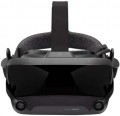 | 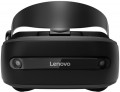 |
|---|---|---|
| Valve Index VR KIT | Lenovo Explorer | |
from $1,749.99 | from $350.00 | |
| TOP sellers | ||
Display refresh rate of 144 Hz in experimental mode. The response time of the matrix is from 0.330 ms to 0.530 ms. The package includes a VR helmet, a pair of controllers and two base stations. The front cameras are not designed for tracking, you will need external sensors to track in space. | 2 Inside-out motion detection cameras. Voice control system Cortana. Cortana is available in select markets, experience may vary by region. | |
| Device type | VR glasses | VR glasses |
| Purpose (compatibility) | Windows | Windows |
Specs | ||
| Screen resolution | 2880x1600 px | 2880x1440 px |
| Field of view | 130 ° | 110 ° |
| Refresh rate | 144 fps | 90 fps |
| 6DoF motion tracking |  | |
| Accelerometer | | |
| Gyroscope | | |
| Proximity sensor |  | |
| Lens distance adjusting | | |
| Pupillary distance adjustment | | |
Multimedia | ||
| USB-A | | |
| DisplayPort | v1.2 | |
| Microphone | | |
| Headphones | | |
| Headphone output | | |
General | ||
| Controller | | |
| External sensors | | |
| Material | plastic | plastic |
| Dimensions (HxWxD) | 185x102x95 mm | |
| Weight | 380 g | |
| Added to E-Catalog | november 2019 | september 2018 |


Compare Valve Index VR KIT and Lenovo Explorer
You may be interested in
Valve Index VR KIT often compared


Lenovo Explorer often compared


Glossary
Screen resolution
Resolution of built-in displays in glasses equipped with such equipment — that is, models for PC / consoles, as well as standalone devices (see "Intended use").
The higher the resolution, the more smooth and detailed the “picture” is given out by glasses, all other things being equal. Thanks to the development of technology nowadays, models with Full HD (1920x1080) screens and even higher resolutions are not uncommon. On the other hand, this parameter significantly affects the cost of points. In addition, it is worth remembering that in order to fully work with high-resolution displays, you need powerful graphics capable of playing relevant content. In the case of glasses for PCs and set-top boxes, this puts forward corresponding requirements for external devices, and in standalone models you have to use advanced integrated video adapters (which affects the cost even more).
The higher the resolution, the more smooth and detailed the “picture” is given out by glasses, all other things being equal. Thanks to the development of technology nowadays, models with Full HD (1920x1080) screens and even higher resolutions are not uncommon. On the other hand, this parameter significantly affects the cost of points. In addition, it is worth remembering that in order to fully work with high-resolution displays, you need powerful graphics capable of playing relevant content. In the case of glasses for PCs and set-top boxes, this puts forward corresponding requirements for external devices, and in standalone models you have to use advanced integrated video adapters (which affects the cost even more).
Field of view
The viewing angle provided by virtual reality glasses is the angular size of the space that falls into the user's field of view. Usually, the characteristics indicate the size of this space horizontally; however, if you need the most accurate information, this point needs to be specified separately.
The wider the viewing angle — the more the game space the user can see without turning his head, the more powerful the immersion effect and the less likely that the image will be subject to the "tunnel vision" effect. On the other hand, making the field of view too wide also does not make sense, given the characteristics of the human eye. In general, a large viewing angle is considered to be an angle of 100° or more. On the other hand, there are models where this indicator is 30° or even less — these are, usually, specific devices (for example, drone piloting glasses and augmented reality glasses), where such characteristics are quite justified given the overall functionality.
The wider the viewing angle — the more the game space the user can see without turning his head, the more powerful the immersion effect and the less likely that the image will be subject to the "tunnel vision" effect. On the other hand, making the field of view too wide also does not make sense, given the characteristics of the human eye. In general, a large viewing angle is considered to be an angle of 100° or more. On the other hand, there are models where this indicator is 30° or even less — these are, usually, specific devices (for example, drone piloting glasses and augmented reality glasses), where such characteristics are quite justified given the overall functionality.
Refresh rate
The refresh rate supported by the glasses' built-in screens, in simple terms, is the maximum frame rate that the screens are capable of delivering.
Recall that screens are provided in models for PC / consoles and in stand-alone devices (see "Intended use"). And the quality of the picture directly depends on this indicator: other things being equal, a higher frame rate provides a smoother image, without jerks and with good detail in dynamic scenes. The flip side of these benefits is an increase in price.
It is also worth considering that in some cases the actual frame rate will not be limited by the capabilities of the glasses, but by the characteristics of the external device or the properties of the content being played. For example, a relatively weak PC graphics card may not be able to pull out a high frame rate signal, or a certain frame rate may be set in the game and not provide boosting. Therefore, you should not chase after large values and points with a frequency of 90 fps will be enough.
Recall that screens are provided in models for PC / consoles and in stand-alone devices (see "Intended use"). And the quality of the picture directly depends on this indicator: other things being equal, a higher frame rate provides a smoother image, without jerks and with good detail in dynamic scenes. The flip side of these benefits is an increase in price.
It is also worth considering that in some cases the actual frame rate will not be limited by the capabilities of the glasses, but by the characteristics of the external device or the properties of the content being played. For example, a relatively weak PC graphics card may not be able to pull out a high frame rate signal, or a certain frame rate may be set in the game and not provide boosting. Therefore, you should not chase after large values and points with a frequency of 90 fps will be enough.
Proximity sensor
The presence of a sensor in the glasses that reacts to approaching the user's face.
A similar sensor is used to automatically switch between operating and standby modes: for example, when the user takes off the glasses, the sensor turns off the built-in screens (or the phone, if it is connected to the glasses via a connector), saving battery power and equipment life, and when put on, it turns on points for full functionality.
A similar sensor is used to automatically switch between operating and standby modes: for example, when the user takes off the glasses, the sensor turns off the built-in screens (or the phone, if it is connected to the glasses via a connector), saving battery power and equipment life, and when put on, it turns on points for full functionality.
USB-A
The presence of at least one USB-A port in the glasses. This is a full-sized USB port, the same type as standard USB ports on computers and laptops. However, its functions may vary depending on the functionality of the glasses (see "Purpose"). For models for PCs and consoles, USB-A is one of the connection ports used in conjunction with a video interface like HDMI or DisplayPort: the video interface transmits the image, while the USB connection transmits data from sensors on the glasses necessary for changing the picture and creating an "immersion effect". In standalone devices, USB-A is used for connecting various additional accessories — for example, flash drives with applications or other content. This port may also be used for charging the battery, although such use is generally not typical for it.
DisplayPort
Availability of DisplayPort input in glasses; the version of this interface can also be specified here.
DisplayPort is one of the most popular high-resolution digital video interfaces these days (however, audio transmission is also possible). It is especially common in computer technology, and is actually a standard in Apple PCs and laptops. Only glasses for computers and set-top boxes are equipped with this type of input (see “Purpose”) - it is used to receive a video signal (and audio signal, if necessary) from an external device. As for DisplayPort versions, the options here could be:
- v.1.2. The earliest (2010) version that is relevant today, but at the same time a more than functional version. Fully supports video quality up to 5K (30 fps), and with certain restrictions - up to 8K.
- v.1.3. Update released in 2014. It provided the opportunity to fully work with 8K resolutions at 30 fps, and with 4K and 5K at 120 and 60 fps, respectively.
- v.1.4. Updated in 2016, in which the bandwidth was further increased - up to support for 5K video at 240 fps and 8K at 120 fps. In addition, there is compatibility with HDR 10 technology, which improves color reproduction and overall picture quality.
DisplayPort is one of the most popular high-resolution digital video interfaces these days (however, audio transmission is also possible). It is especially common in computer technology, and is actually a standard in Apple PCs and laptops. Only glasses for computers and set-top boxes are equipped with this type of input (see “Purpose”) - it is used to receive a video signal (and audio signal, if necessary) from an external device. As for DisplayPort versions, the options here could be:
- v.1.2. The earliest (2010) version that is relevant today, but at the same time a more than functional version. Fully supports video quality up to 5K (30 fps), and with certain restrictions - up to 8K.
- v.1.3. Update released in 2014. It provided the opportunity to fully work with 8K resolutions at 30 fps, and with 4K and 5K at 120 and 60 fps, respectively.
- v.1.4. Updated in 2016, in which the bandwidth was further increased - up to support for 5K video at 240 fps and 8K at 120 fps. In addition, there is compatibility with HDR 10 technology, which improves color reproduction and overall picture quality.
Microphone
The presence of a microphone in the design of VR glasses.
This function is mainly equipped with models for PC / consoles (see "Intended use"). The built-in microphone is mainly used for voice communication in online games. At the same time, it often turns out to be more convenient than a desktop microphone or a microphone built into a headset: glasses can interfere with the comfortable wearing of a headset, and a desktop device is not applicable because at least the user’s head (or even the whole body) is constantly moving in VR games, and constantly it is impossible to be at the optimal distance from the microphone.
For added convenience, your own microphone can be made retractable or removable.
This function is mainly equipped with models for PC / consoles (see "Intended use"). The built-in microphone is mainly used for voice communication in online games. At the same time, it often turns out to be more convenient than a desktop microphone or a microphone built into a headset: glasses can interfere with the comfortable wearing of a headset, and a desktop device is not applicable because at least the user’s head (or even the whole body) is constantly moving in VR games, and constantly it is impossible to be at the optimal distance from the microphone.
For added convenience, your own microphone can be made retractable or removable.
Headphones
The presence of your own headphones in the design or delivery of virtual reality glasses.
A full-fledged "immersion" in the virtual world requires not only a picture on the screen, but also an appropriate sound accompaniment, for which headphones are the best option. However, glasses take up quite a lot of space on the head, and not all “ears” can be comfortably combined with them (this is especially noticeable on large over-ear headphones). In addition, when connecting headphones with a wire, there may be problems related to the length and/or location of the audio cable. Thus, some models provide this function. These models can have any purpose (see above); most of these are for PC/console glasses, but headphones are also popular in standalone devices. Also note that some glasses use speakers located in the ear area; such speakers are also considered headphones in this case.
An alternative to the bundled "ears" is a headphone output; however, there are models with both functions at once — either folding / removable cups or the simplest speakers mentioned above play the role of headphones in them.
A full-fledged "immersion" in the virtual world requires not only a picture on the screen, but also an appropriate sound accompaniment, for which headphones are the best option. However, glasses take up quite a lot of space on the head, and not all “ears” can be comfortably combined with them (this is especially noticeable on large over-ear headphones). In addition, when connecting headphones with a wire, there may be problems related to the length and/or location of the audio cable. Thus, some models provide this function. These models can have any purpose (see above); most of these are for PC/console glasses, but headphones are also popular in standalone devices. Also note that some glasses use speakers located in the ear area; such speakers are also considered headphones in this case.
An alternative to the bundled "ears" is a headphone output; however, there are models with both functions at once — either folding / removable cups or the simplest speakers mentioned above play the role of headphones in them.
Headphone output
Availability in points of an exit for connection of earphones. Most often, the role of such a connector is played by a standard 3.5 mm mini-jack socket.
A full-fledged "immersion" in the virtual world requires not only a picture on the screen, but also an appropriate sound accompaniment, for which headphones are the best option. Its own headphone output allows you to connect wired "ears" directly to the glasses — it is much more convenient and safer during use than connecting headphones to a computer or set-top box. However, independent devices can also have such a connector (see "Purpose").
Note that there are VR glasses with their own built-in headphones, but this option is more convenient: it allows you to select the “ears” separately, according to the user’s own preferences.
A full-fledged "immersion" in the virtual world requires not only a picture on the screen, but also an appropriate sound accompaniment, for which headphones are the best option. Its own headphone output allows you to connect wired "ears" directly to the glasses — it is much more convenient and safer during use than connecting headphones to a computer or set-top box. However, independent devices can also have such a connector (see "Purpose").
Note that there are VR glasses with their own built-in headphones, but this option is more convenient: it allows you to select the “ears” separately, according to the user’s own preferences.