
Comparison HTC Vive Pro 2 vs Valve Index VR KIT
Add to comparison | 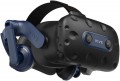 | 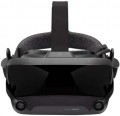 |
|---|---|---|
| HTC Vive Pro 2 | Valve Index VR KIT | |
from $842.00 | from $1,749.99 | |
| TOP sellers | ||
Headphones have a built-in amplifier. Dual front camera. Increased resolution of AMOLED matrices. Comfortable fit. Huge library of PC games. Requires a relatively powerful PC and a lot of free space in the room. | Display refresh rate of 144 Hz in experimental mode. The response time of the matrix is from 0.330 ms to 0.530 ms. The package includes a VR helmet, a pair of controllers and two base stations. The front cameras are not designed for tracking, you will need external sensors to track in space. | |
| Device type | VR glasses | VR glasses |
| Purpose (compatibility) | Windows | Windows |
Specs | ||
| Screen resolution | 4896x2448 px | 2880x1600 px |
| Field of view | 120 ° | 130 ° |
| Refresh rate | 120 fps | 144 fps |
| 6DoF motion tracking |  | |
| Accelerometer | | |
| Gyroscope | | |
| Lens distance adjusting | | |
| Pupillary distance adjustment | | |
Multimedia | ||
| USB-A |  | |
| USB-C | + | |
| DisplayPort | v1.2 | v1.2 |
| Bluetooth | + | |
| Microphone | | |
| Headphones | | |
| Headphone output | | |
General | ||
| Controller | | |
| External sensors | | |
| Track camera | | |
| Material | plastic | plastic |
| Added to E-Catalog | february 2022 | november 2019 |


Compare HTC Vive Pro 2 and Valve Index VR KIT
You may be interested in
My comparisons
HTC Vive Pro 2 often compared


Valve Index VR KIT often compared


Glossary
Screen resolution
Resolution of built-in displays in glasses equipped with such equipment — that is, models for PC / consoles, as well as standalone devices (see "Intended use").
The higher the resolution, the more smooth and detailed the “picture” is given out by glasses, all other things being equal. Thanks to the development of technology nowadays, models with Full HD (1920x1080) screens and even higher resolutions are not uncommon. On the other hand, this parameter significantly affects the cost of points. In addition, it is worth remembering that in order to fully work with high-resolution displays, you need powerful graphics capable of playing relevant content. In the case of glasses for PCs and set-top boxes, this puts forward corresponding requirements for external devices, and in standalone models you have to use advanced integrated video adapters (which affects the cost even more).
The higher the resolution, the more smooth and detailed the “picture” is given out by glasses, all other things being equal. Thanks to the development of technology nowadays, models with Full HD (1920x1080) screens and even higher resolutions are not uncommon. On the other hand, this parameter significantly affects the cost of points. In addition, it is worth remembering that in order to fully work with high-resolution displays, you need powerful graphics capable of playing relevant content. In the case of glasses for PCs and set-top boxes, this puts forward corresponding requirements for external devices, and in standalone models you have to use advanced integrated video adapters (which affects the cost even more).
Field of view
The viewing angle provided by virtual reality glasses is the angular size of the space that falls into the user's field of view. Usually, the characteristics indicate the size of this space horizontally; however, if you need the most accurate information, this point needs to be specified separately.
The wider the viewing angle — the more the game space the user can see without turning his head, the more powerful the immersion effect and the less likely that the image will be subject to the "tunnel vision" effect. On the other hand, making the field of view too wide also does not make sense, given the characteristics of the human eye. In general, a large viewing angle is considered to be an angle of 100° or more. On the other hand, there are models where this indicator is 30° or even less — these are, usually, specific devices (for example, drone piloting glasses and augmented reality glasses), where such characteristics are quite justified given the overall functionality.
The wider the viewing angle — the more the game space the user can see without turning his head, the more powerful the immersion effect and the less likely that the image will be subject to the "tunnel vision" effect. On the other hand, making the field of view too wide also does not make sense, given the characteristics of the human eye. In general, a large viewing angle is considered to be an angle of 100° or more. On the other hand, there are models where this indicator is 30° or even less — these are, usually, specific devices (for example, drone piloting glasses and augmented reality glasses), where such characteristics are quite justified given the overall functionality.
Refresh rate
The refresh rate supported by the glasses' built-in screens, in simple terms, is the maximum frame rate that the screens are capable of delivering.
Recall that screens are provided in models for PC / consoles and in stand-alone devices (see "Intended use"). And the quality of the picture directly depends on this indicator: other things being equal, a higher frame rate provides a smoother image, without jerks and with good detail in dynamic scenes. The flip side of these benefits is an increase in price.
It is also worth considering that in some cases the actual frame rate will not be limited by the capabilities of the glasses, but by the characteristics of the external device or the properties of the content being played. For example, a relatively weak PC graphics card may not be able to pull out a high frame rate signal, or a certain frame rate may be set in the game and not provide boosting. Therefore, you should not chase after large values and points with a frequency of 90 fps will be enough.
Recall that screens are provided in models for PC / consoles and in stand-alone devices (see "Intended use"). And the quality of the picture directly depends on this indicator: other things being equal, a higher frame rate provides a smoother image, without jerks and with good detail in dynamic scenes. The flip side of these benefits is an increase in price.
It is also worth considering that in some cases the actual frame rate will not be limited by the capabilities of the glasses, but by the characteristics of the external device or the properties of the content being played. For example, a relatively weak PC graphics card may not be able to pull out a high frame rate signal, or a certain frame rate may be set in the game and not provide boosting. Therefore, you should not chase after large values and points with a frequency of 90 fps will be enough.
USB-A
The presence of at least one USB-A port in the glasses. This is a full-sized USB port, the same type as standard USB ports on computers and laptops. However, its functions may vary depending on the functionality of the glasses (see "Purpose"). For models for PCs and consoles, USB-A is one of the connection ports used in conjunction with a video interface like HDMI or DisplayPort: the video interface transmits the image, while the USB connection transmits data from sensors on the glasses necessary for changing the picture and creating an "immersion effect". In standalone devices, USB-A is used for connecting various additional accessories — for example, flash drives with applications or other content. This port may also be used for charging the battery, although such use is generally not typical for it.
USB-C
Presence of a USB-C port in glasses. This is a relatively new type of USB port, with miniature size (slightly larger than microUSB) and a convenient reversible design, allowing the plug to be connected either way. It can be found in glasses of different purposes and, accordingly, designed for various applications. For example, in models for PCs/consoles, this port is used similarly to traditional USB-A — for main connection, alongside HDMI or DisplayPort interfaces. In standalone devices, in turn, USB-C is mainly intended for battery charging and connection to a computer for direct file exchange, settings management, firmware updates, etc.
It should also be noted that this section might specify the USB version that the USB-C port corresponds to. Currently, two versions are relevant — 5Gbps and 10Gbps; for VR glasses, the difference between them is generally not significant.
It should also be noted that this section might specify the USB version that the USB-C port corresponds to. Currently, two versions are relevant — 5Gbps and 10Gbps; for VR glasses, the difference between them is generally not significant.
Bluetooth
The presence of a Bluetooth module in the glasses; The Bluetooth version to which this module corresponds can also be specified here.
Bluetooth is a technology created for direct wireless connection between various devices. This technology is found in all types of VR glasses (see “Purpose”), although most models with its support are independent devices. In any case, the most popular way to use Bluetooth in virtual reality glasses is to broadcast sound wirelessly. Moreover, the format of such a broadcast may be different, depending on the specifics of the glasses themselves. Thus, standalone devices broadcast the reproduced sound to external headphones. Models for PCs and smartphones may have built-in headphones, and here the sound is transmitted via Bluetooth to the glasses from an external device; Audio from the built-in microphone can be transmitted in the opposite direction.
In addition, there are other possible ways to use Bluetooth, such as directly exchanging files with another device or connecting game controllers. Such capabilities are found exclusively in stand-alone glasses; the specific functionality for each model should be clarified separately.
As for the versions, the oldest one used in VR glasses today is Bluetooth 3.0, the newest is Bluetooth 5.0. However, the differences between different versions for such devices are not fundamental; this information is provided mainly for reference purposes.
Bluetooth is a technology created for direct wireless connection between various devices. This technology is found in all types of VR glasses (see “Purpose”), although most models with its support are independent devices. In any case, the most popular way to use Bluetooth in virtual reality glasses is to broadcast sound wirelessly. Moreover, the format of such a broadcast may be different, depending on the specifics of the glasses themselves. Thus, standalone devices broadcast the reproduced sound to external headphones. Models for PCs and smartphones may have built-in headphones, and here the sound is transmitted via Bluetooth to the glasses from an external device; Audio from the built-in microphone can be transmitted in the opposite direction.
In addition, there are other possible ways to use Bluetooth, such as directly exchanging files with another device or connecting game controllers. Such capabilities are found exclusively in stand-alone glasses; the specific functionality for each model should be clarified separately.
As for the versions, the oldest one used in VR glasses today is Bluetooth 3.0, the newest is Bluetooth 5.0. However, the differences between different versions for such devices are not fundamental; this information is provided mainly for reference purposes.
Headphone output
Availability in points of an exit for connection of earphones. Most often, the role of such a connector is played by a standard 3.5 mm mini-jack socket.
A full-fledged "immersion" in the virtual world requires not only a picture on the screen, but also an appropriate sound accompaniment, for which headphones are the best option. Its own headphone output allows you to connect wired "ears" directly to the glasses — it is much more convenient and safer during use than connecting headphones to a computer or set-top box. However, independent devices can also have such a connector (see "Purpose").
Note that there are VR glasses with their own built-in headphones, but this option is more convenient: it allows you to select the “ears” separately, according to the user’s own preferences.
A full-fledged "immersion" in the virtual world requires not only a picture on the screen, but also an appropriate sound accompaniment, for which headphones are the best option. Its own headphone output allows you to connect wired "ears" directly to the glasses — it is much more convenient and safer during use than connecting headphones to a computer or set-top box. However, independent devices can also have such a connector (see "Purpose").
Note that there are VR glasses with their own built-in headphones, but this option is more convenient: it allows you to select the “ears” separately, according to the user’s own preferences.
Controller
The presence of a controller — an additional control device — is included in the delivery of glasses.
The design and functionality of such an accessory may be different. So, the most popular option is specialized game controllers with a characteristic look — a handle with an analogue lever and buttons. There can be two such handles at once, under both hands; and in some models they are also used to control gestures. The movement of the hands can be tracked both by sensors in the controllers themselves and by cameras on the glasses. There are also simpler solutions — for example, portable gamepads or remote controls for controlling video playback.
The design and functionality of such an accessory may be different. So, the most popular option is specialized game controllers with a characteristic look — a handle with an analogue lever and buttons. There can be two such handles at once, under both hands; and in some models they are also used to control gestures. The movement of the hands can be tracked both by sensors in the controllers themselves and by cameras on the glasses. There are also simpler solutions — for example, portable gamepads or remote controls for controlling video playback.
External sensors
The presence of external sensors in the delivery set of glasses.
Such sensors are placed in a special way (usually in the corners) in the room where glasses are supposed to be used. They allow you to turn this room (all or part of it) into a playing zone — a space in which the player can physically move during the game. This provides additional features and at the same time ensures safety: the device warns the player when approaching the boundaries of a safe play area (in the real world), preventing collisions and other similar troubles.
Such sensors are placed in a special way (usually in the corners) in the room where glasses are supposed to be used. They allow you to turn this room (all or part of it) into a playing zone — a space in which the player can physically move during the game. This provides additional features and at the same time ensures safety: the device warns the player when approaching the boundaries of a safe play area (in the real world), preventing collisions and other similar troubles.