
Comparison NB F80 vs NB F150
Add to comparison | 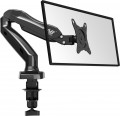 | 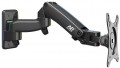 |
|---|---|---|
| NB F80 | NB F150 | |
from $18.73 | from $39.90 | |
| TOP sellers | ||
Built-in gas spring has adjustable stiffness | ||
| Type | desktop mount | wall mount |
| Installation | clamp | |
Specs | ||
| Minimum size | 17 " | 17 " |
| Max. size | 27 " | 27 " |
| Max. weight | 9 kg | 7 kg |
| Minimum distance from the wall | 87 mm | |
| Max. distance from wall | 385 mm | |
| Adjustments | tilt turn depth adjustment slide rotation height adjustment | tilt turn depth adjustment slide rotation height adjustment |
| Built-in level |  |  |
Angles and dimensions | ||
| Upward tilt angle | 35 ° | 50 ° |
| Downward tilt angle | 50 ° | 35 ° |
| Turn angle | 360 ° | 180 ° |
| Rotation angle | 180 ° | 360 ° |
| VESA | 75x75mm 100x100 mm | 75x75mm 100x100 mm |
General | ||
| Cable management | | |
| Dimensions (WxHxD) | 390x280x100 mm | |
| Color | ||
| Added to E-Catalog | september 2017 | november 2016 |


Compare NB F80 and F150
You may be interested in
My comparisons
NB F80 often compared


NB F150 often compared

Glossary
Type
— Wall Mount. A device for mounting a TV on the wall; it attaches directly to the surface without additional items. Such installation is especially useful in small spaces where there's no room for a floor stand or cabinet. However, wall mounting requires some effort (for example, drilling a concrete wall).
— Ceiling Mount. A device for mounting a TV on the ceiling. Like the wall mount, it requires no additional equipment, furniture, etc., and saves space. However, installation comes with some complexities, and constantly watching TV with your head tilted up is uncomfortable. Therefore, these mounts are primarily designed for public places where it’s important to protect the equipment from theft and vandalism.
— Desktop Mount. A device for placing a screen on a desk or similar surface. The specific installation method may vary: among desktop models, there are stands without additional fixtures as well as devices with clamps and/or through-bolt mounting (see “Installation”). However, in any case, desktop models are mainly intended for monitors—when the built-in stand is either completely absent or unsuitable for some parameters.
— Floor Mount. A stand designed to be placed on the floor. It usually does not attach securely and can be moved if desired; there are even models with wheels. Unlike various cabinets (se...e below), it's primarily intended for placing a TV, and any additional shelves are more of an exception than a rule. The advantage of floor mounts is the ease of installation, while the disadvantage is the need for floor space.
— Cabinet. A cabinet in this context is a separate piece of furniture with one or more shelves, sometimes even with drawers. The TV is placed on the top shelf on its own stand, while other shelves can be used for additional equipment (e.g., DVD player or media center) or other items. Such stands are extremely easy to set up and use—they’re simply placed on the floor like regular tables. They also almost have no compatibility issues: the working area is a regular flat surface that fits any included stand (within certain size and weight limits, of course). The main drawback is the floor space they occupy, making cabinets unsuitable for tight spaces. Additionally, placing a TV on its own stand is slightly less secure than a mount, as there is a risk of tipping over (although very small).
— Cabinet with Mount. A type of cabinet (see above) equipped with its own TV mount. While retaining most of the advantages of traditional cabinets (ease of installation, additional shelves), this design offers increased security—the TV can only tip over along with the cabinet, which is nearly impossible to do accidentally. At the same time, the presence of a mount reduces versatility compared to regular cabinets—not every TV may fit.
— Monitor Stand. It is a stationary shelf designed to raise the screen to a comfortable height. It improves workspace ergonomics by reducing neck and back strain and also frees up desk space for storing a keyboard, mouse, or office supplies. These stands can be made of wood, metal, glass, or plastic, and may have additional compartments and drawers. Some models are designed for multiple monitors or equipped with ventilation for better equipment cooling.
— Ceiling Mount. A device for mounting a TV on the ceiling. Like the wall mount, it requires no additional equipment, furniture, etc., and saves space. However, installation comes with some complexities, and constantly watching TV with your head tilted up is uncomfortable. Therefore, these mounts are primarily designed for public places where it’s important to protect the equipment from theft and vandalism.
— Desktop Mount. A device for placing a screen on a desk or similar surface. The specific installation method may vary: among desktop models, there are stands without additional fixtures as well as devices with clamps and/or through-bolt mounting (see “Installation”). However, in any case, desktop models are mainly intended for monitors—when the built-in stand is either completely absent or unsuitable for some parameters.
— Floor Mount. A stand designed to be placed on the floor. It usually does not attach securely and can be moved if desired; there are even models with wheels. Unlike various cabinets (se...e below), it's primarily intended for placing a TV, and any additional shelves are more of an exception than a rule. The advantage of floor mounts is the ease of installation, while the disadvantage is the need for floor space.
— Cabinet. A cabinet in this context is a separate piece of furniture with one or more shelves, sometimes even with drawers. The TV is placed on the top shelf on its own stand, while other shelves can be used for additional equipment (e.g., DVD player or media center) or other items. Such stands are extremely easy to set up and use—they’re simply placed on the floor like regular tables. They also almost have no compatibility issues: the working area is a regular flat surface that fits any included stand (within certain size and weight limits, of course). The main drawback is the floor space they occupy, making cabinets unsuitable for tight spaces. Additionally, placing a TV on its own stand is slightly less secure than a mount, as there is a risk of tipping over (although very small).
— Cabinet with Mount. A type of cabinet (see above) equipped with its own TV mount. While retaining most of the advantages of traditional cabinets (ease of installation, additional shelves), this design offers increased security—the TV can only tip over along with the cabinet, which is nearly impossible to do accidentally. At the same time, the presence of a mount reduces versatility compared to regular cabinets—not every TV may fit.
— Monitor Stand. It is a stationary shelf designed to raise the screen to a comfortable height. It improves workspace ergonomics by reducing neck and back strain and also frees up desk space for storing a keyboard, mouse, or office supplies. These stands can be made of wood, metal, glass, or plastic, and may have additional compartments and drawers. Some models are designed for multiple monitors or equipped with ventilation for better equipment cooling.
Installation
Method of table mount installation (see "Type") to the tabletop.
This parameter is specified for those models that have additional devices for fixing on the table — a clamp, a platform for bolt-through mounting, or both. In addition, there are ordinary stands that do not have fixing devices; they are as simple as possible to install and move from place to place, but they are not very reliable.
As for the different installation methods, their features are as follows:
— Clamp. Fixation with a clamp attached to the edge of the table. Clamps are more limited in their choice of mounting location than bolts — such a mount cannot be installed in the middle of a countertop. At the same time, such installation is much easier both during the initial installation and when moving the structure from place to place: there is no need to drill a table, preparing a place for bolts. And the limited choice of location is often compensated by an abundance of adjustments that allow you to set the optimal position of the screen. Due to this, clamps are the most popular in desktop mounts.
— Bolt-through mounting. Mounting with bolts through holes in the countertop. The main advantages of this option are reliability, as well as the ability to choose the installation point almost anywhere on the countertop. On the other hand, the installation procedure itself is q...uite complicated and involves permanent placement in one place, without moving — after all, it is necessary to drill holes for the bolts. Therefore, such a method of installation in its pure form is extremely rare nowadays — universal mounts have become more common (see below).
— Universal. Mounts that allows two mounting options described above at once — using a clamp to the edge of the countertop or using bolts. This design allows you to choose the best option. At the same time, it is technically easy to provide both a clamp and the possibility of bolt-through installation in one mount; therefore, most mounts with the possibility of using bolts are universal.
This parameter is specified for those models that have additional devices for fixing on the table — a clamp, a platform for bolt-through mounting, or both. In addition, there are ordinary stands that do not have fixing devices; they are as simple as possible to install and move from place to place, but they are not very reliable.
As for the different installation methods, their features are as follows:
— Clamp. Fixation with a clamp attached to the edge of the table. Clamps are more limited in their choice of mounting location than bolts — such a mount cannot be installed in the middle of a countertop. At the same time, such installation is much easier both during the initial installation and when moving the structure from place to place: there is no need to drill a table, preparing a place for bolts. And the limited choice of location is often compensated by an abundance of adjustments that allow you to set the optimal position of the screen. Due to this, clamps are the most popular in desktop mounts.
— Bolt-through mounting. Mounting with bolts through holes in the countertop. The main advantages of this option are reliability, as well as the ability to choose the installation point almost anywhere on the countertop. On the other hand, the installation procedure itself is q...uite complicated and involves permanent placement in one place, without moving — after all, it is necessary to drill holes for the bolts. Therefore, such a method of installation in its pure form is extremely rare nowadays — universal mounts have become more common (see below).
— Universal. Mounts that allows two mounting options described above at once — using a clamp to the edge of the countertop or using bolts. This design allows you to choose the best option. At the same time, it is technically easy to provide both a clamp and the possibility of bolt-through installation in one mount; therefore, most mounts with the possibility of using bolts are universal.
Max. weight
The maximum weight of the TV that can be installed on the mount/stand; more specifically, it is the maximum weight that the mount/stand can support for an indefinitely long time without any negative consequences. Unlike the screen size described above, this parameter is accurate and should not be exceeded: perhaps the stand/mount will not break immediately under excess weight, but this can happen at any time, and such a breakdown is not covered by the warranty.
It is worth considering that for classic stands with several shelves (see "Type"), the maximum wheight is usually indicated for the entire structure as a whole and is the sum of the loads for each individual shelf. Thus, the maximum weight of the TV is not limited by the total maximum wheight, but by the maximum wheight for one shelf. This does not apply to stands with mounts; they usually list the maximum wheight on the mount, in which case it corresponds to the maximum weight of the TV.
The screen size is directly related to the maximum wheight (after all, a large TV weighs more). Typically, for screens up to 24", structures with a maximum wheight of about 5-6 kg are usually quite enough, for a 32" device, about 12 kg may be needed, large 55" screens reach a maximum weight of about 25-30 kg, and in the case of plasma panels, these figures increase by 1.5-2 times However, anyway, before choosing, you should clarify the weight of the specific TV model for which the stand/mount is selected.
It is worth considering that for classic stands with several shelves (see "Type"), the maximum wheight is usually indicated for the entire structure as a whole and is the sum of the loads for each individual shelf. Thus, the maximum weight of the TV is not limited by the total maximum wheight, but by the maximum wheight for one shelf. This does not apply to stands with mounts; they usually list the maximum wheight on the mount, in which case it corresponds to the maximum weight of the TV.
The screen size is directly related to the maximum wheight (after all, a large TV weighs more). Typically, for screens up to 24", structures with a maximum wheight of about 5-6 kg are usually quite enough, for a 32" device, about 12 kg may be needed, large 55" screens reach a maximum weight of about 25-30 kg, and in the case of plasma panels, these figures increase by 1.5-2 times However, anyway, before choosing, you should clarify the weight of the specific TV model for which the stand/mount is selected.
Minimum distance from the wall
The smallest possible distance between the wall on which the mount is hung and its farthest protruding point. First of all, the overall compactness of the design depends on the minimum distance: if you do not want the TV to protrude far forward from the wall, you should pay attention to models with a small minimum distance. And if the mount provides length adjustment, this parameter determines the limits of such adjustment.
Max. distance from wall
The maximum distance from the TV mounting point to the wall (in the case of ceiling mounts, to the ceiling) provided by the mount. See "Minimum distance from wall" for details.
Built-in level
The presence of a water level on the body of the device greatly facilitates the installation of a wall mount, helping to hang the TV mount perfectly straight.
Upward tilt angle
The maximum upwards tilt angle from the vertical of the installed screen. The larger the tilt angle, the wider the adjustment possibilities, however, in fact, an angle of more than 5° is rarely required.
Downward tilt angle
The maximum downward tilt angle from the vertical for the installed screen. As with the upward tilt angle, the larger this angle, the wider the adjustment possibilities; however, downward tilt is usually required more frequently (the TV may be installed under the ceiling), and its angle can be as high as 15-20°.
Turn angle
The angle within which the screen installed on the mount can rotate. Measured from far left to far right. In modern models, it can reach 180°.