
Comparison PXN V10 V2 vs ThrustMaster T128
Add to comparison | 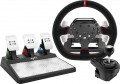 | 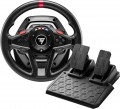 |
|---|---|---|
| PXN V10 V2 | ThrustMaster T128 | |
from $249.99 | Compare prices 2 | |
| TOP sellers | ||
| Device type (configuration) | steering wheel and pedals | steering wheel and pedals |
| Steering wheel size | 24 cm | |
| Compatibility | PC (Windows) Xbox PlayStation 4 | PC (Windows) PlayStation 4 PlayStation 5 |
| Connection | wired | wired |
| Cable | USB-A | USB-A |
Technical specifications | ||
| Total number of buttons | 14 | 16 |
| Feedback | power | power |
| Drive type | hybrid | hybrid |
| Max. torque | 3.2 Nm | 2 Nm |
| D-pad controller |  |  |
| Steering wheel turn | 270° – 900° | 270° – 900° |
| Paddle shifters | 4 pcs | 2 pcs |
| Pedals | accelerator brake clutch | accelerator brake |
General information | ||
| Mounting | clamps | clamps |
| Steering wheel cover | alcantara | rubber |
| Power source | network | network |
| Color | ||
| Added to E-Catalog | november 2023 | january 2023 |




Compare PXN V10 V2 and ThrustMaster T128
What is the difference between PXN V10 V2 and ThrustMaster T128?
PXN V10 V2 targets a more “complete” cockpit feel with a higher-end Alcantara wheel, a separate gearshift lever plus paddles, and a 3‑pedal set that includes a clutch, while ThrustMaster T128 keeps things simpler with a rubber wheel, paddle shifters only, and a 2‑pedal set. Compatibility may decide it too, since V10 V2 works with Xbox as well as PC and PS4, whereas the T128 is aimed at PC plus PS4 and PS5.
Which is better?
Better overall for most buyers: ThrustMaster T128. It is the safer pick if you want broad PlayStation support including PS5, and a simpler, more plug-and-play setup.
T128 supports PC, PS4, and PS5, while PXN V10 V2 supports PC, PS4, and Xbox, so the right choice mainly depends on your console. Both are wired USB steering wheels with power feedback, clamp mounts, and the same wide 270°–900° rotation range.
PXN is more complete out of the box for manual driving because it includes a gearshift lever and a clutch pedal, whereas T128 is paddle-only and has just gas and brake. T128 offers slightly more buttons (16 vs 14) and includes a D-pad for easier menu navigation. Material feel differs too, with PXN using alcantara while T128 uses rubber.
Price comparison
You may be interested in
My comparisons
PXN V10 V2 often compared


ThrustMaster T128 often compared


Glossary
Steering wheel size
The size of a gaming steering wheel usually refers to the diameter of the wheel in round and D-shaped forms and affects the realism of control, rotation speed, and grip comfort. Compact wheels, around 20 – 24 cm, are more common in simple models and are suitable for arcade racing but feel less realistic. A size of 27 – 30 cm is considered more versatile and closer to an actual car steering wheel, making it convenient for simulators, GT, rally, and everyday play. Larger wheels, 31 – 35 cm, are more often used in advanced setups, especially for trucking simulators, drifts, or the most realistic seating.
For formula wheels or steering wheels with a cut-off shape, the size is more often indicated by the maximum width between the outermost grip points.
For formula wheels or steering wheels with a cut-off shape, the size is more often indicated by the maximum width between the outermost grip points.
Compatibility
Compatibility shows which devices a gaming wheel can work with: PC, PlayStation, Xbox, Nintendo Switch or specific console generations. It is important to check this parameter before purchasing because a PC wheel does not always fit a console, and models for PlayStation and Xbox often have different versions (PS3, PS4, PS5) due to the proprietary license and electronics inside the base.
Special attention should be given to steering wheels that have specific compatibility with bases. In most cases, all bases from the brand are suitable, but it is better to confirm this additionally.
Special attention should be given to steering wheels that have specific compatibility with bases. In most cases, all bases from the brand are suitable, but it is better to confirm this additionally.
Total number of buttons
The total number of buttons provided in the manipulator's design.
The more buttons, the more additional functions can be "assigned" to the manipulator, reducing the likelihood of having to use other control devices (e.g., a PC keyboard) during gameplay. However, many gaming consoles (see "Platform Compatibility") require a certain minimum number of buttons for a compatible gamepad — having fewer buttons would simply not allow full use of all the console functions. For instance, the standard controller for the PlayStation 4 has 11 buttons.
Note that the D-Pad manipulator (see below) is not counted in this calculation: it is considered a specific control device, although it is based on buttons.
The more buttons, the more additional functions can be "assigned" to the manipulator, reducing the likelihood of having to use other control devices (e.g., a PC keyboard) during gameplay. However, many gaming consoles (see "Platform Compatibility") require a certain minimum number of buttons for a compatible gamepad — having fewer buttons would simply not allow full use of all the console functions. For instance, the standard controller for the PlayStation 4 has 11 buttons.
Note that the D-Pad manipulator (see below) is not counted in this calculation: it is considered a specific control device, although it is based on buttons.
Max. torque
The max torque indicates the force with which the steering base can resist the steering wheel's turn. The higher the torque, the more strongly tire grip, impacts, skids, curbs, and load in turns are felt, making the control closer to that of a real car. Simple steering wheels usually provide up to 3 Nm, more advanced models — 4-8 Nm, and powerful Direct Drive bases can deliver 10-20 Nm and above.
Meanwhile, in simulators, the force is often adjusted for the game, car, and user's comfort. For example, for arcade racing, a small effort is enough, whereas for iRacing, Assetto Corsa, or serious drifting, a powerful base with a torque reserve provides more accurate and rich feedback.
Meanwhile, in simulators, the force is often adjusted for the game, car, and user's comfort. For example, for arcade racing, a small effort is enough, whereas for iRacing, Assetto Corsa, or serious drifting, a powerful base with a torque reserve provides more accurate and rich feedback.
D-pad controller
D-pad controller helps control the menu, camera, and additional functions directly from the gaming wheel without resorting to the keyboard or gamepad. It is usually a cross-shaped pad with up, down, left, and right presses, and some models also support diagonal commands. This element is convenient for switching cameras, navigating settings, selecting menu items, controlling onboard functions, or issuing quick commands during a race.
Paddle shifters
Paddle shifters behind the steering wheel, which can be pressed with fingers without removing hands from the wheel, are most often used for gear shifting. Basic models usually have two paddles: the right one is for shifting up, and the left one is for shifting down. More advanced wheels may have 4 or 6 paddles, with additional pairs used for clutch, manual start, DRS, car adjustments, or other commands in simulators. The more paddle shifters there are, the more convenient it is to control important functions directly from the wheel, especially in F1, GT, and other racing simulators.
Pedals
Types of pedals included in the manipulator package.
This parameter is specified only in controllers designed for auto racing (in flight simulators, pedals have only one specialization — rudder control — and specifying it further is unnecessary). Most of these "racing" controllers are wheels (see "Device Type"), however, pedals can also be released completely separately. In any case, the minimum necessary for more or less effective car control is two pedals, gas and brake. Meanwhile, for enthusiasts of maximum realism, more expensive three-pedal controllers are produced, which also include a clutch; this complicates control but provides many additional possibilities unavailable with two pedals.
This parameter is specified only in controllers designed for auto racing (in flight simulators, pedals have only one specialization — rudder control — and specifying it further is unnecessary). Most of these "racing" controllers are wheels (see "Device Type"), however, pedals can also be released completely separately. In any case, the minimum necessary for more or less effective car control is two pedals, gas and brake. Meanwhile, for enthusiasts of maximum realism, more expensive three-pedal controllers are produced, which also include a clutch; this complicates control but provides many additional possibilities unavailable with two pedals.
Steering wheel cover
The steering wheel covering affects grip, tactile sensations, wear resistance, and comfort during long gameplay. The material determines whether the wheel is pleasant to the touch, won't slip in your hands, and how quickly the surface will lose its appearance with active use.
— Rubber. Practical, affordable, and well-suited for basic gaming wheels. This covering withstands frequent use, is easy to clean, and requires less maintenance, but usually feels simpler compared to leather or Alcantara.
— Alcantara. A pleasant-to-touch material that provides a firm grip, often found in more expensive and sporty steering wheels. It is great for simulators and active driving but gets dirty faster and requires gentle care, especially if playing without gloves.
— Leather. Usually represented by faux leather, making the wheel more akin to a car's and pleasant for everyday gaming. This covering is ideal for general use, GT, rally, and road simulators but may wear out over time in areas of active grip.
— Rubber. Practical, affordable, and well-suited for basic gaming wheels. This covering withstands frequent use, is easy to clean, and requires less maintenance, but usually feels simpler compared to leather or Alcantara.
— Alcantara. A pleasant-to-touch material that provides a firm grip, often found in more expensive and sporty steering wheels. It is great for simulators and active driving but gets dirty faster and requires gentle care, especially if playing without gloves.
— Leather. Usually represented by faux leather, making the wheel more akin to a car's and pleasant for everyday gaming. This covering is ideal for general use, GT, rally, and road simulators but may wear out over time in areas of active grip.