
Comparison ThrustMaster T128 vs ThrustMaster T248
Add to comparison | 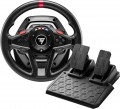 | 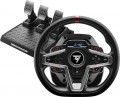 |
|---|---|---|
| ThrustMaster T128 | ThrustMaster T248 | |
| Compare prices 2 | Compare prices 4 | |
| User reviews | ||
| TOP sellers | ||
Built-in display for steering wheel settings and additional functions (display speed, lap time, etc.) | ||
| Device type (configuration) | steering wheel and pedals | steering wheel and pedals |
| Steering wheel size | 24 cm | 28 cm |
| Compatibility | PC (Windows) PlayStation 4 PlayStation 5 | PC (Windows) PlayStation 4 PlayStation 5 |
| Connection | wired | wired |
| Cable | USB-A | USB-A |
Technical specifications | ||
| Total number of buttons | 16 | 21 |
| Feedback | power | power |
| Drive type | hybrid | hybrid |
| Max. torque | 2 Nm | 3.5 Nm |
| D-pad controller |  | |
| Steering wheel turn | 270° – 900° | |
| Paddle shifters | 2 pcs | 2 pcs |
| Pedals | accelerator brake | accelerator brake clutch |
General information | ||
| Mounting | clamps | clamps |
| Display |  | |
| Steering wheel cover | rubber | rubber |
| Power source | network | network |
| Color | ||
| Added to E-Catalog | january 2023 | september 2021 |





Compare ThrustMaster T128 and T248
Comparing ThrustMaster T128 and ThrustMaster T248, several key differences can be highlighted. The T128 offers 16 buttons and gas and brake pedals, whereas the T248 has 21 buttons and additionally a clutch pedal, making it more versatile for simulators. Regarding feedback, the T128 uses standard force feedback, while the T248 employs a hybrid system, providing a more smooth feeling while driving, although some users note a lack of smoothness in steering wheel rotation. The T248 also includes a built-in display for data display, which the T128 does not have. However, despite the improvements, the T248 falls short in build quality compared to Logitech counterparts. Overall, the choice between these models depends on your preferences: the T128 is suitable for beginners, while the T248 offers more options for more experienced users.
Price comparison
You may be interested in
My comparisons
ThrustMaster T128 often compared


ThrustMaster T248 often compared


Glossary
Steering wheel size
The size of a gaming steering wheel usually refers to the diameter of the wheel in round and D-shaped forms and affects the realism of control, rotation speed, and grip comfort. Compact wheels, around 20 – 24 cm, are more common in simple models and are suitable for arcade racing but feel less realistic. A size of 27 – 30 cm is considered more versatile and closer to an actual car steering wheel, making it convenient for simulators, GT, rally, and everyday play. Larger wheels, 31 – 35 cm, are more often used in advanced setups, especially for trucking simulators, drifts, or the most realistic seating.
For formula wheels or steering wheels with a cut-off shape, the size is more often indicated by the maximum width between the outermost grip points.
For formula wheels or steering wheels with a cut-off shape, the size is more often indicated by the maximum width between the outermost grip points.
Total number of buttons
The total number of buttons provided in the manipulator's design.
The more buttons, the more additional functions can be "assigned" to the manipulator, reducing the likelihood of having to use other control devices (e.g., a PC keyboard) during gameplay. However, many gaming consoles (see "Platform Compatibility") require a certain minimum number of buttons for a compatible gamepad — having fewer buttons would simply not allow full use of all the console functions. For instance, the standard controller for the PlayStation 4 has 11 buttons.
Note that the D-Pad manipulator (see below) is not counted in this calculation: it is considered a specific control device, although it is based on buttons.
The more buttons, the more additional functions can be "assigned" to the manipulator, reducing the likelihood of having to use other control devices (e.g., a PC keyboard) during gameplay. However, many gaming consoles (see "Platform Compatibility") require a certain minimum number of buttons for a compatible gamepad — having fewer buttons would simply not allow full use of all the console functions. For instance, the standard controller for the PlayStation 4 has 11 buttons.
Note that the D-Pad manipulator (see below) is not counted in this calculation: it is considered a specific control device, although it is based on buttons.
Max. torque
The max torque indicates the force with which the steering base can resist the steering wheel's turn. The higher the torque, the more strongly tire grip, impacts, skids, curbs, and load in turns are felt, making the control closer to that of a real car. Simple steering wheels usually provide up to 3 Nm, more advanced models — 4-8 Nm, and powerful Direct Drive bases can deliver 10-20 Nm and above.
Meanwhile, in simulators, the force is often adjusted for the game, car, and user's comfort. For example, for arcade racing, a small effort is enough, whereas for iRacing, Assetto Corsa, or serious drifting, a powerful base with a torque reserve provides more accurate and rich feedback.
Meanwhile, in simulators, the force is often adjusted for the game, car, and user's comfort. For example, for arcade racing, a small effort is enough, whereas for iRacing, Assetto Corsa, or serious drifting, a powerful base with a torque reserve provides more accurate and rich feedback.
Steering wheel turn
The steering wheel rotation angle in the control wheel (see "Device Type"). This parameter is measured by the total range — from one extreme point to the other; accordingly, the rotation angle from the mid position will be half of the total. For instance, an indicator of 180° means the wheel can turn both right and left by 90°.
This parameter directly affects both the overall level and the purpose of the wheel. Models with a rotation angle up to 270° are predominantly entry-level and are mainly intended for arcade racing enthusiasts without a significant emphasis on realism, as well as for children and beginner gamers. More advanced wheels have a rotation angle of 900°, or even 1080°. These figures are not arbitrary — they correspond to the steering wheel rotation ranges in most production cars (900°) and some racing supercars (1080°). Thus, such features make using the wheel as realistic as possible — on the other hand, they significantly impact the cost.
The range of steering wheel rotation can be adjusted by the steering angle adjustment function (if this feature is implemented in the game controller). The option is set either directly in the game or through the software that manages the wheel's operation.
This parameter directly affects both the overall level and the purpose of the wheel. Models with a rotation angle up to 270° are predominantly entry-level and are mainly intended for arcade racing enthusiasts without a significant emphasis on realism, as well as for children and beginner gamers. More advanced wheels have a rotation angle of 900°, or even 1080°. These figures are not arbitrary — they correspond to the steering wheel rotation ranges in most production cars (900°) and some racing supercars (1080°). Thus, such features make using the wheel as realistic as possible — on the other hand, they significantly impact the cost.
The range of steering wheel rotation can be adjusted by the steering angle adjustment function (if this feature is implemented in the game controller). The option is set either directly in the game or through the software that manages the wheel's operation.
Pedals
Types of pedals included in the manipulator package.
This parameter is specified only in controllers designed for auto racing (in flight simulators, pedals have only one specialization — rudder control — and specifying it further is unnecessary). Most of these "racing" controllers are wheels (see "Device Type"), however, pedals can also be released completely separately. In any case, the minimum necessary for more or less effective car control is two pedals, gas and brake. Meanwhile, for enthusiasts of maximum realism, more expensive three-pedal controllers are produced, which also include a clutch; this complicates control but provides many additional possibilities unavailable with two pedals.
This parameter is specified only in controllers designed for auto racing (in flight simulators, pedals have only one specialization — rudder control — and specifying it further is unnecessary). Most of these "racing" controllers are wheels (see "Device Type"), however, pedals can also be released completely separately. In any case, the minimum necessary for more or less effective car control is two pedals, gas and brake. Meanwhile, for enthusiasts of maximum realism, more expensive three-pedal controllers are produced, which also include a clutch; this complicates control but provides many additional possibilities unavailable with two pedals.
Display
A small screen that can display various information for the player, notifications about battery status, network connectivity, and more. The specific functionality of the display depends on its implementation on the gaming controller. For example, on racing wheels, the screen often shows speed and/or lap time, while on advanced gamepads, it may indicate the player's health level, ammo count, etc. In any case, the display provides useful information without unnecessarily distracting from the gameplay.