
Comparison BenQ PD3205UA 31.5 " black vs BenQ PD3205U 31.5 " black
Add to comparison | 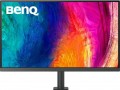 | 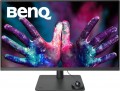 |
|---|---|---|
| BenQ PD3205UA 31.5 " black | BenQ PD3205U 31.5 " black | |
| Compare prices 1 | Compare prices 3 | |
| TOP sellers | ||
| Product type | for graphics and design | for graphics and design |
| Size | 31.5 " | 31.5 " |
Screen | ||
| Panel type | IPS | IPS |
| Surface treatment | anti-glare | anti-glare |
| Resolution | 3840x2160 (16:9) | 3840x2160 (16:9) |
| FPS | 60 Hz | 60 Hz |
| Pixel size | 0.18 mm | 0.18 mm |
| Response time (GtG) | 5 ms | 5 ms |
| Vertical viewing angle | 178 ° | 178 ° |
| Horizontal viewing angle | 178 ° | 178 ° |
| Brightness | 350 cd/m² | 250 cd/m² |
| Static contrast | 1 000:1 | 1 000:1 |
| Colour depth | 8-bit + FRC (1.07B Colors) | 1.07B Colors |
| Colour space (sRGB) | 99 % | 99 % |
| HDR | + | + |
Connection | ||
| Video transmission | DisplayPort v1.4 HDMI v2.0 USB-C (DP Alt Mode) | DisplayPort v1.4 HDMI v2.0 USB-C (DP Alt Mode) |
| Power Delivery |  | |
| Power PD | 90 W | 90 W |
| USB-A hub | 3x5Gbps | 3x5Gbps |
| Fast charge | | |
| Connectors (optional) | mini-Jack output (3.5 mm) | mini-Jack output (3.5 mm) |
Features | ||
| Features | KVM switch PBP (Picture by Picture) Flicker-Free AMD FreeSync CalMAN certification Pantone certification | KVM switch PBP (Picture by Picture) Flicker-Free AMD FreeSync CalMAN certification Pantone certification |
| Portrait pivot | | |
| Screen swivel | | |
| Height adjustment | | |
| Speakers | | |
| Sound power | 2x2.5 W | 2x2.5 W |
General | ||
| Cable management | |  |
| Wall mount | VESA 100x100mm | VESA 100x100mm |
| Power consumption | 32 W | |
| Energy class (new) | F | |
| Remote control | | |
| Dimensions (WxHxD) | 715x581x459 mm | 715x479x257 mm |
| Weight | 10.1 kg | 9.4 kg |
| Color | ||
| Added to E-Catalog | august 2023 | june 2022 |



Compare BenQ PD3205UA and PD3205U
Price comparison
You may be interested in
My comparisons
Glossary
Brightness
The maximum brightness provided by the monitor screen.
Choosing a monitor with high brightness is especially important if the device is going to be used in bright ambient light — for example, if the workplace is exposed to sunlight. A dim image can be "dampened" by such lighting, making work uncomfortable. In other conditions, the high brightness of the screen is very tiring for the eyes.
Most modern monitors give out about 200 – 400 cd / m2 — this is usually quite enough even in the sun. However, there are also higher values: for example, in LCD panels (see "Type") the brightness can reach several thousand cd/m2. This is necessary taking into account the specifics of such devices — the image must be clearly visible from a long distance.
Choosing a monitor with high brightness is especially important if the device is going to be used in bright ambient light — for example, if the workplace is exposed to sunlight. A dim image can be "dampened" by such lighting, making work uncomfortable. In other conditions, the high brightness of the screen is very tiring for the eyes.
Most modern monitors give out about 200 – 400 cd / m2 — this is usually quite enough even in the sun. However, there are also higher values: for example, in LCD panels (see "Type") the brightness can reach several thousand cd/m2. This is necessary taking into account the specifics of such devices — the image must be clearly visible from a long distance.
Colour depth
The colour depth supported by the monitor.
This parameter characterizes the number of shades that the screen can display. And here it is worth recalling that the image in modern monitors is based on 3 basic colours — red, green, blue (RGB scheme). And the number of bits is indicated not for the entire screen, but for each base colour. For example, 6 bits (the minimum colour depth for modern monitors) means that the screen is capable of producing 2 ^ 6, that is, 64 shades of red, green and blue; the total number of shades will be 64 * 64 * 64 = 262,144 (0.26 million). An 8-bit colour depth (256 shades for each base colour) already gives a total of 16.7 million colours; and the most advanced modern monitors support 10-bit colour, allowing you to work with more than a billion shades.
Screens with support for FRC technology are worth a special mention; nowadays, you can find models marked " 6 bit + FRC " and " 8 bit + FRC ". This technology was developed to improve picture quality in situations where the incoming video signal has a greater colour depth than the screen, such as when 10-bit video is fed to an 8-bit matrix. If such a screen supports FRC, the picture on it will be noticeably better than on a regular 8-bit monitor (although somewhat worse than on a full-fledged 10-bit monitor, but “8 bit + FRC” screens are much...cheaper).
High colour depth is important primarily for professional graphics and other tasks that require high colour fidelity. On the other hand, such features significantly affect the cost of the monitor. In addition, it is worth remembering that the quality of colour reproduction depends not only on the colour depth, but also on other parameters — in particular, colour gamut (see below).
This parameter characterizes the number of shades that the screen can display. And here it is worth recalling that the image in modern monitors is based on 3 basic colours — red, green, blue (RGB scheme). And the number of bits is indicated not for the entire screen, but for each base colour. For example, 6 bits (the minimum colour depth for modern monitors) means that the screen is capable of producing 2 ^ 6, that is, 64 shades of red, green and blue; the total number of shades will be 64 * 64 * 64 = 262,144 (0.26 million). An 8-bit colour depth (256 shades for each base colour) already gives a total of 16.7 million colours; and the most advanced modern monitors support 10-bit colour, allowing you to work with more than a billion shades.
Screens with support for FRC technology are worth a special mention; nowadays, you can find models marked " 6 bit + FRC " and " 8 bit + FRC ". This technology was developed to improve picture quality in situations where the incoming video signal has a greater colour depth than the screen, such as when 10-bit video is fed to an 8-bit matrix. If such a screen supports FRC, the picture on it will be noticeably better than on a regular 8-bit monitor (although somewhat worse than on a full-fledged 10-bit monitor, but “8 bit + FRC” screens are much...cheaper).
High colour depth is important primarily for professional graphics and other tasks that require high colour fidelity. On the other hand, such features significantly affect the cost of the monitor. In addition, it is worth remembering that the quality of colour reproduction depends not only on the colour depth, but also on other parameters — in particular, colour gamut (see below).
Cable management
This feature means that the wires connected to the monitor (primarily for the video signal and power supply) can be hidden inside the stand, thus hiding them completely or almost completely.
Hidden cable routing gives the monitor a neat appearance. In addition, it often turns out to be useful from a practical point of view — the wires are in one place, do not get confused at hand and do not interfere, for example, when connecting other peripherals. However the procedure for a hidden connection is somewhat more complicated than an open one; however, in most cases this point is not fundamental.
Note that in some monitors, the complete stand is equipped with external wire mounts (usually in the form of characteristic hooks). They allow you to organize cables, but practically do not hide them; therefore, such a feature is not considered hidden styling.
Hidden cable routing gives the monitor a neat appearance. In addition, it often turns out to be useful from a practical point of view — the wires are in one place, do not get confused at hand and do not interfere, for example, when connecting other peripherals. However the procedure for a hidden connection is somewhat more complicated than an open one; however, in most cases this point is not fundamental.
Note that in some monitors, the complete stand is equipped with external wire mounts (usually in the form of characteristic hooks). They allow you to organize cables, but practically do not hide them; therefore, such a feature is not considered hidden styling.
Power consumption
Rated power consumption of the monitor. Usually, this item indicates the maximum power that the device can consume during normal operation — that is, the energy consumption at maximum brightness, the highest volume of the built-in acoustics, etc. Actual power consumption can be noticeably lower, however, when choosing, it is still best to focus on the value stated in the specifications.
In general, the lower the power consumption, the more economical the device in terms of electricity consumption (ceteris paribus). In addition, this characteristic can be useful when selecting an uninterruptible power supply for a PC and in other specific situations when it is necessary to accurately determine the power consumption of equipment.
In general, the lower the power consumption, the more economical the device in terms of electricity consumption (ceteris paribus). In addition, this characteristic can be useful when selecting an uninterruptible power supply for a PC and in other specific situations when it is necessary to accurately determine the power consumption of equipment.
Energy class (new)
This parameter characterizes the efficiency of electricity consumption. Classes are designated in Latin letters from A to G, in ascending order of energy consumption. Actually, this was originally conceived, until more energy-efficient models pulled up to class A, which eventually received the marking A +, A ++, A +++. Further development of technologies allowed us to go even further, and in order not to produce pluses in energy efficiency labeling, in March 2021, manufacturers returned to the previous indices from G to A, where A is the most energy efficient monitor. Accordingly, the 2021 models will have modern markings, while older models will be marked in the same way.
Remote control
The presence of a remote control for remote control of the device's functions — brightness, contrast, sound volume (if there is an audio system), channel switching (if there is a TV tuner), etc. Note that for classic computer monitors, the remote control is extremely rarely required: both the screen itself and the computer to which it is connected are usually in close proximity to the user. But for plasma and LCD panels (see "Type"), this function may be indispensable: such screens are initially large and designed to be viewed from a long distance.