
Comparison Creative Sound Blaster G3 vs Asus Xonar DX
Add to comparison | 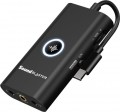 | 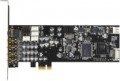 |
|---|---|---|
| Creative Sound Blaster G3 | Asus Xonar DX | |
| Compare prices 3 | from $75.38 up to $83.56 | |
| TOP sellers | ||
| Type | gaming | gaming |
Specs | ||
| Form factor | external | internal |
| Interface | USB-C | PCIe |
| Channels | 2 | 7.1 |
| Audiochip | ASUS AV100 | |
| Standards | Dolby Digital Live, Dolby Headphone, Dolby Virtual Speaker | |
| ASIO |  |  |
| Mac compatibility | | |
| Additional power | | |
DAC | ||
| DAC resolution | 24 bit | 24 bit |
| Max. sampling rate | 96 kHz | 192 kHz |
| Signal-to-noise ratio | 116 dB | |
ADC | ||
| ADC resolution | 24 bit | 24 bit |
| Max. sampling rate | 96 kHz | 192 kHz |
| More features | headphones amplifier | front panel output |
Inputs | ||
| mini-Jack (3.5 mm) | 1 | 1 |
| Jack (6.35 mm) | 1 | |
Outputs | ||
| mini-Jack (3.5 mm) | 1 | 4 |
| Optical S/PDIF | 1 | |
| Added to E-Catalog | april 2021 | january 2014 |




Compare Creative Sound Blaster G3 and Asus Xonar DX
Price comparison
You may be interested in
My comparisons
Creative Sound Blaster G3 often compared


Asus Xonar DX often compared


Glossary
Form factor
The installation and connection method of a sound card depends on its type.
— Internal. These models are designed to work as a permanent component of the system. They are installed in the computer's case, in a slot on the motherboard (PCI or PCIe, see "Connection Interface") in such a way that only the panel with inputs and outputs is usually visible from outside. One of the main advantages of internal cards is their compactness—they do not take up external space and hardly affect the dimensions of the system unit. At the same time, these models can range from the simplest budget options to advanced professional solutions. On the other hand, the connection of internal cards is less universal and more complicated than external ones: it requires at least opening the PC case, and the installation options are limited by the motherboard's specifications and available space inside the case. It's also considered that cards of this type are more susceptible to electromagnetic interference since they are located in close proximity to the computer's electronic components.
— External. As the name implies, models of this type operate outside the PC case and use appropriate connection interfaces—USB or FireWire (see below). The advantages of external cards include convenient connection: plugging a connector into an external socket is much easier and faster than dealing with the case's internals. Beca...use of this, one card can be easily used on multiple computers, reconnecting as needed. Additionally, they are indispensable for laptops and some desktop computers where the installation of internal sound cards is not structurally feasible. Another advantage is their distance from the computer's "innards," which reduces the level of interference. The main drawback of this type of card is the need for additional space near the computer; moreover, more advanced models generally occupy even more space. Furthermore, for devices requiring additional power (see below), a separate socket will be needed.
— Internal. These models are designed to work as a permanent component of the system. They are installed in the computer's case, in a slot on the motherboard (PCI or PCIe, see "Connection Interface") in such a way that only the panel with inputs and outputs is usually visible from outside. One of the main advantages of internal cards is their compactness—they do not take up external space and hardly affect the dimensions of the system unit. At the same time, these models can range from the simplest budget options to advanced professional solutions. On the other hand, the connection of internal cards is less universal and more complicated than external ones: it requires at least opening the PC case, and the installation options are limited by the motherboard's specifications and available space inside the case. It's also considered that cards of this type are more susceptible to electromagnetic interference since they are located in close proximity to the computer's electronic components.
— External. As the name implies, models of this type operate outside the PC case and use appropriate connection interfaces—USB or FireWire (see below). The advantages of external cards include convenient connection: plugging a connector into an external socket is much easier and faster than dealing with the case's internals. Beca...use of this, one card can be easily used on multiple computers, reconnecting as needed. Additionally, they are indispensable for laptops and some desktop computers where the installation of internal sound cards is not structurally feasible. Another advantage is their distance from the computer's "innards," which reduces the level of interference. The main drawback of this type of card is the need for additional space near the computer; moreover, more advanced models generally occupy even more space. Furthermore, for devices requiring additional power (see below), a separate socket will be needed.
Interface
The main interface used to connect a sound card to a computer or other device.
Like the sound cards themselves, the interfaces used in them are divided into internal (PCI, PCIe) and external (USB-A, USB-C, FireWire, Thunderbolt, 3.5 mm mini-jack, Bluetooth). Here's a more detailed description of each of these options:
— PCIe. The main modern interface for connecting internal peripherals (including sound cards) to computer motherboards. It is used in most internal type models (see above). The main advantage of PCIe solutions is that connectors for their connection can be found on almost any modern "motherboard". True, these connectors may be needed for other components — graphics cards, TV tuners, or even SSD drives; however, even the simplest motherboards usually have several PCIe slots, so this point cannot be considered a serious disadvantage.
— PCI. An interface for connecting expansion cards to the PC motherboard. It is the predecessor of PCIe, has significantly lower bandwidth and more modest capabilities, so overall it is outdated. Nevertheless, motherboards with such connectors, and sound cards for the PCI interface (including quite advanced ones), continue to be produced. This is because working with sound requires comparatively low bandwidth; and installing a so...und card in a PCI slot leaves PCIe connectors free, which may be required for components more demanding on connection speed. In any case, before purchasing such a sound card, it does not hurt to separately ensure that there is a connector for its connection on the "motherboard".
— USB-A. Connection through a standard USB port. Until recently, it was the most popular interface for external peripherals, found in almost all PCs and laptops. Most external sound cards were made for USB. The disadvantage of this connection method is that USB connectors may be needed for other devices, which creates problems with a small number of ports and an abundance of peripherals. On the other hand, such situations arise not so often, and to solve them, it is enough to have a USB hub on hand.
It should be noted separately that full-size USB ports in modern PCs and laptops have been replaced by more compact USB-C (see below).
— USB-C. A peripheral connector with a symmetrical contact group, which often replaces full-size USB ports on modern PCs and laptops. Many new models of external sound cards are made for this interface. The only exceptions are individual Thunderbolt devices (see below) — for them, Thunderbolt is indicated as the peripheral connection port, not USB-C.
— Thunderbolt. A universal peripheral port mainly used in Apple computers and laptops. It is important to consider that different generations of Thunderbolt differ in the type of physical connector: versions v1 and v2 use the miniDisplayPort socket, version v3 uses the USB-C socket. So when choosing a sound card with such a connection, it is necessary to clarify this point. On the other hand, Thunderbolt versions with different connectors are fully compatible with each other through corresponding adapters.
— FireWire. Also known as IEEE 1394. An interface for external devices that was somewhat popular some time ago but has now almost fallen out of use.
— 3.5 mm (mini-jack). The mini-jack is one of the most common audio connectors. However, it is usually provided as one of the audio inputs (see below) and is very rarely used as the main interface for connecting a sound card to an external device. Such a connection is mainly found in specialized gaming models, intended for use with consoles as well. In these models, the mini-jack may be combined, allowing for the connection of both a line (analog) signal via a regular electrical wire and an optical (digital) signal via a TOSLINK cable. It is worth noting that the optical interface is notable for being completely immune to external interference; it allows for transmitting multi-channel sound, but cables for such connections require careful handling.
— Bluetooth. Wireless connection following the Bluetooth standard. It is mainly found in models intended for use with smartphones and tablets — these gadgets have few wired connectors, but Bluetooth modules are almost guaranteed to be present. However, initial sound transmission is highly compressed, noticeably affecting its quality; to remedy this drawback, modern Bluetooth sound cards usually support aptX. Of course, this technology must be supported by the signal source as well — make sure of this before purchasing.
Like the sound cards themselves, the interfaces used in them are divided into internal (PCI, PCIe) and external (USB-A, USB-C, FireWire, Thunderbolt, 3.5 mm mini-jack, Bluetooth). Here's a more detailed description of each of these options:
— PCIe. The main modern interface for connecting internal peripherals (including sound cards) to computer motherboards. It is used in most internal type models (see above). The main advantage of PCIe solutions is that connectors for their connection can be found on almost any modern "motherboard". True, these connectors may be needed for other components — graphics cards, TV tuners, or even SSD drives; however, even the simplest motherboards usually have several PCIe slots, so this point cannot be considered a serious disadvantage.
— PCI. An interface for connecting expansion cards to the PC motherboard. It is the predecessor of PCIe, has significantly lower bandwidth and more modest capabilities, so overall it is outdated. Nevertheless, motherboards with such connectors, and sound cards for the PCI interface (including quite advanced ones), continue to be produced. This is because working with sound requires comparatively low bandwidth; and installing a so...und card in a PCI slot leaves PCIe connectors free, which may be required for components more demanding on connection speed. In any case, before purchasing such a sound card, it does not hurt to separately ensure that there is a connector for its connection on the "motherboard".
— USB-A. Connection through a standard USB port. Until recently, it was the most popular interface for external peripherals, found in almost all PCs and laptops. Most external sound cards were made for USB. The disadvantage of this connection method is that USB connectors may be needed for other devices, which creates problems with a small number of ports and an abundance of peripherals. On the other hand, such situations arise not so often, and to solve them, it is enough to have a USB hub on hand.
It should be noted separately that full-size USB ports in modern PCs and laptops have been replaced by more compact USB-C (see below).
— USB-C. A peripheral connector with a symmetrical contact group, which often replaces full-size USB ports on modern PCs and laptops. Many new models of external sound cards are made for this interface. The only exceptions are individual Thunderbolt devices (see below) — for them, Thunderbolt is indicated as the peripheral connection port, not USB-C.
— Thunderbolt. A universal peripheral port mainly used in Apple computers and laptops. It is important to consider that different generations of Thunderbolt differ in the type of physical connector: versions v1 and v2 use the miniDisplayPort socket, version v3 uses the USB-C socket. So when choosing a sound card with such a connection, it is necessary to clarify this point. On the other hand, Thunderbolt versions with different connectors are fully compatible with each other through corresponding adapters.
— FireWire. Also known as IEEE 1394. An interface for external devices that was somewhat popular some time ago but has now almost fallen out of use.
— 3.5 mm (mini-jack). The mini-jack is one of the most common audio connectors. However, it is usually provided as one of the audio inputs (see below) and is very rarely used as the main interface for connecting a sound card to an external device. Such a connection is mainly found in specialized gaming models, intended for use with consoles as well. In these models, the mini-jack may be combined, allowing for the connection of both a line (analog) signal via a regular electrical wire and an optical (digital) signal via a TOSLINK cable. It is worth noting that the optical interface is notable for being completely immune to external interference; it allows for transmitting multi-channel sound, but cables for such connections require careful handling.
— Bluetooth. Wireless connection following the Bluetooth standard. It is mainly found in models intended for use with smartphones and tablets — these gadgets have few wired connectors, but Bluetooth modules are almost guaranteed to be present. However, initial sound transmission is highly compressed, noticeably affecting its quality; to remedy this drawback, modern Bluetooth sound cards usually support aptX. Of course, this technology must be supported by the signal source as well — make sure of this before purchasing.
Channels
The most advanced multi-channel audio format that a sound card is capable of outputting.
— 2. Standard stereo sound on two channels — left and right. This format allows you to provide a sense of surround sound (especially when using headphones), which is quite enough for most simple tasks. However, it noticeably loses to multi-channel sound in terms of the "immersion effect", which can be critical for demanding gamers and audiophiles.
— 5.1. The classic and most popular multi-channel surround sound format today: a centre channel, two front and two rear channels allow you to achieve a full-fledged “surround effect”, and a separate subwoofer channel provides rich bass sound.
— 7.1. The 7.1 format differs from 5.1 by the presence of two additional channels. There are several options for localizing these channels — for example, a pair of side speakers, a pair of additional speakers above the front ones, etc. Anyway, the 7.1 format provides a more reliable surround sound transmission than 5.1, but such cards are more expensive, and there is less specialized content for 7.1.
When choosing a sound card by the number of channels, it is worth considering such moments. Firstly, multi-channel options are capable of producing sound in simpler formats (for example, a 7.1 card can be used for 5.1 acoustics), and stereo sound output is support...ed by all models in general. Secondly, modern multimedia software (in particular, codecs) allows you to output multi-channel audio through a card with fewer channels — for example, play 5.1 sound through a two-channel card with stereo speakers without quality loss. Thirdly, for the full-fledged operation of multi-channel sound, you will need not only a card, but also appropriate acoustics; therefore, it makes no sense to specifically look for a multi-channel model if you plan to use exclusively stereo speakers.
— 2. Standard stereo sound on two channels — left and right. This format allows you to provide a sense of surround sound (especially when using headphones), which is quite enough for most simple tasks. However, it noticeably loses to multi-channel sound in terms of the "immersion effect", which can be critical for demanding gamers and audiophiles.
— 5.1. The classic and most popular multi-channel surround sound format today: a centre channel, two front and two rear channels allow you to achieve a full-fledged “surround effect”, and a separate subwoofer channel provides rich bass sound.
— 7.1. The 7.1 format differs from 5.1 by the presence of two additional channels. There are several options for localizing these channels — for example, a pair of side speakers, a pair of additional speakers above the front ones, etc. Anyway, the 7.1 format provides a more reliable surround sound transmission than 5.1, but such cards are more expensive, and there is less specialized content for 7.1.
When choosing a sound card by the number of channels, it is worth considering such moments. Firstly, multi-channel options are capable of producing sound in simpler formats (for example, a 7.1 card can be used for 5.1 acoustics), and stereo sound output is support...ed by all models in general. Secondly, modern multimedia software (in particular, codecs) allows you to output multi-channel audio through a card with fewer channels — for example, play 5.1 sound through a two-channel card with stereo speakers without quality loss. Thirdly, for the full-fledged operation of multi-channel sound, you will need not only a card, but also appropriate acoustics; therefore, it makes no sense to specifically look for a multi-channel model if you plan to use exclusively stereo speakers.
Audiochip
Brand of the audio chip installed in the sound card.
The audio chip is one of the most important parts of a sound card, a kind of "heart" of the whole circuit, and it is on its characteristics that the sound quality and other capabilities of a particular model largely depend. Knowing the brand of the chip, you can easily find various information on it — official specifications, test results, reviews, etc. — and based on this, draw a conclusion to what extent this sound card is able to meet your requirements. Of course, for ordinary video cards (see "View") there is no need to delve into such details, but when choosing a gaming or audiophile model, they can be very useful.
The audio chip is one of the most important parts of a sound card, a kind of "heart" of the whole circuit, and it is on its characteristics that the sound quality and other capabilities of a particular model largely depend. Knowing the brand of the chip, you can easily find various information on it — official specifications, test results, reviews, etc. — and based on this, draw a conclusion to what extent this sound card is able to meet your requirements. Of course, for ordinary video cards (see "View") there is no need to delve into such details, but when choosing a gaming or audiophile model, they can be very useful.
Standards
Various standards and special digital audio technologies that the sound card is officially compatible with. For example, the Dolby and DTS standards in various variations are used primarily for multi-channel audio tracks in films, while DirectSound and EAX provide high-quality “surround” sound in games. In fact, the ability to work with one or another standard is largely determined by the software part of the system, and not by the characteristics of the sound card; however, official compatibility means at least the full compliance of the card with the requirements of the standard and the minimum risk of conflicts at the hardware level.
ASIO
Sound card compatible with ASIO standard.
ASIO (an abbreviation for Audio Stream Input/Output, i.e. “audio stream input-output”) is a technology designed for professional work with sound in the Windows environment; in particular, it reduces latency and improves the accuracy of the audio stream. If you do not plan to seriously engage in recording, mixing tracks, etc., most likely you will not need this function, but for musicians, sound engineers and other similar professionals, it can be very useful. The ASIO standard provides both software and hardware requirements; therefore, to fully use it, you must have a compatible audio card.
ASIO (an abbreviation for Audio Stream Input/Output, i.e. “audio stream input-output”) is a technology designed for professional work with sound in the Windows environment; in particular, it reduces latency and improves the accuracy of the audio stream. If you do not plan to seriously engage in recording, mixing tracks, etc., most likely you will not need this function, but for musicians, sound engineers and other similar professionals, it can be very useful. The ASIO standard provides both software and hardware requirements; therefore, to fully use it, you must have a compatible audio card.
Mac compatibility
Ability to work sound card with Mac computers.
Mac (Macintosh) in this case can be attributed to both the eponymous line of desktop computers manufactured by Apple and MacBook laptops. Both of them have certain hardware differences from "regular" PCs and laptops, in addition, they were originally created for Apple's own MacOS operating system. All this led to specific requirements for peripheral devices, including and sound cards — not all models are able to work normally with a Mac. Therefore, if you purchase a sound card for such a computer or laptop, you should make sure that Mac support is directly claimed for the selected model.
Note that Apple products have very limited possibilities for replacing internal peripherals by the user, and sound cards are not included in the list of replaceable components at all. Therefore, Mac-enabled models are usually referred to as external (see "Type").
Mac (Macintosh) in this case can be attributed to both the eponymous line of desktop computers manufactured by Apple and MacBook laptops. Both of them have certain hardware differences from "regular" PCs and laptops, in addition, they were originally created for Apple's own MacOS operating system. All this led to specific requirements for peripheral devices, including and sound cards — not all models are able to work normally with a Mac. Therefore, if you purchase a sound card for such a computer or laptop, you should make sure that Mac support is directly claimed for the selected model.
Note that Apple products have very limited possibilities for replacing internal peripherals by the user, and sound cards are not included in the list of replaceable components at all. Therefore, Mac-enabled models are usually referred to as external (see "Type").
Additional power
The need to connect additional power to the sound card.
Most of both internal and external (see "Type") sound cards are powered directly through the connection connector (see "Connection interface"). At the same time, for normal operation of advanced models (for example, audiophile and gaming, as well as some DACs; see "View"), this power may not be enough, which requires an additional power source. In internal audio cards, it is carried out from the computer power supply, in external ones — directly from the 230 V network.
Most of both internal and external (see "Type") sound cards are powered directly through the connection connector (see "Connection interface"). At the same time, for normal operation of advanced models (for example, audiophile and gaming, as well as some DACs; see "View"), this power may not be enough, which requires an additional power source. In internal audio cards, it is carried out from the computer power supply, in external ones — directly from the 230 V network.
Max. sampling rate
The highest sampling rate provided by the digital-to-analogue converter (DAC) of the audio card. For more details on the role of the DAC, see paragraph "Bit depth" above. Here we note that the quality of its work directly depends on the sampling frequency: the higher it is, the less distortion occurs when converting sound.
Usually in sound cards there are standard values for the maximum sampling rate:
44.1 kHz — corresponds to the sound quality of Audio CD;
48 kHz — DVD;
96 kHz — DVD-Audio 5.1;
192 kHz — DVD-Audio 2.0 (two-channel audio has a higher sampling rate than multi-channel audio for a number of reasons), the highest value in modern consumer-grade sound cards.
Another specific point is that the quality of sound played on a computer cannot be higher than the capabilities of a sound card. In other words, if an audio file is recorded at a higher sampling rate than the audio card can provide, its sound quality will be reduced: for example, on a 44.1 kHz card, even DVD-Audio sound will sound like an Audio CD. Therefore, if you want to fully enjoy high-quality sound, you should choose a model with a high sampling rate.
Usually in sound cards there are standard values for the maximum sampling rate:
44.1 kHz — corresponds to the sound quality of Audio CD;
48 kHz — DVD;
96 kHz — DVD-Audio 5.1;
192 kHz — DVD-Audio 2.0 (two-channel audio has a higher sampling rate than multi-channel audio for a number of reasons), the highest value in modern consumer-grade sound cards.
Another specific point is that the quality of sound played on a computer cannot be higher than the capabilities of a sound card. In other words, if an audio file is recorded at a higher sampling rate than the audio card can provide, its sound quality will be reduced: for example, on a 44.1 kHz card, even DVD-Audio sound will sound like an Audio CD. Therefore, if you want to fully enjoy high-quality sound, you should choose a model with a high sampling rate.