
Comparison ZTE MF79U vs Huawei E3372
Add to comparison |  | 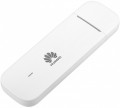 |
|---|---|---|
| ZTE MF79U | Huawei E3372 | |
from $47.00 | from $47.00 | |
| User reviews | ||
| TOP sellers | ||
| Device type | USB modem | USB modem |
| Wi-Fi | Wi-Fi 3 (802.11g) Wi-Fi 4 (802.11n) | |
| Connected devices, up to | 10 | |
| Effective range | 10 m | |
Connection | ||
| Communication generation | 2G 3G 4G (LTE) | 2G 3G 4G (LTE) |
| 4G (LTE) | Cat.4 (150/50 Mbps) | Cat.4 (150/50 Mbps) |
| Transmission technology | GPRS EDGE W-CDMA HSUPA HSDPA HSPA+ LTE | GPRS EDGE W-CDMA HSUPA HSDPA HSPA+ LTE |
| Ports | USB | USB |
Features | ||
| External antenna connector |  | |
| MIMO antenna connection | | |
| Memory card slot | | |
| SIM card slot | | |
General | ||
| Dimensions | 100x32x14 mm | 88x28x11.5 mm |
| Weight | 32 g | 35 g |
| Added to E-Catalog | november 2017 | january 2015 |


Compare ZTE MF79U and Huawei E3372
You may be interested in
ZTE MF79U often compared


Huawei E3372 often compared


Glossary
Wi-Fi
Connection speeds via Wi-Fi, specifically the Wi-Fi standards supported by the modem with corresponding capabilities (see “Type,” “Connection”).
— Wi-Fi 3 (802.11g). This is an advancement of the Wi-Fi 1 standard (802.11b), developed primarily to increase connection bandwidth (2.4 GHz) and introduced in 2003. The 802.11g equipment is fully backward compatible with 802.11b, so even the simplest of modern Wi-Fi devices support both of these standards.
— Wi-Fi 4 (802.11n). A Wi-Fi standard that is a further development of the formats described above — particularly by adding MIMO technology support (distribution of input and output between multiple antennas). Introduced in 2009. The main operating frequency is 2.4 GHz, although devices with an additional 5 GHz band can be found.
— Wi-Fi 5 (802.11ac). Built on 802.11n, introduced at the end of 2013. The main improvements involved increasing the number of streams on the second frequency (5 GHz) and implementing more advanced MIMO and modulation standards, which allowed for a corresponding increase in bandwidth.
— Wi-Fi 6 (802.11ax). The Wi-Fi 6 version delivers the internet via the modern 802.11ax standard in the 2.4 and 5 GHz bands, handling a large number of connected devices better. This modem is especially convenient where smartphones, laptops, TVs, and smart devices use the network simu...ltaneously because Wi-Fi 6 more efficiently distributes traffic and reduces delays in a busy network. Compared to Wi-Fi 5, the difference is usually felt not so much in “peak” speed but in more stable performance during streaming, video calls, and online gaming.
— Wi-Fi 6E (802.11ax). Essentially the same as Wi-Fi 6, but with the addition of a 6 GHz band, making the connection more stable, especially in crowded places. In practice, this is especially useful in an apartment building with many neighboring networks. However, the main point is that the advantage of Wi-Fi 6E is realized only on devices that also support 6 GHz. This frequency allows for a separate channel to be allocated with fewer interferences from other devices.
— Wi-Fi 7 (802.11be). A step further compared to Wi-Fi 6E: it offers even higher speed, lower latency, and more stable network performance under load. Its key advantages over the previous version are related to channels up to 320 MHz and Multi-Link Operation, where the device can use several bands simultaneously instead of just one. In practice, this is particularly useful if the modem is to replace the main home router and deliver fast 5G directly to a laptop, gaming PC, TV with 4K/8K content, NAS, and other demanding equipment. In other words, Wi-Fi 7 is for when not just fast Wi-Fi is needed, but a noticeable reserve in speed and responsiveness for the future.
— Wi-Fi 3 (802.11g). This is an advancement of the Wi-Fi 1 standard (802.11b), developed primarily to increase connection bandwidth (2.4 GHz) and introduced in 2003. The 802.11g equipment is fully backward compatible with 802.11b, so even the simplest of modern Wi-Fi devices support both of these standards.
— Wi-Fi 4 (802.11n). A Wi-Fi standard that is a further development of the formats described above — particularly by adding MIMO technology support (distribution of input and output between multiple antennas). Introduced in 2009. The main operating frequency is 2.4 GHz, although devices with an additional 5 GHz band can be found.
— Wi-Fi 5 (802.11ac). Built on 802.11n, introduced at the end of 2013. The main improvements involved increasing the number of streams on the second frequency (5 GHz) and implementing more advanced MIMO and modulation standards, which allowed for a corresponding increase in bandwidth.
— Wi-Fi 6 (802.11ax). The Wi-Fi 6 version delivers the internet via the modern 802.11ax standard in the 2.4 and 5 GHz bands, handling a large number of connected devices better. This modem is especially convenient where smartphones, laptops, TVs, and smart devices use the network simu...ltaneously because Wi-Fi 6 more efficiently distributes traffic and reduces delays in a busy network. Compared to Wi-Fi 5, the difference is usually felt not so much in “peak” speed but in more stable performance during streaming, video calls, and online gaming.
— Wi-Fi 6E (802.11ax). Essentially the same as Wi-Fi 6, but with the addition of a 6 GHz band, making the connection more stable, especially in crowded places. In practice, this is especially useful in an apartment building with many neighboring networks. However, the main point is that the advantage of Wi-Fi 6E is realized only on devices that also support 6 GHz. This frequency allows for a separate channel to be allocated with fewer interferences from other devices.
— Wi-Fi 7 (802.11be). A step further compared to Wi-Fi 6E: it offers even higher speed, lower latency, and more stable network performance under load. Its key advantages over the previous version are related to channels up to 320 MHz and Multi-Link Operation, where the device can use several bands simultaneously instead of just one. In practice, this is particularly useful if the modem is to replace the main home router and deliver fast 5G directly to a laptop, gaming PC, TV with 4K/8K content, NAS, and other demanding equipment. In other words, Wi-Fi 7 is for when not just fast Wi-Fi is needed, but a noticeable reserve in speed and responsiveness for the future.
Connected devices, up to
The largest number of devices that can be simultaneously connected to the modem via Wi-Fi (see "Connection").
The presence of this limitation is due to the fact that processing network requests from several devices at once requires a fairly large amount of computing resources, and there are not so many of them in miniature electronics like wireless modems. However, even inexpensive models can support about 5 – 6 devices, which is more than enough for most cases; and in more advanced modems, this number can reach 10.
The presence of this limitation is due to the fact that processing network requests from several devices at once requires a fairly large amount of computing resources, and there are not so many of them in miniature electronics like wireless modems. However, even inexpensive models can support about 5 – 6 devices, which is more than enough for most cases; and in more advanced modems, this number can reach 10.
Effective range
The greatest distance at which the modem's built-in router is capable of providing communication via the Wi-Fi interface (see "Connection").
It should be taken into account that in fact the range strongly depends on a number of factors that are not related to the main specs of the modem: the presence of interference and obstacles in the signal path, the specs of the Wi-Fi module of the connected device, the battery charge in this device or the modem itself, etc. Therefore, the actual range indicators can be noticeably lower than the claimed ones: for example, when working through a wall, they are noticeably reduced. However, this spec quite clearly describes the overall range of the device, and comparisons of different models on it are quite acceptable.
Also note that it does not always make sense to purchase a device with a maximum range — although a long range provides additional convenience, it requires high transmitter power, which significantly increases the size and price of the modem. Therefore, when choosing, it is worth proceeding primarily from the intended scenarios of use. For example, if you need a 3G connection to access the Internet on the road from your tablet, a range of several metres will be enough. But for installation in a large private house, it makes sense to look for a model with increased effective range.
It should be taken into account that in fact the range strongly depends on a number of factors that are not related to the main specs of the modem: the presence of interference and obstacles in the signal path, the specs of the Wi-Fi module of the connected device, the battery charge in this device or the modem itself, etc. Therefore, the actual range indicators can be noticeably lower than the claimed ones: for example, when working through a wall, they are noticeably reduced. However, this spec quite clearly describes the overall range of the device, and comparisons of different models on it are quite acceptable.
Also note that it does not always make sense to purchase a device with a maximum range — although a long range provides additional convenience, it requires high transmitter power, which significantly increases the size and price of the modem. Therefore, when choosing, it is worth proceeding primarily from the intended scenarios of use. For example, if you need a 3G connection to access the Internet on the road from your tablet, a range of several metres will be enough. But for installation in a large private house, it makes sense to look for a model with increased effective range.