
Comparison iClebo Omega vs iRobot Roomba 980
Add to comparison | 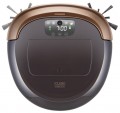 | 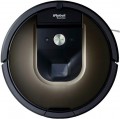 |
|---|---|---|
| iClebo Omega | iRobot Roomba 980 | |
from $32.88 | from $849.99 | |
| User reviews | ||
| TOP sellers | ||
Floor polisher mode (with two rags included). Automatic power adjustment for the type of surface. Efficient indoor navigation. Manual mode. Ergonomic body shape. | Camera for visual orientation. Increased suction power depending on the surface material. Wireless connection to a smartphone. Long battery life. There is no manual control mode. | |
| Type | robot vacuum cleaner | robot vacuum cleaner |
| Cleaning | dry 2 side brushes turbo brush | dry side brush turbo brush |
Robot vacuum cleaner | ||
| Dust container capacity | 1100 ml | |
| Fine filter | HEPA | HEPA |
| Building a room map | camera | camera |
| Cleaning area limitation | magnetic tape | laser sensor |
Features | ||
| Control via smartphone |  |  |
| Voice assistant | Google Assistant, Amazon Alexa | |
| Scheduled cleaning | | |
| Remote control | | |
Battery | ||
| Battery capacity | 4.4 Ah | 3.3 Ah |
| Operating time | 80 min | 120 min |
| Charging time | 3 h | |
General | ||
| Cleaning area | 100 m² | |
| Noise level | 68 dB | 60 dB |
| Dimensions (HxWxD) | 8.7x34x35 cm | 9x35x35 cm |
| Weight | 3.1 kg | |
| Color | ||
| Added to E-Catalog | december 2016 | january 2016 |


Compare iClebo Omega and iRobot Roomba 980
The iClebo Omega and iRobot Roomba 980 robot vacuums each have their strengths that set them apart from competitors. The iClebo Omega receives high marks for its cleaning quality and quiet operation, and users note its ability to effectively handle various surfaces, including carpets. However, a drawback is the lack of a resume function after getting stuck, which can be an issue in large apartments with many obstacles. On the other hand, the iRobot Roomba 980 also offers excellent cleaning quality, especially on carpets, and features smartphone control, making it more modern. However, users express dissatisfaction with the service and potential issues with parts. Overall, both devices cater to different needs: the Omega is better for quietness and simplicity, while the Roomba 980 suits those who value technological innovations and app control.
You may be interested in
My comparisons
iClebo Omega often compared


iRobot Roomba 980 often compared


Glossary
Cleaning
The cleaning method determines whether the robot can only collect dry debris or also wipe the floor covering with water, and which methods are available for this.
— Dry. The robot cleans the floor with brushes and an airflow, directing dust, crumbs, hair and pet fur into the dust container. This option is suitable for carpets and hard floors, but does not remove stains and marks from the floor.
— Dry and wet. The device combines debris suction with floor wiping using a damp attachment. Depending on the design, this may be a simple cloth or an active washing module that can better handle fresh stains and shoe marks.
— Side brushes. Small rotating elements that sweep debris along walls, near furniture and out of corners towards the main suction opening. One side brush on the edge of the body sweeps debris along walls, near furniture and out of corners towards the central suction channel. This design is usually sufficient, as the robot most often moves along obstacles with one particular side. Two brushes operate on both sides of the body and cover a wider strip of floor in one pass. This setup is especially convenient when moving along walls and between furniture, although on smooth floors fast brushes can sometimes scatter light debris.
— Extendable brush. A mov...able side brush automatically extends beyond the body when cleaning corners and areas near walls. Compared to a conventional fixed design, it reduces uncleaned areas where the robot body cannot get close enough.
— Turbo brush. A motorized module at the bottom of the robot that picks up debris and directs it into the suction channel. The working part may consist of a roller with bristles, rubber blades, or a combined surface. This system collects pet fur, hair and dirt from carpets more effectively than a simple suction opening, but bristled elements need regular cleaning to remove tangled hair.
— Floor scrubber. An active washing module with rotating mops or a roller that does not simply glide over the floor but mechanically scrubs away dirt. This system removes stains and marks better than a regular cloth.
— Extendable floor scrubber. One of the rotating mops shifts to the side and extends beyond the robot body. This allows the floor to be wiped closer to skirting boards, furniture legs and corners, where a standard fixed floor scrubber leaves a narrow dry strip.
— Vibration wiping. The washing platform rapidly moves the cloth back and forth, increasing friction against the surface. In terms of effectiveness, this option is between a passive cloth and rotating mops, effectively removing light stains and marks.
— Cloth wiping. A damp fabric attachment is fixed under the body and pulled across the floor as the robot moves. This simple solution is suitable for regular removal of fine dust and fresh marks, but barely scrubs off dried dirt.
— Dry. The robot cleans the floor with brushes and an airflow, directing dust, crumbs, hair and pet fur into the dust container. This option is suitable for carpets and hard floors, but does not remove stains and marks from the floor.
— Dry and wet. The device combines debris suction with floor wiping using a damp attachment. Depending on the design, this may be a simple cloth or an active washing module that can better handle fresh stains and shoe marks.
— Side brushes. Small rotating elements that sweep debris along walls, near furniture and out of corners towards the main suction opening. One side brush on the edge of the body sweeps debris along walls, near furniture and out of corners towards the central suction channel. This design is usually sufficient, as the robot most often moves along obstacles with one particular side. Two brushes operate on both sides of the body and cover a wider strip of floor in one pass. This setup is especially convenient when moving along walls and between furniture, although on smooth floors fast brushes can sometimes scatter light debris.
— Extendable brush. A mov...able side brush automatically extends beyond the body when cleaning corners and areas near walls. Compared to a conventional fixed design, it reduces uncleaned areas where the robot body cannot get close enough.
— Turbo brush. A motorized module at the bottom of the robot that picks up debris and directs it into the suction channel. The working part may consist of a roller with bristles, rubber blades, or a combined surface. This system collects pet fur, hair and dirt from carpets more effectively than a simple suction opening, but bristled elements need regular cleaning to remove tangled hair.
— Floor scrubber. An active washing module with rotating mops or a roller that does not simply glide over the floor but mechanically scrubs away dirt. This system removes stains and marks better than a regular cloth.
— Extendable floor scrubber. One of the rotating mops shifts to the side and extends beyond the robot body. This allows the floor to be wiped closer to skirting boards, furniture legs and corners, where a standard fixed floor scrubber leaves a narrow dry strip.
— Vibration wiping. The washing platform rapidly moves the cloth back and forth, increasing friction against the surface. In terms of effectiveness, this option is between a passive cloth and rotating mops, effectively removing light stains and marks.
— Cloth wiping. A damp fabric attachment is fixed under the body and pulled across the floor as the robot moves. This simple solution is suitable for regular removal of fine dust and fresh marks, but barely scrubs off dried dirt.
Dust container capacity
The dustbin capacity indicates how much dry debris fits in the robot vacuum’s built-in container before it needs to be emptied. Models with a 200–300 ml capacity are suitable for a small apartment and frequent cleaning cycles, while a 400–600 ml capacity is more convenient for larger areas, pets, or lots of hair. For robots with a self-emptying station, the size of the internal container is less important, as debris is automatically transferred to the docking station’s collection bin.
Cleaning area limitation
Cleaning area restriction lets you prevent the robot vacuum from entering certain rooms or selected floor areas. This is useful near pet bowls, fragile items, wires, children’s play areas, or surfaces that should not be wiped with a wet attachment. There are various methods.
— Laser sensor. A separate accessory that creates an invisible boundary — the robot detects it with its sensors and does not cross it. It can be moved between rooms, but the device takes up floor space and usually requires separate power.
— Magnetic tape. A strip is placed on the floor or under a thin covering, creating a physically defined no-go line. This is a simple and reliable method, but the tape may be noticeable in the interior and only restricts the area where it is laid.
— Mobile app. No-go zones and virtual walls are applied directly to the saved map of the room. This option does not require additional accessories, allows you to quickly change boundaries, and is usually the most convenient for regular use.
— Laser sensor. A separate accessory that creates an invisible boundary — the robot detects it with its sensors and does not cross it. It can be moved between rooms, but the device takes up floor space and usually requires separate power.
— Magnetic tape. A strip is placed on the floor or under a thin covering, creating a physically defined no-go line. This is a simple and reliable method, but the tape may be noticeable in the interior and only restricts the area where it is laid.
— Mobile app. No-go zones and virtual walls are applied directly to the saved map of the room. This option does not require additional accessories, allows you to quickly change boundaries, and is usually the most convenient for regular use.
Control via smartphone
Smartphone control allows you to configure and start the robot vacuum cleaner via the branded mobile app. It usually offers mode selection, power and water flow adjustment, cleaning schedules, map viewing, and no-go zone creation. The app also lets you send the robot to a specific room, check the status of consumables, or receive a notification when cleaning is complete. For remote control, most models connect to a home Wi-Fi network.
Voice assistant
Voice assistant lets you control the robot vacuum cleaner with short commands via a compatible smart speaker, smartphone, or smart home system. You can use your voice to start and stop cleaning, return the device to the docking station, and on some models, select a room or operating mode. This feature is especially convenient when your phone is not nearby, but the set of available commands depends on the robot model and the supported platform.
Remote control
Availability of a wireless controller for operating the robot vacuum cleaner without a smartphone or mobile app. With a remote control, you can usually start and stop cleaning, select a mode, change the direction of movement, or send the device to the docking station. This option is especially convenient for elderly users, children, or in rooms without Wi-Fi.
Battery capacity
Battery capacity indicates the amount of charge available to the robot vacuum for navigation, motor operation, brushes, and the mopping system. A higher-capacity battery can potentially provide longer runtime, but it does not allow the exact cleaning time to be determined without considering the device's power consumption. Operating time is more strongly affected by the selected mode, suction power, floor type, use of mopping pads, and frequency of returns to the docking station.
Operating time
Battery life determines how much area the robot vacuum can clean before returning to the docking station. Actual performance depends on the selected mode, suction power, floor type, operation of the mops or roller, and layout complexity. Therefore, the stated maximum time is usually achieved in a gentle mode and will be noticeably shorter during intensive cleaning.
Charging time
Full charging cycle of the robot vacuum to restore the battery from the minimum level to 100%. The process usually takes several hours and depends on the battery capacity and charging system power. However, with regular returns to the base, this parameter rarely affects cleaning convenience.