
Comparison Myriwell RP600A vs Myriwell RP100B
Add to comparison | 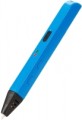 | 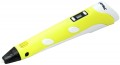 |
|---|---|---|
| Myriwell RP600A | Myriwell RP100B | |
| Outdated Product | from $54.00 | |
| TOP sellers | ||
Display for displaying parameters. Automatic plastic feed. Smooth speed control. Working with ABS and PLA plastic. Auto power off after 2 min. inaction. | ||
| Product Type | hot printing | hot printing |
| Filament Material | ABS + PLA | ABS + PLA |
| Min thread diameter | 1.75 mm | 1.75 mm |
| Nozzle Diameter | 0.6 mm | 0.7 mm |
| Print Speed | 40 mm/s | |
Features | ||
| Temperature Adjust |  | |
| Smooth Speed Adjust | | |
| USB powered | |  |
| Auto Power Off | | |
| Display | | |
General | ||
| Tip Material | ceramics | ceramics |
| Country of brand origin | China | China |
| Dimensions | 175x20x17 mm | 180 mm |
| Thickness | 17 mm | |
| Weight | 40 g | 60 g |
| Added to E-Catalog | november 2016 | july 2015 |


Compare Myriwell RP600A and RP100B
You may be interested in
My comparisons
Myriwell RP600A often compared


Myriwell RP100B often compared


Glossary
Nozzle Diameter
The diameter of the nozzle provided in the pen.
The larger the nozzle, the thicker the lines produced by the pen will be (ceteris paribus; the actual thickness of the lines will also depend on the type of plastic and the adjusted temperature). In the thinnest models, the nozzle diameter is less than 0.5 mm, in the thickest models it is about 0.9 mm. Most modern 3D pens have nozzles in the range of 0.6 – 0.7 mm — this value is considered the most versatile and convenient for practical use.
The larger the nozzle, the thicker the lines produced by the pen will be (ceteris paribus; the actual thickness of the lines will also depend on the type of plastic and the adjusted temperature). In the thinnest models, the nozzle diameter is less than 0.5 mm, in the thickest models it is about 0.9 mm. Most modern 3D pens have nozzles in the range of 0.6 – 0.7 mm — this value is considered the most versatile and convenient for practical use.
Print Speed
The material feed rate provided by the pen. The higher this speed, the faster you can work with this model; on the other hand, the rapid supply of material requires increased accuracy and serious skills. The maximum value of this parameter in modern 3D pens is about 40 mm/s. Models with adjusted speed is also available (see below); for them, usually, the highest speed of operation is given in the specs.
USB powered
The pen is powered by a standard USB connector. Such devices are as versatile as possible in connectivity: they can be powered via a PC, a portable device like a laptop or tablet, an external power bank, a USB wall charger or car charger.
Auto Power Off
Automatic power off of the pen for being idle for a while. Usually, auto-off triggers after a few minutes.
This feature is found mainly in models with a "hot" type of operation (see "Product Type"). It saves energy and reduces the risk of getting burned by accidentally touching the pen that is left on. However, there are also "cold" models with auto-off.
This feature is found mainly in models with a "hot" type of operation (see "Product Type"). It saves energy and reduces the risk of getting burned by accidentally touching the pen that is left on. However, there are also "cold" models with auto-off.
Display
The availability of a built-in display. Usually, these are the simplest single-colour screens that display the basic operating parameters — speed and/or temperature. However, even such a display makes the pen more convenient and allows you to get important information about its operation.