
Comparison Tenda AC8 vs Tenda AC11
Add to comparison | 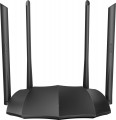 | 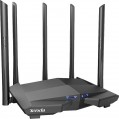 |
|---|---|---|
| Tenda AC8 | Tenda AC11 | |
from $76.13 | Outdated Product | |
| User reviews | ||
| TOP sellers | ||
Beamforming and MU-MIMO support. 4 antennas with a gain of 6 dBi. | It differs from AC10 in the type of LAN controllers, it is also equipped with one additional antenna to increase the strength of the Wi-Fi signal. | |
| Product type | router | router |
| Data input (WAN-port) | Ethernet (RJ45) Wi-Fi | Ethernet (RJ45) Wi-Fi |
Wireless Wi-Fi connection | ||
| Wi-Fi standards | Wi-Fi 3 (802.11g) Wi-Fi 4 (802.11n) Wi-Fi 5 (802.11ac) | Wi-Fi 3 (802.11g) Wi-Fi 4 (802.11n) Wi-Fi 5 (802.11ac) |
| Frequency band | 2.4GHz 5 GHz | 2.4GHz 5 GHz |
| Operating ranges | dual-band (2.4 GHz and 5 GHz) | dual-band (2.4 GHz and 5 GHz) |
| Wireless speed 2.4 GHz | 300 Mbps | 300 Mbps |
| Wireless speed 5 GHz | 867 Mbps | 867 Mbps |
Connection and LAN | ||
| WAN | 1 port 1 Gbps | 1 port 1 Gbps |
| LAN | 3 ports 1 Gbps | 3 ports 1 Gbps |
Antenna and transmitter | ||
| Number of antennas | 4 | 5 |
| Antenna type | external | external |
| MU-MIMO |  | |
| Gain | 6 dBi | 6 dBi |
| 2.4 / 5 GHz antennas | 4 | |
| Transmitter power | 23 dBm | 23 dBm |
| Signal strength 2.4 GHz | 20 dBm | 20 dBm |
| Signal strength 5 GHz | 23 dBm | 23 dBm |
Functions | ||
| Features | NAT bridge mode repeater Beamforming firewall | NAT bridge mode repeater Beamforming firewall |
| More features | DHCP server VPN DDNS DMZ | DHCP server VPN DDNS DMZ |
Security | ||
| Safety standards | WPA WEP WPA2 | WPA WEP WPA2 |
General | ||
| Operating temperature | 0 °C ~ +40 °C | |
| Dimensions | 200x127x34 mm | 220x141.5x49 mm |
| Color | ||
| Added to E-Catalog | january 2020 | september 2019 |


Compare Tenda AC8 and AC11
You may be interested in
My comparisons
Tenda AC8 often compared


Tenda AC11 often compared

Glossary
Number of antennas
The total number of antennas (of all types — see below) provided in the design of the device.
In modern Wi-Fi equipment, this indicator can be different: in addition to the simplest devices with 1 antenna, there are models where this number is 2, 3, 4 and even more. The point of using multiple antennas is twofold. Firstly, if there are several external devices per antenna, they have to share the bandwidth among themselves, and the actual communication speed for each subscriber drops accordingly. Secondly, such a design may also be required when communicating with one external device — to work with MU-MIMO technology (see below), which allows you to fully realize the capabilities of modern Wi-Fi standards.
Anyway, more antennas, usually, means a more advanced and functional device. On the other hand, this parameter significantly affects the cost; so specifically looking for equipment with numerous antennas makes sense mainly when the speed and stability of communication are critical.
Note that antennas intended for mobile communications may also be considered in this clause. So when choosing a model with support for mobile networks, it's ok to clarify this point.
In modern Wi-Fi equipment, this indicator can be different: in addition to the simplest devices with 1 antenna, there are models where this number is 2, 3, 4 and even more. The point of using multiple antennas is twofold. Firstly, if there are several external devices per antenna, they have to share the bandwidth among themselves, and the actual communication speed for each subscriber drops accordingly. Secondly, such a design may also be required when communicating with one external device — to work with MU-MIMO technology (see below), which allows you to fully realize the capabilities of modern Wi-Fi standards.
Anyway, more antennas, usually, means a more advanced and functional device. On the other hand, this parameter significantly affects the cost; so specifically looking for equipment with numerous antennas makes sense mainly when the speed and stability of communication are critical.
Note that antennas intended for mobile communications may also be considered in this clause. So when choosing a model with support for mobile networks, it's ok to clarify this point.
2.4 / 5 GHz antennas
The total number of antennas in the router that can operate on both 5 GHz and 2.4 GHz frequencies. For details about the number of antennas, see "Total antennas", about the range — "Frequency range".
Operating temperature
Ambient air temperature at which the device is guaranteed to remain operational.
All modern Wi-Fi equipment can easily endure the conditions typical for use in apartments, offices, etc. So it makes sense to pay attention to this parameter mainly when choosing a model for outdoor installation (see above) or indoors , where the conditions are not very different from those outside. At the same time, the upper temperature limit is usually quite high, and even in the heat there are usually no problems with operation (of course, if the device is not installed in direct sunlight — which is not recommended anyway). But the lower temperature threshold can be different, not all "street" equipment is designed for frost. However, among frost-resistant models there are solutions where the minimum operating temperature is -10 °C and below, and sometimes even -40 °C and below.
All modern Wi-Fi equipment can easily endure the conditions typical for use in apartments, offices, etc. So it makes sense to pay attention to this parameter mainly when choosing a model for outdoor installation (see above) or indoors , where the conditions are not very different from those outside. At the same time, the upper temperature limit is usually quite high, and even in the heat there are usually no problems with operation (of course, if the device is not installed in direct sunlight — which is not recommended anyway). But the lower temperature threshold can be different, not all "street" equipment is designed for frost. However, among frost-resistant models there are solutions where the minimum operating temperature is -10 °C and below, and sometimes even -40 °C and below.