
Comparison Zalman S2 TG black vs Zalman S3 black
Add to comparison | 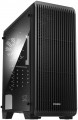 | 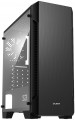 |
|---|---|---|
| Zalman S2 TG black | Zalman S3 black | |
| Compare prices 1 | Outdated Product | |
| User reviews | ||
| TOP sellers | ||
8 places for fans. Large air intake with dust filters on the top cover. Side window. 4 compartments 2.5. | ||
| Features | gaming | |
| Form factor | Midi Tower | Midi Tower |
| Mount | vertical | vertical |
| Motherboard support | ATX | ATX |
| PSU form factor | ATX (regular) | ATX (regular) |
Computer case | ||
| Dimensions (HxWxD) | 451x189x412 mm | 451x189x412 mm |
| Graphics card max lenght | 330 mm | 330 mm |
| Fan max height | 156 mm | 156 mm |
| Weight | 4 kg | |
| Material | steel | steel |
| Rubber feet |  |  |
| Side panel | removable | removable |
Storage | ||
| PSU | | |
| PSU mount | bottom | bottom |
| 3.5" bays | 2 | 2 |
| internal 2.5" compartments | 4 | 4 |
| Expansion slots | 7 | 7 |
Cooling | ||
| Fans (back) | 1x120mm | 1x120mm |
| Fans (front) | 3x120mm | 3x120mm |
| Fans (top) | 2x120mm | 2x120mm |
| Fans (bottom) | 2x120mm | 2x120mm |
| Fan mounts total | 8 | 8 |
| Dust filter | + | + |
| Liquid cooling system support | | |
Liquid cooling system | ||
| Liquid cooling (rear) | 120 mm | 120 mm |
| Liquid cooling (front) | 240mm | 240mm |
| Liquid cooling mounts | 2 | 2 |
Connectors and functions | ||
| Placement | on top of the case | on top of the case |
| USB-A 2.0 | 2 pcs | 2 pcs |
| USB-A 5Gbps | 1 pcs | 1 pcs |
| Audio (microphone/headphones) | | |
More features | ||
| Front panel | solid | |
| Side panel window | acrylic | + |
| More features | CPU cooling mount window | CPU cooling mount window |
| Color | ||
| Added to E-Catalog | march 2019 | february 2019 |



Compare Zalman S2 TG and S3
The cases Zalman S2 TG and Zalman S3 have similar features, such as the Midi Tower form factor and the ability to install motherboards formatted for ATX, micro-ATX, and mini-ITX. However, the main difference lies in the side panel: the S2 TG has an acrylic window, while the S3 features a solid front panel and a window on the side panel. Both cases support water cooling and have the same number of fan mounts, which makes them competitive in terms of cooling. Users note that the S2 TG looks more stylish due to its transparent side panel, while the S3 may be preferred by those seeking a more simple and classic design.
Price comparison
You may be interested in
My comparisons
Zalman S2 TG often compared


Glossary
Features
The direction in which the body is facing. This parameter is indicated only for models that have a certain specialization and differ markedly from general-purpose cases.
— Gaming. Cases designed for high-performance gaming computer systems. They usually have numerous openings for expansion slots and bays for drives (see the corresponding paragraphs), as well as advanced options for installing cooling systems — many “seats” for fans, the ability to use liquid cooling (see “Liquid cooling support”) and etc. In addition, they often stand out due to their design: they can be equipped with decorative lighting, transparent windows, etc.
— HTPC. Enclosures for PC multimedia orientation, the so-called Home Theater Personal Computer (HTPC). The characteristic features of such cases are compact size, the presence of additional buttons on the front panel for controlling multimedia (and sometimes a sensor for the remote control) and an advanced design.
— Gaming. Cases designed for high-performance gaming computer systems. They usually have numerous openings for expansion slots and bays for drives (see the corresponding paragraphs), as well as advanced options for installing cooling systems — many “seats” for fans, the ability to use liquid cooling (see “Liquid cooling support”) and etc. In addition, they often stand out due to their design: they can be equipped with decorative lighting, transparent windows, etc.
— HTPC. Enclosures for PC multimedia orientation, the so-called Home Theater Personal Computer (HTPC). The characteristic features of such cases are compact size, the presence of additional buttons on the front panel for controlling multimedia (and sometimes a sensor for the remote control) and an advanced design.
Rubber feet
The presence of rubberized legs in the design of the case.
These feet absorb vibrations generated during operation of the computer (mainly due to the operation of fans and optical drives), thereby reducing noise levels and providing additional comfort. Rubberized feet are especially desirable if the computer is placed on a table (on a tabletop or in a dedicated compartment on a table) or on a hard floor.
These feet absorb vibrations generated during operation of the computer (mainly due to the operation of fans and optical drives), thereby reducing noise levels and providing additional comfort. Rubberized feet are especially desirable if the computer is placed on a table (on a tabletop or in a dedicated compartment on a table) or on a hard floor.
Front panel
- Lattice. The grille on the front panel of the case often looks good and allows you to better supply the cooling system fans with more outside air. Decorative lighting is often placed behind the perforated panel, which improves the appearance of the case.
- Blank. The competitive advantages of cases with a blank front panel are improved noise insulation and effective protection of the internal space of the computer from dust.
- Glass. The veil of mystery of what is happening inside the computer system unit is lifted by cases with a glass front panel. Tempered glass as a “facade” material is used both in the form of a solid window and in the form of a glass grille with RGB backlighting. And in combination with the glass side window, it turns the body into an “aquarium”.
- Blank. The competitive advantages of cases with a blank front panel are improved noise insulation and effective protection of the internal space of the computer from dust.
- Glass. The veil of mystery of what is happening inside the computer system unit is lifted by cases with a glass front panel. Tempered glass as a “facade” material is used both in the form of a solid window and in the form of a glass grille with RGB backlighting. And in combination with the glass side window, it turns the body into an “aquarium”.
Side panel window
The presence of a viewing window on the side panel of the case, allowing you to see the “filling” without opening the case. It gives the case a stylish appearance; in addition, it allows you to install a lighting system inside, which is appreciated by gamers compared to case models without a window.
The materials for manufacturing the windows on the side panel are:
- Acrylic. Acrylic or plexiglass is an inexpensive material of relatively light weight, which, however, actively collects scratches and can be deformed when exposed to high temperatures.
- Strained glass. Tempered glass panels have excellent transparency, are resistant to scratches and are easy to clean from dirt. At the same time, they weigh a lot and can break to pieces if not handled carefully.
- Metal grid. Wire mesh is a simple type of window material used on the side panel of a cabinet. It allows air to pass through and provides additional heat removal from the internal components of the system unit; dust can leak through the mesh overnight.
The materials for manufacturing the windows on the side panel are:
- Acrylic. Acrylic or plexiglass is an inexpensive material of relatively light weight, which, however, actively collects scratches and can be deformed when exposed to high temperatures.
- Strained glass. Tempered glass panels have excellent transparency, are resistant to scratches and are easy to clean from dirt. At the same time, they weigh a lot and can break to pieces if not handled carefully.
- Metal grid. Wire mesh is a simple type of window material used on the side panel of a cabinet. It allows air to pass through and provides additional heat removal from the internal components of the system unit; dust can leak through the mesh overnight.