
Comparison Eken H9R vs Eken H9
Add to comparison | 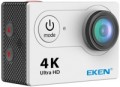 | 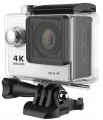 |
|---|---|---|
| Eken H9R | Eken H9 | |
| Outdated Product | from $58.00 | |
| User reviews | ||
| TOP sellers | ||
Portable remote control. Rich equipment. Compatible with GoPro accessories. | ||
| Product type | action camera | action camera |
| Body type | conventional | conventional |
| Thread 1/4" (for tripod) |  | |
| Dust-, moisture-proof of case | IP68 | IP68 |
Filming | ||
| HD (720p) | 1280x720 px 60 fps | 1280x720 px 60 fps |
| Full HD (1080p) | 1920x1080 px 60 fps | 1920x1080 px 60 fps |
| Quad HD | 2704x1520 px 30 fps | 2704x1520 px 30 fps |
| Ultra HD (4K) | 3840x2160 px 24 fps | 3840x2160 px 15 fps |
| Slow motion | 120 fps | 120 fps |
| Field of view | 170 ° | 140 ° |
| Sound recording |  | |
| Megapixels | 12 | 12 |
| Photo resolution | 4000x3000 px | 4000x3000 px |
| Capabilities | serial photo shoot time lapse | serial photo shoot time lapse |
Features | ||
| Display | 2 " 320x240 px | 2 " 320x240 px |
| Connection | Wi-Fi HDMI output | Wi-Fi HDMI output |
| Speaker | | |
| Max. memory card capacity | 32 GB | 32 GB |
| Control | remote control | |
Battery | ||
| Type | removable | removable |
| Battery model | PG1050 | PG1050 |
| Capacity | 1050 mAh | 1050 mAh |
General | ||
| In box | protective case helmet mount flat mount 3-axis mount bicycle / moto handlebar clamp (clip) | protective case helmet mount flat mount 3-axis mount bicycle / moto handlebar clamp (clip) |
| Dimensions | 59x41x25 mm | 59x41x25 mm |
| Weight | 64 g | 65 g |
| Color | ||
| Added to E-Catalog | may 2017 | january 2016 |


Compare Eken H9R and H9
You may be interested in
My comparisons
Eken H9R often compared


Eken H9 often compared


Glossary
Ultra HD (4K)
The ability of the camera to shoot Ultra HD 4K video.
This format covers several resolutions in which the horizontal frame size is approximately 4K pixels. The most popular in action cameras is 3840x2160 (twice the FullHD frame on each side), but there are other options — for example, 3840x1920, corresponding to an aspect ratio of 2:1. In general, 4K is a kind of successor to Full HD: among HD standards that surpass Full HD, UltraHD is the most popular, in particular, many advanced TVs are produced with 3840x2160 screens. On the other hand, this format is quite demanding in terms of processing power and memory, so it is relatively rare in action cameras, mainly among premium models.
Another important parameter given in this paragraph is the frame rate. The higher it is, the smoother the movement in the frame will be, and the details in dynamic scenes will be visible clearly. However, in UltraHD mode, most modern action cameras produce a very low frame rate — most often 30 fps, and in some models 24 fps or even 15 fps. This video is quite viewable, but fast movement in the frame may look blurry. There are cameras capable of shooting UltraHD at a solid speed of 60 fps — the blurring effect during such shooting is almost imperceptible. However, such a model cost is high.
This format covers several resolutions in which the horizontal frame size is approximately 4K pixels. The most popular in action cameras is 3840x2160 (twice the FullHD frame on each side), but there are other options — for example, 3840x1920, corresponding to an aspect ratio of 2:1. In general, 4K is a kind of successor to Full HD: among HD standards that surpass Full HD, UltraHD is the most popular, in particular, many advanced TVs are produced with 3840x2160 screens. On the other hand, this format is quite demanding in terms of processing power and memory, so it is relatively rare in action cameras, mainly among premium models.
Another important parameter given in this paragraph is the frame rate. The higher it is, the smoother the movement in the frame will be, and the details in dynamic scenes will be visible clearly. However, in UltraHD mode, most modern action cameras produce a very low frame rate — most often 30 fps, and in some models 24 fps or even 15 fps. This video is quite viewable, but fast movement in the frame may look blurry. There are cameras capable of shooting UltraHD at a solid speed of 60 fps — the blurring effect during such shooting is almost imperceptible. However, such a model cost is high.
Field of view
For models with several lenses, as a rule, this parameter is indicated for each lens.
Most often (unless otherwise indicated), the specifications indicate the field of view by the diagonal of the frame; in some ultra-wide-angle lenses it can exceed 180°. A special case is made up of lenses for which a 360° view is declared: this means that the optics cover the entire hemisphere in front of it. Such lenses are found in panoramic and 360-degree cameras (see “Product type”).
In general, the field of view primarily determines what area of the scene is being captured into the frame. Accordingly, the wider it is, the more space the camera captures, and the lower the likelihood that something that is happening will be off-screen. On the other hand, it is worth considering that a strong increase in the field of view leads to distortions of the “picture”, especially at the edges, as well as, to a decrease in the size of visible objects and a decrease in detail. Detailed recommendations regarding choosing a camera based on this parameter can be found in special sources.
Most often (unless otherwise indicated), the specifications indicate the field of view by the diagonal of the frame; in some ultra-wide-angle lenses it can exceed 180°. A special case is made up of lenses for which a 360° view is declared: this means that the optics cover the entire hemisphere in front of it. Such lenses are found in panoramic and 360-degree cameras (see “Product type”).
In general, the field of view primarily determines what area of the scene is being captured into the frame. Accordingly, the wider it is, the more space the camera captures, and the lower the likelihood that something that is happening will be off-screen. On the other hand, it is worth considering that a strong increase in the field of view leads to distortions of the “picture”, especially at the edges, as well as, to a decrease in the size of visible objects and a decrease in detail. Detailed recommendations regarding choosing a camera based on this parameter can be found in special sources.
Control
Action camera control. Specified only if this model is equipped with an optional external control device. So in this case we are talking more about the type of remote control.
The remote control itself is convenient, first of all, because reaching directly to the camera can be inconvenient, and sometimes even dangerous. But the types of devices used for this can be as follows:
— Portable remote control. Traditional external control panels that do not have displays. Theoretically, the functionality of such a remote control can be different, but only the most basic functions are usually available — start/stop recording and taking photos; the rest of the possibilities can be controlled traditionally. Such remotes often have a strap for attaching to a hand or a mount for installing such a strap. The absence of a screen, on the one hand, makes them as simple, reliable and autonomous as possible, on the other hand, it limits the functionality.
— Remote screen with remote control. Remote controls complete with their displays. Like simpler devices, without a display, they are usually designed to be mounted on the hand. Therefore, the built-in screens have a very small diagonal — otherwise, it would be simply inconvenient to wear them. Nevertheless, even such a screen turns out to be quite functional and useful. It usually plays the role of an external viewfinder, allowing you to se...e what exactly the camera is recording at the moment — an important feature, given that the action camera's screen (if any) is most often not visible to the user at the time of shooting. Of course, various service information can also be displayed on the remote display.
It is worth noting that many modern action cameras can use a smartphone connected via Wi-Fi as an external display. However, a specialized remote screen is often more convenient due to its compactness, security and convenient attachment to the arm.
The remote control itself is convenient, first of all, because reaching directly to the camera can be inconvenient, and sometimes even dangerous. But the types of devices used for this can be as follows:
— Portable remote control. Traditional external control panels that do not have displays. Theoretically, the functionality of such a remote control can be different, but only the most basic functions are usually available — start/stop recording and taking photos; the rest of the possibilities can be controlled traditionally. Such remotes often have a strap for attaching to a hand or a mount for installing such a strap. The absence of a screen, on the one hand, makes them as simple, reliable and autonomous as possible, on the other hand, it limits the functionality.
— Remote screen with remote control. Remote controls complete with their displays. Like simpler devices, without a display, they are usually designed to be mounted on the hand. Therefore, the built-in screens have a very small diagonal — otherwise, it would be simply inconvenient to wear them. Nevertheless, even such a screen turns out to be quite functional and useful. It usually plays the role of an external viewfinder, allowing you to se...e what exactly the camera is recording at the moment — an important feature, given that the action camera's screen (if any) is most often not visible to the user at the time of shooting. Of course, various service information can also be displayed on the remote display.
It is worth noting that many modern action cameras can use a smartphone connected via Wi-Fi as an external display. However, a specialized remote screen is often more convenient due to its compactness, security and convenient attachment to the arm.