
Comparison Deepcool Dukase V3 without PSU vs Deepcool Dukase black
Add to comparison | 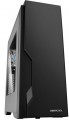 | 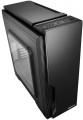 |
|---|---|---|
| Deepcool Dukase V3 without PSU | Deepcool Dukase black | |
from $70.67 up to $72.12 | from $67.79 | |
| TOP sellers | ||
| Features | gaming | gaming |
| Form factor | Midi Tower | Midi Tower |
| Mount | vertical | vertical |
| Motherboard support | ATX | ATX |
| PSU form factor | ATX (regular) | ATX (regular) |
Computer case | ||
| Dimensions (HxWxD) | 504x213x483 mm | 504x213x483 mm |
| Graphics card max lenght | 390 mm | 390 mm |
| Fan max height | 160 mm | 170 mm |
| Weight | 7.03 kg | 6.49 kg |
| Material | steel | steel |
| Lighting type | backlit fan | computer Case |
| Side panel | removable | removable |
Storage | ||
| PSU |  | |
| PSU mount | bottom | bottom |
| 5.25" bays | 2 | 2 |
| 3.5" external bays | 1 | 1 |
| 3.5" bays | 2 | 2 |
| internal 2.5" compartments | 3 | 3 |
| Expansion slots | 7 | 7 |
| Screwless |  | |
Cooling | ||
| Installed fans | 2 шт | 1 шт |
| Fans (back) | 1x120mm | 1x120mm |
| Fans (front) | 1x140mm | 1x140mm |
| Fans (top) | 2x140mm | 2x140mm |
| Fan mounts total | 4 | 4 |
| Dust filter | + | + |
| Liquid cooling system support | | |
Liquid cooling system | ||
| Liquid cooling (rear) | 120 mm | |
| Liquid cooling (top) | 280mm | |
| Liquid cooling mounts | 2 | |
Connectors and functions | ||
| Placement | on top of the case | on top of the case |
| Fan controler | | |
| USB-A 2.0 | 1 pcs | 1 pcs |
| USB-A 5Gbps | 1 pcs | 1 pcs |
| Audio (microphone/headphones) | | |
More features | ||
| Front panel | lattice | lattice |
| Side panel window | + | + |
| More features | front panel hidden wiring CPU cooling mount window | front panel hidden wiring CPU cooling mount window |
| Color | ||
| Added to E-Catalog | april 2017 | february 2016 |


Compare Deepcool Dukase V3 and Dukase
You may be interested in
My comparisons
Deepcool Dukase V3 often compared


Glossary
Fan max height
The highest cooler height allowed for this case.
In this case, we mean a cooler used to cool the processor — such a component is found in the vast majority of modern PCs. Height is measured relative to the motherboard.
In this case, we mean a cooler used to cool the processor — such a component is found in the vast majority of modern PCs. Height is measured relative to the motherboard.
Lighting type
The type of illumination provided in the body design.
The backlight plays mainly a decorative role, it gives the computer an original appearance, which is appreciated by fans of external tuning. Lighting can be mounted separately, but it is easier to purchase a case where it was originally provided. The types of illumination can be as follows:
— Illuminated fan. One or more coolers are illuminated, facing the side or top surface of the case.
— Cases with backlight. Separate parts of the body are illuminated, usually from the inside, in such a way that the illumination can be seen through a transparent window / windows or a lattice surface. Sometimes external lighting can be provided.
There are cases in which both types of illumination are provided simultaneously. And for office needs , cases without backlight are suitable.
The backlight plays mainly a decorative role, it gives the computer an original appearance, which is appreciated by fans of external tuning. Lighting can be mounted separately, but it is easier to purchase a case where it was originally provided. The types of illumination can be as follows:
— Illuminated fan. One or more coolers are illuminated, facing the side or top surface of the case.
— Cases with backlight. Separate parts of the body are illuminated, usually from the inside, in such a way that the illumination can be seen through a transparent window / windows or a lattice surface. Sometimes external lighting can be provided.
There are cases in which both types of illumination are provided simultaneously. And for office needs , cases without backlight are suitable.
Installed fans
The more fans are included in the design, all else being equal — the more intense the cooling will be and the more powerful (and, consequently, "hotter") components can be placed in the case without the risk of overheating. For everyday tasks, a case with one, two, three, or four factory fans is quite sufficient. At the same time, when comparing, it is worth considering not only the number but also the operating characteristics of the fans (diameter, speed). It should also be noted that cases are available for purchase without fans but with open slots for fans, allowing you to supplement the cooling system and improve its performance if necessary.
Liquid cooling (rear)
Size of the mounting space for the liquid cooling system provided on the back of the case.
In cases supporting liquid cooling systems, water cooling radiators are installed in the same slots as traditional fans. In other words, either a fan (or fans) or a liquid cooling radiator can be fitted into the same space. The size of the mounting space for a liquid cooling system is indicated by a single digit — the length (on the larger side); the width can be determined based on this information. The point is that modern liquid cooling radiators typically use fans of one of the standard sizes — 120 mm or 140 mm; and if there are several of such fans, they are arranged in a row. As a result, the length of the radiator becomes a multiple, and the width is equal to one of these numbers: for example, 280 mm is 2x140 mm with a width of 140 mm, and 360 mm is 3x120 mm with a width of 120 mm.
Note that the same nuances are relevant here as for air cooling: a larger fan occupies more space and is more expensive, but it is considered more advanced as it can operate efficiently at lower speeds — which reduces noise levels and vibrations.
In cases supporting liquid cooling systems, water cooling radiators are installed in the same slots as traditional fans. In other words, either a fan (or fans) or a liquid cooling radiator can be fitted into the same space. The size of the mounting space for a liquid cooling system is indicated by a single digit — the length (on the larger side); the width can be determined based on this information. The point is that modern liquid cooling radiators typically use fans of one of the standard sizes — 120 mm or 140 mm; and if there are several of such fans, they are arranged in a row. As a result, the length of the radiator becomes a multiple, and the width is equal to one of these numbers: for example, 280 mm is 2x140 mm with a width of 140 mm, and 360 mm is 3x120 mm with a width of 120 mm.
Note that the same nuances are relevant here as for air cooling: a larger fan occupies more space and is more expensive, but it is considered more advanced as it can operate efficiently at lower speeds — which reduces noise levels and vibrations.
Liquid cooling (top)
The size of the mounting space for the liquid cooling system provided on the top side of the case.
In cases supporting LCS, water cooling radiators are installed in the same slots as traditional fans. In other words, a fan (or fans) or an LCS radiator can be installed in the same mounting space. The size of the mounting space for LCS is specified by a single number — the length (on the longer side); the width can be determined based on this information. The fact is, modern LCS radiators typically use fans of one of the standard sizes — 120 mm or 140 mm; and if there are several such fans, they are arranged in a row. As a result, the length of the radiator is a multiple, and the width is equal to one of these numbers: for example, 280 mm means 2x140 mm with a width of 140 mm, and 360 mm means 3x120 mm with a width of 120 mm. Overall, an upper radiator size of 240 mm and below is considered relatively small, 280 mm is medium, 360 mm is large, and in some models, it reaches 420 mm and even 480 mm.
Note that the same nuances apply here as for air cooling: a larger fan takes up more space and costs more, but is considered more advanced since it can work effectively at a lower speed — which reduces noise and vibrations.
In cases supporting LCS, water cooling radiators are installed in the same slots as traditional fans. In other words, a fan (or fans) or an LCS radiator can be installed in the same mounting space. The size of the mounting space for LCS is specified by a single number — the length (on the longer side); the width can be determined based on this information. The fact is, modern LCS radiators typically use fans of one of the standard sizes — 120 mm or 140 mm; and if there are several such fans, they are arranged in a row. As a result, the length of the radiator is a multiple, and the width is equal to one of these numbers: for example, 280 mm means 2x140 mm with a width of 140 mm, and 360 mm means 3x120 mm with a width of 120 mm. Overall, an upper radiator size of 240 mm and below is considered relatively small, 280 mm is medium, 360 mm is large, and in some models, it reaches 420 mm and even 480 mm.
Note that the same nuances apply here as for air cooling: a larger fan takes up more space and costs more, but is considered more advanced since it can work effectively at a lower speed — which reduces noise and vibrations.
Liquid cooling mounts
The total number of spaces available for liquid cooling systems in the case, in other words, the maximum number of LCS radiators that can be installed in the case. These radiators are usually placed one per side of the case, so several radiators are often located on different sides: for example, 3 LCS spaces can be located at the rear, top, and front.
When evaluating the number of mounting slots (of all types), it's important to consider that fans and LCS radiators usually use the same mounting locations.
When evaluating the number of mounting slots (of all types), it's important to consider that fans and LCS radiators usually use the same mounting locations.