
Comparison Czur ET25 Pro vs Epson DC-13
Add to comparison | 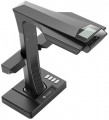 | 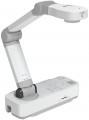 |
|---|---|---|
| Czur ET25 Pro | Epson DC-13 | |
| Outdated Product | Compare prices 3 | |
| TOP sellers | ||
Wi-Fi. Display 2.4". | Video recording with sound. | |
| Product Type | articulated | |
| Paper size | A3 | A3 |
| Camera | 25 MP | |
| Resolution | 5824x4368 px | 1920x1080 px |
| Digital zoom | 16 x | |
| Autofocus |  | |
| Built-in microphone | | |
| Card reader |  | |
| HDMI | | |
| Added to E-Catalog | september 2023 | june 2020 |





Compare Czur ET25 Pro and Epson DC-13
Price comparison
You may be interested in
My comparisons
Czur ET25 Pro often compared

Epson DC-13 often compared


Glossary
Product Type
— Articulated. An articulation is a movable swivel joint. Thanks to that, you can quickly and easily fold and unfold the document camera. Additionally, using the articulated arm, you can adjust the best position of the camera by turning or zooming in/out the optics. Usually, the articulations can work in only one plane, with vertical or horizontal free move. But within the one document camera, several articulations can be implemented, including both horizontal and vertical ones. The more articulations, the more precisely you can adjust the optimal position of the optics. Additionally, there are circular articulations that can rotate both vertically and horizontally. The circular articulation is usually installed at the base of the pillar.
— Gooseneck. The gooseneck allows you to move the document camera holder in any direction. Thanks to that, you can bring the optics closer or further, as well as turn it left and right, up and down. The free movement of the optics is limited only by the size of the gooseneck. This design gives the document camera more movement freedom than an articulated design.
— Ceiling. The document camera is mounted under the ceiling, on a fixed mounting platform, or on a swivel arm. Ceiling installation involves operating with large format documentation. Document cameras of this type are commonly used for drawings, sketches,...plans and diagrams on large size paper, from A3 and A2 to A1 and A0. Ceiling-mounted document cameras usually have a pointer in the form of a light spot or laser dot.
Camera
The detail rate of the resulting image depends on the number of megapixels. This setting is especially important when printing images on large media. So, experience shows that for high-quality digitization of documents in A4 format, it is necessary about 1-5 MP. Working with A3 documents, you need about 5-8 megapixels. For A2 format, you need 8-15 megapixels. But digitizing documentation in A0 format requires 10-20 megapixels or even more, depending on the required print quality.
Resolution
Resolution determines the depth and detail of a digital image. Resolution is especially important when displaying images on the screen, as well as printing digitized documents.
A4 format: low quality — 620x877, medium — 1240x1754, high — 2480x3508.
A3 format: low quality — 877x1240, medium — 1754x2480, high — 3508x4961.
A2 format: low quality — 1240x1754, medium — 2480x3508, high — 4961x7016.
A0 format: low quality — 2483x3511, medium — 4967x7022, high — 9933x14043.
Digital zoom
Document cameras with digital zoom use a software algorithm to enlarge the picture. There is a noticeable difference between digital and optical zoom. Software zoom makes the picture more noisy, but when digitizing text documentation, various diagrams and drawings, the quality of the picture with digital zoom practically does not decrease. The main advantage of digital zoom is the affordable price. Additionally, these cameras are typically smaller, lighter, and more durable than models with optical analogue zooms.
HDMI
Document cameras with HDMI interface allow you to broadcast the image to an external display. If you choose this type of document camera, make sure that the HDMI connectors on the camera and the external display are compatible. At the same time, it is important that the interface itself corresponds to the current standard for the camera and display. There are many versions of HDMI. Older versions usually have backward compatibility with newer ones. For example, HDMI 2.0 can unlock the full potential of HDMI 1.2. But when you connect a camera with HDMI 2.0 to a display with HDMI 1.2, the video signal will lose important data packets.