
Comparison OfficePro LS320 vs Trust Exto Cooling Stand
Add to comparison | 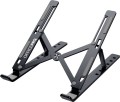 | 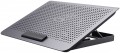 |
|---|---|---|
| OfficePro LS320 | Trust Exto Cooling Stand | |
| Outdated Product | from $68.40 | |
| User reviews | ||
| TOP sellers | ||
| Product type | folding stand | stand |
| Max. screen size | 16 " | 16 " |
Features | ||
| Active cooling |  |  |
| Fans | 1x180 mm | |
| Max. RPM | 650 rpm | |
| Max. fan airflow | 87 CFM | |
| Noise level | 35 dB | |
| Functions & Features | tilt adjustment laptop stopper | tilt adjustment fan speed control laptop stopper |
General | ||
| Power source | uSB powered | |
| Stand material | metal | metal |
| Folded size | 240x40 mm | |
| Table top/platform size | 270x52x28 mm | 255x350 mm |
| Weight | 0.24 kg | 0.63 kg |
| Color | ||
| Added to E-Catalog | may 2023 | december 2022 |


Compare OfficePro LS320 and Trust Exto Cooling Stand
You may be interested in
My comparisons
OfficePro LS320 often compared


Trust Exto Cooling Stand often compared


Glossary
Product type
— Stand. Classic laptop stands include models that are not equipped with clearly defined additional supports — in other words, they are simply platforms, without legs or other similar devices. In practice, this means that the height of the laptop on the stand depends mainly on the thickness of the platform itself. Such models are lighter, more compact and cheaper than tables, but not as versatile (although tilt adjustment is often found among this type).
— Table. A distinctive feature of tables is the presence of fairly high supports. In practice, this means that the height of the laptop depends not so much on the thickness of the platform, but on the height of these supports. In most models, they are made foldable, which allows you to use the table also as a classic stand (see above); at the same time, tables have more extensive functionality, it is in them that you usually find pull-out drawers, a place for a mouse, etc. (see "Additional"). Another convenience is associated with the use of laptops in the absence of tables - sitting in a chair, lying in bed, etc.: if you have to hold the stand directly on your knees, then the table can be leaned on surrounding objects (for example, the surface of the bed). On the other hand, devices of this type are not as portable as stands, and they are more expensive.
— Stand. Lapt...op stands can be either floor-standing or tabletop. They consist of a laptop platform, legs or other support points that provide stable support for the structure. Adjustments in stands usually include the ability to change the position of the laptop platform in height and angle. Tabletop options allow you to properly organize the space on your desk or surface, placing the laptop in an elevated position and freeing up space for other items. Floor-standing options are great for conferences, presentations and off-site events, and they also work great when it comes to setting up workspaces in small rooms with limited space.
— Folding stand. Stands with folding or sliding elements in the design that can be adapted to a specific laptop. As a rule, the device holders in such devices support extension adjustment. Folding stands are compatible with many models of laptops, and their specifications often indicate the range of the minimum and maximum allowable diagonal of the laptop screen. Another advantage of the folding design is the compact size of the corresponding stands when folded, making them easy to transport and taking up a minimum of space in a bag or backpack.
— Table. A distinctive feature of tables is the presence of fairly high supports. In practice, this means that the height of the laptop depends not so much on the thickness of the platform, but on the height of these supports. In most models, they are made foldable, which allows you to use the table also as a classic stand (see above); at the same time, tables have more extensive functionality, it is in them that you usually find pull-out drawers, a place for a mouse, etc. (see "Additional"). Another convenience is associated with the use of laptops in the absence of tables - sitting in a chair, lying in bed, etc.: if you have to hold the stand directly on your knees, then the table can be leaned on surrounding objects (for example, the surface of the bed). On the other hand, devices of this type are not as portable as stands, and they are more expensive.
— Stand. Lapt...op stands can be either floor-standing or tabletop. They consist of a laptop platform, legs or other support points that provide stable support for the structure. Adjustments in stands usually include the ability to change the position of the laptop platform in height and angle. Tabletop options allow you to properly organize the space on your desk or surface, placing the laptop in an elevated position and freeing up space for other items. Floor-standing options are great for conferences, presentations and off-site events, and they also work great when it comes to setting up workspaces in small rooms with limited space.
— Folding stand. Stands with folding or sliding elements in the design that can be adapted to a specific laptop. As a rule, the device holders in such devices support extension adjustment. Folding stands are compatible with many models of laptops, and their specifications often indicate the range of the minimum and maximum allowable diagonal of the laptop screen. Another advantage of the folding design is the compact size of the corresponding stands when folded, making them easy to transport and taking up a minimum of space in a bag or backpack.
Active cooling
The presence in the design of the stand of its own built-in active cooling system.
Active cooling is called cooling, in which heat is forcibly removed from a heated object. In laptop stands, this function is usually provided by fans. Such devices remove part of the load from the laptop's built-in cooling system, and also increase the overall efficiency of heat dissipation; this is especially true in hot weather. The main disadvantage of such stands is the need for power (see below); in addition, active cooling significantly affects the weight and cost.
Active cooling is called cooling, in which heat is forcibly removed from a heated object. In laptop stands, this function is usually provided by fans. Such devices remove part of the load from the laptop's built-in cooling system, and also increase the overall efficiency of heat dissipation; this is especially true in hot weather. The main disadvantage of such stands is the need for power (see below); in addition, active cooling significantly affects the weight and cost.
Fans
In modern models, 1 or 2 fans are installed at a minimum, and in more advanced models this number can reach 4. It makes no sense to bet anymore, because. the area of the cooling system in this case may be larger than the area of the bottom surface of even the largest laptop. The more fans provided, the more intense the heat removal and the higher the efficiency of the cooling system (ceteris paribus, of course). On the other hand, the noise level increases noticeably, and there are “multi-fan” stands, respectively.
The diameter of the fans also plays an important role. The larger the fan, the more advanced it is considered: a large diameter allows you to create an intense airflow at relatively low speeds, which reduces the noise level compared to smaller options. On the other hand, the large size also affects the cost accordingly.
The diameter of the fans also plays an important role. The larger the fan, the more advanced it is considered: a large diameter allows you to create an intense airflow at relatively low speeds, which reduces the noise level compared to smaller options. On the other hand, the large size also affects the cost accordingly.
Max. RPM
The highest rotational speed of the fans provided in the active cooling system of the stand (see above).
Rotation speed is one of the parameters that directly affects efficiency: the faster the fan, the more powerful airflow it creates and the more heat is removed. At the same time, only fans of the same diameter can be directly compared by speed. In addition, high rotation speed increases the noise level; therefore, comparatively slow but large fans are considered more advanced than small and fast ones with the same performance (see "Airflow").
Rotation speed is one of the parameters that directly affects efficiency: the faster the fan, the more powerful airflow it creates and the more heat is removed. At the same time, only fans of the same diameter can be directly compared by speed. In addition, high rotation speed increases the noise level; therefore, comparatively slow but large fans are considered more advanced than small and fast ones with the same performance (see "Airflow").
Max. fan airflow
The maximum airflow that a cooling fan can create; measured in CFM — cubic feet per minute.
The higher the CFM number, the more efficient the fan.
The higher the CFM number, the more efficient the fan.
Noise level
The maximum noise level produced by the stand during operation. This parameter is relevant only for models equipped with active cooling (see above) — in fact, this function is the only source of noise.
The lower this indicator, the more comfortable the use of the stand will be and the better it will be suitable for situations in which silence is important (for example, for working late at night when others are sleeping). At the same time, even in the loudest models, it usually does not exceed 40 dB — this is comparable to the noise of leaves on a tree in a light breeze; and cooling systems in many laptops can make more noise. Therefore, paying close attention to quiet laptop stands is only worth it if you are using an extremely quiet laptop and do not want to lose this advantage.
The lower this indicator, the more comfortable the use of the stand will be and the better it will be suitable for situations in which silence is important (for example, for working late at night when others are sleeping). At the same time, even in the loudest models, it usually does not exceed 40 dB — this is comparable to the noise of leaves on a tree in a light breeze; and cooling systems in many laptops can make more noise. Therefore, paying close attention to quiet laptop stands is only worth it if you are using an extremely quiet laptop and do not want to lose this advantage.
Functions & Features
— Tilt Adjustment. The ability to change the angle of inclination of the surface on which the laptop is mounted. Technically, the tilt can be adjusted on any stand — by placing an object under one of its edges or holding it at the desired angle; however, in this case, adjustment is exclusively due to the devices provided in the design — legs, foldable supports, etc. This feature provides additional convenience — it allows you to set the position of the laptop keyboard at the most optimal angle, without using any specific tricks.
— Height Adjustment. The ability to change the height of the surface on which the laptop is placed. This feature offers enhanced tuning options: you can set the optimal height (within certain limits, of course) right on the spot, without moving the structure to another surface or placing additional objects under it. Height adjustment requires the use of special supports and is therefore mainly found among tables (see “Type”).
— 360° Rotation. The presence of a rotating platform on a bearing or friction disk, which allows the screen to be turned in any direction without rearranging the base. The practical purpose is to quickly share a presentation with a colleague, point the camera during a call, switch between an external monitor and the viewer at the table, without pulling cables or scratching the tabletop. Compared to fixed sta...nds, such a unit enhances ergonomics and saves time, but requires a sufficient base area and load capacity so that the laptop does not tip when rotating; it's good if there is a rubber coating and a ring for cable management — thus the rotation remains smooth and safe. In everyday use and offices, it is convenient on narrow tables, in classrooms, and in kitchens, where the laptop is often turned to the interlocutor or the cooking area.
— Fan Speed Adjustment. The ability to change the fan speed installed in the stand with an active cooling system (see above). With high speed, good airflow intensity is achieved, but noise and power consumption increase accordingly, and intensive cooling of the laptop is not always needed; at the same time, a “quiet” mode may be insufficiently effective for complex tasks with high system loads. Speed adjustment allows you to adjust the fan's performance depending on the current load. However, this needs to be done manually.
— Place for Mouse. The presence of a place in the construction of the stand to accommodate a computer mouse; it can be either a separate additional shelf next to the main platform (often removable) or a part of the platform/desktop not intended for the laptop. In any case, this feature will eliminate the need to search for a suitable flat surface for working with the mouse; and in some models, it is possible to even choose the side of the shelf placement — for right- or left-handed use. Most stands with a mouse place are related to tables (see “Type”).
— Laptop Locks. The presence of fastening fixtures in the construction of the stand for securing the laptop. With such fastenings, reliability and safety of use increase: the laptop will not fall off the platform even with a fairly strong shake, and in some models — even when the structure is turned over. However, when purchasing a model with this function, it is worth checking the compatibility of the locks with your laptop model, especially if its size does not match the maximum diagonal declared in the specifications (see above).
— Built-in Speakers. The presence of built-in speakers in the design; thanks to them, the stand can also act as an external audio system. However, the quality of such speakers is usually not very high; nevertheless, they sound louder than most built-in speakers while not taking up additional space and creating no extra hassle during transportation (unlike traditional portable acoustics, not to mention full-sized ones).
— Sliding Drawer. The presence of a sliding drawer in the stand — similar to those used in desks. The dimensions of such a drawer are usually small; nevertheless, it can be quite useful for storing various small items, such as personal notes or external storage devices for the laptop.
— Smartphone Holder. The presence of a holder for a smartphone in the laptop stand design. It allows placing a mobile gadget at hand in a visible and convenient place — this comes in handy when it is necessary to work on the laptop and use the smartphone simultaneously. Such holders are usually made in the form of a notch, slot, or separate stand on the side — the smartphone is fixed in them mainly in a vertical position.
— Display. This feature is equipped in certain advanced stands with active cooling and extended capabilities (lighting, USB hub, etc.); in simpler products, installing a screen is simply unnecessary. The display itself usually has a very basic design: a monochrome LCD capable of displaying 2–3 digits and some additional symbols. This is quite enough to inform about the operation of the electronic components of the stand: for example, the screen can display data on the speed and number of fans involved, USB port operating modes, failures, and malfunctions, etc. The presence of a display somewhat affects the cost, but most often this moment is almost imperceptible against the background of the overall cost of a high-end model.
— Height Adjustment. The ability to change the height of the surface on which the laptop is placed. This feature offers enhanced tuning options: you can set the optimal height (within certain limits, of course) right on the spot, without moving the structure to another surface or placing additional objects under it. Height adjustment requires the use of special supports and is therefore mainly found among tables (see “Type”).
— 360° Rotation. The presence of a rotating platform on a bearing or friction disk, which allows the screen to be turned in any direction without rearranging the base. The practical purpose is to quickly share a presentation with a colleague, point the camera during a call, switch between an external monitor and the viewer at the table, without pulling cables or scratching the tabletop. Compared to fixed sta...nds, such a unit enhances ergonomics and saves time, but requires a sufficient base area and load capacity so that the laptop does not tip when rotating; it's good if there is a rubber coating and a ring for cable management — thus the rotation remains smooth and safe. In everyday use and offices, it is convenient on narrow tables, in classrooms, and in kitchens, where the laptop is often turned to the interlocutor or the cooking area.
— Fan Speed Adjustment. The ability to change the fan speed installed in the stand with an active cooling system (see above). With high speed, good airflow intensity is achieved, but noise and power consumption increase accordingly, and intensive cooling of the laptop is not always needed; at the same time, a “quiet” mode may be insufficiently effective for complex tasks with high system loads. Speed adjustment allows you to adjust the fan's performance depending on the current load. However, this needs to be done manually.
— Place for Mouse. The presence of a place in the construction of the stand to accommodate a computer mouse; it can be either a separate additional shelf next to the main platform (often removable) or a part of the platform/desktop not intended for the laptop. In any case, this feature will eliminate the need to search for a suitable flat surface for working with the mouse; and in some models, it is possible to even choose the side of the shelf placement — for right- or left-handed use. Most stands with a mouse place are related to tables (see “Type”).
— Laptop Locks. The presence of fastening fixtures in the construction of the stand for securing the laptop. With such fastenings, reliability and safety of use increase: the laptop will not fall off the platform even with a fairly strong shake, and in some models — even when the structure is turned over. However, when purchasing a model with this function, it is worth checking the compatibility of the locks with your laptop model, especially if its size does not match the maximum diagonal declared in the specifications (see above).
— Built-in Speakers. The presence of built-in speakers in the design; thanks to them, the stand can also act as an external audio system. However, the quality of such speakers is usually not very high; nevertheless, they sound louder than most built-in speakers while not taking up additional space and creating no extra hassle during transportation (unlike traditional portable acoustics, not to mention full-sized ones).
— Sliding Drawer. The presence of a sliding drawer in the stand — similar to those used in desks. The dimensions of such a drawer are usually small; nevertheless, it can be quite useful for storing various small items, such as personal notes or external storage devices for the laptop.
— Smartphone Holder. The presence of a holder for a smartphone in the laptop stand design. It allows placing a mobile gadget at hand in a visible and convenient place — this comes in handy when it is necessary to work on the laptop and use the smartphone simultaneously. Such holders are usually made in the form of a notch, slot, or separate stand on the side — the smartphone is fixed in them mainly in a vertical position.
— Display. This feature is equipped in certain advanced stands with active cooling and extended capabilities (lighting, USB hub, etc.); in simpler products, installing a screen is simply unnecessary. The display itself usually has a very basic design: a monochrome LCD capable of displaying 2–3 digits and some additional symbols. This is quite enough to inform about the operation of the electronic components of the stand: for example, the screen can display data on the speed and number of fans involved, USB port operating modes, failures, and malfunctions, etc. The presence of a display somewhat affects the cost, but most often this moment is almost imperceptible against the background of the overall cost of a high-end model.
Power source
Source of electricity for the functions of the stand that require power — primarily for the active cooling system (see above).
— From USB. Powered by computer USB port. The main advantages of this option can be called battery life and versatility. It is enough to connect the stand to the USB connector of the laptop installed on it — and it can be used regardless of the presence of sockets until the battery runs out, and if the laptop is powered by the network, then it is generally unlimited for a long time. Of course, you will need to use one USB port for use, but in many models this disadvantage is compensated by the presence of a USB hub (see "Additional"). But of the obvious shortcomings, one can only distinguish a decrease in the battery life of the laptop — after all, the stand also consumes battery power.
— From the network. Powered by a conventional household network 230 V. This option provides high power, which is more than enough even for the most high consumption cooling systems. On the other hand, it only works when there are outlets nearby and requires the use of a power cord, which creates inconvenience and limits mobility. Theoretically, the advantage of AC power is that it does not drain the battery of the laptop; however, in fact, this point can hardly be called significant, because. such coasters, by definition, are not designed for stand-alone use when you need to save battery. As a result of all this, mains power is very rare — mainl...y in the largest models.
— From USB. Powered by computer USB port. The main advantages of this option can be called battery life and versatility. It is enough to connect the stand to the USB connector of the laptop installed on it — and it can be used regardless of the presence of sockets until the battery runs out, and if the laptop is powered by the network, then it is generally unlimited for a long time. Of course, you will need to use one USB port for use, but in many models this disadvantage is compensated by the presence of a USB hub (see "Additional"). But of the obvious shortcomings, one can only distinguish a decrease in the battery life of the laptop — after all, the stand also consumes battery power.
— From the network. Powered by a conventional household network 230 V. This option provides high power, which is more than enough even for the most high consumption cooling systems. On the other hand, it only works when there are outlets nearby and requires the use of a power cord, which creates inconvenience and limits mobility. Theoretically, the advantage of AC power is that it does not drain the battery of the laptop; however, in fact, this point can hardly be called significant, because. such coasters, by definition, are not designed for stand-alone use when you need to save battery. As a result of all this, mains power is very rare — mainl...y in the largest models.
Folded size
Dimensions of the stand when folded. First of all, the convenience of transportation depends on this: if you plan to carry the product along with a laptop, you should pay attention to ensuring that the bag (case, backpack ...) has the right amount of space.
Note that the height of many models in the folded state is rather small, so manufacturers may not indicate it in the characteristics, limited only by the length and width.
Note that the height of many models in the folded state is rather small, so manufacturers may not indicate it in the characteristics, limited only by the length and width.