
Comparison TP-LINK M7350 vs Novatel MiFi 4620L
Add to comparison | 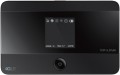 | 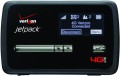 |
|---|---|---|
| TP-LINK M7350 | Novatel MiFi 4620L | |
| Compare prices 1 | from $25.96 up to $43.52 | |
| User reviews | ||
| TOP sellers | ||
Supports up to 15 connected devices. Slot for microSD memory card. | Good signal reception. Multistandard. Informative OLED display. Removable battery. | |
| Device type | portable router | portable router |
| Wi-Fi | Wi-Fi 3 (802.11g) Wi-Fi 4 (802.11n) | Wi-Fi 3 (802.11g) Wi-Fi 4 (802.11n) |
| Connected devices, up to | 15 | 5 |
| Effective range | 30 m | |
Connection | ||
| Communication generation | 2G 3G 4G (LTE) | 2G 3G 4G (LTE) |
| 4G (LTE) | Cat.4 (150/50 Mbps) | |
| Transmission technology | GPRS EDGE W-CDMA HSUPA HSDPA HSPA+ LTE | GPRS EDGE W-CDMA HSUPA HSDPA HSPA+ LTE |
| Ports | microUSB | microUSB |
Features | ||
| External antenna connector |  |  |
| Memory card slot | | |
| SIM card slot | | |
| GPS | | |
| Display | | |
General | ||
| Built-in battery | | |
| Battery capacity | 2000 mAh | 1500 mAh |
| Operating time (internet browsing) | 6 h | |
| Dimensions | 106x66x16 mm | 95x60x14 mm |
| Added to E-Catalog | july 2015 | january 2015 |



Compare TP-LINK M7350 and Novatel MiFi 4620L
Price comparison
You may be interested in
My comparisons
TP-LINK M7350 often compared


Novatel MiFi 4620L often compared


Glossary
Connected devices, up to
The largest number of devices that can be simultaneously connected to the modem via Wi-Fi (see "Connection").
The presence of this limitation is due to the fact that processing network requests from several devices at once requires a fairly large amount of computing resources, and there are not so many of them in miniature electronics like wireless modems. However, even inexpensive models can support about 5 – 6 devices, which is more than enough for most cases; and in more advanced modems, this number can reach 10.
The presence of this limitation is due to the fact that processing network requests from several devices at once requires a fairly large amount of computing resources, and there are not so many of them in miniature electronics like wireless modems. However, even inexpensive models can support about 5 – 6 devices, which is more than enough for most cases; and in more advanced modems, this number can reach 10.
Effective range
The greatest distance at which the modem's built-in router is capable of providing communication via the Wi-Fi interface (see "Connection").
It should be taken into account that in fact the range strongly depends on a number of factors that are not related to the main specs of the modem: the presence of interference and obstacles in the signal path, the specs of the Wi-Fi module of the connected device, the battery charge in this device or the modem itself, etc. Therefore, the actual range indicators can be noticeably lower than the claimed ones: for example, when working through a wall, they are noticeably reduced. However, this spec quite clearly describes the overall range of the device, and comparisons of different models on it are quite acceptable.
Also note that it does not always make sense to purchase a device with a maximum range — although a long range provides additional convenience, it requires high transmitter power, which significantly increases the size and price of the modem. Therefore, when choosing, it is worth proceeding primarily from the intended scenarios of use. For example, if you need a 3G connection to access the Internet on the road from your tablet, a range of several metres will be enough. But for installation in a large private house, it makes sense to look for a model with increased effective range.
It should be taken into account that in fact the range strongly depends on a number of factors that are not related to the main specs of the modem: the presence of interference and obstacles in the signal path, the specs of the Wi-Fi module of the connected device, the battery charge in this device or the modem itself, etc. Therefore, the actual range indicators can be noticeably lower than the claimed ones: for example, when working through a wall, they are noticeably reduced. However, this spec quite clearly describes the overall range of the device, and comparisons of different models on it are quite acceptable.
Also note that it does not always make sense to purchase a device with a maximum range — although a long range provides additional convenience, it requires high transmitter power, which significantly increases the size and price of the modem. Therefore, when choosing, it is worth proceeding primarily from the intended scenarios of use. For example, if you need a 3G connection to access the Internet on the road from your tablet, a range of several metres will be enough. But for installation in a large private house, it makes sense to look for a model with increased effective range.
4G (LTE)
The 4G (LTE) mobile connection speed supported by the modem.
All modern LTE equipment is assigned one or another category (Cat.3, Cat.4, Cat.6, Cat.7, Cat.9, Cat.12, Cat.13, Cat.16, Cat.18, Cat.19, Cat.20, Cat.22), on which the transmission speed directly depends. This paragraph specifies both this category and specific speed indicators, moreover, in two parameters — for reception and for transmission. The transmission speed is always much lower, but given the specifics of mobile Internet access, this is usually not critical.
Note that equipment with different speed categories will be quite compatible with each other, however, the throughput will be limited by the capabilities of the slower device. It is also worth saying that this paragraph indicates the theoretical maximum; practical amounts can be noticeably lower (depending on the quality of the network coverage and the features of specific electronics). However, a modem with a higher speed category will perform faster in fact.
All modern LTE equipment is assigned one or another category (Cat.3, Cat.4, Cat.6, Cat.7, Cat.9, Cat.12, Cat.13, Cat.16, Cat.18, Cat.19, Cat.20, Cat.22), on which the transmission speed directly depends. This paragraph specifies both this category and specific speed indicators, moreover, in two parameters — for reception and for transmission. The transmission speed is always much lower, but given the specifics of mobile Internet access, this is usually not critical.
Note that equipment with different speed categories will be quite compatible with each other, however, the throughput will be limited by the capabilities of the slower device. It is also worth saying that this paragraph indicates the theoretical maximum; practical amounts can be noticeably lower (depending on the quality of the network coverage and the features of specific electronics). However, a modem with a higher speed category will perform faster in fact.
External antenna connector
The presence of a connector for an external removable antenna in the modem design. The meaning of all external antennas is described above; here we note that the connector makes it possible to use rather large antennas with the modem, which significantly exceed the capabilities of stock antennas (both internal and external non-removable ones). In addition, the user can choose the antenna at his discretion.
Memory card slot
The presence of a slot for memory card in the design of the modem. Memory cards are very popular in modern electronics as removable storage media; in wireless modems, there are two main options for working with them. The first one provides use as an external card reader, for exchanging information between the card and the device to which the modem is connected via USB (see below); Simply put, installing a card turns the modem into a "flash drive" with removable storage. And in models with Wi-Fi (see "Type"), it may also be possible to work as a server that provides access to the contents of the memory card to all wireless devices connected to the modem. As for the types of cards, the most common support for the microSD standard is that they are small enough to be easily combined with compact wireless modem cases. Note that even within the same standard of memory cards there are several varieties, and before buying it's worth to clarify which of them the device is compatible with.
GPS
The presence of a GPS module in the design of the modem. This module allows you to track the current geographic coordinates of the device; but the options for working with coordinate data can be different. The most popular way to use such models is to use them as an external GPS module for a laptop or other device.
Battery capacity
The capacity of the battery installed in the modem with the corresponding type of power supply (see below).
The higher the capacity, the longer the battery is able to work without recharging, all other things being equal. However, note that the situation of "other things being equal" is almost not found in modern wireless modems. First, different data transmission technologies (see above) have different power consumption; secondly, even models supporting the same standards can differ in power consumption (and battery life) due to design differences. Therefore, this indicator in most cases is purely reference information, and even very similar models can only be compared approximately. When choosing, it is worth focusing primarily on the claimed specs of the battery life (see below).
The higher the capacity, the longer the battery is able to work without recharging, all other things being equal. However, note that the situation of "other things being equal" is almost not found in modern wireless modems. First, different data transmission technologies (see above) have different power consumption; secondly, even models supporting the same standards can differ in power consumption (and battery life) due to design differences. Therefore, this indicator in most cases is purely reference information, and even very similar models can only be compared approximately. When choosing, it is worth focusing primarily on the claimed specs of the battery life (see below).
Operating time (internet browsing)
The maximum operating time of the modem with battery power (see "Power") on a single charge in Internet browsing mode. Such power is typical for Wi-Fi routers, therefore, usually, Internet browsing is supposed to provide access to the World Wide Web for an external Wi-Fi device.
This spec is the main indicator of battery life for any battery-powered modem, because it describes the time of using it for its main purpose without recharging. At the same time, you should know that this indicator is measured under certain "perfect" conditions; the actual operating time depends on a number of factors, including the intensity of browsing, the amount of data transferred, the number of connected devices and the distance to them, the cellular network signal strength, etc. Therefore, in fact, the battery life of the modem may be somewhat lower. Nevertheless, it is quite possible to compare different models with each other according to the operating time stated in the specs.
This spec is the main indicator of battery life for any battery-powered modem, because it describes the time of using it for its main purpose without recharging. At the same time, you should know that this indicator is measured under certain "perfect" conditions; the actual operating time depends on a number of factors, including the intensity of browsing, the amount of data transferred, the number of connected devices and the distance to them, the cellular network signal strength, etc. Therefore, in fact, the battery life of the modem may be somewhat lower. Nevertheless, it is quite possible to compare different models with each other according to the operating time stated in the specs.