
Comparison Netis NX10 vs Netis N3
Add to comparison |  | 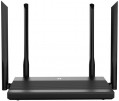 |
|---|---|---|
| Netis NX10 | Netis N3 | |
| Outdated Product | Outdated Product | |
| User reviews | ||
| TOP sellers | ||
| Product type | router | router |
| Data input (WAN-port) | Ethernet (RJ45) Wi-Fi | Ethernet (RJ45) Wi-Fi |
Wireless Wi-Fi connection | ||
| Wi-Fi standards | Wi-Fi 3 (802.11g) Wi-Fi 4 (802.11n) Wi-Fi 5 (802.11ac) Wi-Fi 6 (802.11ax) | Wi-Fi 3 (802.11g) Wi-Fi 4 (802.11n) Wi-Fi 5 (802.11ac) |
| Frequency band | 2.4GHz 5 GHz | 2.4GHz 5 GHz |
| Operating ranges | dual-band (2.4 GHz and 5 GHz) | dual-band (2.4 GHz and 5 GHz) |
| Wireless speed 2.4 GHz | 300 Mbps | 300 Mbps |
| Wireless speed 5 GHz | 1201 Mbps | 867 Mbps |
| Bandwidth | 80 MHz | |
Connection and LAN | ||
| WAN | 1 port 1 Gbps | 1 port 1 Gbps |
| LAN | 3 ports 1 Gbps | 3 ports 1 Gbps |
Antenna and transmitter | ||
| Number of antennas | 4 | 4 |
| Antenna type | external | external |
| MU-MIMO |  | |
| Gain | 5 dBi | |
| 2.4 GHz antennas | 2 | |
| 5 GHz antennas | 2 | |
| Transmitter power | 20 dBm | |
Hardware | ||
| CPU | Realtek RTL8197FH-VG5-CG | |
| Clock Speed | 1 GHz | 1 GHz |
| RAM | 128 MB | 128 MB |
| Flash memory | 16 MB | 8 MB |
Functions | ||
| Features | NAT repeater MESH mode Beamforming | NAT bridge mode repeater MESH mode firewall |
| More features | DHCP server VPN DDNS DMZ | DHCP server VPN DDNS DMZ |
Security | ||
| Safety standards | WPA WEP WPA2 | WPA WEP WPA2 |
General | ||
| Operating temperature | 0 °C ~ +40 °C | 0 °C ~ +40 °C |
| Dimensions | 226x144x191 mm | 182x108x25 mm |
| Color | ||
| Added to E-Catalog | february 2024 | november 2021 |


Compare Netis NX10 and N3
You may be interested in
My comparisons
Netis NX10 often compared


Netis N3 often compared


Glossary
Wi-Fi standards
Wi-Fi standards supported by the equipment. Nowadays, in addition to modern standards Wi-Fi 4 (802.11n), Wi-Fi 5 (802.11ac), Wi-Fi 6 (802.11ax)(its variation Wi-Fi 6E), Wi-Fi 7 (802.11be) and WiGig (802.11ad), you can meet also support for earlier versions — Wi-Fi 3 (802.11g) and even Wi-Fi 1 (802.11b). Here is a more detailed description of each of these versions:
— Wi-Fi 3 (802.11g). An outdated standard, like Wi-Fi 1 (802.11b), which has sunk into oblivion. It was widely used before the advent of Wi-Fi 4, nowadays it is used mainly as an addition to newer versions — in particular, in order to ensure compatibility with outdated and low-cost equipment. Operates at a frequency of 2.4 GHz, the maximum data transfer rate is 54 Mbps.
— Wi-Fi 4 (802.11n). The first of the common standards that supports the frequency of 5 GHz; can operate in this range or in the classic 2.4 GHz. It is worth emphasizing that some models of Wi-Fi equipment for this standard use only 5 GHz, which is why they are incompatible with earlier versions of Wi-Fi. The maximum speed for Wi-Fi 4 is 600 Mbps; in modern wireless devices, this standard is very popular, only recently it began to be squeezed into this position by Wi-Fi 5.
— Wi-Fi 5...(802.11ac). The successor to Wi-Fi 4, which finally moved to the 5 GHz band, which had a positive effect on the reliability of the connection and data transfer rate: it is up to 1.69 Gbps per antenna and up to 6.77 Gbps in general. In addition, this is the first version to fully implement Beamforming technology (for more details, see "Functions and Capabilities").
— Wi-Fi 6, Wi-Fi 6E (802.11ax). The development of Wi-Fi 5, which introduced both an increase in speed to 10 Gbps, and a number of important improvements in the format of work. One of the most important innovations is the use of an extensive frequency range — from 1 to 7 GHz; this, in particular, allows you to automatically select the least loaded frequency band, which has a positive effect on the speed and reliability of the connection. At the same time, Wi-Fi 6 devices are capable of operating at classic frequencies of 2.4 GHz and 5 GHz, and a modification of the Wi-Fi 6E standard is capable of operating at frequencies from 5.9 to 7 GHz, it is generally accepted that devices with Wi-Fi 6E support operate on frequency of 6 GHz, while there is full compatibility with earlier standards. In addition, some improvements were introduced in this version regarding the simultaneous operation of several devices on one channel, in particular, we are talking about OFDMA technology. Thanks to this, Wi-Fi 6 gives the smallest of modern standards a drop in speed when the air is loaded, and the modification of Wi-Fi 6E operating at a frequency of 6 GHz has the least amount of interference.
— Wi-Fi 7 (802.11be). This Wi-Fi standard began to be implemented in 2023. Thanks to the use of 4096-QAM modulation, a maximum theoretical data rate of up to 46 Gb / s can be squeezed out of it. Wi-Fi 7 supports three frequency bands: 2.4 GHz, 5 GHz and 6 GHz. The maximum bandwidth in the standard has been increased from 160 MHz to 320 MHz - the wider the channel, the more data it can transmit overnight. Among the interesting innovations in Wi-Fi 7, the development of MLO (Multi-Link Operation) is noted - with its help, connected devices exchange data using several channels and frequency bands simultaneously, which is especially important for VR and online games. The Multiple Resource Unit technology is designed to minimize communication delays when there are many connected client devices. The new 16x16 MIMO protocol is also aimed at increasing throughput with a large number of simultaneous connections, doubling the number of spatial streams compared to the previous Wi-Fi 6 standard.
WiGig (802.11ad). Wi-Fi standard using an operating frequency of 60 GHz; data transfer rates can be up to 10 Gbps (depending on the specific version of WiGig). The 60 GHz channel is much less loaded than the more popular 2.4 GHz and 5 GHz, which has a positive effect on the reliability of data transmission and reduces latency; the latter is especially important in games and some other special tasks. On the other hand, the increase in frequency has significantly reduced the connection range (for more details, see "Frequency range"), so that in fact this standard is only suitable for communication within the same room.
Note that in fact, the data transfer rate is usually much lower than the theoretical maximum — especially when several Wi-Fi devices operate on the same channel. Also note that different standards are backwards compatible with each other (with a speed limit according to the slower one) provided that the frequencies match: for example, 802.11ac can work with 802.11n, but not with 802.11g.
— Wi-Fi 3 (802.11g). An outdated standard, like Wi-Fi 1 (802.11b), which has sunk into oblivion. It was widely used before the advent of Wi-Fi 4, nowadays it is used mainly as an addition to newer versions — in particular, in order to ensure compatibility with outdated and low-cost equipment. Operates at a frequency of 2.4 GHz, the maximum data transfer rate is 54 Mbps.
— Wi-Fi 4 (802.11n). The first of the common standards that supports the frequency of 5 GHz; can operate in this range or in the classic 2.4 GHz. It is worth emphasizing that some models of Wi-Fi equipment for this standard use only 5 GHz, which is why they are incompatible with earlier versions of Wi-Fi. The maximum speed for Wi-Fi 4 is 600 Mbps; in modern wireless devices, this standard is very popular, only recently it began to be squeezed into this position by Wi-Fi 5.
— Wi-Fi 5...(802.11ac). The successor to Wi-Fi 4, which finally moved to the 5 GHz band, which had a positive effect on the reliability of the connection and data transfer rate: it is up to 1.69 Gbps per antenna and up to 6.77 Gbps in general. In addition, this is the first version to fully implement Beamforming technology (for more details, see "Functions and Capabilities").
— Wi-Fi 6, Wi-Fi 6E (802.11ax). The development of Wi-Fi 5, which introduced both an increase in speed to 10 Gbps, and a number of important improvements in the format of work. One of the most important innovations is the use of an extensive frequency range — from 1 to 7 GHz; this, in particular, allows you to automatically select the least loaded frequency band, which has a positive effect on the speed and reliability of the connection. At the same time, Wi-Fi 6 devices are capable of operating at classic frequencies of 2.4 GHz and 5 GHz, and a modification of the Wi-Fi 6E standard is capable of operating at frequencies from 5.9 to 7 GHz, it is generally accepted that devices with Wi-Fi 6E support operate on frequency of 6 GHz, while there is full compatibility with earlier standards. In addition, some improvements were introduced in this version regarding the simultaneous operation of several devices on one channel, in particular, we are talking about OFDMA technology. Thanks to this, Wi-Fi 6 gives the smallest of modern standards a drop in speed when the air is loaded, and the modification of Wi-Fi 6E operating at a frequency of 6 GHz has the least amount of interference.
— Wi-Fi 7 (802.11be). This Wi-Fi standard began to be implemented in 2023. Thanks to the use of 4096-QAM modulation, a maximum theoretical data rate of up to 46 Gb / s can be squeezed out of it. Wi-Fi 7 supports three frequency bands: 2.4 GHz, 5 GHz and 6 GHz. The maximum bandwidth in the standard has been increased from 160 MHz to 320 MHz - the wider the channel, the more data it can transmit overnight. Among the interesting innovations in Wi-Fi 7, the development of MLO (Multi-Link Operation) is noted - with its help, connected devices exchange data using several channels and frequency bands simultaneously, which is especially important for VR and online games. The Multiple Resource Unit technology is designed to minimize communication delays when there are many connected client devices. The new 16x16 MIMO protocol is also aimed at increasing throughput with a large number of simultaneous connections, doubling the number of spatial streams compared to the previous Wi-Fi 6 standard.
WiGig (802.11ad). Wi-Fi standard using an operating frequency of 60 GHz; data transfer rates can be up to 10 Gbps (depending on the specific version of WiGig). The 60 GHz channel is much less loaded than the more popular 2.4 GHz and 5 GHz, which has a positive effect on the reliability of data transmission and reduces latency; the latter is especially important in games and some other special tasks. On the other hand, the increase in frequency has significantly reduced the connection range (for more details, see "Frequency range"), so that in fact this standard is only suitable for communication within the same room.
Note that in fact, the data transfer rate is usually much lower than the theoretical maximum — especially when several Wi-Fi devices operate on the same channel. Also note that different standards are backwards compatible with each other (with a speed limit according to the slower one) provided that the frequencies match: for example, 802.11ac can work with 802.11n, but not with 802.11g.
Wireless speed 5 GHz
The maximum speed supported by the device when communicating wirelessly in the 5 GHz band.
This range is used in Wi-Fi 4, Wi-Fi 6 and Wi-Fi 6E as one of the available bands, in Wi-Fi 5 as the only one (see "Wi-Fi Standards"). The maximum speed is specified in the specifications in order to indicate the real capabilities of specific equipment - they can be noticeably more modest than the general capabilities of the standard. Also, in fact, it all depends on the generation of Wi-Fi. For example, devices with Wi-Fi 5 support can theoretically deliver up to 6928 Mbit (using eight antennas), with Wi-Fi 6 support up to 9607 Mbit (using the same eight spatial streams). The maximum possible communication speed is achieved under certain conditions, and not every model of Wi-Fi equipment fully satisfies them. Specific figures are conditionally divided into several groups: the value up to 500 Mbit is rather modest, many devices support speeds in the range of 500 - 1000 Mbit, indicators of 1 - 2 Gbps can be attributed to the average, and the most advanced models in class provide a data exchange rate of over 2 Gbps.
This range is used in Wi-Fi 4, Wi-Fi 6 and Wi-Fi 6E as one of the available bands, in Wi-Fi 5 as the only one (see "Wi-Fi Standards"). The maximum speed is specified in the specifications in order to indicate the real capabilities of specific equipment - they can be noticeably more modest than the general capabilities of the standard. Also, in fact, it all depends on the generation of Wi-Fi. For example, devices with Wi-Fi 5 support can theoretically deliver up to 6928 Mbit (using eight antennas), with Wi-Fi 6 support up to 9607 Mbit (using the same eight spatial streams). The maximum possible communication speed is achieved under certain conditions, and not every model of Wi-Fi equipment fully satisfies them. Specific figures are conditionally divided into several groups: the value up to 500 Mbit is rather modest, many devices support speeds in the range of 500 - 1000 Mbit, indicators of 1 - 2 Gbps can be attributed to the average, and the most advanced models in class provide a data exchange rate of over 2 Gbps.
Bandwidth
- 160 MHz. The presence of a bandwidth of 160 MHz increases the throughput for data transmission and allows it to approach the maximum theoretical speed.
- 320 MHz. The bandwidth of 320 MHz was introduced in the Wi-Fi 7 standard (see the corresponding paragraph). It provides a significant increase in the speed of data exchange - twice as much compared to the width of the wireless channel of 160 MHz.
- 320 MHz. The bandwidth of 320 MHz was introduced in the Wi-Fi 7 standard (see the corresponding paragraph). It provides a significant increase in the speed of data exchange - twice as much compared to the width of the wireless channel of 160 MHz.
Gain
Gain provided by each device antenna; if the design provides for antennas with different characteristics (a typical example is both external and internal antennas), then the information, usually, is indicated by the highest value.
Amplification of the signal in this case is provided by narrowing the radiation pattern — just as in flashlights with adjustable beam width, reducing this width increases the illumination range. The simplest omnidirectional antennas narrow the signal mainly in the vertical plane, "flattening" the coverage area so that it looks like a horizontal disk. In turn, directional antennas (mainly in specialized access points, see "Device type") create a narrow beam that covers a very small area, but provides a very solid gain.
Specifically, the gain describes how powerful the signal is in the main direction of the antenna compared to an perfect antenna that spreads the signal evenly in all directions. Together with the power of the transmitter (see below), this determines the total power of the equipment and, accordingly, the efficiency and range of communication. Actually, to determine the total power, it is enough to add the gain in dBi to the transmitter power in dBm; dBi and dBm in this case can be considered as the same units (decibels).
In general, such data is rarely required by the average user, but it can be useful in some specific situations that specialists have to deal with. Detailed calculation methods for suc...h situations can be found in special sources; here we emphasize that it does not always make sense to pursue a high antenna gain. First, as discussed above, this comes at the cost of narrowing the scope, which can be inconvenient; secondly, too strong a signal is also often undesirable, for more details see "Transmitter power".
Amplification of the signal in this case is provided by narrowing the radiation pattern — just as in flashlights with adjustable beam width, reducing this width increases the illumination range. The simplest omnidirectional antennas narrow the signal mainly in the vertical plane, "flattening" the coverage area so that it looks like a horizontal disk. In turn, directional antennas (mainly in specialized access points, see "Device type") create a narrow beam that covers a very small area, but provides a very solid gain.
Specifically, the gain describes how powerful the signal is in the main direction of the antenna compared to an perfect antenna that spreads the signal evenly in all directions. Together with the power of the transmitter (see below), this determines the total power of the equipment and, accordingly, the efficiency and range of communication. Actually, to determine the total power, it is enough to add the gain in dBi to the transmitter power in dBm; dBi and dBm in this case can be considered as the same units (decibels).
In general, such data is rarely required by the average user, but it can be useful in some specific situations that specialists have to deal with. Detailed calculation methods for suc...h situations can be found in special sources; here we emphasize that it does not always make sense to pursue a high antenna gain. First, as discussed above, this comes at the cost of narrowing the scope, which can be inconvenient; secondly, too strong a signal is also often undesirable, for more details see "Transmitter power".
2.4 GHz antennas
The total number of antennas in the router that are responsible for communication in the 2.4 GHz band. For details about the number of antennas, see "Total antennas", about the range — "Frequency range".
5 GHz antennas
The total number of antennas in the router that are responsible for communication in the 5 GHz band. For details about the number of antennas, see "Total antennas", about the range — "Frequency range".
Transmitter power
Rated power of the Wi-Fi transmitter used in the device. If multiple bands are supported (see “Ranges of operation”) the power for different frequencies may be different, for such cases the maximum value is indicated here.
The total transmitting power provided by the device directly depends on this parameter. This power can be calculated by adding the transmitter power and the antenna gain (see above): for example, a 20 dBm transmitter coupled with a 5 dBi antenna results in a total power of 25 dBm (in the main antenna coverage area). For simple domestic use (for example, buying a router in a small apartment), such details are not required, but in the professional field it often becomes necessary to use wireless devices of a strictly defined power. Detailed recommendations on this matter for different situations can be found in special sources, but here we note that the total value of 26 dBm or more allows the device to be classified as equipment with a powerful transmitter. At the same time, such capabilities are not always required in fact: excessive power can create a lot of interference both for surrounding devices and for the transmitter itself (especially in urban and other similar conditions), as well as degrade the quality of the connection with low-power electronics. And for effective communication over a long distance, both the equipment itself and external devices must have the appropriate power (which is far from alway...s achievable). So, when choosing, you should not chase the maximum number of decibels, but take into account the recommendations for a particular case; in addition, a Wi-Fi amplifier or MESH system often turns out to be a good alternative to a powerful transmitter.
The total transmitting power provided by the device directly depends on this parameter. This power can be calculated by adding the transmitter power and the antenna gain (see above): for example, a 20 dBm transmitter coupled with a 5 dBi antenna results in a total power of 25 dBm (in the main antenna coverage area). For simple domestic use (for example, buying a router in a small apartment), such details are not required, but in the professional field it often becomes necessary to use wireless devices of a strictly defined power. Detailed recommendations on this matter for different situations can be found in special sources, but here we note that the total value of 26 dBm or more allows the device to be classified as equipment with a powerful transmitter. At the same time, such capabilities are not always required in fact: excessive power can create a lot of interference both for surrounding devices and for the transmitter itself (especially in urban and other similar conditions), as well as degrade the quality of the connection with low-power electronics. And for effective communication over a long distance, both the equipment itself and external devices must have the appropriate power (which is far from alway...s achievable). So, when choosing, you should not chase the maximum number of decibels, but take into account the recommendations for a particular case; in addition, a Wi-Fi amplifier or MESH system often turns out to be a good alternative to a powerful transmitter.
CPU
The model of the processor installed in the device. The processor is responsible for processing network traffic and running software. Knowing its name, you can get more detailed data on the speed capabilities of the equipment and understand how much such a powerful or, on the contrary, mediocre element is needed on board. In new models of Wi-Fi equipment, coprocessors or so-called NPU modules are often installed, which relieve the load from the main processor.
Most often, Wi-Fi equipment is equipped with processors from Broadcom, MediaTek, Realtek and Qualcomm.
Most often, Wi-Fi equipment is equipped with processors from Broadcom, MediaTek, Realtek and Qualcomm.
Flash memory
The amount of memory allocated for the operation of the operating system on board the router. It stores the OS and the control programme. Note that Flash memory is not available for use by the end user.