
Comparison Hoco HB26 vs Hoco HB1
Add to comparison | 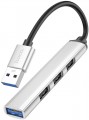 | 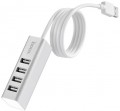 |
|---|---|---|
| Hoco HB26 | Hoco HB1 | |
| Outdated Product | Outdated Product | |
| TOP sellers | ||
Connection cable length — 80 cm | ||
| Product type | USB hub | USB hub |
| Placement | external | external |
| PC connectivity | USB-A 5Gbps | USB-A 2.0 |
HUB connectors | ||
| USB-A | 4 pcs 2.0 and 5Gbps | 4 pcs 2.0 |
More features | ||
| Cable length | 13 cm | 80 cm |
| Material | metal | metal |
| Size | 85.05x16.3x8.83 mm | 78x25x25 mm |
| Added to E-Catalog | june 2023 | december 2019 |


Compare Hoco HB26 and HB1
You may be interested in
Hoco HB26 often compared

Hoco HB1 often compared


Glossary
PC connectivity
— USB-A. The classic, widely accepted USB port, which has recently been losing ground to the more advanced USB-C port.
— USB-C. Unlike the classic, full-sized USB, this connector is much smaller and features a reversible design, allowing the plug to be inserted in either direction. This interface is rarely found in desktop PCs but is becoming increasingly popular in laptops, tablets, and phones. Note that the Type C standard describes only the connector design; the version (interface) of USB is described in the section below.
The main difference between interface versions is the bandwidth — speed.
— 2.0. The outdated 2.0 version provides data transfer speeds up to 480 Mbps. Found only in USB-A ports.
— 5Gbps. Previously named USB 3.2 gen1 and USB 3.0 (they sure know how to confuse). Unlike 2.0, this version offers a 10 times higher maximum speed (4.8 Gbps) and higher power output, allowing power-hungry devices and extensive hubs to be connected.
— 10Gbps. Further enhancement of the 5Gbps standard (and typically, the previously renamed USB 3.2 gen2 and just USB 3.1), achieving a maximum speed of 10 Gbps and even higher power output for external devices.
— 20Gbps. As the name suggests, the interface supports spee...ds up to 20 Gbps.
— USB4 40Gbps / Thunderbolt 4. Connecting a USB4 or Thunderbolt 4 hub to a PC allows data to be transmitted at speeds up to 40 Gbps through a single cable, connect multiple monitors (e.g., two 4K or one 8K display), use high-speed drives with PCIe, supply power to devices up to 100 W, and connect peripherals like network cards, audio interfaces, and chargers, turning one USB-C port into a universal dock with many functions.
— Lightning. Apple's proprietary interface used in its compact devices (iPhone, iPad, and iPod touch) since 2012. In terms of application, it is fully analogous to the microUSB described above, with the adjustment that it is only found in Apple gadgets and not used by other manufacturers.
— Internal USB. A variety of the USB standard used for connecting internal card readers (see "Type", "Purpose"). It differs from external USB in its connector; a card reader with such a connection can only be connected to connectors on the motherboard and is not compatible with external USB ports. All other characteristics are fully analogous to the corresponding standard of external USB (see above).
— microUSB. A reduced version of the external USB interface (see above): the size of such a connector is much smaller than the full-sized one, allowing it to be used in portable equipment, particularly smartphones and tablets. In fact, card readers and hubs using this interface for connection are usually intended for such equipment. Note that proper operation is only possible if the primary device can operate in USB host mode (this feature is called USB On-the-Go).
— USB-C. Unlike the classic, full-sized USB, this connector is much smaller and features a reversible design, allowing the plug to be inserted in either direction. This interface is rarely found in desktop PCs but is becoming increasingly popular in laptops, tablets, and phones. Note that the Type C standard describes only the connector design; the version (interface) of USB is described in the section below.
The main difference between interface versions is the bandwidth — speed.
— 2.0. The outdated 2.0 version provides data transfer speeds up to 480 Mbps. Found only in USB-A ports.
— 5Gbps. Previously named USB 3.2 gen1 and USB 3.0 (they sure know how to confuse). Unlike 2.0, this version offers a 10 times higher maximum speed (4.8 Gbps) and higher power output, allowing power-hungry devices and extensive hubs to be connected.
— 10Gbps. Further enhancement of the 5Gbps standard (and typically, the previously renamed USB 3.2 gen2 and just USB 3.1), achieving a maximum speed of 10 Gbps and even higher power output for external devices.
— 20Gbps. As the name suggests, the interface supports spee...ds up to 20 Gbps.
— USB4 40Gbps / Thunderbolt 4. Connecting a USB4 or Thunderbolt 4 hub to a PC allows data to be transmitted at speeds up to 40 Gbps through a single cable, connect multiple monitors (e.g., two 4K or one 8K display), use high-speed drives with PCIe, supply power to devices up to 100 W, and connect peripherals like network cards, audio interfaces, and chargers, turning one USB-C port into a universal dock with many functions.
— Lightning. Apple's proprietary interface used in its compact devices (iPhone, iPad, and iPod touch) since 2012. In terms of application, it is fully analogous to the microUSB described above, with the adjustment that it is only found in Apple gadgets and not used by other manufacturers.
— Internal USB. A variety of the USB standard used for connecting internal card readers (see "Type", "Purpose"). It differs from external USB in its connector; a card reader with such a connection can only be connected to connectors on the motherboard and is not compatible with external USB ports. All other characteristics are fully analogous to the corresponding standard of external USB (see above).
— microUSB. A reduced version of the external USB interface (see above): the size of such a connector is much smaller than the full-sized one, allowing it to be used in portable equipment, particularly smartphones and tablets. In fact, card readers and hubs using this interface for connection are usually intended for such equipment. Note that proper operation is only possible if the primary device can operate in USB host mode (this feature is called USB On-the-Go).
USB-A
The number of USB ports located on the body of the card reader or hub (see "Type"). This parameter determines the number of USB ports you will have at your disposal after connecting the device. "Pure" card readers and combined models generally have 1, 2, and even 3 USB ports, while hubs typically feature 4 or more ports.
And the USB connection interface affects the speed. It is worth noting that the speed of the input port does not necessarily indicate overall throughput, as simultaneous connection of USB drives, phones, and memory cards can slow down data transmission, which is in any case limited by the connection interface of the device itself to the PC or laptop (refer to "Connection Interface").
— USB-A 2.0. The outdated version 2.0 provides a data transfer speed of up to 480 Mbps.
— USB-A 5Gbps. Previously known as the standards USB 3.2 gen1 and USB 3.0 (they sure know how to confuse). This version provides a maximum speed 10 times greater (4.8 Gbps) and higher power supply, allowing for energy-demanding devices and extensive splitters to be connected.
— USB-A 10Gbps. Further enhancement of the USB-A 5Gbps standard (and as expected, with multiple previous names like USB 3.2 gen2 and simply USB 3.1), achieving a maximum speed of 10 Gbps and...an even higher power supply for external devices.
And the USB connection interface affects the speed. It is worth noting that the speed of the input port does not necessarily indicate overall throughput, as simultaneous connection of USB drives, phones, and memory cards can slow down data transmission, which is in any case limited by the connection interface of the device itself to the PC or laptop (refer to "Connection Interface").
— USB-A 2.0. The outdated version 2.0 provides a data transfer speed of up to 480 Mbps.
— USB-A 5Gbps. Previously known as the standards USB 3.2 gen1 and USB 3.0 (they sure know how to confuse). This version provides a maximum speed 10 times greater (4.8 Gbps) and higher power supply, allowing for energy-demanding devices and extensive splitters to be connected.
— USB-A 10Gbps. Further enhancement of the USB-A 5Gbps standard (and as expected, with multiple previous names like USB 3.2 gen2 and simply USB 3.1), achieving a maximum speed of 10 Gbps and...an even higher power supply for external devices.
Cable length
The length of the cable supplied with the device. Mostly relevant for models with a non-removable cable that cannot be replaced.