
Comparison MSI Force GC200 vs MSI Force GC20
Add to comparison |  | 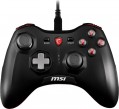 |
|---|---|---|
| MSI Force GC200 | MSI Force GC20 | |
| Expecting restock | from $39.99 | |
| User reviews | ||
| TOP sellers | ||
Two cables included: for PC (2 m, USB) and for Android devices (30 cm, OTG). Compatible with Windows, Android and PS3. Two interchangeable crosses. Vibration feedback. No smartphone mount included. | ||
| Product type | gamepad | gamepad |
Connection | ||
| Platform | PC (Windows) Android | PC (Windows) Android |
| Interface | wired | wired |
| Wired interface | USB-A | USB-A, microUSB |
| Cable length | 2 m | 2 m |
Control | ||
| Number of buttons | 12 pcs | 10 pcs |
| Switch type | membrane | |
| Feedback | vibration | vibration |
| D-pad | 4 position | 4 position |
| Sticks | 2 asymmetrical | 2 asymmetrical |
| Bumpers (shifts) | 2 pcs | 2 pcs |
| Triggers | 2 pcs | 2 pcs |
Power supply | ||
| Power source | USB port | USB port |
General | ||
| Material | plastic | plastic |
| Weight | 265 g | |
| Color | ||
| Added to E-Catalog | january 2026 | july 2018 |


Compare MSI Force GC200 and Force GC20
You may be interested in
My comparisons
MSI Force GC20 often compared


Glossary
Wired interface
— USB-A. A classic interface for connecting to a full-size USB port, which is still very common on PCs, consoles, TVs, and docking stations. This interface is particularly convenient for stationary use, when a gamepad or other controller connects directly without adapters or additional settings. Compared to USB-C, it is less modern in format but often wins in compatibility with older and universal devices.
— USB-C. A modern wired interface that is better suited for newer laptops, tablets, smartphones, and compact PCs. Its main advantage is that this port is more convenient for current technology and is more often used in mobile gaming accessories and new controllers. Compared to USB-A, it looks more modern and fits better into devices where full-size ports are few or nonexistent.
— MicroUSB. A compact wired interface that was more commonly found on older mobile devices, and in gaming controllers is mainly characteristic of controllers from previous generations.
— Lightning. A connection primarily designed for older Apple devices with the proprietary Lightning port. This option is especially useful for mobile controllers for the iPhone, when a direct connection to the smartphone is needed without switching to USB-C. Compared to USB-C, this interface is significantly narrower in application range, but it fits better for compatibility with older iPhones and some iPads.
— Proprietary. A brand-specific connection for a pa...rticular manufacturer. This option is usually designed for a specific device model or its own ecosystem of accessories, making it less universal compared to USB-A and USB-C. Its advantage is that the manufacturer can better tailor the shape, mounting, or power for their device, but the downside is less compatibility and more challenging cable replacement.
— USB-C. A modern wired interface that is better suited for newer laptops, tablets, smartphones, and compact PCs. Its main advantage is that this port is more convenient for current technology and is more often used in mobile gaming accessories and new controllers. Compared to USB-A, it looks more modern and fits better into devices where full-size ports are few or nonexistent.
— MicroUSB. A compact wired interface that was more commonly found on older mobile devices, and in gaming controllers is mainly characteristic of controllers from previous generations.
— Lightning. A connection primarily designed for older Apple devices with the proprietary Lightning port. This option is especially useful for mobile controllers for the iPhone, when a direct connection to the smartphone is needed without switching to USB-C. Compared to USB-C, this interface is significantly narrower in application range, but it fits better for compatibility with older iPhones and some iPads.
— Proprietary. A brand-specific connection for a pa...rticular manufacturer. This option is usually designed for a specific device model or its own ecosystem of accessories, making it less universal compared to USB-A and USB-C. Its advantage is that the manufacturer can better tailor the shape, mounting, or power for their device, but the downside is less compatibility and more challenging cable replacement.
Number of buttons
The total number of buttons provided in the design of the manipulator.
The more buttons — the more additional features you can "tie" to the manipulator, the lower the likelihood that during the game you will have to turn to other controls (for example, a PC keyboard). However, many game consoles (see "Platform Compatibility") provide a certain minimum number of buttons for a compatible gamepad — a smaller number simply would not allow full use of all the functions of the console. For example, the original PlayStation 4 controller has 11 buttons.
Note that the D-Pad (see below) is not included in this calculation: it is considered a specific control, although it is based on buttons.
The more buttons — the more additional features you can "tie" to the manipulator, the lower the likelihood that during the game you will have to turn to other controls (for example, a PC keyboard). However, many game consoles (see "Platform Compatibility") provide a certain minimum number of buttons for a compatible gamepad — a smaller number simply would not allow full use of all the functions of the console. For example, the original PlayStation 4 controller has 11 buttons.
Note that the D-Pad (see below) is not included in this calculation: it is considered a specific control, although it is based on buttons.
Switch type
The type of switches indicates the mechanism under the buttons of a gamepad or controller and how exactly the device registers pressing. This affects the click feel, response speed, noise, durability, and accuracy of repeated presses.
— Membrane. Under the button is a flexible rubber or silicone membrane that gets pressed to close the contact. These switches are usually quieter, softer, and cheaper but can lose elasticity over time and do not match mechanical solutions in terms of response precision.
— Mechanical. In mechanical switches, each press is handled by an individual mechanism with a spring and more pronounced tactile feedback. These buttons feel better to the fingers, return to the starting position faster, and are well-suited for fighting games, arcade games, and frequent commands.
— Optical. An optical switch registers the button's movement by interrupting or changing a light beam, rather than through regular contact. Compared to mechanical solutions, it can respond faster and wear less in the contact zone, making them a good choice for active gaming and esports.
— Membrane. Under the button is a flexible rubber or silicone membrane that gets pressed to close the contact. These switches are usually quieter, softer, and cheaper but can lose elasticity over time and do not match mechanical solutions in terms of response precision.
— Mechanical. In mechanical switches, each press is handled by an individual mechanism with a spring and more pronounced tactile feedback. These buttons feel better to the fingers, return to the starting position faster, and are well-suited for fighting games, arcade games, and frequent commands.
— Optical. An optical switch registers the button's movement by interrupting or changing a light beam, rather than through regular contact. Compared to mechanical solutions, it can respond faster and wear less in the contact zone, making them a good choice for active gaming and esports.