
Comparison Fossibot F800 vs EcoFlow RIVER 2 Max
Add to comparison | 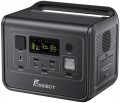 | 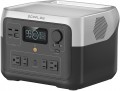 |
|---|---|---|
| Fossibot F800 | EcoFlow RIVER 2 Max | |
from $299.00 | Compare prices 3 | |
| User reviews | ||
| TOP sellers | ||
3 USB A ports, 1 USB-C port. Car cigarette lighter, DC5521 port, XT60 port. Surges up to 1000 W are allowed. LFP (LiFePO4) – lithium iron phosphate battery. | ||
| In box | charging station | charging station |
| Rated power | 800 W | 500 W |
| Peak power | 1600 W | 1000 W |
| Output waveform | sinusoid (PSW) | sinusoid (PSW) |
| UPS function |  | |
| Switchover time to battery | 10 ms | 30 ms |
Outputs | ||
| Sockets (230 V) | 1 | 2 |
| USB-A | 3 pcs 5В/2.4А 12 W | |
| USB-A (quick charge) | 2 5В/3A, 9В/2A, 12В/1.5A 18 W | |
| USB-C | 3 pcs 100 W | 1 pcs 5 A 100 W |
| Car cigarette lighter | | |
| DC output | 2x DC5521 (12.6 V / 3 A / 36 W) | |
Inputs (station charging) | ||
| From solar panels | | |
| Via USB-C port |  | |
| Input port XT60 | | |
Battery and charging time | ||
| Battery type | LiFePO4 | LiFePO4 |
| Battery capacity | 512 Wh | 512 Wh |
| Charging cycles | 3500 | 3000 |
| Charging time (socket) ≈ | 90 min | 60 min |
| Charging time (socket + solar panel) ≈ | 72 min | |
| Charging time (solar panel) ≈ | 150 min | 180 min |
| Charging time (cigarette lighter) ≈ | 307 min | |
| Charging power (socket) | 400 W | 660 W |
| Charging power (solar panel) | 200 W | 220 W |
| Charging power (cigarette lighter) | 120 W | 100 W |
General | ||
| Smartphone synchronization | Bluetooth and WiFi | |
| PSU | built into the body | built into the body |
| Display | | |
| Backlight | | |
| Carrying handle | | |
| Operating temperature | -10 °C ~ +40 °C | 0 °C ~ +45 °C |
| Dimensions (LxWxH) | 276x209x230 mm | 270x260x196 mm |
| Weight | 6.5 kg | 6 kg |
| Warranty | 2 years | 5 years |
| Added to E-Catalog | october 2023 | november 2022 |





Compare Fossibot F800 and EcoFlow RIVER 2 Max
When comparing the Fossibot F800 and EcoFlow RIVER 2 Max charging stations, it is worth noting that the Fossibot F800 has a higher nominal power (800 W versus 500 W for the EcoFlow) and peak value (1600 W versus 1000 W), making it more suitable for high-power devices. However, EcoFlow offers more outputs: 2 sockets of 230 V and 4 sockets of 100-120 V, whereas Fossibot has only one 230 V socket. Both devices have LiFePO4 batteries with the same capacity of 20 Ah, but Fossibot has a longer lifespan (3500 cycles compared to 3000 for EcoFlow). The charging time from a socket is faster for the EcoFlow (60 min versus 90 min for the Fossibot), but Fossibot can charge faster when using solar panels. EcoFlow also offers a wider operating temperature range and has a 5-year warranty, while Fossibot has a 2-year warranty. Overall, the choice between them depends on your needs: Fossibot is better for high-power devices, while EcoFlow is better for convenience and quick charging.
Price comparison
You may be interested in
Fossibot F800 often compared


EcoFlow RIVER 2 Max often compared


Glossary
Rated power
Power that a device can consistently produce for an indefinitely long time without any unpleasant consequences. For normal operation of the charging station, the rated power must be at least 15 - 20% higher than the total power of all devices simultaneously connected to it.
Peak power
Some electrical appliances (in particular, units with electric motors - refrigerators, air conditioners, etc.) consume significantly more energy at startup than after reaching the operating mode. For such a load, the peak power of the charging station must be taken into account - its indicator must be higher than the starting power of the load.
Switchover time to battery
The delay (usually in milliseconds) between the power going out from the outlet and the moment when the station starts feeding connected devices from its battery, maintaining "pass-through" power. The shorter this time, the higher the chance that devices won't notice the drop at all: for routers, cameras, NAS, and PCs, this is critical because a long pause can cause a reboot, loss of connection, or even filesystem errors. Essentially, this is the same parameter as in a classic UPS, but for charging stations, it greatly depends on implementation: models with a more "UPS-like" switching scheme switch considerably faster, while some stations formally have a UPS mode but actually create a noticeable break or activate the output only after "realizing" the network's loss. In practice, this point helps distinguish a charging station that is truly suitable as a UPS for sensitive electronics from an option "for lights and charging": for example, for home internet and video surveillance, minimal switching time is important, while for lamps, charging phones, or a heater, a brief pause is typically not critical.
Sockets (230 V)
Total number of outlets with output voltage. This is, in fact, the number of devices that can be simultaneously connected to the charging station without the use of splitters, extension cords and carriers. Accordingly, weaker charging stations have one or two sockets in their submission. Powerful charging stations already have three or more sockets “on board”.
USB-A
Full-size USB-A connectors are popular in computer technology, commonly used in charging adapters for 230 V household networks and 12 V car sockets. These outputs have become widespread in charging stations for charging gadgets.
— The total number of such ports can be quite varied (1 USB, 2 connectors, 3 ports, and even 4), as they allow for charging and, in some cases, powering various low-power devices — smartphones, tablets, power banks, lamps, and more.
— Current Strength. The maximum current delivered through the USB-A connector to the charging device. Note that different ports of the charging station may output different currents (for example, 1.5 A and 2.1 A). In such cases, the highest current strength is usually specified.
— Power. The maximum output power in watts (W) that the charging station is capable of delivering through the USB-A connector to a single charging gadget.
— The total number of such ports can be quite varied (1 USB, 2 connectors, 3 ports, and even 4), as they allow for charging and, in some cases, powering various low-power devices — smartphones, tablets, power banks, lamps, and more.
— Current Strength. The maximum current delivered through the USB-A connector to the charging device. Note that different ports of the charging station may output different currents (for example, 1.5 A and 2.1 A). In such cases, the highest current strength is usually specified.
— Power. The maximum output power in watts (W) that the charging station is capable of delivering through the USB-A connector to a single charging gadget.
USB-A (quick charge)
Full-sized USB-A ports with fast charging support. This feature allows you to charge your smartphone, tablet, or other connected devices much more quickly. The charging process occurs at increased power, with current and voltage regulated at each stage to stay within optimal values. However, keep in mind that there are many fast-charging technologies today, and not all of them are compatible with each other.
— Current strength. The current parameters delivered through USB-A fast charging ports. Note that different ports of the charging station may output different voltage and current parameters. This section specifies the current strength values at a certain voltage (for example, 5V / 3A, 9V / 2A, 12V / 1.5A).
— Power. The maximum power in watts (W) that the charging station can deliver through the USB-A fast charging port to a single charging gadget. High output power allows for faster charging. However, the charging device must support the corresponding power; otherwise, the speed will be limited by the gadget's characteristics.
— Current strength. The current parameters delivered through USB-A fast charging ports. Note that different ports of the charging station may output different voltage and current parameters. This section specifies the current strength values at a certain voltage (for example, 5V / 3A, 9V / 2A, 12V / 1.5A).
— Power. The maximum power in watts (W) that the charging station can deliver through the USB-A fast charging port to a single charging gadget. High output power allows for faster charging. However, the charging device must support the corresponding power; otherwise, the speed will be limited by the gadget's characteristics.
USB-C
USB type C ports are smaller compared to classic USB ports and have a convenient reversible design that allows connecting the plug either way. USB type C was initially created to implement various advanced features: increased power, fast charging technologies, etc.
Since the port is relatively new and quite powerful (you can find USB type C with 60W, even 100W and 140W), the total number of such connectors is often limited to one port, or sometimes two).
— Current. The maximum current delivered through the USB type C port to the device being charged. Note that different ports of a charging station may deliver different currents (for example, 1.5A and 2.1A). In such cases, the highest current is usually specified.
— Power. The maximum power in watts (W) that the charging station can deliver to one charging gadget. The high output power of the USB type C port allows for faster charging. However, the device being charged must support the corresponding power; otherwise, the speed of the process will be limited by the gadget's specifications.
Since the port is relatively new and quite powerful (you can find USB type C with 60W, even 100W and 140W), the total number of such connectors is often limited to one port, or sometimes two).
— Current. The maximum current delivered through the USB type C port to the device being charged. Note that different ports of a charging station may deliver different currents (for example, 1.5A and 2.1A). In such cases, the highest current is usually specified.
— Power. The maximum power in watts (W) that the charging station can deliver to one charging gadget. The high output power of the USB type C port allows for faster charging. However, the device being charged must support the corresponding power; otherwise, the speed of the process will be limited by the gadget's specifications.
DC output
The presence of a DC connector (or several such outputs) in the device to power external gadgets with direct current. The standard DC jack is round and has a pin in the center. However, its dimensions may differ in depth and diameter. The voltage output to the DC output may be different. The most popular options are 18 - 20 V for powering laptops, 12 V for various specialized devices and automotive electrical accessories.
Via USB-C port
The ability to replenish energy reserves in the battery cells of the charging station via the USB type C connector. This port itself is small in size and has a convenient double-sided design, thanks to which the plug can be inserted in either direction. However, in charging stations it does not always work as an input interface.