
Comparison Amazfit Bip 5 vs Amazfit GTS 4 Mini
Add to comparison | 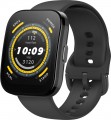 | 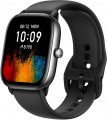 |
|---|---|---|
| Amazfit Bip 5 | Amazfit GTS 4 Mini | |
| Compare prices 15 | Compare prices 12 | |
| TOP sellers | ||
Ability to make Bluetooth calls. Calculation of the PAI index. Over 70 downloadable applications. | The main difference from previous generations is the presence of a built-in microphone (Alexa voice assistant). Circular polarization of GPS antennas. Recognizing strength and running exercises. Supports 5 satellite systems. Simplified version of GTR4/GTS4 - without player, speaker, dual-channel GPS and altimeter. | |
| Type | smartwatch | smartwatch |
| Interface | Bluetooth v5.2 | Bluetooth v5.2 |
| Gadget OS | Zepp OS | Zepp OS |
Telephony | ||
| Calls and alerts | notifications Amazon Alexa sound signal vibration built-in microphone built-in speaker | notifications Amazon Alexa vibration built-in microphone |
Sports and tourism | ||
| Possible measurements | heart rate monitor blood oxygen level number of steps distance traveled movement speed calories burned activity time sleep tracking stress level women's calendar | heart rate monitor blood oxygen level number of steps distance traveled movement speed calories burned activity time sleep tracking stress level women's calendar |
| Sports modes | 124 | 126 |
| Swimming mode |  |  |
| Navigation | GPS module GLONASS Galileo | GPS module GLONASS Galileo |
Display | ||
| Touch screen | | |
| Type | colour | colour |
| Display type | TFT | AMOLED |
| Size | 1.91 " | 1.65 " |
| Screen resolution | 380x320 px | 384x336 px |
| PPI | 260 ppi | 309 ppi |
| Light sensor | | |
| Watch face protection | glass | glass |
| Bezel-less | | |
Hardware | ||
| Extra features | accelerometer | accelerometer |
Power source | ||
| Device charging | magnetic | magnetic |
| Source of power | Li-Ion | Li-Ion |
| Battery capacity | 300 mAh | 270 mAh |
| Operating time (normal mode) | 10 days | 15 days |
| Operating time (active mode) | 120 h | 192 h |
| Battery life (GPS) | 21 h | |
Case and strap | ||
| Material | plastic | aluminium |
| Strap | quick release | quick release |
| Strap Options | rubber/silicone | rubber/silicone |
| Clasp options | classic buckle | classic buckle |
| Band Width | 22 mm | 20 mm |
| Wrist strap | 155 – 210 mm | 135 – 190 mm |
General | ||
| Protection rating | IP68 | 50 WR (5 ATM) |
| Dimensions (without strap) | 45.94x38.09x11.2 mm | 41.8x36.6x9.1 mm |
| Weight | 26 g | 19 g |
| Color | ||
| Added to E-Catalog | august 2023 | september 2022 |


Compare Amazfit Bip 5 and GTS 4 Mini
Price comparison
You may be interested in
My comparisons
Amazfit Bip 5 often compared


Amazfit GTS 4 Mini often compared


Glossary
Calls and alerts
Types of notifications, as well as basic voice communication features supported by the gadget.
- Notifications. In classic smart watches and fitness trackers, the specific functionality of such notifications can be different – from a regular sound or vibration signal to the ability to display on the screen and even respond. But in any case, such notifications are often more noticeable to the user than the own signal from a smartphone located deep in a pocket or bag.
— Voice control. The ability to control the device through voice commands. In order for a smartwatch or fitness tracker to perform some simple feature, it is enough to say its name aloud.
— Voice assistant. In watches with voice assistant support, the level of user interaction with the device is displayed in a new qualitative way. The most popular virtual assistants are Google Assistant and Amazon Alexa. In Apple devices, the role of an assistant is performed by Apple Siri, in Samsung wearable gadgets — a virtual assistant Bixby. Unlike the voice control function, the assistant does not just turn on this or that feature, but allows you to perform certain operations in applications that require feedback.
— Sound signal. The ability to give sound signals using the built-in speaker. This feature will be useful primarily in situations where the gadget is not on hand — for example, if it is used as an ala...rm clock and is removed at night.
— Vibration. Vibration signal similar to that used in mobile phones. In wearable gadgets, such a signal is especially convenient due to the fact that the device is constantly in contact with the wearer's skin, so that the vibration is perfectly felt — and regardless of the level of noise around. In addition, vibration mode is also useful in quiet environments where a loud sound signal is undesirable.
— Built-in microphone. Own microphone built into the body of the device. Such equipment can be used for different purposes, depending on the type and features of the gadget. First of all, voice communication is impossible without a microphone. Another feature for which a microphone is required is the voice assistant (see above). And in children's smartwatches, it may be possible to remotely turn on the microphone from the parent gadget and listen to what is happening around the child; see the relevant paragraph below for details.
— Speakerphone(speaker). The ability to work the gadget in hands-free mode, using the built-in speaker and microphone for conversation. In a conventional smartwatch (see "Type"), this feature allows you to talk through the watch without removing the smartphone from your pocket; in watch-phones, speakerphone allows you to do so without headphones and headsets, and for children's smartwatches, this feature is almost mandatory. However the volume of the built-in speaker is usually low, so in a noisy environment its power may not be enough.
- Notifications. In classic smart watches and fitness trackers, the specific functionality of such notifications can be different – from a regular sound or vibration signal to the ability to display on the screen and even respond. But in any case, such notifications are often more noticeable to the user than the own signal from a smartphone located deep in a pocket or bag.
— Voice control. The ability to control the device through voice commands. In order for a smartwatch or fitness tracker to perform some simple feature, it is enough to say its name aloud.
— Voice assistant. In watches with voice assistant support, the level of user interaction with the device is displayed in a new qualitative way. The most popular virtual assistants are Google Assistant and Amazon Alexa. In Apple devices, the role of an assistant is performed by Apple Siri, in Samsung wearable gadgets — a virtual assistant Bixby. Unlike the voice control function, the assistant does not just turn on this or that feature, but allows you to perform certain operations in applications that require feedback.
— Sound signal. The ability to give sound signals using the built-in speaker. This feature will be useful primarily in situations where the gadget is not on hand — for example, if it is used as an ala...rm clock and is removed at night.
— Vibration. Vibration signal similar to that used in mobile phones. In wearable gadgets, such a signal is especially convenient due to the fact that the device is constantly in contact with the wearer's skin, so that the vibration is perfectly felt — and regardless of the level of noise around. In addition, vibration mode is also useful in quiet environments where a loud sound signal is undesirable.
— Built-in microphone. Own microphone built into the body of the device. Such equipment can be used for different purposes, depending on the type and features of the gadget. First of all, voice communication is impossible without a microphone. Another feature for which a microphone is required is the voice assistant (see above). And in children's smartwatches, it may be possible to remotely turn on the microphone from the parent gadget and listen to what is happening around the child; see the relevant paragraph below for details.
— Speakerphone(speaker). The ability to work the gadget in hands-free mode, using the built-in speaker and microphone for conversation. In a conventional smartwatch (see "Type"), this feature allows you to talk through the watch without removing the smartphone from your pocket; in watch-phones, speakerphone allows you to do so without headphones and headsets, and for children's smartwatches, this feature is almost mandatory. However the volume of the built-in speaker is usually low, so in a noisy environment its power may not be enough.
Sports modes
The number of types of sports training supported by the smartwatch. The more of them, the wider the coverage of the potential audience is provided by a wearable gadget on the wrist.
The most common sports modes include running, walking, cycling, swimming, elliptical exercise, and so on. The quantity and quality of data for different sports depends on the technical level of equipment of a particular device. While some models only record heart rate and roughly calculate the number of calories burned, other smartwatches evaluate the effectiveness of a workout using a detailed list of data and even draw a conditional run track based on information from GPS satellites.
The most common sports modes include running, walking, cycling, swimming, elliptical exercise, and so on. The quantity and quality of data for different sports depends on the technical level of equipment of a particular device. While some models only record heart rate and roughly calculate the number of calories burned, other smartwatches evaluate the effectiveness of a workout using a detailed list of data and even draw a conditional run track based on information from GPS satellites.
Swimming mode
A training programme for waterproof smartwatches or fitness trackers with water sports disciplines support. In swimming mode the wearable gadget determines the speed, distance and time of the swim, advanced instances of smartwatches measure the number of laps in the pool, calculate the frequency and efficiency of strokes in certain swimming styles. A personal assistant on the wrist evaluates the performance of water workouts and often makes recommendations to improve their effectiveness.
Display type
— TFT. The simplest type of liquid crystal panel used in colour displays. They provide a relatively low, but generally sufficient image quality, while they are much cheaper than more advanced options. This type does not require backlight — more precisely, the backlight is part of the screen itself and turns on with it. Of the unequivocal disadvantages, it is worth noting that many TFT panels have rather limited viewing angles; however, as technology improves, this drawback is gradually eliminated.
— IPS. A variety of LCD panels created in an attempt to eliminate the shortcomings of TFT. There are many subspecies of IPS panels, but they all feature high colour reproduction quality, excellent brightness and wide viewing angles. The disadvantage of this option is the relatively high cost.
— OLED. In this case, we mean the technology used to create the simplest monochrome displays. In such screens, each segment that makes up the image is a separate LED, which eliminates the need for external illumination (and even the display itself can be used as a flashlight).
— AMOLED. Screens based on a panel of active organic light emitting diodes. Similar to various types of TFT, this technology allows the creation of high-resolution colour displays. Its key feature is that the screen doe...s not require a separate backlight system — in AMOLED panels, each pixel glows independently, resulting in somewhat lower power consumption. At the same time, such screens are distinguished by good colour reproduction quality, excellent brightness and wide viewing angles, however, they are much more expensive than TFT.
— Super AMOLED. An enhanced version of the AMOLED technology described above, delivering more expansive colour reproduction and brightness, as well as improved touch accuracy and speed, all at a thinner display and lower power consumption. In addition, the degree of reflection of external light is reduced, such a panel gives less glare and is better visible in sunlight.
— E-Ink (E-Paper). Displays made using "electronic paper" technology; in addition, this category also includes screens such as Memory LCD. The classic E-Ink screen is black and white, does not have a backlight (however, it can be built into particular gadgets), has a very low refresh rate and is poorly suited even for stopwatches, not to mention videos or animated pictures. On the other hand, "electronic paper" is perfectly visible in bright light and has a very low power consumption: it requires electricity only when the image is changed, while a still image remains visible even when the power is completely turned off. Memory LCD screens, in turn, with the same advantages, are almost as good as classic LCD panels in terms of refresh rate, but for a number of reasons they are not widely used.
— Transflective. A specific type of LCD panels that can work both due to its own backlight and due to reflected light. In bright external light (for example, in the sun), such a screen effectively reflects it and does not require a separate backlight — however, it is still included in the design and turns on in low light. This type of operation can significantly reduce power consumption compared to traditional LCD screens, where the image is not visible without backlight; in addition, good visibility in bright light is also an important advantage. The main disadvantage of panels of this type is their high cost; in addition, they are made mostly monochrome.
- LTPO. OLED and AMOLED matrices with an adaptive refresh rate that varies over a wide range based on the tasks performed. When rendering dynamic frames, screens with LTPO technology automatically raise the refresh rate to the maximum values, while viewing static images, they automatically reduce it to the minimum. At the heart of the technology is a traditional LTPS substrate with a thin TFT oxide film on top of the TFT base. Dynamic control of the refresh rate is provided by controlling the electron flow. The key benefit of LTPO screens is their reduced power consumption.
— IPS. A variety of LCD panels created in an attempt to eliminate the shortcomings of TFT. There are many subspecies of IPS panels, but they all feature high colour reproduction quality, excellent brightness and wide viewing angles. The disadvantage of this option is the relatively high cost.
— OLED. In this case, we mean the technology used to create the simplest monochrome displays. In such screens, each segment that makes up the image is a separate LED, which eliminates the need for external illumination (and even the display itself can be used as a flashlight).
— AMOLED. Screens based on a panel of active organic light emitting diodes. Similar to various types of TFT, this technology allows the creation of high-resolution colour displays. Its key feature is that the screen doe...s not require a separate backlight system — in AMOLED panels, each pixel glows independently, resulting in somewhat lower power consumption. At the same time, such screens are distinguished by good colour reproduction quality, excellent brightness and wide viewing angles, however, they are much more expensive than TFT.
— Super AMOLED. An enhanced version of the AMOLED technology described above, delivering more expansive colour reproduction and brightness, as well as improved touch accuracy and speed, all at a thinner display and lower power consumption. In addition, the degree of reflection of external light is reduced, such a panel gives less glare and is better visible in sunlight.
— E-Ink (E-Paper). Displays made using "electronic paper" technology; in addition, this category also includes screens such as Memory LCD. The classic E-Ink screen is black and white, does not have a backlight (however, it can be built into particular gadgets), has a very low refresh rate and is poorly suited even for stopwatches, not to mention videos or animated pictures. On the other hand, "electronic paper" is perfectly visible in bright light and has a very low power consumption: it requires electricity only when the image is changed, while a still image remains visible even when the power is completely turned off. Memory LCD screens, in turn, with the same advantages, are almost as good as classic LCD panels in terms of refresh rate, but for a number of reasons they are not widely used.
— Transflective. A specific type of LCD panels that can work both due to its own backlight and due to reflected light. In bright external light (for example, in the sun), such a screen effectively reflects it and does not require a separate backlight — however, it is still included in the design and turns on in low light. This type of operation can significantly reduce power consumption compared to traditional LCD screens, where the image is not visible without backlight; in addition, good visibility in bright light is also an important advantage. The main disadvantage of panels of this type is their high cost; in addition, they are made mostly monochrome.
- LTPO. OLED and AMOLED matrices with an adaptive refresh rate that varies over a wide range based on the tasks performed. When rendering dynamic frames, screens with LTPO technology automatically raise the refresh rate to the maximum values, while viewing static images, they automatically reduce it to the minimum. At the heart of the technology is a traditional LTPS substrate with a thin TFT oxide film on top of the TFT base. Dynamic control of the refresh rate is provided by controlling the electron flow. The key benefit of LTPO screens is their reduced power consumption.
Size
The size of the display installed in the gadget; for round screens, respectively, the diameter is indicated.
A larger screen, on the one hand, is more convenient to use, on the other hand, it significantly affects the dimensions of the entire device, which is especially critical for wearable gadgets. Therefore, manufacturers choose the display size in accordance with the purpose and functionality of each specific model — so that there is enough space on the screen and the device itself is not too bulky.
It is also worth mentioning that screens with a similar size may have different aspect ratios. For example, traditional smartwatches are usually equipped with square or round panels, while in fitness trackers, screens are often made elongated in height.
A larger screen, on the one hand, is more convenient to use, on the other hand, it significantly affects the dimensions of the entire device, which is especially critical for wearable gadgets. Therefore, manufacturers choose the display size in accordance with the purpose and functionality of each specific model — so that there is enough space on the screen and the device itself is not too bulky.
It is also worth mentioning that screens with a similar size may have different aspect ratios. For example, traditional smartwatches are usually equipped with square or round panels, while in fitness trackers, screens are often made elongated in height.
Screen resolution
Screen size in dots (pixels) horizontally and vertically. In general, this is one of the indicators that determine the image quality: the higher the resolution, the clearer and smoother the picture on the screen (with the same size), the less noticeable are the individual dots. On the other hand, an increase in the number of pixels affects the cost of displays, their power consumption and requirements for a hardware platform (more powerful hardware is required, which itself will cost more). In addition, the specifics of using smartwatches is such that there is simply no need to install high-resolution screens in them. Therefore, modern wrist accessories use displays with a relatively low resolution: for example, 320x320 with a size of about 1.6" is considered quite sufficient even for premium watches.
PPI
The density of dots on the screen of the gadget, namely, the number of pixels that are on each inch of the panel vertically or horizontally.
The higher the PPI, the higher the detail of the screen, the clearer and smoother the image is. On the other hand, this indicator affects the price accordingly. Therefore, the higher the density of points, the more advanced, usually, this gadget is in terms of general capabilities. However, when choosing a screen, manufacturers take into account the general purpose and functionality of the device; so that even a small number of PPIs usually does not interfere with comfortable use.
The higher the PPI, the higher the detail of the screen, the clearer and smoother the image is. On the other hand, this indicator affects the price accordingly. Therefore, the higher the density of points, the more advanced, usually, this gadget is in terms of general capabilities. However, when choosing a screen, manufacturers take into account the general purpose and functionality of the device; so that even a small number of PPIs usually does not interfere with comfortable use.
Light sensor
A small sensor that helps watches and bracelets adapt to the surrounding environment, making the screen comfortable in all conditions while simultaneously extending battery life. Unlike a simple "fixed" brightness level, it reduces the risk of the display being too dim in sunlight or too bright in darkness, and compared to the "scheduled auto-brightness" mode, it works more accurately because it responds to the actual light around. Light sensor significantly influences convenience: there's less need to fiddle with settings, it's easier to read notifications on the go, and at night, the screen doesn't disturb you or those around you. An example is the quick brightness switch when entering a building after being outside or when checking the time in the bedroom when the light is almost off.
Battery capacity
The capacity of the battery that is installed in the gadget.
Theoretically, the higher the capacity, the longer the battery can work on a single charge. However, in fact, the battery life of the gadget also depends on its power consumption, and it is determined by the specs of the display and the hardware. Therefore, only models of the same type with very similar specs can be compared in terms of battery capacity; and for an accurate assessment of battery life, it is better to focus on the directly claimed operating time in one mode or another.
It is also worth mentioning that high-capacity batteries inevitably turn out to be quite heavy and bulky. So the capacity of batteries installed in wearable gadgets is also greatly limited by size and weight.
Theoretically, the higher the capacity, the longer the battery can work on a single charge. However, in fact, the battery life of the gadget also depends on its power consumption, and it is determined by the specs of the display and the hardware. Therefore, only models of the same type with very similar specs can be compared in terms of battery capacity; and for an accurate assessment of battery life, it is better to focus on the directly claimed operating time in one mode or another.
It is also worth mentioning that high-capacity batteries inevitably turn out to be quite heavy and bulky. So the capacity of batteries installed in wearable gadgets is also greatly limited by size and weight.