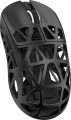
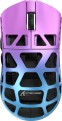
Comparison Attack Shark R2 vs Attack Shark
Add to comparison | ![]() | ![]() |
|---|---|---|
| Attack Shark R2 | Attack Shark | |
from $444.54 | Compare prices 1 | |
| TOP sellers | ||
The Attack Shark R3 stands out due to its PixArt 3395 sensor with a resolution of up to 26,000 DPI and a polling rate of 8,000 Hz, which ensures lightning-fast accuracy in games. Convenient connectivity via radio, Bluetooth, or cable makes it versatile. | ||
| Product type | mouse | |
| Connection | radio / Bluetooth / wired | radio / Bluetooth / wired |
| Multi-Device | ||
| Sensor | optical | optical |
Sensor and control | ||
| Sensor | PixArt 3950 | PixArt 3395 |
| Sensor resolution | 800 – 42000 DPI | |
| Max. acceleration | 50 G | 50 G |
| Max. speed | 750 ips | 650 ips |
| Max. polling rate | 8000 Hz (0.125 ms) | 8000 Hz (0.125 ms) |
| Number of buttons | 4 | 4 |
| Side buttons | ||
| DPI-button | ||
| Switches | Omron | Kailh |
| Switch resource | 100 million clicks | 80 million clicks |
| Scroll wheels | 1 | 1 |
Additional features | ||
| Suitable for left-handers | ||
| Perforated body | ||
| Programmable buttons | ||
Connection and power supply | ||
| Cable | USB-A removable braided | USB-A removable braided |
| Power source | battery | battery |
General | ||
| In box | USB-A dongle | USB-A dongle |
| Size (LxWxH) | 118x62x39 mm | 119x61x36 mm |
| Weight | 45 g | 46 g |
| Added to E-Catalog | september 2024 | september 2024 |
Compare Attack Shark R2 and
The Attack Shark R2 and R3 mice have similar characteristics, however, there are several key differences. The R2 is equipped with a PixArt 3950 sensor with a maximum resolution of 42000 DPI, making it more suitable for high-precision tasks, while the R3 uses a PixArt 3395 sensor with a maximum resolution of 26000 DPI. Both devices have the same number of buttons and Multi-Device support, but the switches in the R2 are Omron with a lifespan of 100 million clicks, while in the R3 they are Kailh with a lifespan of 80 million. Additionally, the R2 is slightly lighter (45 g compared to 46 g for the R3) and has a perforated body, as does the R3. Overall, if high sensitivity is important to you, it is better to choose the R2, while the R3 is suitable for regular use.
Price comparison
You may be interested in
My comparisons
Attack Shark R2 often compared
Glossary
Product type
In addition to more or less traditional mice, with a classic format of work, you can also find more specific types of manipulators on the market: trackpads, trackballs and 3D mice. Here is a more detailed description of each of them:
— Mouse. In this case, mice include all manipulators that work by moving around a table, a special rug or other surface. Most of these devices have a distinctive look that most users are familiar with: a low, oblong body with buttons in the front (and, most often, at least one wheel). However, there are also more specific design options — ergonomic mice in asymmetric cases (for a strictly defined hand) and even devices with a vertical layout. For more information about the latter, see "In the Direction", which also describes such varieties of mice as gaming and laptop mice.
Anyway, mice are the most popular nowadays: they are comfortable, functional, familiar to experienced users and easy to learn for beginners at the computer. Their disadvantages include the fact that for work you need a certain space on a flat surface, and not all types of surfaces are correctly recognized by modern mice.
— Trackball. Initially, a trackball is a kind of antipode of a classic mouse: the body of the device is stationary during operation, and the user controls the cursor by scrolling a special ball. Mod...ern trackballs are usually shaped like mice; in this case, the ball is most often placed under the user's thumb (although there are exceptions). Anyway, it is believed that this format of work reduces the load on the joints of the hands and reduces the risk of developing carpal tunnel syndrome — we recall that this pathology, which causes discomfort, quite often occurs precisely because of prolonged monotonous work with the mouse. In addition, trackballs are very undemanding to the place of installation: it is enough that the device can be more or less stably kept in one place; less installation space is required than for the same trackpad; and the type of surface is not important for them (unlike mice). This can be a real salvation in some situations — for example, when working with a laptop on the road. On the other hand, manipulators of this type are noticeably inferior to traditional mice in terms of speed and convenience when moving the cursor over a long distance, which is why they are poorly suited (or even not suitable at all) for some tasks, including games. Therefore, very few trackballs are produced nowadays; and some of them are completely traditional mice, supplemented with a thumb ball. Such combination devices in our catalog are also referred to as trackballs, and not mice; they are the most versatile, but quite expensive.
— Trackpad. Manipulators of this type (also known as "touchpads") have the form of a touch panel (usually rectangular, with a diagonal of several centimeters), supplemented by buttons. In other words, such models are analogues of laptop touchpads, made as separate devices. Such devices are in many ways similar to trackballs (see above): on the one hand, they do not move during operation and practically do not depend on the type of surface, on the other hand, they do not differ in speed and are poorly suited for games and other similar tasks. However, touchpads take up more space and are generally not designed for use on the road and other similar conditions — they are more convenient on a desktop or other similar surface. On the other hand, the touch surface provides quite extensive control options that are not available in other types of manipulators. So, in addition to finger movement, modern trackpads are able to recognize tapping (in some models, even with the definition of force), as well as various multi-finger gestures: zoom by pinching and spreading two fingers, scrolling by moving a finger along the side of the sensor, etc.
— 3D mouse. A type of mouse that supports cursor control using gestures in the air, without contact with a table or other surface (however, some models can also work like regular mice). A rather specific type of manipulators that has not gained distribution — mainly because 3D mice are not cheap, and their specific functionality is not needed so often in fact.
— Presenter. A kind of manipulators, designed mainly for presentations, including remote control of slides. Presenters really outwardly resemble remote controls: such a device is held in the hand on weight during operation, and various specialized buttons are responsible for control (navigation, “start / pause”, etc.). In addition, many models provide additional equipment — for example, a laser pointer or a built-in touchpad. And in the software part, such specific functions as “spotlight” (the ability to highlight a certain area on the screen, darkening the rest), “zoom” (enlargement of the selected part of the image), etc. can be implemented. Presenters are usually connected wirelessly (see. connection type).
— Mouse. In this case, mice include all manipulators that work by moving around a table, a special rug or other surface. Most of these devices have a distinctive look that most users are familiar with: a low, oblong body with buttons in the front (and, most often, at least one wheel). However, there are also more specific design options — ergonomic mice in asymmetric cases (for a strictly defined hand) and even devices with a vertical layout. For more information about the latter, see "In the Direction", which also describes such varieties of mice as gaming and laptop mice.
Anyway, mice are the most popular nowadays: they are comfortable, functional, familiar to experienced users and easy to learn for beginners at the computer. Their disadvantages include the fact that for work you need a certain space on a flat surface, and not all types of surfaces are correctly recognized by modern mice.
— Trackball. Initially, a trackball is a kind of antipode of a classic mouse: the body of the device is stationary during operation, and the user controls the cursor by scrolling a special ball. Mod...ern trackballs are usually shaped like mice; in this case, the ball is most often placed under the user's thumb (although there are exceptions). Anyway, it is believed that this format of work reduces the load on the joints of the hands and reduces the risk of developing carpal tunnel syndrome — we recall that this pathology, which causes discomfort, quite often occurs precisely because of prolonged monotonous work with the mouse. In addition, trackballs are very undemanding to the place of installation: it is enough that the device can be more or less stably kept in one place; less installation space is required than for the same trackpad; and the type of surface is not important for them (unlike mice). This can be a real salvation in some situations — for example, when working with a laptop on the road. On the other hand, manipulators of this type are noticeably inferior to traditional mice in terms of speed and convenience when moving the cursor over a long distance, which is why they are poorly suited (or even not suitable at all) for some tasks, including games. Therefore, very few trackballs are produced nowadays; and some of them are completely traditional mice, supplemented with a thumb ball. Such combination devices in our catalog are also referred to as trackballs, and not mice; they are the most versatile, but quite expensive.
— Trackpad. Manipulators of this type (also known as "touchpads") have the form of a touch panel (usually rectangular, with a diagonal of several centimeters), supplemented by buttons. In other words, such models are analogues of laptop touchpads, made as separate devices. Such devices are in many ways similar to trackballs (see above): on the one hand, they do not move during operation and practically do not depend on the type of surface, on the other hand, they do not differ in speed and are poorly suited for games and other similar tasks. However, touchpads take up more space and are generally not designed for use on the road and other similar conditions — they are more convenient on a desktop or other similar surface. On the other hand, the touch surface provides quite extensive control options that are not available in other types of manipulators. So, in addition to finger movement, modern trackpads are able to recognize tapping (in some models, even with the definition of force), as well as various multi-finger gestures: zoom by pinching and spreading two fingers, scrolling by moving a finger along the side of the sensor, etc.
— 3D mouse. A type of mouse that supports cursor control using gestures in the air, without contact with a table or other surface (however, some models can also work like regular mice). A rather specific type of manipulators that has not gained distribution — mainly because 3D mice are not cheap, and their specific functionality is not needed so often in fact.
— Presenter. A kind of manipulators, designed mainly for presentations, including remote control of slides. Presenters really outwardly resemble remote controls: such a device is held in the hand on weight during operation, and various specialized buttons are responsible for control (navigation, “start / pause”, etc.). In addition, many models provide additional equipment — for example, a laser pointer or a built-in touchpad. And in the software part, such specific functions as “spotlight” (the ability to highlight a certain area on the screen, darkening the rest), “zoom” (enlargement of the selected part of the image), etc. can be implemented. Presenters are usually connected wirelessly (see. connection type).
Sensor
The model of the sensor installed in the mouse. This information is indicated mainly for models equipped with high-end sensors, which are significantly superior in their capabilities to simpler solutions. Such characteristics are important primarily for gaming mice, so most of the devices for which the sensor model is specified belong to this category.
Knowing the name, you can find detailed data on the sensor and evaluate its capabilities. Note that one of the most popular brands nowadays, under which advanced sensors are produced, is PixArt ; on the market are often found, in particular, sensors PixArt 3212, PixArt 3325, PixArt 3327, PixArt 3335, PixArt 3360, PixArt 3389, PixArt 3395, PixArt 3950.
Sensor resolution
Resolution of the sensor responsible for tracking mouse movements on the work surface. Specified in DPI — dots per inch.
The physical meaning of DPI as a whole is as follows. The sensor of a modern mouse works on the same principle as the camera matrix, and consists of pixels. And DPI is the number of pixels that fall on 1 inch of the underlying surface (length or width), "visible" by the sensor.
It is believed that more DPI means a more advanced sensor and mouse in general; nowadays, models for 3500 – 5000 DPI, 12000 DPI, 16000 DPI even more are not uncommon. In a way, it is — high resolution contributes to accuracy. However, the only thing that is directly determined by this indicator is the speed at which the cursor moves across the screen: the higher the resolution of the sensor, the greater the number of pixels that the cursor will move when the mouse itself moves a certain distance. At the same time, it is worth recalling that too high a speed is even more undesirable than too low. So the real need for high DPI ( 1000 and above) arises mainly when working on large screens (4K resolution and more); for more modest displays (HD and Full HD), smaller values are often enough.
The physical meaning of DPI as a whole is as follows. The sensor of a modern mouse works on the same principle as the camera matrix, and consists of pixels. And DPI is the number of pixels that fall on 1 inch of the underlying surface (length or width), "visible" by the sensor.
It is believed that more DPI means a more advanced sensor and mouse in general; nowadays, models for 3500 – 5000 DPI, 12000 DPI, 16000 DPI even more are not uncommon. In a way, it is — high resolution contributes to accuracy. However, the only thing that is directly determined by this indicator is the speed at which the cursor moves across the screen: the higher the resolution of the sensor, the greater the number of pixels that the cursor will move when the mouse itself moves a certain distance. At the same time, it is worth recalling that too high a speed is even more undesirable than too low. So the real need for high DPI ( 1000 and above) arises mainly when working on large screens (4K resolution and more); for more modest displays (HD and Full HD), smaller values are often enough.
Max. speed
The ips (inches per second) parameter is the linear speed of mouse movement, expressed in inches per second, at which the manipulator's sensor is able to read the surface. In top models, the maximum mouse movement speed often reaches 400-600 ips, but devices with ips in the region of 200 are more common.
Switches
The brand of switches (switches) installed in the mouse. Also, these parts are often called "mikriki" — from the term "microswitches". Usually, the characteristics indicate the brand of switches used in the main buttons (left and right); additional buttons, usually, are equipped with other switches, often simpler and cheaper.
The mics are directly responsible for the operation of the keys when pressed. Accordingly, the quality of the mouse, as well as the feel and comfort of the user, depend on the quality of these parts: different switches can vary in stiffness, ease of operation and the sound of pressing. And the brand of switches is not specified for all mice, but only for models equipped with advanced elements. In other words, this parameter is indicated in cases where the brand of the microswitch is a sign of the high quality of the "rodent". Typical examples include mics under the brands Omron(considered premium) and Huano(Chinese counterparts of quite comparable quality). Light Strike and Razer switches are also pulled up to them.
We emphasize that in this case, not a specific model is indicated, but a general brand under which mikriks are released (sometimes also their type, opto-mechanical or mechanical). At the same time, the same brand may include different models of switche...s that differ in features: some are “quiet”, others with a normal sound, some with increased accuracy, others with an extended service life, etc. So the features of these parts should be clarified separately. However, the detailed characteristics of mikriks are important mainly for demanding users, in particular professional cybersportsmen.
The mics are directly responsible for the operation of the keys when pressed. Accordingly, the quality of the mouse, as well as the feel and comfort of the user, depend on the quality of these parts: different switches can vary in stiffness, ease of operation and the sound of pressing. And the brand of switches is not specified for all mice, but only for models equipped with advanced elements. In other words, this parameter is indicated in cases where the brand of the microswitch is a sign of the high quality of the "rodent". Typical examples include mics under the brands Omron(considered premium) and Huano(Chinese counterparts of quite comparable quality). Light Strike and Razer switches are also pulled up to them.
We emphasize that in this case, not a specific model is indicated, but a general brand under which mikriks are released (sometimes also their type, opto-mechanical or mechanical). At the same time, the same brand may include different models of switche...s that differ in features: some are “quiet”, others with a normal sound, some with increased accuracy, others with an extended service life, etc. So the features of these parts should be clarified separately. However, the detailed characteristics of mikriks are important mainly for demanding users, in particular professional cybersportsmen.
Switch resource
The durability of mouse switches is measured by the number of clicks the keys can withstand before they begin to show signs of wear or malfunction. Switches can have a lifespan of several million to tens of millions of clicks. In laboratory conditions, this parameter is checked using special testing machines, which diligently press the keys the required number of times, on the basis of which a verdict is made regarding the approximate service life of the switches.
Suitable for left-handers
Mice with a symmetrical body shape. The main advantage of such models is that their shape is the same well suited for both right and left hands. Considering that specialized "left-handed" devices are extremely rare, a symmetrical mouse can be a real salvation for a left-hander. At the same time, note that the symmetry in this case concerns only the shape of the case and the location of the main buttons; additional buttons can be placed exclusively under the right hand. If the mouse is bought for a left-hander, it is necessary to clarify these points.
Weight
The total weight of the mouse. For models with a wired connection, usually, it is indicated without cable, and for devices with weight adjustment (see above) — without weights.
This parameter is important primarily for professional gaming applications, although it is often relevant for ordinary users. Theoretically, less weight promotes speed and reduces fatigue. At the same time, in fact, much depends on the personal habits and preferences of the user: a mouse that is too light may “not be felt in the hands” and not give familiar feedback. Therefore, although most mice have a lower weight limit of 60 – 80 g, however, even among professional gaming models there are much more massive devices — 120 – 140 g or more. The lightest variety of "rodents" is laptop (see "In the direction"), among them devices come across and less than 60 g.
Also note that the weight to some extent depends on the size and “tricked out” of the device, but there is no unambiguous dependence here: models similar in size and functionality can differ markedly in weight.
This parameter is important primarily for professional gaming applications, although it is often relevant for ordinary users. Theoretically, less weight promotes speed and reduces fatigue. At the same time, in fact, much depends on the personal habits and preferences of the user: a mouse that is too light may “not be felt in the hands” and not give familiar feedback. Therefore, although most mice have a lower weight limit of 60 – 80 g, however, even among professional gaming models there are much more massive devices — 120 – 140 g or more. The lightest variety of "rodents" is laptop (see "In the direction"), among them devices come across and less than 60 g.
Also note that the weight to some extent depends on the size and “tricked out” of the device, but there is no unambiguous dependence here: models similar in size and functionality can differ markedly in weight.