
Comparison WD Blue WD20EZBX 2 TB 256/7200 vs WD Black 3.5" Gaming Hard Drive WD4005FZBX 4 TB V1
Add to comparison | 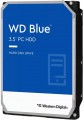 | 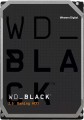 |
|---|---|---|
| WD Blue WD20EZBX 2 TB 256/7200 | WD Black 3.5" Gaming Hard Drive WD4005FZBX 4 TB V1 | |
| Compare prices 9 | Compare prices 5 | |
| User reviews | ||
| TOP sellers | ||
| Placement | built-in | built-in |
| Type | HDD | HDD |
| Features | for PC | for PC |
| Volume | 2 TB | 4 TB |
| Form factor | 3.5 " | 3.5 " |
| Connection | SATA3 | SATA3 |
| Manufacturer's warranty | 2 years | 5 years |
Technical specs | ||
| Cache memory | 256 MB | 256 MB |
| Record technology | SMR | CMR |
| RPM | 7200 rpm | 7200 rpm |
| Data transfer rate | 215 MB/s | 202 MB/s |
| Operation power consumption | 9.1 W | |
| Standby power consumption | 5.8 W | |
| Reading noise level | 36 dB | |
| Standby mode noise level | 29 dB | |
| MTBF (on/off) | 300 K | |
General | ||
| Size | 147x102x26 mm | 147x102x26 mm |
| Weight | 720 g | |
| Added to E-Catalog | may 2021 | july 2018 |





Compare WD Blue WD20EZBX and Black 3.5" Gaming Hard Drive WD4005FZBX
You may be interested in
My comparisons
WD Blue often compared


WD Black 3.5" Gaming Hard Drive often compared


Glossary
Volume
The capacity of a hard disk drive shows how much data the HDD can store—from documents and photos to games, movies, backups, and large work archives. This parameter determines whether the drive is suitable for a simple home system, file storage, or, for example, for long-term accumulation of video recordings from surveillance cameras.
Models small by modern standards are more often chosen for documents, music, and basic files, whereas drives of 4 – 8 TB and larger are already interesting for large media libraries, backups, and NAS systems. Compared to SSDs, high-capacity HDDs are usually more cost-effective per gigabyte, so they are often chosen particularly when the maximum space is more important than record-breaking speed. For example, a drive of 1 or 2 TB might be enough for a regular PC, while 6 – 10 TB could be suitable for a movie collection, family archive, or constant video recording.
Models small by modern standards are more often chosen for documents, music, and basic files, whereas drives of 4 – 8 TB and larger are already interesting for large media libraries, backups, and NAS systems. Compared to SSDs, high-capacity HDDs are usually more cost-effective per gigabyte, so they are often chosen particularly when the maximum space is more important than record-breaking speed. For example, a drive of 1 or 2 TB might be enough for a regular PC, while 6 – 10 TB could be suitable for a movie collection, family archive, or constant video recording.
Manufacturer's warranty
Manufacturer's warranty provided for this model.
In fact, this is the minimum service life promised by the manufacturer, subject to the rules of operation. Most often, the actual service life of the device is much longer than the guaranteed one.
In fact, this is the minimum service life promised by the manufacturer, subject to the rules of operation. Most often, the actual service life of the device is much longer than the guaranteed one.
Record technology
— CMR(Conventional Magnetic Recording) is a classic method of magnetic recording, characterized by high data access speed. CMR hard drives are used in systems where it is important to provide high (as far as possible) data read/write speed. These are user computers, security video surveillance systems, etc. The main disadvantage of CMR hard drives is the high complexity of creating volume drives, which is reflected in their price. Additionally, HDDs with CMR technology are quite “gluttonous” in terms of power supply.
— SMR(Shingled Magnetic Recording) — a promising technology for magnetic recording, which is called "tiled". SMR allows to achieve high data density, which in turn increases the capacity of memory drives and lowers their market value. SMR hard drives have slow rewriting speed, which makes such memory drives poorly suited for use in client computer systems. But they have proven themselves well when working as part of data processing centers, archives and similar systems for which low write / rewrite speed is not critical. However, some companies still produce SMR solutions for personal and even mobile systems. These HDDs use an optimized write/rewrite technology called Drive-Managed SMR (DM-SMR).
Data transfer rate
The speed of data transfer between the disk and client devices is determined by the type of drive, spindle speed, memory buffer size and connection connectors. The last parameter is the most important, since it is impossible to exceed the bandwidth of a particular interface.
Operation power consumption
The amount of power consumed by the disk when reading and writing information. In fact, this is the peak power consumption, it is in these modes that the drive consumes the most energy.
HDD power consumption data is needed primarily to calculate the overall system power consumption and power supply requirements for the system. In addition, for laptops that are planned to be used often "in isolation from outlets", it is advisable to choose more economical drives.
HDD power consumption data is needed primarily to calculate the overall system power consumption and power supply requirements for the system. In addition, for laptops that are planned to be used often "in isolation from outlets", it is advisable to choose more economical drives.
Standby power consumption
The amount of power consumed by the disk "idle". In the on state, the disk platters rotate regardless of whether information is being written or read or not — maintaining this rotation takes the energy consumed while waiting.
The lower the power consumption while waiting, the more economical the disk is, the less energy it consumes. At the same time, we note that in fact this parameter is relevant mainly when choosing a drive for a laptop, when energy efficiency is crucial. For stationary PCs, “idle” power consumption does not play a special role, and when calculating the requirements for a power supply, it is necessary to take into account not this indicator, but the power consumption during operation (see above).
The lower the power consumption while waiting, the more economical the disk is, the less energy it consumes. At the same time, we note that in fact this parameter is relevant mainly when choosing a drive for a laptop, when energy efficiency is crucial. For stationary PCs, “idle” power consumption does not play a special role, and when calculating the requirements for a power supply, it is necessary to take into account not this indicator, but the power consumption during operation (see above).
Reading noise level
The level of noise produced by the disk when reading and/or writing information. The source of sound in this case is the moving plates of the disk, as well as the mechanics that control the reading heads. The lower the noise level, the more comfortable the use of the device. The maximum noise produced by modern hard drives during operation is about 50 dB — this is comparable to the sound background in an average office.
Standby mode noise level
The amount of noise produced by a disk "idle", when no read and/or write operations are performed. The sound source in this case is the plates — they rotate all the time while the disk is on; since no other mechanics are involved, idle noise is generally lower than read/write noise. The lower the noise level, the more comfortable the use of the device. The maximum noise level of modern hard drives in standby mode is about 40 dB — this is comparable to quiet human speech.
MTBF (on/off)
Guaranteed (minimum) number of hard drive on-off cycles after which it will remain operational. The higher this number, the more reliable the drive.