
Comparison NETGEAR AC791L vs ZTE MF920
Add to comparison | 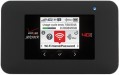 |  |
|---|---|---|
| NETGEAR AC791L | ZTE MF920 | |
from $14.99 | from $99.25 | |
| User reviews | ||
| TOP sellers | ||
PowerBank function (via USB). Connect up to 15 devices. Color screen. Touch control. Connectors for external antennas. | ||
| Device type | portable router | portable router |
| Wi-Fi | Wi-Fi 3 (802.11g) Wi-Fi 4 (802.11n) Wi-Fi 5 (802.11aс) | Wi-Fi 3 (802.11g) Wi-Fi 4 (802.11n) |
| Connected devices, up to | 15 | 32 |
Connection | ||
| Communication generation | 2G 3G 4G (LTE) | 2G 3G 4G (LTE) |
| 4G (LTE) | Cat.4 (150/50 Mbps) | Cat.4 (150/50 Mbps) |
| Transmission technology | GPRS EDGE W-CDMA HSUPA HSDPA HSPA+ LTE | GPRS EDGE W-CDMA HSUPA HSDPA HSPA+ LTE |
| Ports | microUSB | microUSB |
Features | ||
| External antenna connector |  |  |
| MIMO antenna connection | | |
| SIM card slot | | |
| Display | | |
General | ||
| Built-in battery | | |
| Battery capacity | 4340 mAh | 2000 mAh |
| Operating time (internet browsing) | 24 h | 6 h |
| Operating time (standby) | 120 h | |
| Power bank feature | | |
| Dimensions | 110x68x19 mm | 107.5x63.7x14.8 mm |
| Weight | 164 g | |
| Added to E-Catalog | december 2017 | may 2016 |


Compare NETGEAR AC791L and ZTE MF920
You may be interested in
My comparisons
NETGEAR AC791L often compared


ZTE MF920 often compared


Glossary
Wi-Fi
Connection speeds via Wi-Fi, specifically the Wi-Fi standards supported by the modem with corresponding capabilities (see “Type,” “Connection”).
— Wi-Fi 3 (802.11g). This is an advancement of the Wi-Fi 1 standard (802.11b), developed primarily to increase connection bandwidth (2.4 GHz) and introduced in 2003. The 802.11g equipment is fully backward compatible with 802.11b, so even the simplest of modern Wi-Fi devices support both of these standards.
— Wi-Fi 4 (802.11n). A Wi-Fi standard that is a further development of the formats described above — particularly by adding MIMO technology support (distribution of input and output between multiple antennas). Introduced in 2009. The main operating frequency is 2.4 GHz, although devices with an additional 5 GHz band can be found.
— Wi-Fi 5 (802.11ac). Built on 802.11n, introduced at the end of 2013. The main improvements involved increasing the number of streams on the second frequency (5 GHz) and implementing more advanced MIMO and modulation standards, which allowed for a corresponding increase in bandwidth.
— Wi-Fi 6 (802.11ax). The Wi-Fi 6 version delivers the internet via the modern 802.11ax standard in the 2.4 and 5 GHz bands, handling a large number of connected devices better. This modem is especially convenient where smartphones, laptops, TVs, and smart devices use the network simu...ltaneously because Wi-Fi 6 more efficiently distributes traffic and reduces delays in a busy network. Compared to Wi-Fi 5, the difference is usually felt not so much in “peak” speed but in more stable performance during streaming, video calls, and online gaming.
— Wi-Fi 6E (802.11ax). Essentially the same as Wi-Fi 6, but with the addition of a 6 GHz band, making the connection more stable, especially in crowded places. In practice, this is especially useful in an apartment building with many neighboring networks. However, the main point is that the advantage of Wi-Fi 6E is realized only on devices that also support 6 GHz. This frequency allows for a separate channel to be allocated with fewer interferences from other devices.
— Wi-Fi 7 (802.11be). A step further compared to Wi-Fi 6E: it offers even higher speed, lower latency, and more stable network performance under load. Its key advantages over the previous version are related to channels up to 320 MHz and Multi-Link Operation, where the device can use several bands simultaneously instead of just one. In practice, this is particularly useful if the modem is to replace the main home router and deliver fast 5G directly to a laptop, gaming PC, TV with 4K/8K content, NAS, and other demanding equipment. In other words, Wi-Fi 7 is for when not just fast Wi-Fi is needed, but a noticeable reserve in speed and responsiveness for the future.
— Wi-Fi 3 (802.11g). This is an advancement of the Wi-Fi 1 standard (802.11b), developed primarily to increase connection bandwidth (2.4 GHz) and introduced in 2003. The 802.11g equipment is fully backward compatible with 802.11b, so even the simplest of modern Wi-Fi devices support both of these standards.
— Wi-Fi 4 (802.11n). A Wi-Fi standard that is a further development of the formats described above — particularly by adding MIMO technology support (distribution of input and output between multiple antennas). Introduced in 2009. The main operating frequency is 2.4 GHz, although devices with an additional 5 GHz band can be found.
— Wi-Fi 5 (802.11ac). Built on 802.11n, introduced at the end of 2013. The main improvements involved increasing the number of streams on the second frequency (5 GHz) and implementing more advanced MIMO and modulation standards, which allowed for a corresponding increase in bandwidth.
— Wi-Fi 6 (802.11ax). The Wi-Fi 6 version delivers the internet via the modern 802.11ax standard in the 2.4 and 5 GHz bands, handling a large number of connected devices better. This modem is especially convenient where smartphones, laptops, TVs, and smart devices use the network simu...ltaneously because Wi-Fi 6 more efficiently distributes traffic and reduces delays in a busy network. Compared to Wi-Fi 5, the difference is usually felt not so much in “peak” speed but in more stable performance during streaming, video calls, and online gaming.
— Wi-Fi 6E (802.11ax). Essentially the same as Wi-Fi 6, but with the addition of a 6 GHz band, making the connection more stable, especially in crowded places. In practice, this is especially useful in an apartment building with many neighboring networks. However, the main point is that the advantage of Wi-Fi 6E is realized only on devices that also support 6 GHz. This frequency allows for a separate channel to be allocated with fewer interferences from other devices.
— Wi-Fi 7 (802.11be). A step further compared to Wi-Fi 6E: it offers even higher speed, lower latency, and more stable network performance under load. Its key advantages over the previous version are related to channels up to 320 MHz and Multi-Link Operation, where the device can use several bands simultaneously instead of just one. In practice, this is particularly useful if the modem is to replace the main home router and deliver fast 5G directly to a laptop, gaming PC, TV with 4K/8K content, NAS, and other demanding equipment. In other words, Wi-Fi 7 is for when not just fast Wi-Fi is needed, but a noticeable reserve in speed and responsiveness for the future.
Connected devices, up to
The largest number of devices that can be simultaneously connected to the modem via Wi-Fi (see "Connection").
The presence of this limitation is due to the fact that processing network requests from several devices at once requires a fairly large amount of computing resources, and there are not so many of them in miniature electronics like wireless modems. However, even inexpensive models can support about 5 – 6 devices, which is more than enough for most cases; and in more advanced modems, this number can reach 10.
The presence of this limitation is due to the fact that processing network requests from several devices at once requires a fairly large amount of computing resources, and there are not so many of them in miniature electronics like wireless modems. However, even inexpensive models can support about 5 – 6 devices, which is more than enough for most cases; and in more advanced modems, this number can reach 10.
External antenna connector
The presence of a connector for an external removable antenna in the modem design. The meaning of all external antennas is described above; here we note that the connector makes it possible to use rather large antennas with the modem, which significantly exceed the capabilities of stock antennas (both internal and external non-removable ones). In addition, the user can choose the antenna at his discretion.
MIMO antenna connection
The ability to connect the MIMO antenna (the antenna itself, usually, must be purchased separately).
MIMO technology is used in Wi-Fi communications, as well as in 4G LTE networks (starting with Cat.2). Its general principle is to split the transmitted signal into several transmitting and receiving antennas; at the same time, each of the transmitting antennas broadcasts a signal to all receiving antennas at once (or at least to several of them). This format of operation allows more efficient use of the frequency range, increases the actual data transfer rate, and also increases resistance to interference. But antennas for MIMO are rather bulky, in the case of modems it is difficult to make them built-in; and such feature is required not so often. Therefore, separate external antennas are used to work with this technology.
Note that even in portable Wi-Fi hotspots (see "Type"), this feature is used exclusively for 4G/LTE; Wi-Fi connection is provided by built-in antennas.
MIMO technology is used in Wi-Fi communications, as well as in 4G LTE networks (starting with Cat.2). Its general principle is to split the transmitted signal into several transmitting and receiving antennas; at the same time, each of the transmitting antennas broadcasts a signal to all receiving antennas at once (or at least to several of them). This format of operation allows more efficient use of the frequency range, increases the actual data transfer rate, and also increases resistance to interference. But antennas for MIMO are rather bulky, in the case of modems it is difficult to make them built-in; and such feature is required not so often. Therefore, separate external antennas are used to work with this technology.
Note that even in portable Wi-Fi hotspots (see "Type"), this feature is used exclusively for 4G/LTE; Wi-Fi connection is provided by built-in antennas.
Battery capacity
The capacity of the battery installed in the modem with the corresponding type of power supply (see below).
The higher the capacity, the longer the battery is able to work without recharging, all other things being equal. However, note that the situation of "other things being equal" is almost not found in modern wireless modems. First, different data transmission technologies (see above) have different power consumption; secondly, even models supporting the same standards can differ in power consumption (and battery life) due to design differences. Therefore, this indicator in most cases is purely reference information, and even very similar models can only be compared approximately. When choosing, it is worth focusing primarily on the claimed specs of the battery life (see below).
The higher the capacity, the longer the battery is able to work without recharging, all other things being equal. However, note that the situation of "other things being equal" is almost not found in modern wireless modems. First, different data transmission technologies (see above) have different power consumption; secondly, even models supporting the same standards can differ in power consumption (and battery life) due to design differences. Therefore, this indicator in most cases is purely reference information, and even very similar models can only be compared approximately. When choosing, it is worth focusing primarily on the claimed specs of the battery life (see below).
Operating time (internet browsing)
The maximum operating time of the modem with battery power (see "Power") on a single charge in Internet browsing mode. Such power is typical for Wi-Fi routers, therefore, usually, Internet browsing is supposed to provide access to the World Wide Web for an external Wi-Fi device.
This spec is the main indicator of battery life for any battery-powered modem, because it describes the time of using it for its main purpose without recharging. At the same time, you should know that this indicator is measured under certain "perfect" conditions; the actual operating time depends on a number of factors, including the intensity of browsing, the amount of data transferred, the number of connected devices and the distance to them, the cellular network signal strength, etc. Therefore, in fact, the battery life of the modem may be somewhat lower. Nevertheless, it is quite possible to compare different models with each other according to the operating time stated in the specs.
This spec is the main indicator of battery life for any battery-powered modem, because it describes the time of using it for its main purpose without recharging. At the same time, you should know that this indicator is measured under certain "perfect" conditions; the actual operating time depends on a number of factors, including the intensity of browsing, the amount of data transferred, the number of connected devices and the distance to them, the cellular network signal strength, etc. Therefore, in fact, the battery life of the modem may be somewhat lower. Nevertheless, it is quite possible to compare different models with each other according to the operating time stated in the specs.
Operating time (standby)
The maximum time the modem can operate on battery power (see "Power") in standby mode on a single battery charge.
This mode can be described as the standby mode. It assumes that the device is turned on, its operating circuits are powered and ready to respond to an incoming signal or user command at any time, but no data exchange occurs and no features work. This indicator is not as important as the Internet browsing time (see above), but it is also of practical importance and allows you to evaluate the battery life of the device — after all, during breaks between communication sessions, the modem is in standby mode.
This mode can be described as the standby mode. It assumes that the device is turned on, its operating circuits are powered and ready to respond to an incoming signal or user command at any time, but no data exchange occurs and no features work. This indicator is not as important as the Internet browsing time (see above), but it is also of practical importance and allows you to evaluate the battery life of the device — after all, during breaks between communication sessions, the modem is in standby mode.
Power bank feature
Possibility of modem performing in power bank mode. This mode allows you to use the built-in battery to power your smartphone or other external gadget. Thus, the modem can be an additional external battery, which is important in situations where it is not possible to charge a portable device.