
Comparison OfficePro MA902G vs OfficePro MA502
Add to comparison | 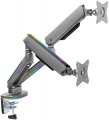 |  |
|---|---|---|
| OfficePro MA902G | OfficePro MA502 | |
| Outdated Product | Outdated Product | |
| TOP sellers | ||
RGB backlight. | ||
| Type | desktop mount | desktop mount |
| Number of mounts | for 2 panels | for 2 panels |
| Installation | universal | universal |
Specs | ||
| Minimum size | 17 " | 17 " |
| Max. size | 32 " | 32 " |
| Max. weight | 9 kg | 9 kg |
| Adjustments | tilt turn depth adjustment slide rotation height adjustment | tilt turn depth adjustment slide rotation height adjustment |
Angles and dimensions | ||
| Upward tilt angle | 40 ° | 90 ° |
| Downward tilt angle | 40 ° | 90 ° |
| Turn angle | 180 ° | 180 ° |
| Rotation angle | 180 ° | 180 ° |
| VESA | 75x75mm 100x100 mm | 75x75mm 100x100 mm |
| Removable VESA plate |  |  |
General | ||
| RGB backlight | | |
| Cable management | | |
| Color | ||
| Added to E-Catalog | july 2023 | july 2023 |


Compare OfficePro MA902G and MA502
You may be interested in
OfficePro MA902G often compared


OfficePro MA502 often compared


Glossary
Upward tilt angle
The maximum upwards tilt angle from the vertical of the installed screen. The larger the tilt angle, the wider the adjustment possibilities, however, in fact, an angle of more than 5° is rarely required.
Downward tilt angle
The maximum downward tilt angle from the vertical for the installed screen. As with the upward tilt angle, the larger this angle, the wider the adjustment possibilities; however, downward tilt is usually required more frequently (the TV may be installed under the ceiling), and its angle can be as high as 15-20°.
Removable VESA plate
"Quick-release" interface between TV/monitor and bracket: a thin plate is screwed to the screen according to the VESA standard (usually 75×75, 100×100, 200×200, and larger), then clicks into the base on the bracket with one motion and is fixed with a locking screw or latch. This solution speeds up installation and maintenance: you can hang a heavy monitor solo, quickly remove the TV for cable management or cleaning, and easily move the screen from wall mounting to a desktop arm. Compared to a fixed plate, it's more convenient and there's less risk of missing the holes; the downsides are a slight increase in extension and possible play in cheap mechanisms. Typical scenarios include an office with frequent monitor rotation, a digital menu and display service, and a home setup where the screen is periodically removed for port access.
RGB backlight
RGB lighting is primarily decoration, with static colors or simple effects. It can function as a light background and allows you to enrich your workspace with "colors." Such solutions are chosen for the streaming atmosphere or build styling.
Cable management
Possibility of placing the cables connected to the TV inside the rod or support of the mount(for ceiling and floor structures, respectively, see "Type"). This placement gives the whole structure a neat appearance, because cables, often of different sizes and colours, and even tangled with each other, are hidden from view and do not spoil the aesthetics.