
Comparison Gamdias AURA GC3 black vs DarkFlash Leo black
Add to comparison | 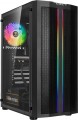 | 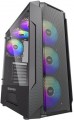 |
|---|---|---|
| Gamdias AURA GC3 black | DarkFlash Leo black | |
| Outdated Product | Outdated Product | |
| TOP sellers | ||
| Features | gaming | gaming |
| Form factor | Midi Tower | Midi Tower |
| Mount | vertical | vertical |
| Motherboard support | ATX | ATX |
| Board placement | vertical | vertical |
| PSU form factor | ATX (regular) | ATX (regular) |
Computer case | ||
| Dimensions (HxWxD) | 442x200x352 mm | 430x190x349 mm |
| PSU max lenght | 150 mm | |
| Graphics card max lenght | 260 mm | 320 mm |
| Fan max height | 160 mm | 165 mm |
| Weight | 4.9 kg | |
| Material | steel | steel |
| Rubber feet |  | |
| Lighting type | backlit fan / housing | |
| Lighting colour | ARGB | |
| Lighting sync | multi compatibility | |
| Side panel | removable | removable |
Storage | ||
| PSU |  | |
| PSU mount | bottom | bottom |
| 3.5" bays | 2 | 2 |
| internal 2.5" compartments | 2 | 2 |
| Expansion slots | 7 | 7 |
Cooling | ||
| Installed fans | 1 шт | |
| Fans (back) | 1x120mm | 1x120mm |
| Fans (front) | 2x140mm | 3x120mm |
| Fans (top) | 2x120mm | 2x120mm |
| Fans (bottom) | 2x120mm | |
| Fan mounts total | 6 | 8 |
| Dust filter | + | top and bottom |
| Liquid cooling system support | | |
Liquid cooling system | ||
| Liquid cooling (rear) | 120 mm | |
| Liquid cooling (front) | 240mm | 240mm |
| Liquid cooling mounts | 2 | 1 |
Connectors and functions | ||
| Placement | on top of the case | on top of the case |
| USB-A 2.0 | 2 pcs | 2 pcs |
| USB-A 5Gbps | 1 pcs | 1 pcs |
| Audio (microphone/headphones) | | |
More features | ||
| Front panel | lattice | lattice |
| Side panel window | tempered glass | tempered glass |
| More features | CPU cooling mount window | hidden wiring CPU cooling mount window |
| Color | ||
| Added to E-Catalog | january 2023 | july 2022 |


Compare Gamdias AURA GC3 and DarkFlash Leo
You may be interested in
Gamdias AURA GC3 often compared

DarkFlash Leo often compared


Glossary
PSU max lenght
Possible length of the PSU that can be installed in the case.
Graphics card max lenght
The maximum length of a graphics card that can be installed in this case.
Modern mid-range and top-end video cards with high performance often differ in considerable length, which is why such a card can not fit into any case. So before collecting components, it is worth evaluating the length of the proposed graphics card and choosing a case in which it is guaranteed to fit. This forethought is useful anyway, but it's especially true if you're building a system that requires a powerful graphics adapter, such as a high-end gaming PC or 3D design workstation.
Modern mid-range and top-end video cards with high performance often differ in considerable length, which is why such a card can not fit into any case. So before collecting components, it is worth evaluating the length of the proposed graphics card and choosing a case in which it is guaranteed to fit. This forethought is useful anyway, but it's especially true if you're building a system that requires a powerful graphics adapter, such as a high-end gaming PC or 3D design workstation.
Fan max height
The highest cooler height allowed for this case.
In this case, we mean a cooler used to cool the processor — such a component is found in the vast majority of modern PCs. Height is measured relative to the motherboard.
In this case, we mean a cooler used to cool the processor — such a component is found in the vast majority of modern PCs. Height is measured relative to the motherboard.
Lighting type
The type of illumination provided in the body design.
The backlight plays mainly a decorative role, it gives the computer an original appearance, which is appreciated by fans of external tuning. Lighting can be mounted separately, but it is easier to purchase a case where it was originally provided. The types of illumination can be as follows:
— Illuminated fan. One or more coolers are illuminated, facing the side or top surface of the case.
— Cases with backlight. Separate parts of the body are illuminated, usually from the inside, in such a way that the illumination can be seen through a transparent window / windows or a lattice surface. Sometimes external lighting can be provided.
There are cases in which both types of illumination are provided simultaneously. And for office needs , cases without backlight are suitable.
The backlight plays mainly a decorative role, it gives the computer an original appearance, which is appreciated by fans of external tuning. Lighting can be mounted separately, but it is easier to purchase a case where it was originally provided. The types of illumination can be as follows:
— Illuminated fan. One or more coolers are illuminated, facing the side or top surface of the case.
— Cases with backlight. Separate parts of the body are illuminated, usually from the inside, in such a way that the illumination can be seen through a transparent window / windows or a lattice surface. Sometimes external lighting can be provided.
There are cases in which both types of illumination are provided simultaneously. And for office needs , cases without backlight are suitable.
Lighting colour
For more on decorative lighting in general, see Light Type above. Here we note that it can have different shades, and sometimes several options are indicated in the characteristics at once. If these options are listed through "and" (for example, "red, blue and green") — this means that this model contains all the specified colours, and the user can switch between them at his discretion. If the shades are listed through “or” (for example, “red, blue or green”), this means that this model is available in several versions that differ in the colour of the backlight.
Special mention is the "RGB" option. This is the name of the most advanced backlight, the shade of which can be chosen at your discretion. However the original RGB backlighting is capable of simultaneously displaying only one of several basic colours (white, yellow, green, red, blue or purple); nevertheless, even these possibilities are enough to customize the appearance of the case and apply various effects (such as backlight synchronization — see below).
And relatively recently, an even more advanced type of adjustable systems has appeared — ARGB backlight. The key difference between ARGB and classic RGB is the possibility of simultaneous operation of diodes of different colours. In other words, classic RGB lighting can display only one colour at a time, while ARGB can display several colours, which provides additional effects. Also, ARGB lighting is connecte...d using a 3pin 5v connector, while regular RGB uses a 4pin 12v connection. It can be represented by various types of illumination. So, ARGB is often integrated into the cooling system, the front panel and magnetic LED strips, which the user can mount at his discretion. To control the backlight, a special controller is usually provided, and buttons or controls for switching the illumination operation modes are placed on the interface panel. In some cases, the backlight is controlled by the motherboard, through a special connector. Many ARGB systems support the ability to fine-tune through specialized software.
Special mention is the "RGB" option. This is the name of the most advanced backlight, the shade of which can be chosen at your discretion. However the original RGB backlighting is capable of simultaneously displaying only one of several basic colours (white, yellow, green, red, blue or purple); nevertheless, even these possibilities are enough to customize the appearance of the case and apply various effects (such as backlight synchronization — see below).
And relatively recently, an even more advanced type of adjustable systems has appeared — ARGB backlight. The key difference between ARGB and classic RGB is the possibility of simultaneous operation of diodes of different colours. In other words, classic RGB lighting can display only one colour at a time, while ARGB can display several colours, which provides additional effects. Also, ARGB lighting is connecte...d using a 3pin 5v connector, while regular RGB uses a 4pin 12v connection. It can be represented by various types of illumination. So, ARGB is often integrated into the cooling system, the front panel and magnetic LED strips, which the user can mount at his discretion. To control the backlight, a special controller is usually provided, and buttons or controls for switching the illumination operation modes are placed on the interface panel. In some cases, the backlight is controlled by the motherboard, through a special connector. Many ARGB systems support the ability to fine-tune through specialized software.
Lighting sync
The timing technology provided in the illuminated housing (see “Light Type”).
Synchronization itself allows you to "match" the backlight of the case with the backlight of other system components — the motherboard, graphics card, keyboard, mouse, etc. Thanks to this matching, all components can change colour synchronously, turn on / off at the same time, etc. It is worth noting that all such systems have RGB backlighting. The specific features of the operation of such a backlight depend on the synchronization technology used, and, usually, each manufacturer has its own (Mystic Light Sync for MSI, Aura Sync for Asus, etc.). The compatibility of the components also depends on this: they must all support the same technology. So the easiest way to achieve backlight compatibility is to collect components from the same manufacturer.
Synchronization itself allows you to "match" the backlight of the case with the backlight of other system components — the motherboard, graphics card, keyboard, mouse, etc. Thanks to this matching, all components can change colour synchronously, turn on / off at the same time, etc. It is worth noting that all such systems have RGB backlighting. The specific features of the operation of such a backlight depend on the synchronization technology used, and, usually, each manufacturer has its own (Mystic Light Sync for MSI, Aura Sync for Asus, etc.). The compatibility of the components also depends on this: they must all support the same technology. So the easiest way to achieve backlight compatibility is to collect components from the same manufacturer.
Installed fans
The more fans are included in the design, all else being equal — the more intense the cooling will be and the more powerful (and, consequently, "hotter") components can be placed in the case without the risk of overheating. For everyday tasks, a case with one, two, three, or four factory fans is quite sufficient. At the same time, when comparing, it is worth considering not only the number but also the operating characteristics of the fans (diameter, speed). It should also be noted that cases are available for purchase without fans but with open slots for fans, allowing you to supplement the cooling system and improve its performance if necessary.
Fans (front)
The number of fan slots on the front of the case, and the size of the fans these slots are designed for. The presence of the fans themselves in the kit should be specified separately.
The larger the fan, the more advanced it is considered: a large diameter allows you to work efficiently at relatively low speeds, which reduces the noise level and energy consumption. Case fans are available in several standard diameters; specifically for the front panel, the size up to 92 mm is considered relatively small, 120 mm — medium, 140 mm — large, and in the most advanced solutions, fans of 180 mm or even more can be installed.
Also note that most often the holes for installing fans are designed for one specific size, however, there are also “multi-size” seats, for 2-3 options. Moreover, these options may differ both in diameter and in quantity: for example, it may be possible to install two 140 mm fans or three 120 mm fans.
The larger the fan, the more advanced it is considered: a large diameter allows you to work efficiently at relatively low speeds, which reduces the noise level and energy consumption. Case fans are available in several standard diameters; specifically for the front panel, the size up to 92 mm is considered relatively small, 120 mm — medium, 140 mm — large, and in the most advanced solutions, fans of 180 mm or even more can be installed.
Also note that most often the holes for installing fans are designed for one specific size, however, there are also “multi-size” seats, for 2-3 options. Moreover, these options may differ both in diameter and in quantity: for example, it may be possible to install two 140 mm fans or three 120 mm fans.
Fans (bottom)
The number of fan slots on the underside of the case, as well as the size of the fans that these slots are designed for. The presence of the fans themselves in the kit should be specified separately.
The larger the fan, the more advanced it is considered: a large diameter allows you to work efficiently at relatively low speeds, which reduces the noise level and energy consumption. Case fans are available in several standard diameters, and the seats under them can be designed for both one and several sizes — for example, 120 / 140 mm. At the same time, in some models, the available number of seats also depends on the selected size: for example, it may be possible to install either one 180 mm fan or two 140 mm fans.
The larger the fan, the more advanced it is considered: a large diameter allows you to work efficiently at relatively low speeds, which reduces the noise level and energy consumption. Case fans are available in several standard diameters, and the seats under them can be designed for both one and several sizes — for example, 120 / 140 mm. At the same time, in some models, the available number of seats also depends on the selected size: for example, it may be possible to install either one 180 mm fan or two 140 mm fans.